AutoRun Manager
AutoRun Manager is a free Windows utility for managing programs that run when the system starts.
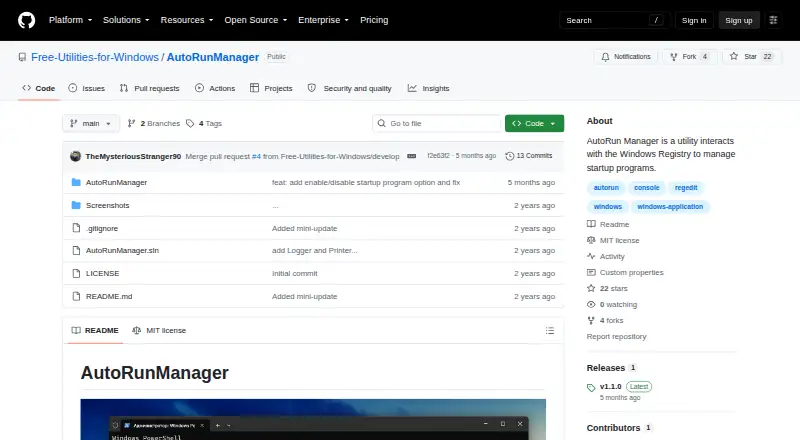
What AutoRun Manager is
AutoRun Manager is a free Windows utility for managing programs that run when the system starts. It can display, add, and remove startup programs, and it can back up or restore the startup configuration. That backup covers the configuration, not the programs themselves. The utility also includes a command to remove every program from the startup list. To manage startup entries, it interacts with the Windows Registry. Its instructions say to open Command Prompt as an administrator and run AutoRunManager.exe. Actions and errors are recorded in timestamped text files in My Documents\AutoRunManager. The project uses the MIT License, which allows use and distribution free of charge and provides the software without warranty. The project page does not list integrations. Its README invites community contributions through pull requests. AutoRun Manager is focused on startup inspection and configuration rather than backing up the applications listed there.
Good
- Displays, adds, and removes startup programs.
- Can back up and restore startup configuration.
- Includes a command to clear the startup list.
- Logs actions and errors to timestamped text files.
Watch out
- Backups cover configuration, not the programs themselves.
- Requires running from Command Prompt as an administrator.
- Interacts with the Windows Registry.
- Provided without warranty under the MIT License.
Who it suits
AutoRun Manager suits Windows users who want to inspect and change their startup program list or save and restore its configuration. It may also interest users who are comfortable launching a utility from an administrator Command Prompt.
Verdict
AutoRun Manager offers direct control over Windows startup entries and supports configuration backup and restore. Remember that the backup does not include the programs themselves, and the utility interacts with the Registry.
Plans and prices
From AutoRun Manager's own pricing page, checked 8 Oct 2026.
| Plan | Price | What it gives you |
|---|---|---|
| Free | Free | MIT-licensed software · Windows startup configuration |
The facts
Each one read from AutoRun Manager's own pages, with the date it was checked.
What it does
- Add and remove
- It can add a program to and remove a program from the startup list.checked 8 Oct 2026
- Author
- The README names Bohdan Harabadzhyu as the author.checked 8 Oct 2026
- Backup and restore
- It can back up and restore the startup configuration, but does not back up or restore the programs themselves.checked 8 Oct 2026
- Cleanup
- It includes a command to remove all programs from the startup list.checked 8 Oct 2026
- How to run
- The usage instructions say to open a command prompt as administrator and run AutoRunManager.exe.checked 8 Oct 2026
- Integrations
- The project page does not list integrations.checked 4 Oct 2026
- Intended users
- The README describes a Windows utility for people managing startup programs and their startup configuration.checked 4 Oct 2026
- Interface
- The README describes a command-line utility that displays available commands when started.checked 8 Oct 2026
- License
- The project is distributed under the MIT License.checked 8 Oct 2026
- Logging
- Actions and errors are logged to timestamped text files in the user's My Documents\AutoRunManager directory.checked 8 Oct 2026
- Project maintainer
- The GitHub organization describes itself as Free Utilities for Windows and lists AutoRunManager as one of its public repositories.checked 8 Oct 2026
- Purpose
- AutoRun Manager manages programs that run at startup on a Windows system.checked 8 Oct 2026
- Registry access
- The utility interacts with the Windows Registry, and its README advises using it with caution.checked 8 Oct 2026
- Startup controls
- It can display, add, and remove startup programs.checked 4 Oct 2026
- Support and contributions
- The README invites community contributions through pull requests.checked 4 Oct 2026
- Usage
- The instructions say to open Command Prompt as administrator and run AutoRunManager.exe.checked 4 Oct 2026
- View startup programs
- It lists programs currently set to run at startup.checked 8 Oct 2026
- Warranty
- The MIT license says the software is provided "AS IS" without warranty.checked 8 Oct 2026
The full review of AutoRun Manager
Overview
AutoRun Manager is a free Windows command-line utility for managing programs configured to launch at startup. It is best suited to users comfortable with an administrator Command Prompt who want focused control over startup entries. Its appeal is practical rather than broad: it handles startup configuration, but offers no graphical interface.
Key features
The utility displays startup programs and lets you add or remove entries. Because it works through the Windows Registry, it can change the configuration behind those launches; that makes it useful for targeted startup maintenance, not a general application manager.
Backup and restore cover the startup configuration, which can help preserve the entry list before changes. They do not include the programs themselves, so restoring a configuration cannot recover an application that has been removed. A separate command clears the entire startup list. That may suit a deliberate reset, but is too broad for selective cleanup.
Actions and errors are recorded in timestamped text files under My Documents\AutoRunManager, giving users a log to consult after a change. Running the tool requires opening Command Prompt as administrator and launching AutoRunManager.exe. It displays available commands on startup, but users who prefer visual controls will be better served elsewhere.
Pricing
| Plan | Price | Includes |
|---|---|---|
| Free | free | MIT-licensed software for managing Windows startup configuration. |
There is no paid tier to unlock additional controls. The MIT License permits use and distribution free of charge, but provides the software without warranty; users should be comfortable accepting that limitation when making Registry changes.
Platforms
AutoRun Manager is for Windows. Its administrator Command Prompt requirement and Registry-based operation make it a poor fit for users seeking a cross-platform or graphical startup manager.
Who it's for
Choose AutoRun Manager if you want a free, narrowly focused way to inspect and edit Windows startup entries, and are comfortable using command-line instructions. Its backup and timestamped logs add useful safeguards and traceability, though the backup is limited to configuration. If you need visual controls or broader system-management features, another utility is a better fit.
Pros and cons
- Pro: Displays, adds, and removes startup entries, covering the core tasks of focused startup management.
- Pro: Backup and restore preserve startup configuration, while timestamped logs record actions and errors.
- Pro: Free under the MIT License, with permission to use and distribute.
- Con: Requires an administrator Command Prompt, which excludes users who expect a graphical interface.
- Con: Backups do not contain the programs themselves, so they cannot restore removed applications.
- Con: The all-entry removal command is indiscriminate, and Registry access calls for care.
- Con: The MIT License provides the software without warranty.
Alternatives
Browse Startup Manager Software for a broader comparison of tools in this category.
- Autorun Organizer is another free Windows option, with startup entry management, startup delay controls, and VirusTotal scanning; choose it if those extra controls matter.
- HiBit Startup Manager is free for Windows and adds startup monitoring plus Windows services and scheduled-task management, making it a better fit for wider system oversight.
- Autoruns is free Windows software with no limit on installs or use across devices you use or support; consider it if that device flexibility is important.
- BootRacer offers a free plan for non-commercial use and a Premium option; choose it if its boot-focused approach suits your needs.
- Win Startup Manager is another free Windows option for managing startup entries stored in the Registry.
- Argente Uninstall Manager offers a free Windows plan for one PC with less frequent donation reminders, alongside paid plans; consider it if you want an uninstall manager as well.
- Microsoft Quick Assist is free and supports Windows, macOS, and web for Microsoft Support interactions; choose it for that support use case instead.
- Corionis Service Manager.NET is a free Windows option for x86/x64 systems and Windows 7 through Windows Server 2016.
Verdict
AutoRun Manager is a sensible choice for Windows users who want free, direct control of startup entries and are comfortable working in an administrator Command Prompt. Its focused controls, configuration backup, and logs make a useful package for that audience. Look elsewhere if you need a graphical interface, backups of the applications themselves, or software covered by a warranty.
Getting started
- Download AutoRunManager.exe from the project repository
- Open Command Prompt as administrator
- Run AutoRunManager.exe
- Use the displayed commands to inspect or change startup entries
Questions
How much does AutoRun Manager cost?
It is free software under the MIT License.
Which platform does it support?
AutoRun Manager supports Windows.
What can it do with startup programs?
It lists startup programs and can add or remove entries. It also has a command to remove all programs from the startup list.
Does it back up the programs?
No. Its backup and restore functions apply to the startup configuration, not the programs themselves.
How is it operated?
Open Command Prompt as an administrator and run AutoRunManager.exe. The command-line utility displays available commands when started.
Who is the author?
The README names Bohdan Harabadzhyu as the author.
Alternatives to AutoRun Manager
- 1
Argente Uninstall Manager
Free planWindows7.4From €9 a year - 2

AlwaysUp
Windows6.7$39.99 one-time - 3
BootRacer
Free planWindows6.6From $99.95 a year - 4
ServiWin
Free planWindows6.5Free plan - 5
FireDaemon Fusion
WebAPISelf-hostedWindows6.4$45 one-time - 6

Autoruns
Free planWindows6.3Free plan