
123 ToDo
123 ToDo is a free task manager and voice-notes app for organizing work and capturing spoken notes.
What 123 ToDo is
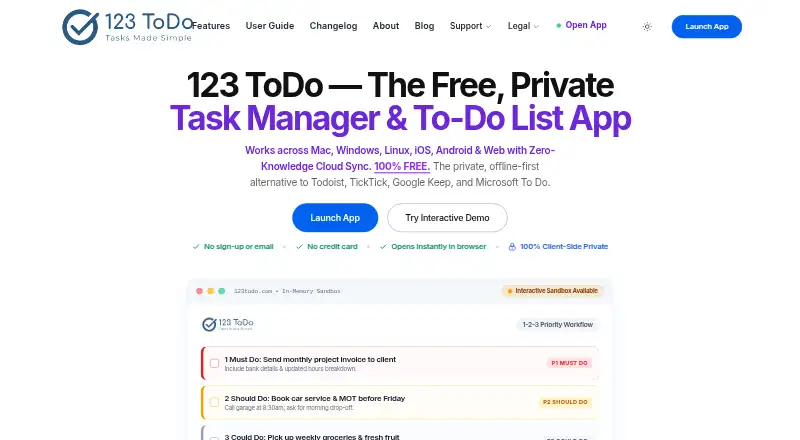
123 ToDo is a free task manager and voice-notes app for organizing work and capturing spoken notes. Tasks use four priorities—Must Do (P1), Should Do (P2), Could Do (P3), and On Hold (P4)—and support due dates, weekday scheduling, deferral to the next day or week, and recurring items that roll over after completion. Color-coded projects can contain nested subtasks and appear as Kanban columns on wide desktop screens. Voice mode offers hands-free dictation, spoken punctuation, and commands for adding tasks or notes. Notes allow up to three photo attachments through drag-and-drop, clipboard screenshots, or a mobile camera. The app runs on Android, iOS, Linux, macOS, web, and Windows. Its PWA works offline, stores data locally, and creates snapshots every 24 hours. Optional encrypted synchronization uses 123ToDo Cloud Sync or Google Drive AppData Sync. Imports support Todoist, TickTick, Google Keep, Google Tasks, and Microsoft To Do formats. Workspaces export as readable JSON. The free plan includes unlimited tasks, projects, and note lengths, with up to three photos per note.
Good
- Free forever plan
- Priority levels, recurring tasks, and subtasks
- Voice dictation with task commands
- Offline PWA and local snapshots
- Encrypted cross-device synchronization
Watch out
- Photo attachments limited to three per note
- Sync is optional rather than automatic
- No free trial listed
Who it suits
It suits office professionals and knowledge workers using task management, and trade contractors, builders, or field workers who prefer voice notes. It also fits people needing offline access and cross-device syncing.
Verdict
123 ToDo combines structured task planning with hands-free voice capture across desktop and mobile platforms. Its free plan, offline operation, imports, and encrypted sync provide a broad set of practical workflows.
Plans and prices
From 123 ToDo's own pricing page, checked 22 Sep 2026.
| Plan | Price | What it gives you |
|---|---|---|
| Free | Free | Priority-based task management · Recurring tasks · Subtask checklists · Offline PWA access · Encrypted cross-device sync |
| 123 ToDo | Free | Uncapped tasks · unlimited projects · unlimited note lengths · up to 3 photos per note · sync included · Free forever |
The facts
Each one read from 123 ToDo's own pages, with the date it was checked.
What it does
- Attachments
- Each note can have up to 3 photo attachments, with file drag-and-drop, clipboard screenshots, and mobile camera capture.checked 12 Oct 2026
- Data portability
- Users can export their workspace as human-readable JSON.checked 12 Oct 2026
- Imports
- The importer accepts Todoist CSV, TickTick backup CSV, Google Keep and Google Tasks JSON, and Microsoft To Do CSV.checked 12 Oct 2026
- Intended users
- The maker describes voice notes mode as designed for trade contractors, builders, and field work, and task manager mode for office professionals and knowledge workers.checked 12 Oct 2026
- Limits
- The maker says task counts, project counts, and note lengths are unlimited; photo attachments are limited to 3 per note.checked 12 Oct 2026
- Offline access
- web_and_mobilechecked 22 Sep 2026
- Offline and backups
- The PWA works offline, stores data locally, and creates automatic local snapshots every 24 hours.checked 12 Oct 2026
- Priorities
- Tasks can be organized into Must Do (P1), Should Do (P2), Could Do (P3), and On Hold (P4) priorities.checked 12 Oct 2026
- Privacy policy
- The privacy policy says tasks, notes, timestamps, photos, and personal information are processed client-side and stored locally by default.checked 12 Oct 2026
- Product
- 123 ToDo is a task manager and voice notes app with task management and rapid voice notes modes.checked 12 Oct 2026
- Projects and subtasks
- Users can organize tasks in color-coded projects, create nested subtasks, and view projects as Kanban columns on wide desktop screens.checked 12 Oct 2026
- Recurring tasks
- Yeschecked 22 Sep 2026
- Scheduling
- Tasks support due dates, weekday scheduling, next-day and next-week deferral, and recurring tasks that roll over on completion.checked 12 Oct 2026
- Security
- The maker says data is encrypted on the device using AES-256-GCM before sync and that the service does not hold the decryption key.checked 12 Oct 2026
- Subtasks
- Yeschecked 22 Sep 2026
- Support
- The site lists [email protected] for bug reports and enhancement suggestions.checked 12 Oct 2026
- Sync
- Optional encrypted synchronization is available through 123ToDo Cloud Sync powered by Cloudflare D1 or Google Drive AppData Sync.checked 12 Oct 2026
- Voice notes
- Voice mode supports hands-free dictation, spoken punctuation, and commands to add tasks or notes.checked 12 Oct 2026
Money
- Free plan
- Yeschecked 22 Sep 2026
Alternatives to 123 ToDo
- 1
Pomodoist
Free planOpen sourceAndroidiOSWebAPI9.2Free plan - 2

Any.do
Free planAndroidiOSWebmacOS8.8Free plan - 3

TickTick
Free planAndroidiOSWebLinux8.7From $49.99 a year - 4

Routine
Free planAndroidiOSWebLinux8.7From $5 a month - 5

Nozbe
Free planAndroidiOSWebmacOS8.6From $6 a month - 6

Vikunja
Free planAndroidiOSWebAPI8.5From €4 a month