yt-dlp
yt-dlp is a free command-line tool for downloading audio and video from online sources.
What yt-dlp is
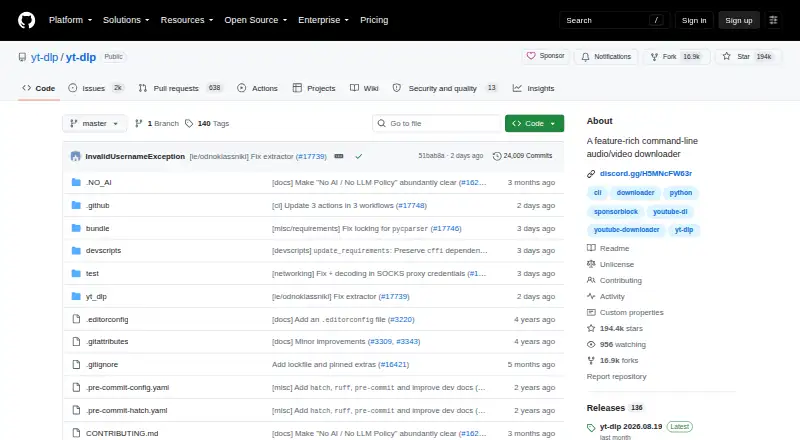
yt-dlp is a free command-line tool for downloading audio and video from online sources. It supports thousands of sites, including YouTube, Bilibili, Dailymotion, Facebook, Vimeo, TikTok, and Twitch. It can handle playlists, subtitles, and batch downloads, with output options ranging from AVI, MKV, MP4, MOV, and WebM to AAC, FLAC, MP3, and WAV. The tool runs on Linux, macOS, and Windows. Standalone macOS executables require macOS 10.15 or later, while Windows binaries support Windows 8 or later; Linux builds cover multiple system and processor variants. yt-dlp is a fork of youtube-dl based on the inactive youtube-dlc, and its public repository uses the Unlicense. It supports CPython 3.10+ and PyPy 3.11+, and full YouTube support requires yt-dlp-ejs. Stable releases generally arrive on a mostly monthly schedule, and versions older than 90 days show an update warning. Release checksum files use SHA-512 and SHA-256 signatures with a GPG public key.
Good
- Supports thousands of sites
- Downloads playlists, subtitles, and batches
- Offers a wide range of audio and video formats
- Available for Linux, macOS, and Windows
- Free and licensed under the Unlicense
Watch out
- Full YouTube support requires yt-dlp-ejs
- macOS executables require macOS 10.15 or later
- Windows binaries support Windows 8 or later
Who it suits
yt-dlp suits users comfortable with a command-line downloader who want playlist, subtitle, or batch downloads from supported sites. It is available across Linux, macOS, and Windows, subject to the listed operating-system requirements.
Verdict
yt-dlp offers broad source and format support, along with playlist, subtitle, and batch downloads, in a free command-line package. Users seeking full YouTube support need yt-dlp-ejs.
Plans and prices
From yt-dlp's own pricing page, checked 11 Oct 2026.
| Plan | Price | What it gives you |
|---|---|---|
| Free software | Free | No paid plans or usage limits stated |
The facts
Each one read from yt-dlp's own pages, with the date it was checked.
What it does
- Batch downloads
- Yeschecked 20 Sep 2026
- Dependencies
- Python 3.10+ is supported for CPython, and ffmpeg, ffprobe, yt-dlp-ejs, and a supported JavaScript runtime are recommended, with yt-dlp-ejs required for full YouTube support.checked 11 Oct 2026
- Embedding
- The project documents embedding yt-dlp in Python programs through its YoutubeDL interface.checked 11 Oct 2026
- Formats
- Its format selection supports choosing and sorting available video and audio formats.checked 11 Oct 2026
- Integrity verification
- Release checksums have SHA-512 and SHA-256 signature files with a GPG public key.checked 27 Sep 2026
- License
- The repository is marked Unlicense, while the README explains that some bundled release binaries contain third-party code under other licenses.checked 11 Oct 2026
- Output formats
- avi,flv,mkv,mov,mp4,webm,aac,aiff,alac,flac,m4a,mka,mp3,ogg,opus,vorbis,wavchecked 20 Sep 2026
- Partial downloads
- Videos can be downloaded partially by timestamps or chapters, and split into multiple files by chapter.checked 11 Oct 2026
- Playlist downloads
- Yeschecked 20 Sep 2026
- Playlists
- It supports playlist downloads and configurable output templates and paths for downloaded files.checked 11 Oct 2026
- Plugins
- Extractor and postprocessor plugins can be loaded from external files, but the project warns that plugin code is unchecked and should only be trusted if the user trusts its author.checked 11 Oct 2026
- Pricing page
- The repository pricing URL returns a page-not-found result.checked 27 Sep 2026
- Primary license
- The project is licensed under the Unlicense.checked 27 Sep 2026
- Project origin
- A fork of youtube-dl based on the inactive youtube-dlc.checked 27 Sep 2026
- Project type
- A feature-rich command-line audio/video downloader.checked 27 Sep 2026
- Purpose
- yt-dlp is a feature-rich command-line audio/video downloader with support for thousands of sites.checked 11 Oct 2026
- Python support
- Supports CPython 3.10+ and PyPy 3.11+.checked 27 Sep 2026
- Release channels
- Binary releases have stable, nightly, and master channels; the README describes nightly as recommended for regular users and warns master may have bugs or regressions.checked 11 Oct 2026
- Release integrity
- The project publishes SHA-256 and SHA-512 checksum files with GPG signature files and provides a public key to verify them.checked 11 Oct 2026
Where it runs
- Browser cookies
- It can extract cookies from supported browsers, including Brave, Chrome, Firefox, Safari, and Edge.checked 11 Oct 2026
- Device platforms
- Windows,macOS,Linuxchecked 20 Sep 2026
- Linux support
- Provides Linux binaries for glibc, musl, x86_64, aarch64, and armv7l variants.checked 27 Sep 2026
- macOS support
- Provides standalone macOS executables for macOS 10.15 or later.checked 27 Sep 2026
Money
- Free plan
- Yeschecked 20 Sep 2026
The full review of yt-dlp
yt-dlp is a command-line downloader for audio and video, best suited to people comfortable working without a graphical interface. Its breadth of sources and fine-grained download controls make it a strong choice for flexible, repeatable jobs; the trade-off is a more involved setup, including an extra dependency for full YouTube support.
Overview
Based on the inactive youtube-dlc and descended from youtube-dl, yt-dlp supports thousands of sites, including YouTube, Bilibili, Dailymotion, Facebook, Vimeo, TikTok, and Twitch. The project is distributed through a public GitHub repository under the Unlicense, although some bundled release binaries include third-party code under other licenses.
The command-line design gives users control over downloads, but makes yt-dlp a poor fit for anyone who wants to manage the process through a conventional desktop interface. The project offers stable, nightly, and master binary channels. Stable releases generally arrive about monthly; versions older than 90 days show an update warning. Nightly is recommended for regular users, while master may contain bugs or regressions.
Key features
Playlist, batch, and subtitle downloads make yt-dlp useful for collecting and organizing more than one clip at a time. Configurable templates and output paths help keep files organized, while format selection lets users choose and sort the available video and audio options. Supported outputs include AVI, FLV, MKV, MOV, MP4, WebM, AAC, AIFF, ALAC, FLAC, M4A, MKA, MP3, OGG, Opus, Vorbis, and WAV.
Downloads can be limited to timestamps or chapters, and chapter-based splitting can produce separate files. SponsorBlock integration can mark or remove sponsor and other segments in YouTube videos. These controls are useful for users who want more than a basic save operation, but they also reward familiarity with command-line options.
yt-dlp can extract cookies from supported browsers such as Brave, Chrome, Firefox, Safari, and Edge. It also supports external extractor and postprocessor plugins, but plugin code is unchecked; users should install it only when they trust its author. Developers can embed the program in Python applications through its YoutubeDL interface.
Full YouTube support requires yt-dlp-ejs, and the project recommends ffmpeg, ffprobe, and a supported JavaScript runtime. That dependency stack is a meaningful setup cost for users seeking a simple one-off download. Release files include SHA-256 and SHA-512 checksums with GPG signatures and a public key for verification, a useful integrity check for software commonly installed outside an app store.
Pricing
Free software: free. yt-dlp has no paid plans or stated usage limits, so it suits users who want the full command-line tool without a subscription. There is no free trial because the software is free to use.
Platforms
Standalone binaries are available for Windows 8 or later (x64, x86, and ARM64) and macOS 10.15 or later. Linux binaries cover glibc and musl, with x86_64, aarch64, and armv7l variants. A platform-independent binary requires Python; the project supports CPython 3.10+ and PyPy 3.11+.
Who it's for
yt-dlp is best for technically comfortable users who need broad source coverage, batch or playlist jobs, detailed format selection, or chapter-level control. Developers may also value its documented Python interface. It is less suitable for users who prioritize a graphical workflow or want full YouTube support without installing the required companion components.
Pros and cons
- Pro: Thousands of supported sites and a wide range of audio and video formats make it adaptable to varied download needs.
- Pro: Playlist, batch, subtitle, timestamp, and chapter options provide control over both what gets downloaded and how it is saved.
- Pro: Free software with no stated usage limits avoids recurring costs or plan-based caps.
- Con: A command-line interface puts it out of reach for users who want a standard graphical app.
- Con: Full YouTube support requires yt-dlp-ejs, with additional recommended media and JavaScript components to account for during setup.
- Con: External plugin code is unchecked, so adding plugins requires trust in their authors.
Alternatives
Video Downloaders is a useful starting point for comparing options across the category.
- 4K Video Downloader+ is worth considering for readers who prefer a freemium option with a permanent basic tier and a free trial.
- MeTube is a free, self-hosted alternative with no paid plans.
- NeoDLP is another free option, described as fully free and open source.
- Freemake Video Downloader may suit Windows and macOS users seeking a free downloader for personal, private, non-commercial use.
- Youwee is a free, open-source option for users who want support across browser extension and desktop platforms.
- yt-dlp app offers a desktop app for Windows, macOS, and Linux, with no telemetry or tracking.
- DownKingo is a free alternative for Windows, macOS, and Linux.
- OmniGet is a free alternative with no ads, account, or paid plan.
Verdict
Choose yt-dlp if you are comfortable with commands and want a free downloader with unusually broad source support and precise control over formats, playlists, and partial downloads. Its main drawback is the technical setup, especially the extra requirement for full YouTube support; users who want a straightforward graphical experience should choose a desktop app instead.
Getting started
- Open the yt-dlp GitHub project page.
- Choose a release for Windows, macOS or Linux, or use the platform-independent binary with Python.
- Check the platform requirements: Windows 8 or later, macOS 10.15 or later, or a supported Linux build.
- For full YouTube support, ensure yt-dlp-ejs is available.
- Use the command line to choose sources, formats and download options.
Limits worth knowing
The free plan is listed as free, with no paid plans or usage limits stated. Full YouTube support requires yt-dlp-ejs; Python use requires CPython 3.10+ or PyPy 3.11+.
Questions
How much does yt-dlp cost?
It is free, listed as free.
Which platforms does it support?
Release files include Windows, macOS and Linux options. The platform-independent binary requires Python.
Which sites can it download from?
It supports thousands of sites, including YouTube, Bilibili, Dailymotion, Facebook, Vimeo, TikTok and Twitch.
Can it download playlists and subtitles?
Yes. Playlist, subtitle and batch downloads are supported.
Is yt-dlp open source?
Its public GitHub repository is licensed under the Unlicense. Some bundled release binaries contain third-party code under other licenses.
What is needed for full YouTube support?
yt-dlp-ejs is required. The project recommends ffmpeg, ffprobe and a supported JavaScript runtime as well.
Alternatives to yt-dlp
- 1
4K Video Downloader+
Free planAndroidLinuxmacOSWindows8.6Free plan - 2
Hive
Free planOpen sourceAndroidiOSWebAPI8.6From $5 a month - 3

ClipGrab
Free planOpen sourceLinuxmacOSWindows8.4€10 one-time - 4
MeTube
Free planAndroidiOSWebExtension8.1Free plan - 5
SSvid
Free planAndroidLinuxmacOSWindows8.1$10 one-time - 6
Turbo Downloader
Free planmacOSWindows8.0From $19 a year