
NeoDLP
NeoDLP is a free, open-source video and audio downloader for Windows, macOS, and Linux.
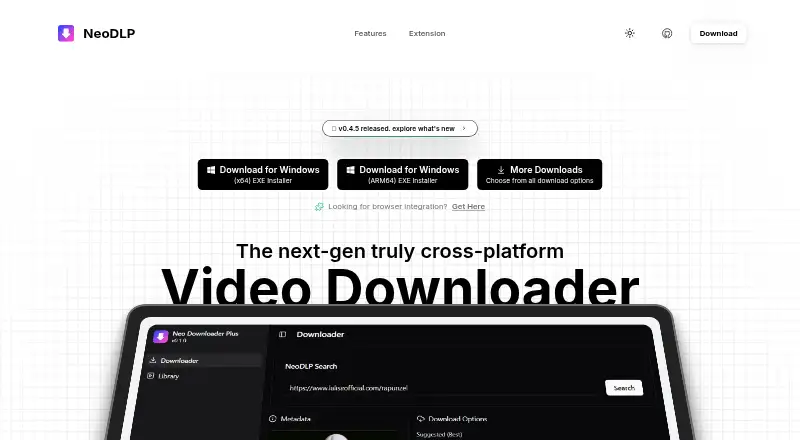
What NeoDLP is
NeoDLP is a free, open-source video and audio downloader for Windows, macOS, and Linux. Its site lists support for more than 2,500 websites, including YouTube, Facebook, Instagram, and X. Users can download individual videos, playlists, or batches and choose formats such as MP4, WEBM, MKV, and MP3. Options can embed subtitles, chapters, information, and thumbnails, and selected video and audio streams can be combined. NeoDLP Library helps organize downloads, while Chrome and Firefox integration is available through a separate extension. Other listed features include SponsorBlock, Aria2, proxy and rate controls, and customizable settings. The project lists Windows 10/11, macOS 11 or later, and modern Linux distributions, with installers and packages for those systems and options such as WinGet, Homebrew, Flathub, and AUR. Experimental macOS ARM64 browser downloads are unsigned; the project recommends Homebrew or its command-line installer for Apple Silicon. Users are responsible for downloading only content they own or are authorized to use and following applicable laws and source-platform terms.
Good
- Free and open source
- Supports more than 2,500 websites
- Offers video, playlist, and batch downloads
- Includes multiple output formats and subtitle options
- Has Chrome and Firefox integration
Watch out
- Experimental macOS ARM64 browser downloads are unsigned
- Users must follow applicable laws and source-platform terms
Who it suits
NeoDLP suits people who want to save video or audio from supported sites and organize downloads across Windows, macOS, or Linux. It may also fit users who need playlists, batches, or embedded subtitles.
Verdict
NeoDLP offers broad site support, multiple download modes, and desktop options without a listed paid tier. Apple Silicon users should note the caveat for browser-downloaded ARM64 builds.
Plans and prices
From NeoDLP's own pricing page, checked 11 Oct 2026.
| Plan | Price | What it gives you |
|---|---|---|
| Free and open source | Free | Fully free; open source under the MIT license |
The facts
Each one read from NeoDLP's own pages, with the date it was checked.
What it does
- Additional features
- Listed features include SponsorBlock support, Aria2 support, proxy and rate controls, and customizable settings.checked 11 Oct 2026
- Batch downloads
- Yeschecked 22 Sep 2026
- Dependencies
- The project lists YT-DLP, FFmpeg and FFprobe, Aria2, Deno, and a Rust-based PO Token Provider among its external dependencies.checked 11 Oct 2026
- Downloads
- It supports individual videos, playlists, and batch downloads, and can combine selected video and audio streams.checked 11 Oct 2026
- Download sources
- The site says NeoDLP supports downloading from thousands of sites, including YouTube, Facebook, Instagram and X.checked 11 Oct 2026
- Extension availability
- The extension page lists Chrome Web Store and Firefox Add-ons versions, as well as ZIP downloads for both browsers.checked 11 Oct 2026
- Formats and metadata
- It offers formats such as MP4, WEBM, MKV, and MP3, plus options to embed subtitles, chapters, information, and thumbnails.checked 11 Oct 2026
- Installation
- Download and package options include Windows installers, macOS packages, Linux packages, WinGet, Homebrew, Flathub, and AUR.checked 11 Oct 2026
- Intended use
- The project says users should download only content they own or are authorized to download and are responsible for complying with source-platform terms and laws.checked 11 Oct 2026
- Library
- NeoDLP Library helps users manage and organize downloads in one place.checked 11 Oct 2026
- Open source
- The site describes NeoDLP as fully free and open source, built on free and open-source software components.checked 11 Oct 2026
- Output formats
- MP4,WEBM,MKV,MP3,and other selectable formatschecked 22 Sep 2026
- Playlist downloads
- Yeschecked 22 Sep 2026
- Privacy
- The website privacy policy says it uses cookies and log files, and may collect contact details when users contact or register with the website.checked 11 Oct 2026
Where it runs
- Browser integration
- The site names Chrome and Firefox browser integration, with a separate NeoDLP Extension.checked 11 Oct 2026
- Desktop platforms
- The project lists Windows 10/11, macOS 11 or later, and modern Linux distributions as supported desktop platforms.checked 11 Oct 2026
- Device platforms
- Windows,macOS,Linuxchecked 22 Sep 2026
- Linux downloads
- The download page lists Linux x64 and ARM64 DEB and RPM packages, and gives Flatpak and native installer options.checked 11 Oct 2026
- macOS downloads
- The download page lists macOS x64 DMG and app bundle downloads, plus experimental ARM64 downloads.checked 11 Oct 2026
- macOS limitation
- The maker says experimental macOS ARM64 binaries are unsigned and may not open when downloaded in a browser; it recommends Homebrew or the command-line installer for Apple Silicon.checked 11 Oct 2026
- Platform caveat
- The download page says macOS ARM64 browser downloads are experimental and unsigned, and recommends installing through Homebrew or its command-line installer.checked 11 Oct 2026
Money
- Free plan
- Yeschecked 22 Sep 2026
The company
- Maker
- The Terms of Use say the NeoDLP website is a copyrighted work belonging to Subhamoy Biswas.checked 11 Oct 2026
- Maker location
- The project describes itself as made in India.checked 11 Oct 2026
The full review of NeoDLP
NeoDLP is a free, open-source desktop video and audio downloader with Chrome and Firefox integration. It best suits people who want to gather and organize media from many sites in one place. Its range of download options is compelling, though Apple Silicon users face an installation caveat.
Overview
Built on YT-DLP, NeoDLP pairs broad source support with a library for organizing downloads. It supports more than 2,500 websites, including YouTube, Facebook, Instagram, and X. The desktop interface and browser extension offer an alternative to working directly with the command-line tool, while the reliance on several external components may matter to people seeking a self-contained app.
Downloads can include individual videos, playlists, or batches, and the software can combine selected video and audio streams. It is intended for content users own or are authorized to download; users remain responsible for complying with applicable laws and source-platform terms.
Key features
- Video and audio formats: Choose formats including MP4, WEBM, MKV, and MP3. Customizable settings and stream combination provide useful control over output.
- Collection tools: Playlist and batch downloads suit larger collections, while the library helps keep saved items organized. Subtitle embedding and options for chapters, information, and thumbnails add metadata choices.
- Browser integration: Chrome and Firefox integrations, distributed through their extension stores and as ZIP downloads, complement the desktop app. That gives users a browser-based route to the downloader without making the extension a substitute for the desktop library.
- Additional controls: SponsorBlock, Aria2, proxy and rate controls, and customizable settings serve users who want to tune how downloads are handled. The listed dependencies include YT-DLP, FFmpeg and FFprobe, Aria2, Deno, and a Rust-based PO Token Provider, so the breadth of functionality comes with a substantial supporting stack.
Pricing
NeoDLP's Free and open source plan costs nothing. It is fully free and open source under the MIT license; there is no paid plan or free trial. That makes it suitable for users who want desktop downloading without a recurring software charge, though no paid tier is offered for those seeking one.
Platforms
The desktop app supports Windows 10/11, macOS 11 or later, and modern Linux distributions. Windows x64 and ARM64 installers are offered in EXE and MSI formats. macOS packages include x64 DMG and app bundle downloads, while Linux options include x64 and ARM64 DEB and RPM packages, Flatpak, and native installers. WinGet, Homebrew, and AUR are also installation routes.
Apple Silicon users should take care: experimental macOS ARM64 downloads are unsigned and may not open when downloaded in a browser. The recommended route is Homebrew or the command-line installer. Windows and Linux also have ARM64 packages, but the macOS caveat makes NeoDLP a less straightforward pick for users who want a conventional browser download on an Apple Silicon Mac.
Who it's for
NeoDLP is a good fit for people who download from multiple sites, want playlist or batch support, and value a desktop library alongside browser integration. Its format and metadata controls also suit users who want more say over saved media. Those who need a downloader without external dependencies, or who want an unsigned experimental macOS build to install without extra steps, should look elsewhere.
The privacy policy says the website uses cookies and log files and may collect contact details when users contact or register with it. The maker also provides support by email at [email protected].
Pros and cons
- Pros: Broad coverage. Support for more than 2,500 websites, including major social and video platforms, gives it range beyond a single-source downloader.
- Pros: Flexible collection and output options. Playlist and batch downloads, stream combination, multiple formats, and metadata choices help accommodate varied download needs.
- Pros: Free and open source. The MIT-licensed software has a free plan, with no paid tier to navigate.
- Cons: Apple Silicon installation friction. Experimental ARM64 browser downloads are unsigned and may not open, so Homebrew or the command-line installer is the recommended path.
- Cons: Multiple dependencies. Its reliance on YT-DLP, FFmpeg, Aria2, Deno, and other components may not suit people who prefer a more self-contained application.
Alternatives
Compare video downloaders if you want to weigh NeoDLP against other approaches. yt-dlp is a free alternative for users comfortable with a command-line tool; its free software plan is free, with no paid plans or usage limits stated. 4K Video Downloader+ is another option if you prefer a freemium product with a free trial and a permanent basic-features Starter plan at no cost.
MeTube may suit users looking for a free, self-hosted option, while Freemake Video Downloader is a free choice for personal, private, non-commercial use on macOS or Windows. Youwee is another free, MIT-licensed option across extension, Linux, macOS, and Windows.
yt-dlp app offers a free open-source desktop app for Windows, macOS, and Linux, with no telemetry or tracking. DownKingo is a free, open-source alternative for Linux, macOS, and Windows. OmniGet is worth considering if you want a free option with no ads, no account, and no paid plan across extension and desktop platforms.
Verdict
Choose NeoDLP if you want a free desktop downloader with broad site support, playlist and batch downloads, and a library for organizing what you save. Its feature range is the main reason to choose it; look elsewhere if you need a self-contained app or want a simple browser download and install path on Apple Silicon.
Alternatives to NeoDLP
- 1

4K Video Downloader+
Free planAndroidLinuxmacOSWindows8.6Free plan - 2
Hive
Free planOpen sourceAndroidiOSWebAPI8.6From $5 a month - 3

ClipGrab
Free planOpen sourceLinuxmacOSWindows8.4€10 one-time - 4
MeTube
Free planAndroidiOSWebExtension8.1Free plan - 5
SSvid
Free planAndroidLinuxmacOSWindows8.1$10 one-time - 6
Turbo Downloader
Free planmacOSWindows8.0From $19 a year