OmniGet
OmniGet is a free, open-source desktop app for saving video, audio, and files from supported websites, as well as torrents, magnet links, and direct files.
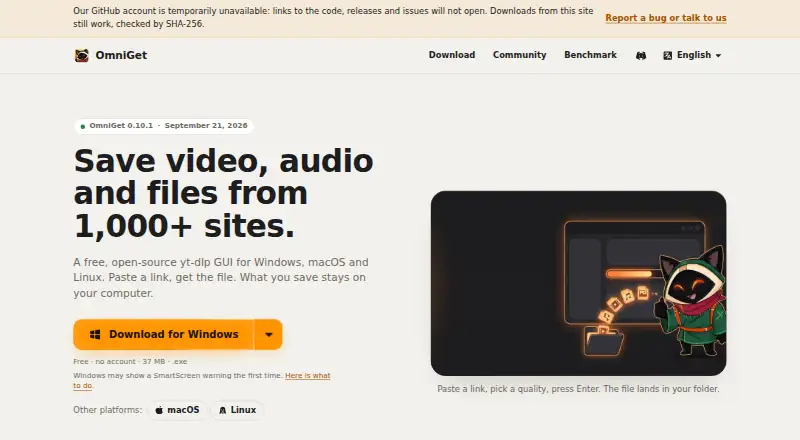
What OmniGet is
OmniGet is a free, open-source desktop app for saving video, audio, and files from supported websites, as well as torrents, magnet links, and direct files. It supports more than 1,800 sites, including YouTube, Instagram, TikTok, Reddit, Twitch, Vimeo, and Bilibili. Video downloads can reach 4K; audio-only options include MP3, M4A, Opus, FLAC, and WAV, and subtitle downloads include SRT and VTT. Playlist and batch downloads are supported. OmniGet uses yt-dlp and installs and updates it and FFmpeg automatically. Its queue can resume interrupted downloads, retry with backoff, and follow channels. Downloads stay on the user's computer, and the app reports no telemetry about downloaded content. It can only download material the user's own session can already open; it does not bypass DRM or paywalls. OmniGet runs on Windows, macOS, and Linux, with optional browser extensions. It is GPL-3.0 licensed and has no ads, account requirement, or paid plan; the listed plan is free.
Good
- Supports more than 1,800 sites.
- Downloads video at up to 4K.
- Queue resumes interrupted downloads and retries.
- No ads, account requirement, or paid plan.
Watch out
- Cannot bypass DRM or paywalls.
- Downloads only content the user's session can open.
- Windows installers are not signed.
Who it suits
OmniGet suits people who want a desktop download queue for supported sites, direct files, or torrents. It is also an option for users who want audio-only or subtitle downloads and accept the access limits.
Verdict
OmniGet combines site, torrent, magnet-link, and direct-file downloads with queue management and multiple output types. Its access is limited to content already available to the user's session, and its installers are not signed or notarized across the listed systems.
Plans and prices
From OmniGet's own pricing page, checked 30 Sep 2026.
| Plan | Price | What it gives you |
|---|---|---|
| Free | Free | no ads · no account · no paid plan · GPL-3.0 |
The facts
Each one read from OmniGet's own pages, with the date it was checked.
What it does
- Access limits
- OmniGet only downloads content the user's own session can already open and does not break DRM or paywalls.checked 30 Sep 2026
- Agent integration
- Its beta MCP server lets Claude Code, Cursor, VS Code and Codex check links, queue downloads, wait for completion and report failures.checked 30 Sep 2026
- Batch downloads
- Yeschecked 22 Sep 2026
- Code signing
- Windows installers are not signed, macOS builds are not notarized and Linux packages are not signed with a distribution key.checked 30 Sep 2026
- Download engine
- It uses yt-dlp and installs and updates yt-dlp and FFmpeg automatically.checked 30 Sep 2026
- Formats
- It supports up to 4K video, audio-only downloads in MP3, M4A, Opus, FLAC or WAV, and subtitles as SRT or VTT.checked 30 Sep 2026
- Integrity checks
- The official download page publishes SHA-256 hashes for every release file and describes verification commands.checked 30 Sep 2026
- License
- OmniGet is licensed under GPL-3.0 and has no ads, account requirement or paid plan.checked 30 Sep 2026
- Maximum video quality
- 4kchecked 22 Sep 2026
- MCP security
- Each MCP connection has its own token and permissions, and the server listens only on the local computer.checked 30 Sep 2026
- Output formats
- MP4,M4A,XML,ASS,JSONchecked 22 Sep 2026
- Playlist downloads
- Yeschecked 22 Sep 2026
- Privacy
- Downloads stay on the user's computer and the app reports no telemetry about what is downloaded.checked 30 Sep 2026
- Purpose
- OmniGet is a free, open-source desktop app for saving video, audio and files from more than 1,000 sites.checked 30 Sep 2026
- Queue
- Its queue resumes interrupted downloads, retries with backoff and can follow channels.checked 30 Sep 2026
- Sources
- It supports torrents, magnet links and direct files in addition to sites supported through yt-dlp.checked 30 Sep 2026
- Subtitle downloads
- Yeschecked 22 Sep 2026
- Support
- Security vulnerabilities should be reported privately to [email protected].checked 30 Sep 2026
- Supported sources
- YouTube,Instagram,TikTok,X/Twitter,Reddit,Twitch,Vimeo,Bluesky,Pinterest,SoundCloud,Bilibili,Telegram,Udemy,Hotmart,Pixiv,DeviantArt,ArtStation,Douyin and 1,800+ siteschecked 22 Sep 2026
Where it runs
- Browser extension
- An optional extension for Chrome, Edge and Brave sends the current page and forwards browser cookies to OmniGet.checked 30 Sep 2026
- Device platforms
- Windows,macOS,Linux,Chrome and Firefox browser extensionchecked 22 Sep 2026
Money
- Free plan
- Yeschecked 22 Sep 2026
The full review of OmniGet
OmniGet is a free, open-source desktop downloader for video, audio and files from a wide range of sites. It suits people who want playlists, subtitles and a managed download queue without an account or paid tier. Its breadth is appealing, but it cannot bypass access restrictions, and its installers lack platform signing or notarization.
Overview
Built around yt-dlp, OmniGet installs and updates yt-dlp and FFmpeg automatically, reducing setup work for users who might otherwise manage those components themselves. It handles supported websites as well as torrents, magnet links and direct files, with interrupted downloads resumed and failures retried with backoff. The queue can also follow channels, making it more useful for recurring downloads than a tool limited to one-off links.
Downloads remain on the user's computer, and the app reports no telemetry about download activity. It requires no account, carries no ads and is licensed under GPL-3.0. Those are meaningful advantages for privacy-conscious users, though they do not make OmniGet a way around access controls: it only downloads content the user's own session can open and does not break DRM or paywalls.
Key features
OmniGet supports more than 1,800 sites, including YouTube, Instagram, TikTok, X/Twitter, Reddit, Twitch, Vimeo, Bluesky, Pinterest, SoundCloud, Bilibili, Telegram, Udemy, Hotmart, Pixiv, DeviantArt, ArtStation and Douyin. That breadth suits people who collect media across several services; it is less compelling for someone who needs only a single-site downloader.
Video downloads can reach 4K. For audio-only files, OmniGet supports MP3, M4A, Opus, FLAC and WAV; subtitle downloads include SRT and VTT. MP4, M4A, XML, ASS and JSON are among the supported output formats. Playlist and batch downloads help when a collection is more useful than individual files, while the queue's resume and retry behavior can reduce the need to restart interrupted work manually.
An optional Chrome, Edge and Brave extension sends the current page to OmniGet and forwards browser cookies. That is useful when the user's browser session can open content the desktop app could not access on its own, but the access boundary remains: OmniGet cannot unlock content the session itself cannot open.
A beta MCP server lets Claude Code, Cursor, VS Code and Codex check links, queue downloads, wait for completion and report failures. Each connection has its own token and permissions, and the server listens only on the local computer. The integration may suit developers who want download tasks within those tools, but its beta status makes it a less settled part of the product than the core downloader.
Pricing
OmniGet is free: the Free plan costs nothing, with no ads, account requirement or paid plan. There are no stated download quotas or tier limits to weigh against a subscription, which makes it straightforward for occasional users and regular downloaders alike. The trade-off is not a paid upgrade path but the product's access limits and unsigned or unnotarized installers.
Platforms
OmniGet is available for Windows, macOS and Linux, with Chrome and Firefox browser extensions listed among its device platforms. Its optional extension also supports Edge and Brave. Desktop users should weigh a security and installation concern: Windows installers are not signed, macOS builds are not notarized, and Linux packages are not signed with a distribution key. The official download page publishes SHA-256 hashes and verification commands, giving technically comfortable users a way to check release files, but verification is an extra step rather than a substitute for platform signing.
Who it's for
OmniGet is a good fit for people who want one free desktop app for downloads across many sites, file sources and media types, especially those who value local storage, queue recovery, playlists or subtitles. Its local MCP server also gives developers a route to manage downloads from supported coding tools. It is a poor choice for anyone seeking to defeat DRM or paywalls, or for users who prefer the assurance of signed Windows and Linux installers or notarized macOS builds.
Pros and cons
- Pros: Broad site coverage, torrent and direct-file support, plus playlist, batch and subtitle downloads make it more versatile than a single-purpose site downloader.
- Pros: Free, open-source use with no ads, account or download telemetry is a strong fit for users who want local downloads without a paid tier.
- Pros: Automatic yt-dlp and FFmpeg setup and a queue that resumes and retries interrupted work reduce ongoing maintenance.
- Cons: It cannot access content beyond what the user's own session can open, so it is not a solution for DRM-protected or paywalled material.
- Cons: Installers and packages lack platform signing or notarization, which may deter users who prioritize those assurances.
- Cons: The MCP server is beta, so developers relying on that integration should account for its less mature status.
Alternatives
For a categorized roundup, see Video Downloaders.
4K Video Downloader+ is worth considering for users who want a freemium alternative with a permanent basic tier and a free trial; its paid Lite plan is for one device with three simultaneous downloads.
yt-dlp online is another free, open-source desktop option with no premium tier or download limits, suitable for readers who want that simpler plan structure.
SSvid may suit users who prefer a freemium service across Android and desktop systems, provided its free plan's five-downloads-per-day cap is sufficient.
yt-dlp app is a free, open-source desktop alternative for Windows, macOS and Linux that also emphasizes no telemetry or tracking.
MeowLoad is an option for readers seeking a freemium mix of desktop, web and extension access, with playlist, channel and bulk downloads in its premium tier.
yt-dlp is the direct alternative for readers who want the free underlying downloader rather than OmniGet's desktop app.
aTube Catcher may be a better fit for users satisfied with single-video downloads up to 1080p on its free Community plan, or who prefer a paid Pro option.
SnapAny suits readers who want an online downloader with free access, while its Pro plan is aimed at users seeking all-site support and playlist or channel downloads.
Verdict
Choose OmniGet if you want a capable, free local downloader that combines broad site support with torrents, direct files, playlists, subtitles and queue recovery. Its lack of telemetry and account requirements strengthens the case for privacy-minded users. Look elsewhere if you need restricted content opened, or if signed or notarized installers are a requirement.
Alternatives to OmniGet
- 1

4K Video Downloader+
Free planAndroidLinuxmacOSWindows8.6Free plan - 2
Hive
Free planOpen sourceAndroidiOSWebAPI8.6From $5 a month - 3

ClipGrab
Free planOpen sourceLinuxmacOSWindows8.4€10 one-time - 4
MeTube
Free planAndroidiOSWebExtension8.1Free plan - 5
SSvid
Free planAndroidLinuxmacOSWindows8.1$10 one-time - 6
Turbo Downloader
Free planmacOSWindows8.0From $19 a year