SSvid
SSvid is a video and audio downloader with native apps for macOS, Windows, Linux, and Android.
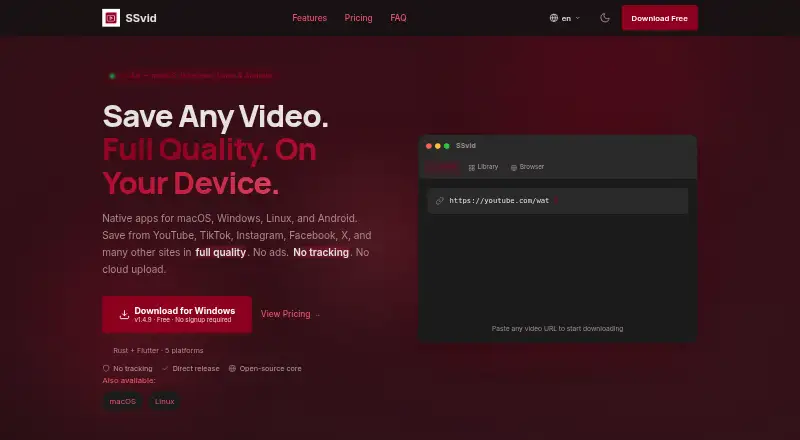
What SSvid is
SSvid is a video and audio downloader with native apps for macOS, Windows, Linux, and Android. It supports YouTube, TikTok, Instagram, Facebook, X, Vimeo, Reddit, Dailymotion, SoundCloud, Pinterest, and more than 1,000 other platforms. Downloads range from 144p to 4K and can be saved as MP4, WebM, MP3, or M4A, with video-only and audio-only options. Users can download playlists, subtitles, and batches; downloads can be paused and resumed, including after closing the app. Its included browser can intercept videos with one click. SSvid says its Rust engine supports 10 parallel downloads, while Premium removes that limit. The free plan costs nothing and allows five downloads per day without signup. Paid passes are one-time payments with no automatic renewal: Premium 7 Days costs $10, paid once, Premium 30 Days costs $15, paid once, Premium 90 Days costs $25, paid once, and Lifetime costs $42, paid once. Premium includes a Gemini-powered assistant for questions, summaries, and subtitle translation. SSvid describes its core as open source and says it has no tracking, ads, data collection, or cloud uploads.
Good
- Supports more than 1,000 platforms
- Downloads up to 4K
- Playlist, subtitle, and batch downloads
- Free plan allows five daily downloads
- Passes do not renew automatically
Watch out
- Free plan is limited to five downloads daily
- Premium passes are paid
- Premium device limits vary by pass
Who it suits
SSvid suits people who download video or audio from its supported sites on macOS, Windows, Linux, or Android. Its free plan may suit occasional use, while one-time Premium passes include a higher parallel-download limit and an AI assistant.
Verdict
SSvid combines broad source support with video, audio, playlist, subtitle, and batch downloads across four native-app platforms. The free plan has a daily download limit; paid options are listed as one-time passes rather than subscriptions.
Plans and prices
From SSvid's own pricing page, checked 28 Sep 2026.
| Plan | Price | What it gives you |
|---|---|---|
| Free | Free | Free forever; no signup required; 5 downloads per day. · 5 downloads per day · 5 downloads per day; no signup required |
| Premium 7 Days | $10, paid once | 7-day pass; does not renew automatically. · Up to 5 devices · 7-day pass; single payment |
| Premium 30 Days | $15, paid once | 30-day pass; does not renew automatically. · Up to 5 devices · 30-day pass; single payment |
| Premium 90 Days | $25, paid once | 90-day pass; does not renew automatically. · Up to 5 devices · 90-day pass; single payment |
| Lifetime | $42, paid once | Lifetime does not expire; device limits vary by lifetime tier. · Up to 5 devices · Does not expire |
| Premium one-time payment | $15, paid once | The page prints this amount without identifying a separate tier. · $15 one time |
| Monthly | — | The page mentions monthly plans but prints no amount. |
| Yearly | — | The page mentions yearly plans but prints no amount. |
The facts
Each one read from SSvid's own pages, with the date it was checked.
What it does
- AI assistant
- Premium includes a Gemini-powered assistant for questions, summaries, and subtitle translation.checked 28 Sep 2026
- Batch downloads
- Yeschecked 22 Sep 2026
- Maximum video quality
- 4kchecked 22 Sep 2026
- Open-source core
- The product page describes SSvid as having an open-source core.checked 28 Sep 2026
- Output formats
- MP4,WebM,MP3,M4Achecked 22 Sep 2026
- Parallel downloads
- The Rust engine supports 10 parallel downloads; Premium removes the parallel-download limit.checked 28 Sep 2026
- Pause and resume
- Downloads support pause and resume, including after closing the app.checked 28 Sep 2026
- Payment security
- Payments are handled through PayPal with 256-bit SSL encryption.checked 28 Sep 2026
- Playlist downloads
- Premium supports batch playlist and channel downloads.checked 28 Sep 2026
- Privacy controls
- SSvid states that it has no tracking, ads, data collection, or cloud uploads.checked 28 Sep 2026
- Quality range
- Downloads range from 144p to 4K, with video-only or audio-only options.checked 28 Sep 2026
- Subtitle downloads
- Yeschecked 22 Sep 2026
- Support channel
- Users can contact support for payment, activation, refund, and general questions.checked 28 Sep 2026
- Supported sources
- YouTube,TikTok,Instagram,Facebook,X,Vimeo,Reddit,Dailymotion,SoundCloud,Pinterest,and 1,000+ other platformschecked 22 Sep 2026
Money
- Billing model
- Passes are one-time payments with no subscription or automatic renewal.checked 28 Sep 2026
- Free limit
- Free users can make 5 downloads per day.checked 28 Sep 2026
- Free plan
- Yeschecked 22 Sep 2026
- Free price
- The free plan costs $0 forever.checked 28 Sep 2026
- Premium starting price
- Premium passes start at $10.checked 28 Sep 2026
Where it runs
- Built-in browser
- The app includes a browser that can intercept videos with one click.checked 28 Sep 2026
- Device limit
- Premium monthly plans allow up to 5 devices; yearly allows up to 10.checked 28 Sep 2026
- Device platforms
- macOS,Windows,Linux,Androidchecked 22 Sep 2026
- Supported platforms
- Native apps are available for macOS, Windows, Linux, and Android.checked 28 Sep 2026
The company
- Company founder
- The founder named on the page is Minh.checked 28 Sep 2026
The full review of SSvid
SSvid is a video and audio downloader for people who want one app for media from social, video, and music platforms. It suits users who need playlist, subtitle, or batch downloads across desktop and Android. Its broad source support and native apps are balanced by a five-download daily cap on the free plan.
Overview
SSvid supports YouTube, TikTok, Instagram, Facebook, X, Vimeo, Reddit, Dailymotion, SoundCloud, Pinterest, and more than 1,000 other platforms. Downloads can reach 4K and be saved as MP4, WebM, MP3, or M4A; playlist, subtitle, and batch downloads are supported. That range makes it useful for varied media workflows, though free users will need to ration downloads to five per day.
The app includes a built-in browser that can intercept videos with one click, and downloads can be paused and resumed even after closing the app. SSvid says it has no tracking, ads, data collection, or cloud uploads, and describes its core as open source. Payments go through PayPal with 256-bit SSL encryption.
Key features
- Broad source and format coverage: Support for a wide range of named services and 1,000+ other platforms is a strong fit for users who collect media from multiple sites. MP4, WebM, MP3, and M4A output, with quality from 144p to 4K and video-only or audio-only options, offers useful flexibility.
- Playlist, subtitle, and batch downloads: These features suit users saving collections or handling several items at once, rather than downloading only occasional single clips.
- Parallel downloads: The Rust engine supports 10 concurrent downloads. Premium removes the parallel-download limit, which matters most to users handling larger queues.
- Premium assistant: Premium includes a Gemini-powered assistant for questions, summaries, and subtitle translation. It adds capabilities beyond downloading, but is only relevant to users who want those AI functions.
Pricing
SSvid is freemium. The Free plan costs $0 forever, requires no signup, and permits five downloads per day. It is a practical way to use the app lightly, but the daily quota makes it a poor fit for frequent downloading.
| Plan | Price | Term and limits |
|---|---|---|
| Premium 7 Days | $10.00 USD | One-time 7-day pass; up to 5 devices. |
| Premium 30 Days | $15.00 USD | One-time 30-day pass; up to 5 devices. |
| Premium 90 Days | $25.00 USD | One-time 90-day pass; up to 5 devices. |
| Lifetime | $42.00 USD | One-time payment; does not expire; up to 5 devices. |
The passes are one-time payments with no subscription or automatic renewal, so they suit users who want a defined period or a non-expiring option without recurring billing. The 7-day pass has the lowest upfront cost but the shortest access; the 30- and 90-day passes extend the term, while Lifetime costs more upfront and does not expire. SSvid also mentions monthly plans allowing up to 5 devices and yearly plans allowing up to 10, but gives no prices for either. It prints a separate $15 one-time payment without identifying a tier, so that amount cannot be matched to a distinct plan.
Platforms
Native apps are available for macOS, Windows, Linux, and Android. That breadth is useful for people who want a downloader across desktop systems and Android, rather than relying on a browser-only option.
Who it's for
SSvid is best suited to users who regularly download from multiple platforms, need playlists, subtitles, or batches, and value native apps on both desktop and Android. The free tier can serve occasional use; users with heavier queues are more likely to benefit from Premium's removal of the parallel-download limit and its Gemini-powered assistant. It is less compelling for anyone who needs an unrestricted free plan or wants recurring subscription pricing.
Pros and cons
- Pro: Supports 1,000+ sources alongside named services such as YouTube, TikTok, and SoundCloud, reducing the need for separate tools across sites.
- Pro: 4K output, audio-only downloads, playlists, subtitles, and batch downloads cover more than basic single-video saving.
- Pro: Native apps span macOS, Windows, Linux, and Android, and paid passes do not renew automatically.
- Con: The free plan stops at five downloads per day, a meaningful constraint for regular use.
- Con: Premium's parallel-download limit is removed, but the monthly and yearly prices are not given, making those terms hard to compare with the priced passes.
Alternatives
Browse video downloaders to compare more options. Choose 4K Video Downloader+ if a free trial matters; its Starter plan offers permanent access to basic features, though the supplied Lite plan details are incomplete. OmniGet is a free option for readers who prefer no ads, no account, and a GPL-3.0 license. yt-dlp online is a free, open-source desktop application with no download limits and no premium tier. yt-dlp app is another free open-source desktop option for Windows, macOS, and Linux, with no telemetry or tracking. MeowLoad may suit users seeking basic desktop functions for free and a premium tier with playlist, channel, and bulk downloads. yt-dlp is a free alternative for Linux, macOS, and Windows. aTube Catcher offers a free Community plan capped at 1080p for single-video downloads, while its Pro plan is priced at $19.95 a month. SnapAny is an alternative with free online downloading and a Pro tier described as adding all-site support and accelerated processing and downloads.
Verdict
Choose SSvid if you want broad source coverage, playlist and batch tools, and native apps across desktop and Android; its one-time passes also avoid automatic renewal. Look elsewhere if five free downloads a day is too restrictive or if you need clear pricing for a monthly or yearly plan before committing.
Alternatives to SSvid
- 1

4K Video Downloader+
Free planAndroidLinuxmacOSWindows8.6Free plan - 2
Hive
Free planOpen sourceAndroidiOSWebAPI8.6From $5 a month - 3

ClipGrab
Free planOpen sourceLinuxmacOSWindows8.4€10 one-time - 4
MeTube
Free planAndroidiOSWebExtension8.1Free plan - 5
Turbo Downloader
Free planmacOSWindows8.0From $19 a year - 6
SnapAny
Free planWebmacOSWindows8.0Free plan