
Freemake Video Downloader
Freemake Video Downloader downloads online videos for offline viewing on Windows and macOS.
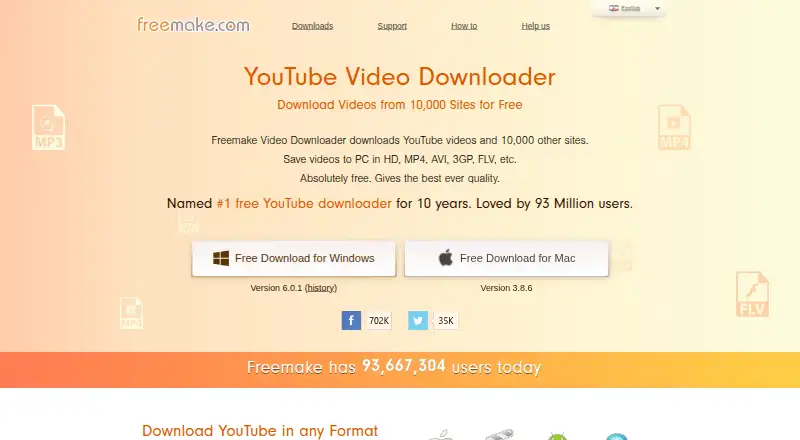
What Freemake Video Downloader is
Freemake Video Downloader downloads online videos for offline viewing on Windows and macOS. The product page lists more than 10,000 supported websites, including YouTube, Facebook, Vimeo, Dailymotion, Flickr, VK, and Hulu. It supports playlist and batch downloads, with direct downloads up to 4K. Output options include MP4, WebM, FLV, 3GP, AVI, MP3, WMV, MKV, and formats for iPod and iPhone, iPad, Android, and PSP devices. Users can select video quality, set download speed limits, review download history, and pause or resume interrupted downloads. Downloaded files can also be sent to Dropbox, Google Drive, or OneDrive by choosing a cloud destination. The software has a free plan, and Freemake says its free license does not expire. The stated requirements include Windows 11, 10, 8, 8.1, 7, or Vista, or Mac OS, along with a 1 GHz processor, .NET Framework 4.5, 256 MB RAM, 25 MB of disk space, and an internet connection. Freemake says downloads should be for personal, private, non-commercial use.
Good
- Supports more than 10,000 websites.
- Downloads video up to 4K.
- Playlist and batch downloads are supported.
- Can pause and resume interrupted downloads.
- Free license does not expire.
Watch out
- Available platforms are Windows and macOS.
- Downloads should be non-commercial and private.
- Requires an internet connection.
Who it suits
This suits desktop users who want to download videos from supported sites, including playlists or batches. It is intended for personal, private, non-commercial use.
Verdict
Freemake Video Downloader combines broad site coverage with quality selection, batch downloads, and several output formats. Check that your operating system meets the listed requirements and that your intended downloads fit its usage restriction.
Plans and prices
From Freemake Video Downloader's own pricing page, checked 11 Oct 2026.
| Plan | Price | What it gives you |
|---|---|---|
| Freemake Video Downloader | Free | Free download; personal, private, non-commercial use |
The facts
Each one read from Freemake Video Downloader's own pages, with the date it was checked.
What it does
- Batch downloads
- It can save up to 500 YouTube clips at once and supports videos and channels.checked 11 Oct 2026
- Cloud destinations
- The page says downloaded files can be sent to Dropbox, Google Drive, or OneDrive by selecting a cloud service as the destination.checked 11 Oct 2026
- Download controls
- The product page lists selectable video quality, download speed limits, download history, and the ability to pause and resume interrupted downloads.checked 11 Oct 2026
- Formats and quality
- It lists direct downloads up to 4K and output formats including MP4, WebM, FLV, and 3GP, with conversion options such as AVI, WMV, and MKV.checked 11 Oct 2026
- Maximum video quality
- 4kchecked 20 Sep 2026
- Output formats
- MP4,WebM,FLV,3GP,AVI,MP3,WMV,MKV,iPod/iPhone,iPad,Android and PSPchecked 20 Sep 2026
- Playlist downloads
- Yeschecked 20 Sep 2026
- Purpose
- Downloads online videos from YouTube and other video hosting sites for offline viewing.checked 11 Oct 2026
- Security claim
- Freemake says its software is signed with Microsoft Authenticode and recommends downloading it from the official site.checked 11 Oct 2026
- Service dependency
- Freemake says disabling its Video Capture service limits downloads to the sites on its supported-sites list.checked 11 Oct 2026
- Site coverage
- The product page says it supports downloads from 10,000 sites, including YouTube, Facebook, Vimeo, and Dailymotion.checked 11 Oct 2026
- Support
- Freemake directs users to its support request form for technical assistance.checked 11 Oct 2026
- Supported sources
- 10,000+ websites,including YouTube,Facebook,Vimeo,Dailymotion,Flickr,VK and Huluchecked 20 Sep 2026
- System requirements
- The listed requirements include Windows 11, 10, 8, 8.1, 7, or Vista, or Mac OS, plus a 1 GHz processor, .NET Framework 4.5, 256 MB RAM, 25 MB disk space, and an internet connection.checked 11 Oct 2026
- Telemetry
- Freemake says its optional utility collects crash reports and usage statistics, and that installation requires user consent.checked 11 Oct 2026
- Usage restriction
- Freemake says multimedia downloads should be for personal, private, non-commercial use.checked 11 Oct 2026
The company
- Company
- Freemake’s about page identifies Mixbyte LLC as the UK company operating the project and lists an address at 60 Cannon Street, London.checked 11 Oct 2026
- Founded
- 2010checked 28 Sep 2026
- Headquarters
- London, United Kingdomchecked 28 Sep 2026
Where it runs
- Device platforms
- Windows and Mac OSchecked 20 Sep 2026
Money
- Free license
- Freemake support says its free license does not expire and core options are provided free.checked 11 Oct 2026
- Free plan
- Yeschecked 20 Sep 2026
The full review of Freemake Video Downloader
Freemake Video Downloader is a desktop downloader for saving online videos and converting them for offline playback. It suits Windows and Mac users who collect content from many hosting services and need playlist, batch, cloud-destination, and format controls. The permanent free license makes it a strong personal-use option, but the non-commercial restriction and service dependency matter before you commit.
Overview
Freemake handles both one-off and larger downloading jobs. You can select video quality, set a download-speed limit, review download history, and pause or resume an interrupted transfer. Those controls are useful on busy or unreliable connections, while playlist and batch support reduce repetitive URL work.
Coverage is the headline strength: Freemake says it supports more than 10,000 websites, including YouTube, Facebook, Vimeo, Dailymotion, Flickr, VK, and Hulu. That breadth benefits users who move between several platforms rather than relying on one source. Downloads can be sent to Dropbox, Google Drive, or OneDrive, so the computer does not have to be the only destination.
There is an important qualification. Freemake says disabling its Video Capture service limits downloads to sites on its supported-sites list. Users who turn off that service should expect narrower coverage. The software is intended for personal, private, non-commercial multimedia downloads, which excludes business distribution and other commercial workflows.
Key features
Quality and output choices
Direct downloads reach up to 4K when the source provides that quality. Output choices include MP4, WebM, FLV, and 3GP, with conversion-oriented formats such as AVI, WMV, and MKV. MP3 output covers audio-only needs, while presets for iPod/iPhone, iPad, Android, and PSP are useful when the target device matters more than retaining the original file.
Queue and transfer control
Playlist downloads and batch processing make Freemake practical for series, collections, or multiple URLs. Selectable speed limits help prevent downloads from consuming all available bandwidth. Pause-and-resume support is a meaningful safeguard for long transfers, and download history provides a record of completed work.
Cloud destinations and privacy choices
Choosing Dropbox, Google Drive, or OneDrive as the destination suits users who want files available across devices without a separate upload step. Freemake also says its optional utility collects crash reports and usage statistics only with user consent. The installer requires that consent, so privacy-conscious users can review the option rather than treating telemetry as unavoidable.
Pricing
Freemake Video Downloader costs free. The free license does not expire, has no trial period because the product is already free, and provides the core options without a paid upgrade described here. It is for personal, private, non-commercial use, so organizations, commercial publishers, and anyone distributing downloaded media should look elsewhere.
Platforms
Freemake supports Windows and Mac OS. Listed Windows versions are 11, 10, 8, 8.1, 7, and Vista. Requirements include a 1 GHz processor, 256 MB of RAM, 25 MB of disk space, .NET Framework 4.5, and an internet connection. Freemake directs technical questions to its support request form and recommends downloading the Microsoft Authenticode-signed software from the official site.
Who it's for
This is a good fit for Windows or Mac users who download from varied services, need 4K or device-specific output, and value playlists, queues, and cloud storage. It is less suitable for Linux users, commercial or business use, or anyone unwilling to rely on Freemake’s Video Capture service for broader downloading behavior.
Pros and cons
- Pro: Support for more than 10,000 sites makes it useful across multiple video platforms.
- Pro: 4K downloads, numerous video and audio formats, and device presets cover varied playback targets.
- Pro: Playlist, batch, pause/resume, speed-limit, and history controls provide real download management.
- Pro: Direct Dropbox, Google Drive, and OneDrive destinations simplify cloud-based workflows.
- Con: The license permits only personal, private, non-commercial use.
- Con: Disabling Video Capture limits downloads to Freemake’s supported-sites list.
- Con: Windows and Mac support leaves Linux users without a native platform option.
Alternatives
For a broader directory of options, see Video Downloaders and Download Manager Software.
- yt-dlp is a free option for Linux, macOS, Windows, and self-hosted setups, with no paid plans or stated usage limits.
- 4K Video Downloader+ is worth choosing if you want Android or Linux support and a free trial alongside its permanent basic tier.
- MeTube suits users who prefer a free, self-hosted downloader with web and mobile-oriented platform options.
- NeoDLP is the alternative for readers specifically seeking fully free, open-source software.
- Youwee offers a completely free, MIT-licensed open-source approach across desktop and extension platforms.
- yt-dlp app is a free open-source desktop choice for Windows, macOS, and Linux with no telemetry or tracking.
- DownKingo is a free open-source alternative with source code, releases, and a public roadmap on GitHub.
- OmniGet is a free GPL-3.0 option with no ads, no account, and no paid plan.
Verdict
Choose Freemake Video Downloader if you use Windows or Mac, download from many services, and want a lasting free license with 4K, conversion, batch, playlist, and cloud-destination options. Look elsewhere if your work is commercial, you need Linux, or you want downloading that does not depend on Freemake’s Video Capture service.
Alternatives to Freemake Video Downloader
- 1

4K Video Downloader+
Free planAndroidLinuxmacOSWindows8.6Free plan - 2
Hive
Free planOpen sourceAndroidiOSWebAPI8.6From $5 a month - 3

ClipGrab
Free planOpen sourceLinuxmacOSWindows8.4€10 one-time - 4
MeTube
Free planAndroidiOSWebExtension8.1Free plan - 5
SSvid
Free planAndroidLinuxmacOSWindows8.1$10 one-time - 6
Turbo Downloader
Free planmacOSWindows8.0From $19 a year