
WorshipTools Presenter
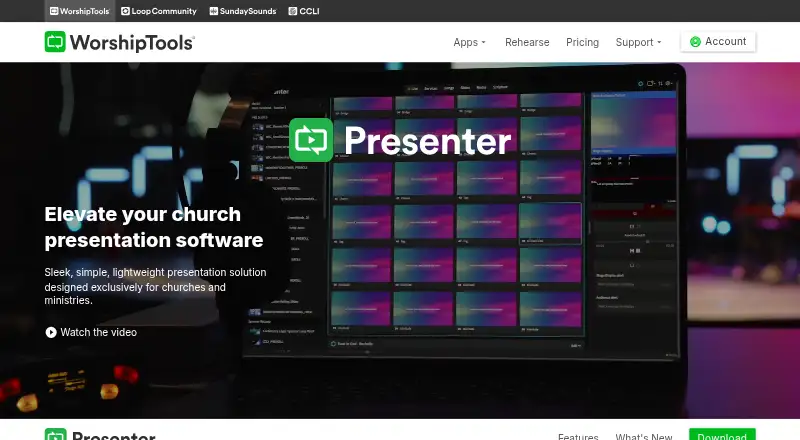
WorshipTools Presenter is a presentation solution designed for churches and ministries, with a free plan for creating and managing services.
What WorshipTools Presenter is
WorshipTools Presenter is a presentation solution designed for churches and ministries, with a free plan for creating and managing services. Cloud syncing makes song lyrics, videos, images, and cue lists available from different computers. Users can also create or open services offline, but internet-dependent functions such as YouTube playback and SongSelect imports are unavailable without a connection. Presenter supports multiple output screens with different visual layouts, limited by the displays connected to the computer. CCLI SongSelect supports lyric, chord, and lyric video imports, and Presenter also integrates with Charts. Built-in Bibles let users display scripture by entering a reference; each plan lists more than 65 Bibles. Loop Connect can turn a setlist into lyric slides after users choose how many lines appear on each slide. The Free plan includes 500 MB cloud storage, 10 users, and 15 items per service, plus unlimited services and songs. Presenter supports Windows and macOS, with downloads listed for Windows, macOS, and Linux. Mobile remote control requires a WorshipTools Pro or Pro Plus account.
Good
- Free plan includes unlimited services and songs
- Services can be created or opened offline
- Supports multiple output screens with different layouts
- Built-in Bibles display scripture by reference
Watch out
- Free plan includes 500 MB cloud storage
- Free plan includes 10 users
- Free plan allows 15 items per service
- Mobile remote control requires a Pro or Pro Plus account
Who it suits
Presenter suits churches and ministries preparing services with lyrics, media, scripture, and multiple display layouts. It can also suit teams that need to work offline, provided they do not need internet-dependent features at that time.
Verdict
Presenter brings service materials and presentation outputs into one tool, with offline access and a free plan. Check the plan limits and account requirement for mobile remote control before choosing it.
Plans and prices
From WorshipTools Presenter's own pricing page, checked 30 Sep 2026.
| Plan | Price | What it gives you |
|---|---|---|
| Free | Free | 500 MB cloud storage · 10 users · 15 items per service · unlimited services and songs |
| Pro | Priced on request | 5 GB cloud storage · 30 users · unlimited items per service · Stage Display, mobile remote and multiple output screens |
| Pro Plus | Priced on request | 50 GB cloud storage · unlimited users · advanced permissions · simultaneous Presenter sessions · motion graphics and templates |
The facts
Each one read from WorshipTools Presenter's own pages, with the date it was checked.
What it does
- Cloud sync
- Cloud syncing makes presentation assets, including song lyrics, videos, images and cue lists, accessible from any computer.checked 30 Sep 2026
- Data location
- WorshipTools says its servers and infrastructure are located in Google Cloud data centers in South Carolina.checked 30 Sep 2026
- Integrations
- Presenter supports CCLI SongSelect lyric, chord and lyric video imports, and the product page describes integration with Charts.checked 30 Sep 2026
- Lyrics automation
- Loop Connect can add an entire setlist as lyric slides after the user chooses the number of lines per slide.checked 30 Sep 2026
- Offline access
- Yeschecked 20 Sep 2026
- Offline use
- Presenter can create or open services offline, but internet-dependent functions such as YouTube playback and SongSelect imports are unavailable.checked 30 Sep 2026
- Outputs
- Presenter supports multiple output screens with different visual layouts and has no limit beyond the displays connected to the computer.checked 30 Sep 2026
- PowerPoint import
- Yeschecked 20 Sep 2026
- Presenter mode
- Yeschecked 20 Sep 2026
- Purpose
- Presenter is a lightweight presentation solution designed for churches and ministries.checked 30 Sep 2026
- Real-time collaboration
- Yeschecked 20 Sep 2026
- Remote control
- The Presenter Remote app controls presentations from iPhone, iPad or Android devices, and requires a WorshipTools Pro or Pro Plus account.checked 30 Sep 2026
- Scripture
- Built-in Bibles let users display scripture by entering a reference, and the pricing page lists 65+ Bibles on each plan.checked 30 Sep 2026
- Security
- WorshipTools says data transfers use HTTPS encryption and that it is PCI compliant, uses Stripe for payments, and does not store card information.checked 30 Sep 2026
- Support
- The site lists documentation and tutorials, a support forum, and contact support.checked 30 Sep 2026
Money
- Free plan
- Yeschecked 20 Sep 2026
- Plan limit
- The pricing page lists Presenter Stage Display, mobile remote and multiple output screens as Pro and Pro Plus features; they are not listed for Free.checked 30 Sep 2026
The company
- Headquarters
- Wilmington, Delaware, United Stateschecked 28 Sep 2026
Where it runs
- Platform downloads
- The legacy Presenter download page lists Windows 32-bit and 64-bit, macOS Intel and Apple, and Linux versions.checked 30 Sep 2026
- Supported platforms
- Windows,macOSchecked 20 Sep 2026
The full review of WorshipTools Presenter
Overview
WorshipTools Presenter is presentation software for churches and ministries that need to prepare and display service materials. It is best suited to teams working with lyrics, scripture and multiple screens; its free plan makes it a practical starting point, though some display and remote-control features require a paid-tier account.
Cloud syncing keeps lyrics, videos, images and cue lists accessible from any computer, while real-time collaboration and PowerPoint import support shared preparation and existing slide decks. Presenter can also create or open services offline, a useful safeguard when internet access is unreliable. Offline mode does not cover internet-dependent functions such as YouTube playback or SongSelect imports.
Presenter sits within a broader church workflow that includes volunteer scheduling, participant assignments, a service calendar, team notifications and mobile access. Teams comparing adjacent tools can browse Worship Planning Software, Church Presentation Software and Presentation software.
Key features
Lyrics, scripture and slides
Loop Connect can turn a full setlist into lyric slides after the user chooses how many lines to show per slide. That reduces repetitive slide preparation for song-led services. CCLI SongSelect imports cover lyrics, chords and lyric videos, but those imports depend on an internet connection. PowerPoint import helps teams carry existing presentations into the service workflow.
Built-in Bibles display scripture from a reference, and each plan includes access to 65+ Bibles. Multiple output screens can use different visual layouts, with the number limited only by the displays connected to the computer. That flexibility suits services with separate audience and stage views, but it is a Pro or Pro Plus feature, not part of Free.
Offline use and remote control
Users can create or open services offline, which protects preparation and presentation work from a network outage. YouTube playback and SongSelect imports remain internet-dependent, so offline access is not a substitute for a connection when using those functions.
The Presenter Remote app works from iPhone, iPad or Android devices, but mobile remote control requires a WorshipTools Pro or Pro Plus account. Teams considering it should include that account requirement in their plan decision rather than assume remote control comes with the free mobile app.
Pricing
Presenter uses a freemium model. Free costs nothing and includes 500 MB of cloud storage, 10 users, 15 items per service, and unlimited services and songs. It is a meaningful option for smaller teams with modest storage needs, but the per-service item cap and absence of listed Stage Display, mobile remote and multiple output screens constrain more elaborate services.
Pro has custom pricing and raises storage to 5 GB, supports 30 users and removes the items-per-service limit. It also adds Stage Display, mobile remote and multiple output screens, making it the more suitable tier for teams that need those presentation controls.
Pro Plus has custom pricing and includes 50 GB of storage and unlimited users, alongside the Pro-level presentation features. It fits larger teams or those with heavier asset libraries; smaller groups may not need its expanded capacity. No trial length or renewal terms are stated here.
Platforms
Presenter supports Windows, macOS and Linux, and its legacy downloads cover Windows 32-bit and 64-bit, macOS Intel and Apple, and Linux versions. The Presenter Remote app supports iPhone, iPad and Android devices, subject to the Pro or Pro Plus account requirement. The platform range is useful for mixed-computer teams, while mobile access is specifically useful for controlling presentations remotely.
Who it's for
Presenter is a strong fit for churches and ministries that want service content, scripture and presentation outputs in one workflow, especially when offline preparation or multiple display layouts matter. Small teams can start on Free if 500 MB, 10 users and 15 items per service are sufficient. Larger teams, or anyone needing Stage Display, mobile remote or multiple outputs, should compare the custom-priced Pro and Pro Plus plans before committing.
It is less compelling for teams that depend on YouTube or SongSelect while offline, or that need mobile remote control without moving beyond Free. Teams whose needs stop at basic service coordination may also prefer a tool centered more narrowly on planning or scheduling.
Pros and cons
- Pros: Offline service creation and opening provide continuity when internet access is unavailable.
- Pros: Loop Connect, SongSelect imports, built-in Bibles and PowerPoint import cover several common service-content tasks.
- Pros: Free includes unlimited services and songs, plus 10 users, making it usable beyond a short trial for smaller teams.
- Cons: Free caps storage at 500 MB and each service at 15 items, which can constrain asset-heavy or complex services.
- Cons: Stage Display, mobile remote and multiple output screens require Pro or Pro Plus; remote control also requires that account tier.
- Cons: YouTube playback and SongSelect imports require internet, limiting what offline access can accomplish.
Alternatives
Choose OnStage instead if a free team-planning option with up to five members, 200 MB storage, five monthly events, reminders, chat, annotations and PDF song imports better matches the workflow.
Planning Center is worth considering for a broader church operations setup: its free tiers include a one-room Calendar, unlimited People database and reporting, and Services for five team members.
Ministry Planner may suit churches wanting free planning tools, including scheduling for one team and up to 1,000 volunteers or one active event for up to 1,000 people.
For an iPhone- and iPad-focused free option, compare ServeFlow: Worship Planner. AssemblyFlow is another freemium choice, available on web, Windows, iOS and Android.
Ministry Order is a paid alternative with a free trial, while Worshipful offers paid plans with a choose-your-amount model starting at $5 a month. Assemblea is another freemium option for teams comparing church tools.
For category comparisons, see Church Volunteer Management Software and Church Scheduling Software.
Verdict
WorshipTools Presenter is a sensible choice for churches that need a flexible service presentation workflow, particularly those that value offline access, lyric and scripture tools, or multiple display layouts. The free tier is capable for smaller teams, but its storage and item caps are real constraints, and remote control and expanded screen features sit behind custom-priced plans. Choose Presenter when presentation is central to the service workflow; look elsewhere if you need those controls without a paid-tier commitment or depend on internet-based media while offline.
Getting started
- Visit https://www.worshiptools.com/en-us/presenter
- Download Presenter for Windows, macOS, or Linux
- Choose the Free plan or a Pro or Pro Plus account
- Create or open a service and add presentation assets
- Connect output displays if using multiple screens
Limits worth knowing
The Free plan includes 500 MB cloud storage, 10 users, and 15 items per service, with unlimited services and songs. Presenter Stage Display, mobile remote, and multiple output screens are listed for Pro and Pro Plus, not Free.
Questions
Is WorshipTools Presenter free?
Yes. Its Free plan costs nothing and includes 500 MB cloud storage, 10 users, 15 items per service, and unlimited services and songs.
Which desktop platforms have downloads?
Downloads are listed for Windows, macOS, and Linux. Windows 32-bit and 64-bit, and macOS Intel and Apple versions are listed.
Can Presenter be used offline?
Yes. Users can create or open services offline, but internet-dependent functions such as YouTube playback and SongSelect imports are unavailable without a connection.
What does the free plan limit?
It includes 500 MB cloud storage, 10 users, and 15 items per service. Presenter Stage Display, mobile remote, and multiple output screens are listed as Pro and Pro Plus features.
Can I control a presentation from a phone?
The Presenter Remote app controls presentations from iPhone, iPad, or Android devices. It requires a WorshipTools Pro or Pro Plus account.
What does Presenter integrate with?
Presenter supports CCLI SongSelect lyric, chord, and lyric video imports, and the product page describes integration with Charts.
Alternatives to WorshipTools Presenter
- 1
Holyrics
Free planAndroidiOSWebAPI8.1From $2 a month - 2
SongShow Plus
Free planAndroidiOSWebWindows7.4From $180 a year - 3
MakeChurchEasy
Free planAndroidiOSmacOSWindows7.1From $7 a month - 4
VerseCAST
Free planAndroidiOSWeb7.1From $24.99 a year - 5

OpenLP
Free planAndroidiOSWebLinux7.0Free plan - 6

DisplayWord
Free planWebmacOSWindows6.9From $24 a month