Vylo
Vylo records meetings and turns them into searchable transcripts, summaries, and action items.
What Vylo is
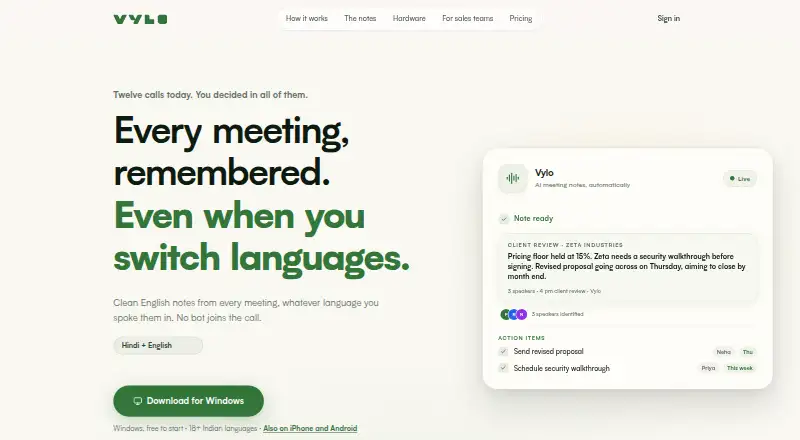
Vylo records meetings and turns them into searchable transcripts, summaries, and action items. It supports more than 18 Indian languages and says it can handle code-switching while generating English notes. Its desktop app records calls on Zoom, Teams, and Meet without a bot joining. On Mac, Vylo can connect to Google Calendar to list upcoming meetings and provide reminders. Users can choose from six summary formats, including an action plan, highlights, executive brief, and decision log. Vylo is available on Android, iOS, macOS, Windows, and the web, and also supports audio-file imports. The free plan costs nothing, billed forever, and includes unlimited meeting recording, AI summaries and action items, searchable transcripts, and 30 days of access to each meeting’s full transcript and summary. Recordings are not deleted when that access window ends. Vylo says recordings and transcripts are encrypted, staff cannot access them, and they are not used to train AI models.
Good
- Supports more than 18 Indian languages and code-switching.
- Records Zoom, Teams, and Meet calls without a bot.
- Six summary formats include action plans and decision logs.
- Free plan includes unlimited meeting recording.
- Encrypted recordings and transcripts are not used to train AI.
Watch out
- Free transcript and summary access lasts 30 days.
- ChatGPT connection is coming soon and was in review.
- Claude or ChatGPT content follows that provider’s privacy terms.
- Vylo Card is not currently available for purchase.
Who it suits
Vylo suits people who want searchable meeting records and summaries, especially those working across Indian languages or using Zoom, Teams, or Meet. Its free plan includes unlimited meeting recording and 30 days of transcript and summary access.
Verdict
Vylo combines meeting capture, searchable transcripts, summaries, and action items, with language support and several ways to capture or import audio. Note the 30-day free access window and the privacy terms that apply when sharing content with a connected AI provider.
Plans and prices
From Vylo's own pricing page, checked 15 Oct 2026.
| Plan | Price | What it gives you |
|---|---|---|
| Free | Free | Unlimited recording · AI summaries and action items · Searchable transcripts · Full transcript and summary for 30 days · Meetings never deleted · ₹0 forever |
| Vylo Card hardware + 12 months Vylo Pro | ₹7,999, paid once | 64 GB encrypted storage · All-day battery · 18+ Indian languages · 12 months Pro · ₹7,999, GST included; free shipping across India |
| Vylo Card | — | Optional recorder · no subscription required · not available for purchase currently · One-time purchase; current price unavailable |
| Vylo Pro | — | Full conversation history · Ask across all meetings · Folders beyond 30-day window · Monthly subscription; price loads inside the app |
| Vylo Pro | — | Full conversation history · Ask across all meetings · Folders beyond 30-day window · Yearly subscription; cheaper per month; price loads inside the app |
The facts
Each one read from Vylo's own pages, with the date it was checked.
Where it runs
- Apple App Store listing
- The iPhone app is listed as free with in-app purchases, 97.1 MB in size, and developed by WHEELSEYE TECHNOLOGY INDIA PRIVATE LIMITED.checked 15 Oct 2026
What it does
- Business beta
- Vylo's frontline sales product is in private beta with a 90-day structured pilot, aimed at field sales teams of 200 or more.checked 9 Oct 2026
- Calendar
- Vylo for Mac connects to Google Calendar to list upcoming meetings and provide reminders.checked 9 Oct 2026
- Calendar integration
- The desktop app connects Google Calendar to list upcoming meetings and provide recording reminders.checked 15 Oct 2026
- Card hardware
- The optional Vylo Card has 64 GB encrypted storage, dual beam-forming microphones, and an all-day battery, according to its product page.checked 9 Oct 2026
- ChatGPT integration
- Vylo says its ChatGPT connector is not live and is awaiting OpenAI review.checked 15 Oct 2026
- Claude integration
- Anthropic lists Vylo as an Anthropic-verified Claude connector added in September 2026.checked 15 Oct 2026
- Connector permissions
- The Claude connection is read-only and can access only the user's own meetings; it cannot change, delete, or add data.checked 9 Oct 2026
- Consent limitation
- Terms require users to follow applicable recording-consent laws and prohibit recording where all-party consent is required without obtaining it.checked 15 Oct 2026
- Funding
- YourStory reports total funding of $1.0 million from Prime Venture Partners.checked 15 Oct 2026
- Google Play features
- Google Play describes offline capture, Bluetooth pairing, automatic speaker identification, transcript search and 18+ Indian languages.checked 15 Oct 2026
- Google Play listing
- The Google Play listing shows 100+ downloads and does not display a user-rating score or review count on the opened page.checked 15 Oct 2026
- Hardware
- Vylo Card has dual MEMS beam-forming microphones, 400 mAh battery, 64 GB encrypted storage and a stated range of up to two metres.checked 15 Oct 2026
- Hardware warranty
- The Card page states free India-wide shipping, 30-day returns and a one-year warranty.checked 15 Oct 2026
- Integrations
- Vylo connects to Claude over MCP; the site says ChatGPT is coming soon and was in review.checked 9 Oct 2026
- Languages
- It supports more than 18 Indian languages and says it can handle code-switching while producing English notes.checked 9 Oct 2026
- Language support
- The product supports transcription and AI notes in more than 18 Indian languages, including code-switching.checked 15 Oct 2026
- Licence and hosting
- The opened terms state that Vylo owns its software and hardware design and protect them under applicable intellectual-property laws; no open-source licence or self-hosting option is documented.checked 15 Oct 2026
The company
- Company founded
- YourStory lists the company's founding date as 2017.checked 15 Oct 2026
- Company headquarters
- YourStory lists WheelsEye Technology India Private Limited headquarters in Gurugram, Haryana, India.checked 15 Oct 2026
- Company legal name
- Vylo's privacy policy identifies Wheelseye Technology India Private Limited as the registered Indian product company.checked 15 Oct 2026
- Company size
- YourStory lists 251 to 500 employees for WheelsEye Technology.checked 15 Oct 2026
- Headquarters
- Gurugram, Haryana, Indiachecked 28 Sep 2026
Money
- Free retention
- Free users can access each meeting's full transcript and summary for 30 days; recordings are not deleted when that window ends.checked 9 Oct 2026
The full review of Vylo
Vylo is meeting-recording software that turns conversations into searchable transcripts, summaries, and action items. It is best suited to people working across Indian languages or capturing meetings on several kinds of devices. Its broad capture options are appealing, but the free plan’s 30-day access limit matters if you need a lasting written archive.
Overview
Vylo combines recording with tools to revisit and act on conversations: transcripts are searchable, speakers are identified, and summaries can surface next steps. Support for more than 18 Indian languages, including code-switching with English notes, gives it a particular advantage for multilingual meetings. The key qualification is that free users lose access to each meeting’s full transcript and summary after 30 days, even though the recordings themselves are not deleted.
Key features
Capture and meeting records
The desktop app records Zoom, Teams, and Meet calls without a bot joining. That is a practical advantage when adding a notetaker to the participant list is undesirable. Capture is not limited to those calls: Vylo also offers macOS, Android, and iPhone apps, audio-file import, and an optional recorder called Vylo Card.
After capture, Vylo produces searchable transcripts, summaries, and action items. Its six summary formats include an action plan, highlights, executive brief, and decision log. That range supports different follow-up needs, from assigning next steps to reviewing decisions, rather than forcing every meeting into one summary style. On Mac, a Google Calendar connection lists upcoming meetings and provides reminders.
Language, AI, and privacy
Vylo’s language support is a strong reason to consider it for conversations that move between Indian languages and English: it can handle code-switching while producing English notes. That is more targeted than a generic promise of multilingual transcription, though the product’s stated support is specifically for more than 18 Indian languages.
Vylo connects to Claude over MCP. The connection is read-only, limited to the user’s own meetings, and cannot add, change, or delete data. ChatGPT support is described as coming soon and in review. Vylo says recordings and transcripts are encrypted, staff cannot access them, and they are not used to train AI models. A separate privacy boundary applies when meeting content is sent to a connected Claude or ChatGPT account: that use is governed by the provider’s own privacy terms and settings.
Optional recorder
The Vylo Card is an optional hardware recorder with 64 GB of encrypted storage, dual beam-forming microphones, and an all-day battery, according to its product page. It could suit users who want a dedicated way to capture in-person conversations, but it is not currently available to purchase and does not replace a subscription plan.
Pricing
Free
Free costs nothing, billed forever. It includes unlimited meeting recording, AI summaries and action items, searchable transcripts, and full access to each meeting’s transcript and summary for 30 days. This is a substantial starting point for regular capture, especially if you do not need to consult older written records. The trade-off is clear for anyone building a long-term archive: after 30 days, the recording remains, but the full transcript and summary are no longer accessible on the free plan.
Vylo Pro
Vylo Pro has custom pricing and is billed monthly or yearly. It adds full meeting history, the ability to ask questions across that history, and folders for meetings beyond the 30-day window. Those additions make it the more suitable plan for people who depend on past conversations as a searchable reference. Pro is purchased in-app; web purchase is unavailable. The price is not published, so compare the in-app offer with your expected use before committing.
Vylo Card
Vylo Card is a one-time purchase with custom pricing and no subscription requirement. It is an optional recorder rather than a complete replacement for Vylo’s software plans, and it is not currently available to purchase.
Platforms
Vylo is available on Android, iOS, macOS, web, and Windows. Its capture methods include the macOS app, Android app, iPhone app, audio-file import, Zoom calls, and the optional Vylo Card. The desktop app can record calls on Zoom, Teams, and Meet without a bot joining. Calendar reminders through Google Calendar are a Mac feature.
Who it's for
Vylo makes the most sense for people who need searchable meeting records, action-oriented summaries, and support for Indian-language conversations. It also suits users who want several ways to capture audio, including bot-free recording of supported desktop calls and file import. The free plan can work well for people who act on notes promptly; anyone who regularly searches old decisions should weigh Pro’s history features against its custom pricing.
It is a less straightforward fit for users seeking a permanent archive at no cost, or for those unwilling to have meeting content governed by a connected AI provider’s privacy terms when using that integration. Questions and privacy requests can be sent to [email protected].
Pros and cons
- Pros: Unlimited meeting recording on the free plan makes frequent capture possible without a stated recording quota.
- Pros: Support for more than 18 Indian languages and code-switching with English notes serves multilingual conversations directly.
- Pros: Bot-free desktop recording for Zoom, Teams, and Meet avoids adding a notetaker participant to those calls.
- Pros: Six summary formats, searchable transcripts, and action items cover both review and follow-up.
- Cons: Free access to a meeting’s transcript and summary ends after 30 days, limiting its usefulness as a long-term written archive.
- Cons: Pro pricing is custom, and purchase is available in-app rather than on the web.
- Cons: The optional Card is not currently available to buy.
- Cons: Content sent to Claude or ChatGPT is subject to that provider’s privacy terms and settings, separate from Vylo’s stated protections.
Alternatives
Bluedot is worth considering if you want a free plan with a five-meeting lifetime cap and access through a Chrome extension as well as desktop and mobile apps; its free offer also lists Slack, Notion, and Zapier integrations.
Circleback may fit better if online and in-person meeting notes, action items, and limited automations are the priority in a free plan.
Notta is a better fit for someone who prefers a defined monthly transcription allowance: its free plan includes one seat and 120 transcription minutes per month.
Laxis offers a free Basic plan with 300 transcription minutes per month, 30 days of conversation history, and a 45-minute maximum per recording, making it an option for users comfortable with explicit recording limits.
Read AI is an alternative for users whose needs fit five free meetings per month and support for more than 20 languages, or who want a stated Pro price of $15 a month.
Grain may suit users who want a bot-based notetaker and whose use fits its free plan’s 45-minute meetings and 20 bot-recorded meetings for personal email users.
Noota is another option if a free allowance of 300 minutes per month, one month of storage, and up to three workspace seats matches your needs.
Wudpecker is worth comparing if its free allowance of 10 bot-recorded meetings per month and three Ask AI questions per recording is a better fit.
For broader comparisons, see our Meeting Transcription Software and Meeting Recording Software lists.
Verdict
Choose Vylo if multilingual meeting capture, bot-free desktop recording, and searchable follow-up notes matter more than keeping every transcript accessible for free indefinitely. Its recording allowance and language support make it a compelling fit for frequent capture, while the 30-day free access window is the main reason to look elsewhere or consider Pro. The right choice depends on whether you need a searchable history beyond that window—and whether Pro’s custom-priced, in-app purchase suits your budget.
Alternatives to Vylo
- 1

Avoma
Free planAndroidiOSWebAPI8.4From $19 a month - 2
tl;dv
Free planAndroidiOSWebAPI8.4From $18 a month - 3

Fathom
Free planiOSWebAPIExtension8.3From $15 a month - 4

Read AI
Free planAndroidiOSWebAPI8.3From $15 a month - 5

Bluedot
Free planAndroidiOSWebAPI8.2Free plan - 6

Notta
Free planAndroidiOSWebExtension8.2From $8.17 a month