UsageOS
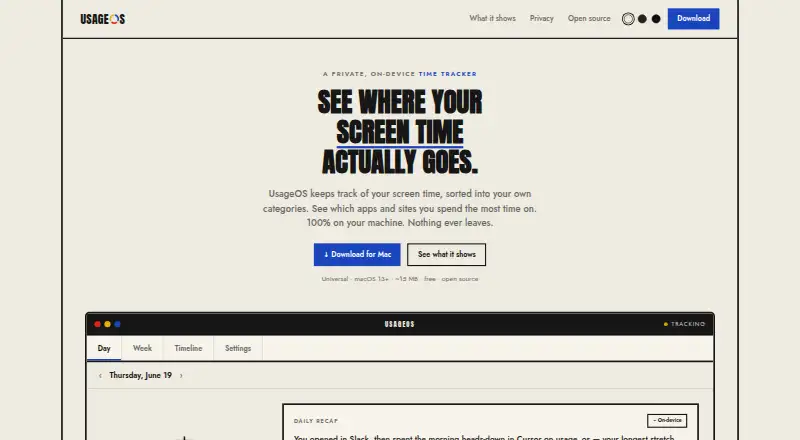
UsageOS is a free, open-source macOS app that records time spent in applications and websites, then organizes that activity into categories you define.
What UsageOS is
UsageOS is a free, open-source macOS app that records time spent in applications and websites, then organizes that activity into categories you define. Rules can use an app, website, or a word in a window title, and changing a rule also reorganizes existing history. A weekly view places seven days on one 24-hour scale. The daily timeline lists activity and shows app switches within a run. Activity remains in one local SQLite file that you can export to CSV, automatically delete after 30, 90, or 365 days, or erase. The maker says data has no network path or telemetry, and the app cannot see the screen. It reads the current browser tab to identify the site, while private windows omit titles and URLs. Apps can be excluded, or titles marked private while time still counts. macOS 13+ installation is available by DMG or Homebrew.
Good
- Free plan at no cost
- Rules classify apps, sites, or title words
- Weekly and daily activity views
- Local SQLite storage with CSV export
- Open source under the MIT license
Watch out
- macOS only
- No free trial
- Browser tab access identifies websites
- Accessibility and Automation permissions may be needed
Who it suits
It suits macOS users who want categorized application and website time records stored locally. It is also suitable for users who need CSV export and configurable deletion.
Verdict
UsageOS focuses on categorized time tracking with local storage and detailed retention controls. Its macOS-only availability and optional permissions are the main boundaries.
Plans and prices
From UsageOS's own pricing page, checked 11 Oct 2026.
| Plan | Price | What it gives you |
|---|---|---|
| UsageOS | Free | macOS 13+ · Universal · ~15 MB |
The facts
Each one read from UsageOS's own pages, with the date it was checked.
Where it runs
- Browser detail
- The app reads the current browser tab to identify the website being used.checked 11 Oct 2026
- Private windows
- Incognito and private browser windows do not have their titles or URLs stored.checked 11 Oct 2026
What it does
- Data storage
- Activity data is stored in one local SQLite file that users can export to CSV, auto-delete after 30, 90, or 365 days, or wipe.checked 11 Oct 2026
- Exclusions
- Users can exclude apps entirely or mark titles private while still counting the time.checked 11 Oct 2026
- Installation
- The maker offers a Universal macOS DMG and Homebrew installation.checked 11 Oct 2026
- License
- UsageOS is open source under the MIT license.checked 11 Oct 2026
- Permissions
- Accessibility and Automation permissions are optional; the README says UsageOS never requests Screen Recording.checked 11 Oct 2026
- Privacy
- The maker says there is no network in the data path and no telemetry, and that the app cannot see the screen.checked 11 Oct 2026
- Product
- UsageOS tracks screen time by app and site, then sorts it into user-defined categories.checked 11 Oct 2026
- Rules
- Users can classify activity by app, website, or a word in the window title, and changes re-sort recorded history.checked 11 Oct 2026
- Timeline
- The daily timeline lists activity and lets users inspect app switches within a run.checked 11 Oct 2026
- Updates
- Automatic update checks are opt-in and off by default, and the README says each update is signed.checked 11 Oct 2026
- Weekly view
- The week view shows seven days on the same 24-hour scale.checked 11 Oct 2026
Alternatives to UsageOS
- 1

Freedom
Free planAndroidiOSWebExtension8.2From $40 a year - 2

Opal
Free planAndroidiOSExtensionmacOS8.0From $8.29 a month - 3

ScreenZen
Free planAndroidiOSmacOSWindows7.3$49 one-time - 4
one sec
AndroidiOSExtensionLinux7.2From $19.99 a year - 5

FocusMe
AndroidiOSExtensionLinux7.1$249 one-time - 6
YourHour
Free planAndroidiOS7.1From $12.99 a year