Timemoz
Timemoz brings time and productivity tracking for desk teams together with attendance, GPS, and store-visit tools for field teams.
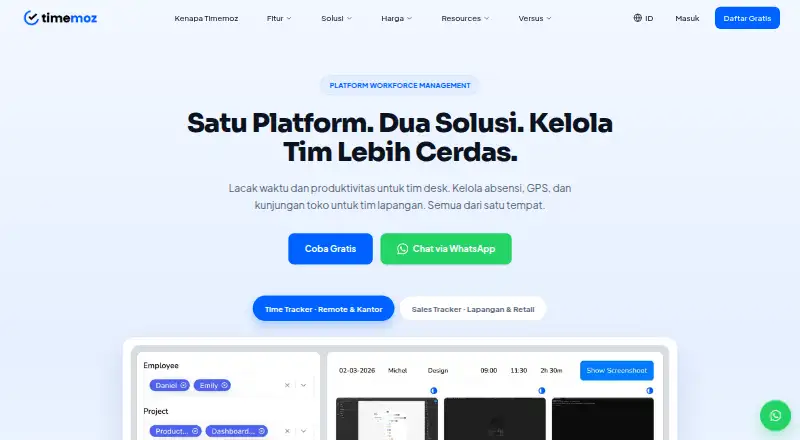
What Timemoz is
Timemoz brings time and productivity tracking for desk teams together with attendance, GPS, and store-visit tools for field teams. The time tracker handles timer and manual entries, timesheets, approvals, billing rates, idle detection, and reports. Monitoring features include activity levels, periodic screenshots, app and URL tracking, and cheat detection. Time data can support project budgets, billing, client reporting, and payroll. Sales Tracker offers GPS clock-in, geofences, visit plans, and reports for field and retail teams. The time-tracking app is available on Windows, Mac, Linux, and the web; the listed platforms also include Android and iOS. Integrations include tools such as Jira, Trello, Asana, Slack, Microsoft Teams, and Google Workspace. The Time Tracker free plan is free and limits screenshot retention to seven days, exports to three monthly, and history to three months. Time Tracker Pro is listed at $4.99 a year, billed as $9.98 total for two seats. Sales Tracker Field Pro is $8.99 a year, billed as $17.98 total for two seats.
Good
- Supports timer and manual time entries.
- Includes timesheets, approvals, and billing rates.
- Sales Tracker offers GPS clock-in and geofences.
- Lists integrations with project and communication tools.
Watch out
- Free time-tracker history is limited to three months.
- Free plan allows three report exports per month.
- Free screenshot retention is seven days.
- Paid plans have a two-seat minimum.
Who it suits
Timemoz may suit agencies, BPOs, small and remote teams, and businesses that bill by time. Its field tools are aimed at sales and retail teams managing visits and GPS check-ins.
Verdict
Timemoz combines desk-based time tracking and monitoring with field visit management. The free plans have defined history and usage limits, while the listed paid plans have a two-seat minimum.
Plans and prices
From Timemoz's own pricing page, checked 30 Sep 2026.
| Plan | Price | What it gives you |
|---|---|---|
| Time Tracker Free | Free | Unlimited users and projects · Screenshots 640×360, retained 7 days · 3 report exports/month · 3 months data history · Forever free; 2 seat minimum |
| Free | Free | unlimited users and projects · screenshots 640×360 retained 7 days · 3 report exports/month · 3 months data history · forever; 2-seat minimum |
| Free Field | Free | 2 active geofences · 100 total automatic check-ins · 1 visit form · 7 days route history and GPS alerts · 10 stores · 3 months data history · forever; 2-seat minimum |
| Sales Tracker Free Field | Free | 2 active geofences · 100 total auto check-ins · 1 visit form · 7 days route history and GPS alerts · Maximum 10 stores · 3 months data history · Forever free; 2 seat minimum |
| Pro | $4.99 a month | full-HD screenshots · unlimited exports · forever data history · email and Slack webhook budget alerts · PDF and branded-link client reports · $9.98 total for 2 seats, billed annually; 33% saving |
| Time Tracker Pro | $4.99 a year | Unlimited users and projects · Full HD screenshots · Unlimited exports and data history · Priority support · $9.98 total · 2 seats · Billed annually · 2 seat minimum |
| Sales Tracker Field Pro | $8.99 a year | Unlimited geofences, auto check-ins, visit forms, stores, route history, and data history · $17.98 total · 2 seats · Billed annually · 2 seat minimum |
| Field Pro | 118,000 IDR a month | unlimited geofences · unlimited automatic check-ins · unlimited visit forms · unlimited stores · forever route and data history · multi-store analytics · IDR 236,000 total for 2 seats, billed annually; 40% saving |
The facts
Each one read from Timemoz's own pages, with the date it was checked.
Where it runs
- Android app
- Google Play lists Timemoz Sales Tracker by PT Karya Generasi Biru for attendance, location validation and sales-visit planning; the listing reports 1+ downloads and data encrypted in transit.checked 14 Oct 2026
What it does
- API and SDKs
- The maker’s public terms and integration pages describe connectors but do not state a public API, SDK or developer portal.checked 14 Oct 2026
- Cheat detection
- Its detection system flags mouse jigglers, auto-clickers, simulated keyboard input and activity patterns that conflict with screenshots.checked 14 Oct 2026
- Compliance
- Timemoz says its field-data security is built for Indonesian enterprises and compliant with UU PDP No. 27/2022.checked 30 Sep 2026
- Desktop requirements
- The desktop client is offered for Windows, Mac and Linux; the product can also be used through the web version.checked 14 Oct 2026
- Field operations
- Sales Tracker includes GPS clock-in and geofences, with visit plans and reports for field and retail teams.checked 30 Sep 2026
- GPS attendance
- Field check-ins use configurable geofences, fake-GPS detection, selfies and timestamped location evidence.checked 14 Oct 2026
- Independent product description
- GetApp characterizes Timemoz as a cloud-based workforce-management tool for remote, hybrid and distributed teams that bill by the hour.checked 14 Oct 2026
- Integration data handling
- Timemoz says connected-app personal data is not stored, integrations are read-only by default and access tokens are encrypted at rest.checked 14 Oct 2026
- Integration privacy
- The privacy policy says connected-app metadata is processed in transit and not retained, and that integrations use OAuth 2.0 where supported.checked 30 Sep 2026
- Integrations
- The maker lists Jira, Trello, Asana, ClickUp, Monday.com, GitHub, GitLab, Slack, Microsoft Teams, Google Workspace, Notion and Basecamp integrations.checked 14 Oct 2026
- Jira integration
- Jira authentication uses Atlassian OAuth 2.0; worklog write-back is optional and requires the write scope.checked 14 Oct 2026
- Limit: cut-off settings
- One G2 review specifically says attendance cut-off settings need improvement.checked 14 Oct 2026
- Monitoring
- Monitoring features include activity levels, periodic screenshots, app and URL tracking, idle detection, and cheat detection.checked 30 Sep 2026
- Notable news: developer update
- A February 26, 2026 developer update introduced Timemoz as a screenshot-monitoring tool and described downloading its client app after signup.checked 14 Oct 2026
Money
- Billing and budgets
- Timemoz supports multiple billing rates, project hour caps, budget monitoring and client billing reports.checked 14 Oct 2026
- Free-plan limits
- The Time Tracker free plan limits screenshot retention to 7 days, report exports to 3 per month, and data history to 3 months.checked 30 Sep 2026
The company
- Company founded
- Timemoz says it began in 2020 in Bali, Indonesia.checked 14 Oct 2026
- Company history
- Timemoz says it was founded in 2020 in Bali, Indonesia, and operates remotely worldwide without a physical headquarters.checked 30 Sep 2026
- Company scale
- Timemoz reports more than 2 million hours tracked and over 300 team members managed remotely on the platform.checked 14 Oct 2026
- Founded
- 2020checked 28 Sep 2026
- Headquarters
- Bali, Indonesiachecked 28 Sep 2026
- Headquarters and operating model
- The maker says the team works remotely without a physical headquarters, while its company contact address is in South Jakarta, Indonesia.checked 14 Oct 2026
- Licence and ownership
- The terms assign all software and trademark rights to PT Lightmedia Inovasi Teknologi and grant only a limited, revocable use licence.checked 14 Oct 2026
The full review of Timemoz
Timemoz is a workforce platform that brings time records, productivity monitoring and field visits into one product. It is best suited to teams that need both desk-based billing workflows and mobile attendance or store visits. Its broad feature set is appealing, but free users face short history and usage caps, and paid plans require at least two seats.
Overview
Timemoz combines time tracking and monitoring for desk teams with GPS attendance and visit management for field teams. That mix can suit a business coordinating office-based or remote work alongside sales or retail visits, though teams needing only one of those workflows may find the combined scope unnecessary. The product is available on Android, iOS, Linux, macOS, web and Windows.
Key features
Time tracking and billing
Workers can enter time with a timer or manually, then use timesheets, approvals, billing rates and basic reports to organize it. Time data can feed project budgets and client billing or payroll. This is a practical fit for agencies, BPOs, small and remote teams, and businesses billing by time; the reports are described as basic, so teams seeking more elaborate analysis should weigh that limitation.
Monitoring
Activity levels, periodic screenshots, app and URL tracking, idle detection and cheat detection give managers several ways to monitor work. That can help teams that need visibility into computer-based work, but screenshot monitoring is not a neutral choice for every workplace. On the free Time Tracker plan, screenshots are 640×360 and retained for seven days; exports are limited to three per month and history to three months.
Field operations
Sales Tracker supports GPS clock-ins, geofences, visit plans and reports for field and retail teams. Visit scheduling, territory management, offline mobile access and multi-day planning are also supported. The free field plan is a constrained way to try this workflow: it allows two active geofences, 100 total auto check-ins, one visit form, up to 10 stores, and only seven days of route history and GPS alerts.
Integrations and security
Integrations include Jira, Trello, Asana, ClickUp, Monday.com, GitHub, GitLab, Slack, Microsoft Teams, Google Workspace, Notion and Basecamp. Connected-app metadata is processed in transit and not retained; OAuth 2.0 is used where supported. Timemoz describes AES-256 encryption at rest, TLS 1.3 in transit, role-based access, audit logs and daily backups on local Indonesian servers. It says its field-data security is designed for Indonesian enterprises and complies with UU PDP No. 27/2022.
Pricing
Timemoz is freemium, with a free plan and a free trial. The free plans have no charge, but their two-seat minimum means they are not a one-seat option.
- Time Tracker Free: free, billed Forever free, with a two-seat minimum. It allows unlimited users and projects, but screenshots are 640×360 and kept for seven days, exports are capped at three per month, and data history is limited to three months. It suits a small team testing basic time workflows, not one needing long-term records or frequent exports.
- Sales Tracker Free Field: free, billed Forever free, with a two-seat minimum. It includes two active geofences, 100 total auto check-ins, one visit form, a maximum of 10 stores, and seven days of route history and GPS alerts; data history is three months. It is a limited trial ground for a small field operation, rather than a durable fit for expanding visit programs.
- Time Tracker Pro: $4.99 a year (billed $9.98 total), for two seats, billed annually, with a two-seat minimum. It adds Full HD screenshots, unlimited exports and data history, and priority support while retaining unlimited users and projects. The expanded history and exports matter to teams that rely on records for billing or payroll, but the per-year price and two-seat billing terms should be checked carefully against the team's budget.
- Sales Tracker Field Pro: $8.99 a year (billed $17.98 total), for two seats, billed annually, with a two-seat minimum. It removes the free plan's caps on geofences, auto check-ins, visit forms, stores, route history and data history. It fits field teams that have outgrown the small free quotas; the minimum purchase still excludes solo users.
The pricing note says paid plans start at $8.99/user/mo (annual), while the individual plan terms above state annual prices and two-seat totals. Review the applicable billing terms before choosing a plan.
Platforms
Timemoz supports Android, iOS, Linux, macOS, web and Windows. The time tracker is available on Windows, Mac and Linux as well as through the web version, giving desk teams desktop and browser access alongside the mobile platforms for field use.
Who it's for
Timemoz is strongest for organizations that need time records tied to budgets, billing or payroll and also manage field attendance or store visits. Agencies, BPOs, small and remote teams, and time-billing businesses are natural candidates for the Time Tracker. Field and retail teams can use Sales Tracker for scheduled visits and GPS check-ins. A solo worker, a team that rejects screenshot monitoring, or a business needing only a narrow route-planning or transit tool should consider a more focused product.
Pros and cons
- Pro: Desk time records can flow into project budgets, client billing and payroll, reducing the gap between tracking work and accounting for it.
- Pro: Field workflows include GPS clock-ins, geofences, visit planning and offline mobile access, useful for teams coordinating visits away from a desk.
- Pro: Broad desktop, web and mobile platform coverage can accommodate mixed-device teams.
- Con: Free history, exports, screenshots and field quotas are tight, so teams may outgrow the no-cost plans quickly.
- Con: Every stated plan has a two-seat minimum, which rules out a straightforward single-user purchase.
- Con: Screenshots, app and URL tracking, and activity monitoring may be inappropriate for teams that prioritize employee privacy over oversight.
Alternatives
For a broader comparison of route-focused tools, see Route Planning Software.
- Badger Maps is a stronger candidate when route optimization and stop capacity are the priority: its free Personal plan includes the full Business feature set and optimization for up to 120 stops, with native iOS and Android apps.
- Moovit is the more fitting choice for free transit planning, real-time information and directions rather than workforce time tracking or store-visit management.
- SalesRabbit Appointment Management may suit a single user seeking limited core appointment features at no cost; its Lite plan does not provide full team management.
- Route4Me is worth considering for straightforward route work: its free plan supports 10 stops with routes saved for seven days, while its $9.99 per month plan offers unlimited stops.
- Mapline is an alternative for teams looking for a mapping-focused product.
- Asseco Dynamic Route Optimization is an option for organizations considering a paid route-optimization product with deployment scope based on team size and whether it is standalone or part of a full platform.
- Citymapper is a freemium option for users comparing mobile-oriented city navigation.
- Geopointe is a paid alternative for buyers who want pricing based on a requested team size and product selection.
Verdict
Choose Timemoz if your organization needs one system for desk-based time and billing workflows plus GPS-backed field visits, and can work within its two-seat minimum. Its main advantage is the breadth across those two kinds of work; its main drawbacks are restrictive free-plan quotas and monitoring features that may not suit every workplace. Look elsewhere if you need a single-user plan, prefer a focused route tool, or do not want screenshot and activity monitoring.
Getting started
- Visit https://timemoz.com/en.
- Choose the Time Tracker or Sales Tracker Field free plan, or review the listed paid plans.
- Create an account and select the plan for your team.
- Use the web version or install the time-tracking app on Windows, Mac or Linux; mobile platforms are also listed.
- Connect any needed listed integrations.
Limits worth knowing
Time Tracker Free has 7-day screenshot retention, 3 report exports per month and 3 months of data history. Sales Tracker Free Field allows 2 active geofences, 100 total auto check-ins, 1 visit form, 7 days of route history and GPS alerts, a maximum of 10 stores, and 3 months of data history. The listed paid-from price is $8.99/user/mo (annual); separate plan details list Time Tracker Pro at $4.99 a year, billed $9.98 total for 2 seats, and Sales Tracker Field Pro at $8.99 a year, billed $17.98 total for 2 seats.
Questions
Is there a free plan?
Yes. Time Tracker Free and Sales Tracker Free Field are each listed as free, billed forever free, with a 2-seat minimum.
What does the free Time Tracker plan limit?
It retains screenshots for 7 days, permits 3 report exports per month and keeps 3 months of data history.
Which platforms are listed?
Timemoz lists Android, iOS, Linux, macOS, web and Windows. The time-tracking app is specifically described as available for Windows, Mac, Linux and the web.
What does the free field plan include and limit?
Sales Tracker Free Field includes 2 active geofences, 100 total auto check-ins and 1 visit form. It limits route history and GPS alerts to 7 days, stores to 10 and data history to 3 months.
What integrations are listed?
The privacy policy lists Jira, Trello, Asana, ClickUp, Monday.com, GitHub, GitLab, Slack, Microsoft Teams, Google Workspace, Notion and Basecamp.
What are the listed paid prices?
Separate plan details list Time Tracker Pro at $4.99 a year, billed $9.98 total for 2 seats, and Sales Tracker Field Pro at $8.99 a year, billed $17.98 total for 2 seats.
Alternatives to Timemoz
- 1

Route4Me
Free planAndroidiOSWebAPI8.2From $79.99 a year - 2
SalesRabbit Appointment Management
Free planAndroidiOSWebAPI8.2From $59 a month - 3

Badger Maps
Free planAndroidiOSWebAPI8.1From $12 a month - 4
SalesRoute.ai
Free planAndroidiOSWebLinux8.1From $10 a year - 5

portatour
AndroidiOSWebAPI7.8From €89.95 a month - 6
MyRouteOnline
AndroidiOSWebAPI7.7From $19 a month