Snowflake CoCo
Snowflake CoCo is an AI coding agent for data engineering, analytics, machine learning and agent-building work in Snowflake.
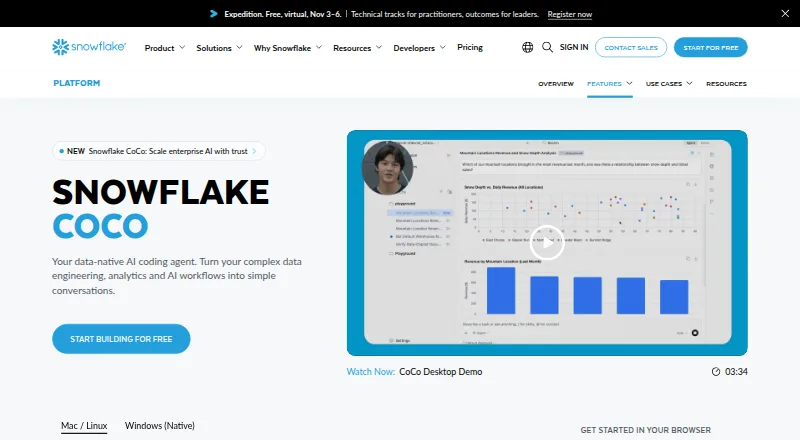
What Snowflake CoCo is
Snowflake CoCo is an AI coding agent for data engineering, analytics, machine learning and agent-building work in Snowflake. It is available in Snowsight, as a desktop IDE and through a command-line interface. In Snowsight, it can draft SQL and Python notebook code from natural-language requests, explain or optimize queries, and answer account administration questions. Desktop mode offers agent and editor workflows, access to local repositories, plugins, skills, hooks and MCP connections, and interaction with web pages and Snowflake notebooks. The CLI can connect to Snowflake, run SQL, access local files, and perform bash and git operations. It also supports code completion, chat assistance, codebase indexing and terminal access, with an Agent Client Protocol preview for Zed, JetBrains, VS Code and Neovim. CoCo requires cross-region inference to be enabled. Usage is billed by token consumption for existing Snowflake customers, and separate compute or storage charges may apply. The advertised introductory trial includes $40 USD in inference credits for the first 30 days, followed by a $20 USD monthly subscription fee and separate platform consumption charges.
Good
- Drafts SQL and Python notebook code from natural language.
- CLI can run SQL, bash and git operations.
- Desktop supports local repositories and MCP connections.
- Includes code completion, chat and codebase indexing.
Watch out
- Requires cross-region inference to be enabled.
- Usage is billed by token consumption for existing customers.
- Separate Snowflake compute or storage charges may apply.
- Desktop and CLI exclude government, VPS and sovereign accounts.
Who it suits
CoCo suits Snowflake customers doing data engineering, analytics, machine learning or agent-building work who want coding assistance through Snowsight, a desktop IDE or the CLI. Account availability varies by interface, and cross-region inference must be enabled.
Verdict
CoCo offers coding-agent workflows across Snowflake's web interface, desktop IDE and CLI. Before choosing it, account for token-based usage, potential platform charges and interface-specific availability limits.
Plans and prices
From Snowflake CoCo's own pricing page, checked 29 Sep 2026.
| Plan | Price | What it gives you |
|---|---|---|
| CoCo CLI/Desktop subscription | — | Fixed monthly usage; unavailable until the next billing period if included usage is exceeded · Monthly subscription after a 30-day free trial; the amount is not stated on the pages opened. |
| CoCo pay-as-you-go | Priced on request | Snowflake compute and storage are billed separately at standard rates · Token consumption for companies with an existing Snowflake account; price depends on consumption. |
The facts
Each one read from Snowflake CoCo's own pages, with the date it was checked.
What it does
- Availability
- The documentation marks Snowsight, Desktop, and CLI as generally available and states that access requires cross-region inference to be enabled.checked 29 Sep 2026
- Chat assistance
- Yeschecked 22 Sep 2026
- CLI capabilities
- The CLI can connect to Snowflake, execute SQL, access local files, run bash and git operations, and use project-specific agent instructions and skills.checked 29 Sep 2026
- Codebase indexing
- Yeschecked 22 Sep 2026
- Code completion
- Yeschecked 22 Sep 2026
- Coding agent
- Yeschecked 22 Sep 2026
- Desktop features
- CoCo Desktop supports agent and editor modes, local repository access, plugins, skills, hooks, MCP connections, and interaction with web pages and Snowflake notebooks.checked 29 Sep 2026
- IDE support
- CoCo’s Agent Client Protocol preview supports embedding it as a local agent backend in editors including Zed, JetBrains, VS Code, and Neovim.checked 29 Sep 2026
- Integrations
- CoCo supports MCP connections to tools and data sources such as GitHub, Jira, internal APIs, and databases; the product page also names dbt, Apache Airflow, Postgres, Spark, and AWS Glue workflows.checked 29 Sep 2026
- Interfaces
- CoCo is available in Snowsight, as a desktop IDE, and through a command-line interface.checked 29 Sep 2026
- Model choices
- The product page lists Claude Opus 4.8, Claude Opus 4.7, Claude Opus 4.6, Claude Opus 4.5, Claude Sonnet 5, Claude Sonnet 4.6, Claude Sonnet 4.5, OpenAI GPT 5.4, and OpenAI GPT 5.2.checked 29 Sep 2026
- Notable limits
- CoCo Desktop and CLI availability excludes government accounts, VPS, and sovereign accounts, while Snowsight lists commercial, FedRAMP Moderate and High, DoD, and KSA sovereign accounts.checked 29 Sep 2026
- Pricing basis
- CoCo usage is billed by token consumption for existing Snowflake customers, and separate Snowflake compute or storage charges may apply.checked 29 Sep 2026
- Purpose
- CoCo is an AI coding agent for data engineering, analytics, machine learning, and agent-building work in Snowflake.checked 29 Sep 2026
- Security
- The CLI supports Snowflake role-based access control, OS-level sandboxing, a three-tier approval system, and automatic risk assessment.checked 29 Sep 2026
- Snowsight features
- In Snowsight, CoCo can generate SQL and Python notebook code from natural language, explain and optimize queries, and answer account administration questions.checked 29 Sep 2026
- Supported IDEs
- Zed,JetBrains,VS Code,Neovimchecked 22 Sep 2026
- Terminal access
- Yeschecked 22 Sep 2026
The company
- Founded
- 2012checked 28 Sep 2026
- Headquarters
- Menlo Park, California, United Stateschecked 28 Sep 2026
- Maker
- The maker is Snowflake Inc.; its opened About page describes it as a data platform company but does not state a founding date or headquarters address.checked 29 Sep 2026
Money
- Free plan
- Nochecked 22 Sep 2026
- Trial offer
- The product page advertises an introductory Snowflake trial with $40 USD in inference credits for the first 30 days, followed by a $20 USD monthly subscription fee; separate Snowflake platform consumption charges apply.checked 29 Sep 2026
The full review of Snowflake CoCo
Snowflake CoCo is an AI coding agent for Snowflake-focused data engineering, analytics, machine learning, and agent-building work. It is best suited to Snowflake customers who want help in notebooks, local projects, and the command line. Its broad reach across those workflows is appealing, but token-based billing and account restrictions make it a less natural choice for teams outside Snowflake’s environment.
Overview
CoCo goes beyond code completion and chat: it can act on code and project tasks across Snowsight, a desktop IDE, and a CLI. In Snowsight, it generates SQL and Python notebook code from natural-language requests, explains and optimizes queries, and answers account-administration questions. That makes it useful for developers and analysts who move between writing queries and managing Snowflake accounts; it is less compelling for someone seeking only a general coding assistant.
Its reach into local files, SQL execution, terminal operations, and connected tools can help keep data work moving across a repository and a Snowflake account. The trade-off is that the product’s strongest case depends on being invested in Snowflake rather than needing an environment-neutral coding agent.
Key features
Separate interfaces for different work
CoCo Desktop provides agent and editor modes, local repository access, plugins, skills, hooks, MCP connections, and interaction with web pages and Snowflake notebooks. This is the most flexible option for people working across code and data tasks, though its many project-level capabilities matter less if the need is limited to occasional query help.
The CLI connects to Snowflake, executes SQL, accesses local files, and runs bash and git operations. Project-specific instructions and skills can tailor its behavior to a repository. Snowflake role-based access control, OS-level sandboxing, a three-tier approval system, and automatic risk assessment add controls around command-line work, a meaningful consideration when an agent can act on both local files and account data.
Connections and editor support
CoCo supports MCP connections to tools and data sources such as GitHub, Jira, internal APIs, and databases. Snowflake also names workflows involving dbt, Apache Airflow, Postgres, Spark, and AWS Glue, giving data teams a wider context for its intended use.
Its Agent Client Protocol preview can embed CoCo as a local agent backend in Zed, JetBrains, VS Code, and Neovim. The preview status is worth weighing for teams that want this editor integration as a dependable part of their workflow. The model choices include Claude Opus 4.8, 4.7, 4.6 and 4.5; Claude Sonnet 5, 4.6 and 4.5; and OpenAI GPT 5.4 and 5.2.
Pricing
CoCo is paid, with two billing approaches for existing Snowflake customers. Neither gives a published price for ongoing CoCo usage, so teams should account for token consumption or subscription terms as well as any separate Snowflake compute and storage charges.
- CoCo CLI/Desktop subscription: Custom pricing, billed as a monthly subscription after a 30-day free trial. The plan has fixed monthly usage; if included usage is exceeded, it becomes unavailable until the next billing period. This structure suits teams that prefer a recurring plan, but the usage interruption and unstated monthly amount make it important to understand expected consumption before relying on it.
- CoCo pay-as-you-go: Custom pricing based on token consumption for companies with an existing Snowflake account. Snowflake compute and storage are billed separately at standard rates. It may suit variable usage better than a fixed allowance, but total cost can move with consumption and is not limited to CoCo tokens alone.
The introductory Snowflake trial includes $40 USD in inference credits for the first 30 days, followed by a $20 USD monthly subscription fee. Separate Snowflake platform consumption charges apply. There is no free plan, so the trial is the route to trying CoCo before committing to an ongoing paid arrangement.
Platforms
CoCo is available through the web-based Snowsight interface, desktop IDE, CLI, and API, with Linux, macOS, and Windows listed among its platforms. Snowsight, Desktop, and CLI are generally available, but access requires cross-region inference to be enabled.
Availability varies by account type. Snowsight supports commercial, FedRAMP Moderate and High, DoD, and KSA sovereign accounts. Desktop and CLI exclude government accounts, VPS, and sovereign accounts, so customers in those categories should not assume they can use the full interface set.
Who it's for
CoCo is a strong fit for Snowflake customers whose work crosses SQL, Python notebooks, local repositories, and terminal tasks, especially when they want a coding agent connected to tools such as GitHub or Jira. Data teams already using Snowflake workflows involving dbt, Airflow, Postgres, Spark, or AWS Glue may also find its broad interface mix relevant.
It is a weaker fit for people who need a free coding assistant, a predictable all-in cost, or Desktop and CLI access on excluded account types. Teams that do not want a dependency on Snowflake’s account and billing environment should look elsewhere.
Pros and cons
- Pro: Snowsight combines SQL and Python notebook generation with query explanations, optimization, and account-administration answers, covering both coding and database work.
- Pro: Desktop and CLI can reach local repositories, files, terminals, and connected tools, extending CoCo beyond an in-browser query helper.
- Pro: CLI controls include role-based access, sandboxing, approval tiers, and automatic risk assessment, useful for teams cautious about agent actions.
- Con: Token-based billing and separate platform charges can make total spend harder to predict.
- Con: The CLI/Desktop subscription has fixed monthly usage and can be unavailable after that usage is exceeded until the next billing period.
- Con: Desktop and CLI are not available for government, VPS, or sovereign accounts, limiting interface choice for some organizations.
Alternatives
For data clean-room needs rather than Snowflake-centered coding-agent work, consider Placino: its free plan includes 500K datapoints per month, one clean room, and up to three partners, while its Pilot plan is a PoC engagement with 5M datapoints per month and one clean room.
Amazon Marketing Cloud is a free option for eligible advertisers, with web and API access. AppsFlyer Data Clean Room is a freemium alternative with Android, iOS, web, and API platforms; its Data Clean Room plan is a premium feature with pricing not listed publicly.
BigQuery Data Clean Rooms is free and separates data-contributor and clean-room-subscriber roles, with prices not listed for either role. Decentriq Data Clean Rooms is a paid alternative with pricing not listed and a demo request option.
Permutive, InfoSum Data Clean Room, and Vendia Distributed Data Clean Rooms are other paid alternatives; Vendia offers custom pricing.
Readers comparing adjacent categories can also browse Data Clean Room Software, Data Warehouse Software, AI Database Assistants, Data Marketplace Software, SQL Query Tools, and Model Registry Software.
Verdict
Choose Snowflake CoCo if your team already works in Snowflake and wants one agent to support notebook, repository, and terminal tasks with connected data tools. Its strongest advantage is that range; its main drawback is usage-linked cost, compounded by separate platform charges and interface eligibility limits. If predictable pricing, a free plan, or broader access across account types matters more, look elsewhere.
Alternatives to Snowflake CoCo
- 1

Weights & Biases
Free planAndroidiOSWebAPI9.1From $60 a month - 2
Databricks Notebooks
Free planAndroidWebAPILinux9.0$0.07 usage-based - 3

Comet
Free planWebAPILinuxmacOS8.7From $19 a month - 4

DagsHub
Free planWebAPILinuxmacOS8.6From $99 a month - 5
TrueFoundry AI Gateway
Free planWebAPILinuxSelf-hosted8.2From $499 a month - 6

ClearML
Free planWebAPILinuxmacOS8.1From $15 a month