
Signally
Signally manages company email signatures and banner campaigns for organizations.
What Signally is
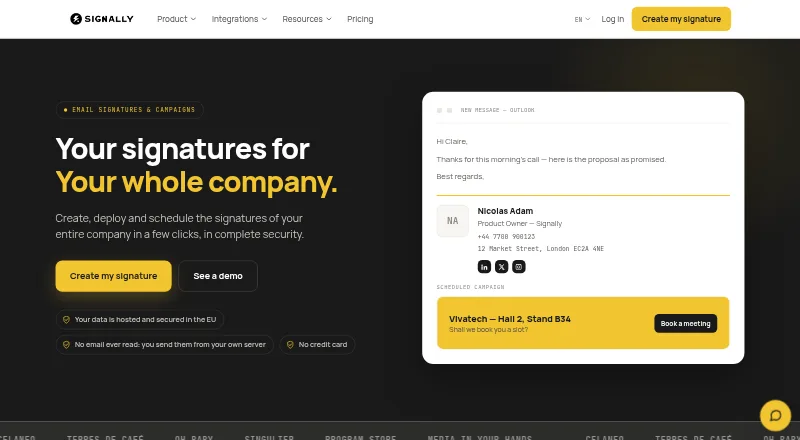
Signally manages company email signatures and banner campaigns for organizations. Its drag-and-drop visual editor lets users build signatures without writing HTML, while fields can draw information from Microsoft Entra ID or Google Directory. Administrators can assign templates to subsidiaries, brands, departments, countries or groups, and lock selected fields. Banner campaigns can be scheduled, targeted by team and measured through click statistics. Signally integrates with Microsoft 365 and Outlook through an add-in, and with Google Workspace and Gmail through an add-on. The Google add-on can be installed across a domain from the admin console, with templates assigned by organisational unit or group. Signally says it does not read, analyse or store email content, and messages do not pass through its servers. Its infrastructure is in France, and it says service data stays within the European Union. The free editor supports manual creation and installation, while automatic company-wide deployment and campaigns require a subscription.
Good
- Signatures can use directory-sourced fields.
- Templates can be assigned by team or group.
- Campaigns support scheduling and click statistics.
- Support is included at every headcount.
- Signatures can be previewed across listed mail clients.
Watch out
- Free users must install signatures manually.
- Automatic company-wide deployment requires a subscription.
- The listed per-user rate varies by headcount.
Who it suits
Signally suits organizations that want to centrally manage employee signatures and targeted email banner campaigns. It may be especially relevant to teams using Google Workspace or Microsoft 365.
Verdict
Signally combines signature administration with targeted banner campaigns and directory-based fields. The free editor is for manual setup; organizations needing centralized deployment must subscribe.
Plans and prices
From Signally's own pricing page, checked 29 Sep 2026.
| Plan | Price | What it gives you |
|---|---|---|
| Free signature editor | Free | Create and install signatures manually; automatic company-wide deployment and campaigns require a subscription · Free; no credit card required |
| Signally | €1.50 a month | All features included; price falls with headcount · €1.50 excl. VAT per user / month for 1–10 users; €1.25 for 11–50; €1.00 for 51–100; €0.75 for 101–500; €0.50 for 500+ |
The facts
Each one read from Signally's own pages, with the date it was checked.
What it does
- Campaigns
- Banner campaigns can be scheduled, targeted by team, and measured with click statistics.checked 29 Sep 2026
- Compatibility
- Signatures are previewable for Outlook on Windows and Mac, Outlook Web, Gmail, Apple Mail, iOS, and Android.checked 29 Sep 2026
- Data location
- Signally says its infrastructure is located in France and service data is not transferred outside the European Union.checked 29 Sep 2026
- Dynamic fields
- Signature fields can be populated from Microsoft Entra ID or Google Directory.checked 29 Sep 2026
- Email access
- Signally says it does not read, analyse, or store email content, and messages do not pass through its servers.checked 29 Sep 2026
- Google deployment
- The Google add-on is installed domain-wide from the admin console and supports templates by organisational unit or group.checked 29 Sep 2026
- Integrations
- Signally offers a Microsoft 365 and Outlook add-in and a Google Workspace and Gmail add-on.checked 29 Sep 2026
- Pricing limits
- The maker says a user is a mailbox receiving a managed signature; shared mailboxes and aliases are not billed separately.checked 29 Sep 2026
- Purpose
- Signally manages company email signatures and banner campaigns.checked 29 Sep 2026
- Support
- The pricing page says support is included at every headcount.checked 29 Sep 2026
- Visual editor
- The editor lets users build signatures with drag-and-drop blocks without writing HTML.checked 29 Sep 2026
The company
- Team templates
- Administrators can assign templates to subsidiaries, brands, departments, countries, or groups and lock selected fields.checked 29 Sep 2026
The full review of Signally
Overview
Signally is for organizations that want centrally managed email signatures and promotional banners across teams. It is strongest when employee details already live in Microsoft Entra ID or Google Directory; the free editor, by contrast, suits people willing to install signatures manually. The paid plan brings the administration and campaigns that make Signally useful at company scale.
For a broader category comparison, see our Email Signature Management Software guide.
Key features
Build and govern signatures
A drag-and-drop editor assembles signatures from blocks without requiring HTML. Directory-fed fields can populate employee details from Microsoft Entra ID or Google Directory, reducing manual upkeep. Administrators can assign templates by subsidiary, brand, department, country, or group, then lock selected fields. That balance suits organizations with distinct teams or brands that still need central control over key information.
Run targeted banner campaigns
Banner campaigns can be scheduled, targeted by team, and measured with click statistics. This makes signatures a channel for coordinated promotions as well as routine contact details; organizations that only need a static signature may not need the subscription features.
Deploy through familiar mail platforms
Signally provides a Microsoft 365 and Outlook add-in and a Google Workspace and Gmail add-on. Google administrators can install the add-on domain-wide and assign templates by organizational unit or group. Signatures can be previewed for Outlook on Windows and Mac, Outlook Web, Gmail, Apple Mail, iOS, and Android.
Email handling and data location
Signally says it does not read, analyze, or store email content, and messages do not pass through its servers. Its infrastructure is in France, and service data stays within the European Union. Those are relevant assurances for organizations assessing email-related tools.
Pricing
The Free signature editor costs free, is billed free, and requires no credit card. It covers creating and installing signatures manually, but not automatic company-wide deployment or campaigns. It is a practical starting point for individuals or small teams comfortable managing installation themselves, not a free route to centralized administration.
The paid Signally plan includes all features and is priced by mailbox receiving a managed signature: shared mailboxes and aliases are not billed separately. Rates are €1.50 excl. VAT per user / month for 1–10 users, €1.25 for 11–50, €1.00 for 51–100, €0.75 for 101–500, and €0.50 for 500+ users. The declining rate favors larger deployments, while the per-user model makes headcount central to the cost. Support is included at every headcount.
Platforms
Signally supports Android, iOS, macOS, web, and Windows. Its integrations cover Microsoft 365 and Outlook, plus Google Workspace and Gmail, with signature previews spanning major desktop, web, and mobile mail clients.
Who it's for
Signally is best suited to organizations that want centrally assigned signatures, directory-based employee fields, and team-targeted banner campaigns under one system. Its template controls also fit companies managing multiple brands or departments. It is less suitable for users who need free automated deployment, since the free plan is manual, or for teams that only want a basic signature and have no use for campaign management.
Pros and cons
- Pros: Directory-synced fields and locked template elements help maintain consistent company details across groups.
- Pros: Scheduled, team-targeted campaigns with click statistics add measurable promotional use to signature management.
- Pros: Shared mailboxes and aliases do not incur separate charges, and support is included at every headcount.
- Cons: The free editor requires manual creation and installation, so it does not provide centralized rollout or campaigns.
- Cons: The paid plan's per-user pricing means larger managed-mailbox counts drive the bill, even as the unit price falls with headcount.
Alternatives
Signitic is another freemium choice with a free plan for up to 19 employees, one signature template, and one banner campaign; its free tier displays a Signitic badge. Consider it if those caps fit a small rollout.
Scribe offers a free plan for up to two users and one template, making it an option for a very small team. Lastline has a web-based free Starter tier with three seats, ten templates, basic analytics, and ten AI signature generations per month; consider it if those limits and web platform suit your needs.
Email Signature Rescue has no free plan, while Signivo is paid and offers a free trial. Sigsync is also paid, with a free trial and a monthly plan. WiseStamp offers a free trial but no free plan. Spreadly Email Signatures is another paid option with a free trial.
Verdict
Choose Signally if your organization needs managed signatures tied to directory data, controlled templates, and targeted banner campaigns, especially across multiple teams or brands. Its manual free editor is a useful way to create signatures without a subscription, but centralized deployment requires the paid plan. Look elsewhere if you need automation at no cost or only need a simple, manually maintained signature.
Getting started
- Open the Signally website.
- Use the free signature editor to create and install signatures manually, with no credit card required.
- For company-wide deployment or campaigns, choose the Signally subscription; pricing varies by mailbox headcount.
- Connect through the Microsoft 365 and Outlook add-in or the Google Workspace and Gmail add-on.
- For Google Workspace, install the add-on domain-wide from the admin console and assign templates by organizational unit or group.
Limits worth knowing
The free plan supports manual signature creation and installation; automatic company-wide deployment and campaigns require a subscription. The paid per-user monthly price varies by headcount, from €1.50 for 1–10 users to €0.50 for 500+ users.
Questions
Is there a free plan?
Yes. The Free signature editor costs €0.00 and does not require a credit card. It supports manual creation and installation.
How much does the subscription cost?
Listed monthly rates are €1.50 per user for 1–10 users, €1.25 for 11–50, €1.00 for 51–100, €0.75 for 101–500, and €0.50 for 500+ users; prices exclude VAT.
Which platforms are supported?
Signally is available on Android, iOS, macOS, the web, and Windows. Signatures can be previewed for Outlook on Windows and Mac, Outlook Web, Gmail, Apple Mail, iOS, and Android.
Does Signally read email content?
Signally says it does not read, analyze, or store email content, and messages do not pass through its servers.
Which email services does it integrate with?
It offers an add-in for Microsoft 365 and Outlook and an add-on for Google Workspace and Gmail.
How does Signally count users for billing?
A user is a mailbox receiving a managed signature. Shared mailboxes and aliases are not billed separately.
Alternatives to Signally
- 1

Blinq Email Signatures
Free planAndroidiOSWebAPI8.2Free plan - 2

HiHello Email Signature Manager
Free planAndroidiOSWebmacOS8.2From $5 a month - 3

Signite
Free planAndroidiOSWebAPI8.1Free plan - 4

MySignature
Free planAndroidiOSWebExtension8.0From $2.40 a month - 5

Scribe
Free planAndroidiOSWebAPI8.0From $68 a month - 6

Signitic
Free planAndroidiOSWebExtension7.4Free plan