ShareVision
ShareVision is a cloud nonprofit CRM and case-management platform for organizations delivering direct services.
What ShareVision is
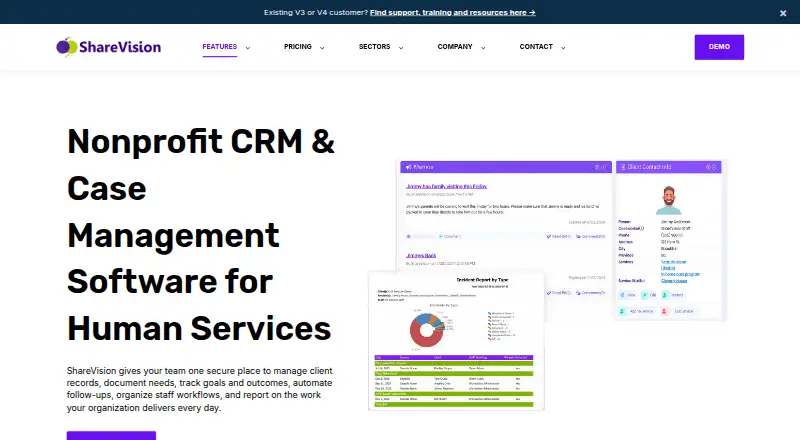
ShareVision is a cloud nonprofit CRM and case-management platform for organizations delivering direct services. It combines client profiles, case notes, documents, service enrollment history and waitlists with tracking for individual and program goals, assessments, outcome indicators and pre- and post-service surveys. Teams can create editable electronic forms and customize fields around their processes. A notification manager sends in-app, email or SMS alerts, although SMS requires a Twilio account. Google and Microsoft calendar connections are available. The responsive cloud platform works on mobile devices without requiring an app. Security controls include encryption, configurable access, permissions, multi-factor authentication and automated daily backups. ShareVision states that customer data is stored in Canada behind secure firewalls. A free trial is available, but there is no free plan. Plans range from 1–10 users to 251–500 users, with document storage and add-ons varying by tier.
Good
- Tracks client records, notes, documents and waitlists
- Supports goals, assessments and outcome indicators
- Custom electronic forms and fields
- Mobile access requires no app
- Includes encryption, MFA and daily backups
Watch out
- Annual commitment required for listed plans
- SMS alerts require a Twilio account
- No free plan
- Higher tiers have substantially higher monthly prices
Who it suits
ShareVision is designed for nonprofits, social-service agencies and community organizations providing direct services. It fits teams needing client, service, outcome and workflow records in a browser-based system.
Verdict
ShareVision covers core nonprofit case management, service tracking and reporting with customizable forms and mobile access. Buyers should match user counts, storage and add-on needs to its annual plans.
Plans and prices
From ShareVision's own pricing page, checked 1 Oct 2026.
| Plan | Price | What it gives you |
|---|---|---|
| Simply 10 | $160 a month | 1–10 users · 10 GB built-in document storage · unlimited clients and services · annual commitment required |
| Simply 25 | $320 a month | 11–25 users · 10 GB built-in document storage · unlimited clients and services · annual commitment required |
| Simply 50 | $480 a month | 26–50 users · 10 GB built-in document storage · 5 JumpStart service credits · unlimited clients and services · annual commitment required |
| Plenty 100 | $800 a month | 51–100 users · 100 GB built-in document storage · 40 JumpStart service credits · suite of add-ons · annual commitment required |
| Plenty 250 | $1,250 a month | 101–250 users · 100 GB built-in document storage · 50 JumpStart service credits · suite of add-ons · annual commitment required |
| Plenty 500 | $2,100 a month | 251–500 users · 100 GB built-in document storage · 50 JumpStart service credits · suite of add-ons · annual commitment required |
The facts
Each one read from ShareVision's own pages, with the date it was checked.
What it does
- Calendar integrations
- ShareVision can connect to Google or Microsoft calendars.checked 1 Oct 2026
- Client tracking
- ShareVision supports client profiles and records, case notes, documentation, service enrollment history and waitlists.checked 1 Oct 2026
- Customer base
- ShareVision says it has helped more than 200 agencies migrate from paper-based systems to online automated environments.checked 1 Oct 2026
- Custom forms
- ShareVision includes editable electronic forms and tools for customizing fields and forms around an organization’s processes.checked 1 Oct 2026
- Data residency
- ShareVision states that customer data is stored in Canada on database servers behind secure firewalls.checked 1 Oct 2026
- Mobile access
- ShareVision works on mobile devices through a responsive cloud platform and requires no app.checked 1 Oct 2026
- Notifications
- The notification manager can send in-app, email or SMS alerts, with SMS requiring a Twilio account.checked 1 Oct 2026
- Outcomes tracking
- Organizations can track individual and program goals, progress, outcome indicators, assessments and pre- and post-service surveys.checked 1 Oct 2026
- Security
- The platform provides advanced encryption, customizable access settings, multi-factor authentication, permissions and automated daily backups.checked 1 Oct 2026
- Support
- All listed plans include access to the ShareVision Community Forum for technical support.checked 1 Oct 2026
- Target users
- The platform is built for nonprofits, social-service agencies and community-based organizations that provide direct services.checked 1 Oct 2026
- What it does
- ShareVision is a cloud-based nonprofit CRM and case-management platform for managing client records, services, goals, outcomes, staff workflows and reporting.checked 1 Oct 2026
The company
- Company history
- ShareVision was created in 2004 by founder Sven Brindley to address operating challenges at a developmental-services organization in Sechelt, British Columbia.checked 1 Oct 2026
- Headquarters
- Sechelt, British Columbia, Canadachecked 28 Sep 2026
Money
- Free plan
- Nochecked 20 Sep 2026
- Free trial
- ShareVision offers a complimentary, no-obligation two-week trial for available add-on features.checked 1 Oct 2026
Alternatives to ShareVision
- 1

In-Form
Free planAndroidiOSWebAPI8.0From £165 a year - 2

Primero
Free planAndroidiOSWebAPI7.7From $8,250 a year - 3
FAMCare
AndroidiOSWebAPI7.3From $795 a month - 4

CharityTracker
WebAPI7.1From $216 a year - 5
Neighbor Solutions
AndroidiOSWeb6.8From $100 a month - 6
CaseFlow
AndroidiOSWebmacOS6.7From $150 a month