ScreenTimeTrack
ScreenTimeTrack is an iOS app for managing phone time and building healthier usage habits.
What ScreenTimeTrack is
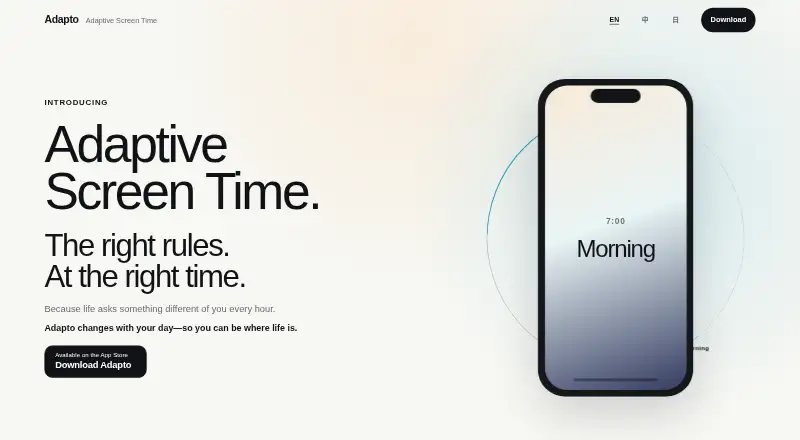
ScreenTimeTrack is an iOS app for managing phone time and building healthier usage habits. Users can set limits for apps or categories across different parts of the day, such as morning, afternoon, and evening. When a limit is reached, it can send a reminder or block apps. The free version includes basic usage statistics and one all-day segment. Premium supports up to 10 custom time segments per day, segment-based monitoring, Shortcuts sharing, and Family Sharing. Through Apple Shortcuts, usage data can be shared with other apps or people. The maker says usage data remains stored locally on the device rather than being uploaded, and states that the app complies with Apple privacy standards. It describes use cases such as reducing work or study distractions, managing late-night phone use, and helping parents support healthier digital habits for children. The app is linked for download through the App Store and supports iOS/iPadOS. A 7-day Premium trial is listed, but no Premium price is provided.
Good
- Sets app or category limits by time of day.
- Can remind users or block apps at limits.
- Free version includes basic usage statistics.
- Usage data is stored locally, according to the maker.
- Premium supports Family Sharing.
Watch out
- Free version has one all-day segment.
- Focus sessions are not supported.
Who it suits
It may suit people who want scheduled app limits to manage work or study distractions or late-night phone use. Parents can also use its limits to support healthier phone habits for children.
Verdict
ScreenTimeTrack offers scheduled app limits, reminders or blocking, and basic statistics on its free version.
Plans and prices
From ScreenTimeTrack's own pricing page, checked 8 Oct 2026.
| Plan | Price | What it gives you |
|---|---|---|
| Free Version | Free | 1 all-day segment · basic usage statistics · reminders or app blocking at limits |
| Premium Version | Priced on request | Up to 10 custom time segments per day · segment-based monitoring · Shortcuts sharing · Family Sharing · 7-day free trial |
The facts
Each one read from ScreenTimeTrack's own pages, with the date it was checked.
What it does
- Data storage
- The maker says usage data is stored locally on the device and is not uploaded.checked 8 Oct 2026
- Family use
- The Premium version includes Family Sharing support.checked 8 Oct 2026
- Flexible schedules
- Users can set app or category limits for separate periods such as morning, afternoon, and evening.checked 8 Oct 2026
- Integration
- ScreenTimeTrack can share usage data with other apps or people through Apple Shortcuts.checked 8 Oct 2026
- Intended users
- The maker describes use cases including people managing work or study distractions, late-night phone use, and parents helping children form healthier digital habits.checked 8 Oct 2026
- Limit actions
- The app can give reminders or block apps when usage limits are reached.checked 8 Oct 2026
- Premium limit
- Premium supports up to 10 custom time segments per day.checked 8 Oct 2026
- Privacy
- The maker states that the app complies with Apple privacy standards.checked 8 Oct 2026
- Purpose
- ScreenTimeTrack is a personal time management app intended to help users build healthier phone habits and improve focus.checked 8 Oct 2026
- Support
- The maker lists support at [email protected].checked 8 Oct 2026
- Usage statistics
- The free version includes basic usage statistics.checked 8 Oct 2026
Where it runs
- Platform
- The maker links to an App Store download for the app.checked 8 Oct 2026
Alternatives to ScreenTimeTrack
- 1

Freedom
Free planAndroidiOSWebExtension8.2From $40 a year - 2

Opal
Free planAndroidiOSExtensionmacOS8.0From $8.29 a month - 3

ScreenZen
Free planAndroidiOSmacOSWindows7.3$49 one-time - 4
one sec
AndroidiOSExtensionLinux7.2From $19.99 a year - 5
FocusMe
AndroidiOSExtensionLinux7.1$249 one-time - 6
YourHour
Free planAndroidiOS7.1From $12.99 a year