ScreenCap
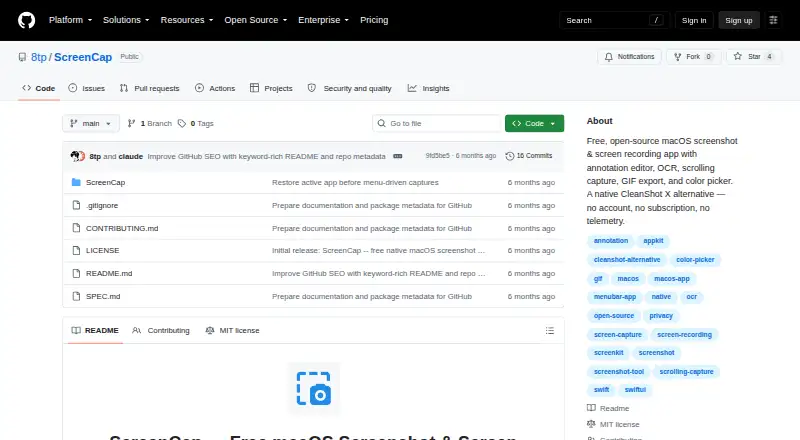
ScreenCap is a free, open-source macOS application for screenshots and screen recording.
What ScreenCap is
ScreenCap is a free, open-source macOS application for screenshots and screen recording. It captures full screens, selected areas, windows and scrolling content, and records a full display or chosen region to MP4 using H.264, with GIF export available. Screenshot files can be exported as PNG, JPEG or TIFF. An annotation editor provides drawing, text, highlighting, blur or pixelation, numbered steps and cropping. Apple Vision supplies OCR, while a color picker copies hex or RGB values. A floating thumbnail can be dragged into other applications, and screenshots can be pinned to the desktop. The project states that ScreenCap makes zero network calls, keeps screenshots on the Mac, requires no account and has no analytics or tracking. It is released under the MIT license for personal and commercial use. ScreenCap requires macOS 14 (Sonoma) or later. The project page describes building from source with Swift or Package.swift in Xcode and lists Xcode 15 or later for building.
Good
- Captures fullscreen, areas, windows and scrolling content
- Records MP4 and exports GIFs
- Includes OCR, annotation and color picking
- No network calls or account requirement
- MIT license permits personal and commercial use
Watch out
- Requires macOS 14 or later
- No team collaboration features
- No browser extension
- Building from source requires Xcode 15 or later
Who it suits
It suits Mac users who want local screenshot, recording and annotation tools without accounts or tracking. Developers can build it from source using the documented Swift and Xcode setup.
Verdict
ScreenCap offers a broad local capture and markup workflow with recording, OCR and export formats. Its macOS requirement and lack of collaboration features make it a focused individual desktop utility.
Plans and prices
From ScreenCap's own pricing page, checked 4 Oct 2026.
| Plan | Price | What it gives you |
|---|---|---|
| Free | Free | macOS 14 (Sonoma) or later · personal and commercial use · Free forever |
The facts
Each one read from ScreenCap's own pages, with the date it was checked.
What it does
- Accounts and tracking
- The project says ScreenCap requires no account and has no analytics or tracking.checked 4 Oct 2026
- Capture
- It supports fullscreen, area, window, and scrolling capture.checked 4 Oct 2026
- Distribution
- The page describes building from source with Swift or opening Package.swift in Xcode; it lists Xcode 15 or later for building.checked 4 Oct 2026
- Editing
- Its annotation editor includes drawing, text, highlight, blur or pixelate, numbered steps, and crop tools.checked 4 Oct 2026
- Export formats
- Screenshots can be saved as PNG, JPEG, or TIFF.checked 4 Oct 2026
- License
- ScreenCap is released under the MIT license for personal and commercial use.checked 4 Oct 2026
- Measurement tools
- Yeschecked 24 Sep 2026
- Other tools
- It includes OCR using Apple Vision and a color picker that copies hex or RGB values.checked 4 Oct 2026
- Privacy
- The project states that ScreenCap makes zero network calls and that screenshots stay on the Mac.checked 4 Oct 2026
- Recording
- It records full screens or selected areas to MP4 (H.264) and can export recordings as GIFs.checked 4 Oct 2026
- Redaction tools
- Yeschecked 24 Sep 2026
- System requirement
- ScreenCap requires macOS 14 (Sonoma) or later.checked 4 Oct 2026
- What it does
- ScreenCap is an open-source macOS app for screenshots and screen recording.checked 4 Oct 2026
- Workflow
- A floating thumbnail supports drag-and-drop to other apps, and screenshots can be pinned to the desktop.checked 4 Oct 2026
Where it runs
- Browser extension
- Nochecked 24 Sep 2026
Money
- Free plan
- Yeschecked 24 Sep 2026
The company
- Team collaboration
- Nochecked 24 Sep 2026
Alternatives to ScreenCap
- 1

Awesome Screenshot
Free planiOSWebExtensionmacOS8.3From $5 a month - 2

Monosnap
Free planWebExtensionLinuxmacOS8.1From $2.50 a month - 3
Usersnap
AndroidiOSWebAPI7.9From €49 a month - 4

Greenshot
Free planWindows7.8$1.99 one-time - 5
ShareX
Free planOpen sourceWindows7.6Free plan - 6
Markup Hero
Free planExtensionmacOSWindows7.6From $3 a month