ReceiptMe
ReceiptMe finds and organizes receipts, invoices, and purchase confirmations from connected email and cloud-storage accounts.
What ReceiptMe is
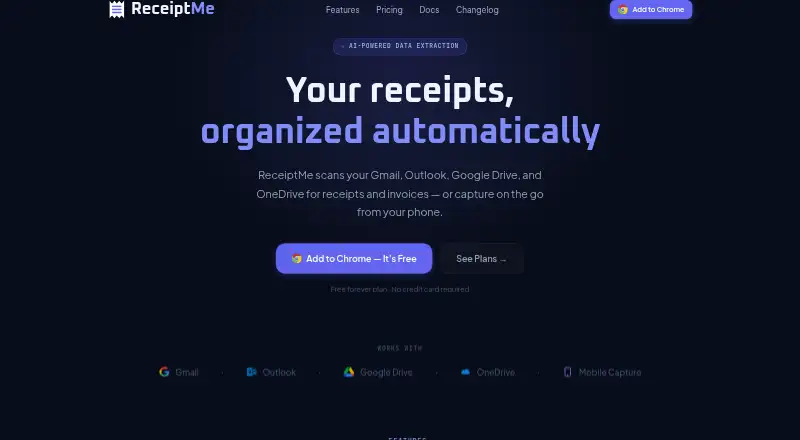
ReceiptMe finds and organizes receipts, invoices, and purchase confirmations from connected email and cloud-storage accounts. It scans Gmail and Outlook; scanning is manual on the free plan and automatic on Pro and Business. A machine-learning classifier sorts expenses by vendor, amount, category, and IRS Schedule C line. Receipts can be exported as single or bulk PDFs, while Pro and Business add Google Drive and Google Sheets export and cloud auto-import from Google Drive and OneDrive. ReceiptMe is available on the web, iOS, Android, and as a Chrome extension that also works in Chromium-based browsers including Edge, Brave, and Arc. Phone receipt capture is available through its web app. Extracted records remain stored locally in the browser unless a user explicitly exports them. Email message bodies are processed inside the extension; OCR attachments and short classification snippets are sent for processing. The free plan includes 50 receipts and 10 AI extractions per month. Pro costs $5 a month and Business costs $10 a month. Other email providers are not currently supported; support for them is described as being on the roadmap.
Good
- Classifies expenses by vendor, amount, category, and tax line
- Exports receipts as single or bulk PDFs
- Supports Google Drive and OneDrive imports
- Receipt records stay in the browser unless exported
Watch out
- Supports only Gmail and Outlook email
- Free email scanning is manual
- Free plan allows 10 AI extractions monthly
Who it suits
ReceiptMe is aimed at freelancers, consultants, self-employed professionals, and small business owners who organize receipts from Gmail or Outlook. It may suit people who want browser-based or mobile receipt capture and PDF exports.
Verdict
ReceiptMe pairs receipt organization with email scanning, cloud imports, and PDF exports. The free plan is limited to manual scanning and 10 AI extractions per month; paid plans start at $5 a month.
Plans and prices
From ReceiptMe's own pricing page, checked 5 Oct 2026.
| Plan | Price | What it gives you |
|---|---|---|
| Free | Free | 50 receipts · 10 AI extractions/month · 3 vendor rules · 7-day lookback · manual email scan · bulk PDF download · mobile capture |
| Pro | $5 a month | 5,000 receipts · 500 AI extractions/month · unlimited vendor rules · up to 1 year lookback · automatic email scan · cloud import/export · cross-device settings and rules sync · email support · $ 5 / mo |
| Business | $10 a month | 5,000 receipts · 1,000 AI extractions/month · up to 5 email accounts · up to 1 year lookback · cross-device receipt sync · priority email support · $ 10 / mo |
The facts
Each one read from ReceiptMe's own pages, with the date it was checked.
What it does
- Audience
- The product is described as built for freelancers, consultants, self-employed professionals, and small business owners.checked 5 Oct 2026
- Classification
- Its machine-learning classifier categorizes expenses by vendor, amount, category, and IRS Schedule C line.checked 5 Oct 2026
- Cloud integrations
- ReceiptMe supports Google Drive and OneDrive imports, with cloud auto-import available on Pro and Business.checked 5 Oct 2026
- Data storage
- Extracted receipt records are stored locally in the browser and are not uploaded unless users explicitly export them.checked 5 Oct 2026
- Email scanning
- It scans Gmail and Outlook for receipts, invoices, and purchase confirmations, manually on Free and automatically on Pro and Business.checked 5 Oct 2026
- Exports
- Users can export receipts as single or bulk PDFs, and Pro and Business add Google Drive and Google Sheets export.checked 5 Oct 2026
- Limits
- ReceiptMe currently supports Gmail and Microsoft Outlook; support for other email providers is described as on the roadmap.checked 5 Oct 2026
- Mobile capture
- Users can capture receipts from a phone using the ReceiptMe web app.checked 5 Oct 2026
- Privacy
- Email message bodies are processed inside the extension and are not transmitted to ReceiptMe servers; OCR attachments and short classification snippets are sent for processing.checked 5 Oct 2026
- Purpose
- ReceiptMe finds and organizes receipts and invoices from connected email and cloud-storage accounts.checked 5 Oct 2026
- Security
- The privacy policy states that communications use TLS 1.3, with TLS 1.2 or higher required, and that persisted server data is encrypted at rest with AES-256.checked 5 Oct 2026
- Support
- General support is available by email, and Business customers receive priority responses.checked 5 Oct 2026
Where it runs
- Browser support
- ReceiptMe is a Chrome extension that also works in Chromium-based browsers including Edge, Brave, and Arc.checked 5 Oct 2026
Money
- Free trial
- The pricing FAQ says the Free plan is available indefinitely and that no trial period is needed.checked 5 Oct 2026
The company
- Headquarters
- Harrisonville, Missouri, United Stateschecked 28 Sep 2026
The full review of ReceiptMe
ReceiptMe is a browser-centered tool for collecting receipts, invoices, and purchase confirmations from email and cloud storage. It is best suited to freelancers, consultants, self-employed professionals, and small businesses that rely on Gmail or Outlook. Its strongest case is organized, classified records with browser-local storage; its main drawbacks are limited provider support and firm extraction quotas.
Overview
ReceiptMe brings together records from Gmail, Microsoft Outlook, Google Drive, and OneDrive, then applies machine-learning classification by vendor, amount, expense category, and IRS Schedule C line. That classification gives independent workers a useful first pass at tax and expense organization, rather than leaving every receipt as an unstructured image or message.
Receipt records are kept locally in the browser until the user explicitly exports them. Message bodies are processed within the extension, while OCR attachments and short classification excerpts are sent for processing. Communications use TLS 1.3 (with TLS 1.2 or newer required), and persisted server data is encrypted at rest with AES-256. The privacy design reduces centralized storage, although attachment and snippet processing still sends selected content beyond the browser.
Key features
- Email scanning: Gmail and Outlook are supported. Free requires a manual scan, while Pro and Business scan automatically, making the paid tiers substantially better for users who want receipts collected in the background.
- Classification: Merchant, date, and total are covered by OCR, while the classifier adds vendor, amount, category, and IRS Schedule C line organization. This is particularly relevant to self-employed users preparing records for tax work.
- Exports: Single and bulk PDF exports are available. Pro and Business add Google Drive and Google Sheets export, giving those plans a more useful handoff to cloud filing and spreadsheet workflows.
- Cloud imports: Google Drive and OneDrive can be imported, with automatic cloud importing reserved for Pro and Business.
- Capture and browser access: Receipts can be captured through the web app on a phone. The Chrome extension also runs in Edge, Brave, and Arc, so users are not tied to Chrome itself.
ReceiptMe currently supports only Gmail and Outlook for email; people using another provider must wait for broader support. General help is provided by email, with priority responses for Business customers.
Pricing
| Plan | Price | What it includes |
|---|---|---|
| Free | free | 50 receipts, 10 AI extractions/month, three vendor rules, seven-day lookback, manual email scan, bulk PDF download, and mobile capture |
| Pro | $5 a month | 5,000 receipts, 500 AI extractions/month, unlimited vendor rules, up to one year lookback, automatic email scan, cloud import/export, cross-device settings and rules sync, and email support |
| Business | $10 a month | 5,000 receipts, 1,000 AI extractions/month, up to five email accounts, up to one year lookback, cross-device receipt sync, and priority email support |
Free works for occasional filing and a small receipt archive, but 50 receipts, 10 monthly extractions, three rules, and a seven-day lookback will quickly constrain active businesses. Pro is the practical choice for one person who needs automation and cloud workflows at $5 a month. Business doubles the extraction allowance and supports up to five email accounts, making it the better fit for a small team or multi-inbox operation. There is no free trial, so upgrading means committing to the paid monthly plan rather than sampling a trial period.
Platforms
ReceiptMe is offered on Android, iOS, the web, and as a browser extension. The extension supports Chrome and Chromium-based browsers including Edge, Brave, and Arc; the web app also handles phone capture.
Who it's for
Choose ReceiptMe if your receipts already arrive in Gmail or Outlook and you want automatic collection, Schedule C-oriented classification, and PDF or cloud exports. It is less suitable for users on other email services, people needing uncapped AI processing, or teams requiring more than five connected email accounts.
Pros and cons
Pros
- Browser-local records limit routine centralized storage.
- Automatic scanning, cloud imports, and Drive/Sheets exports make Pro useful for recurring workflows.
- IRS Schedule C line classification directly addresses self-employed bookkeeping.
- Business supports five email accounts and priority email responses.
Cons
- Email support is restricted to Gmail and Outlook.
- Free has a seven-day lookback, manual scans, 50 receipts, and only 10 AI extractions per month.
- Pro and Business still cap AI extractions at 500 and 1,000 per month.
- OCR processing sends attachments and classification snippets for processing despite local record storage.
Alternatives
Bonro is a better pick for users who want Android, iOS, and web access plus a free trial, although its free plan allows only five receipts per month and no export.
Easy Expense suits someone who needs manual tracking, data export, and cloud storage with a free trial, but its free tier permits 10 scans and two expense reports per month.
Foreceipt is worth considering when a free plan with up to 100 receipts, 12-month retention, two team members, and PDF/Excel reports is the priority.
Receipt Reader AI fits users seeking an API option and a free trial, with 10 AI scans per month and one account on its free plan.
Smart Receipts is a mobile-first alternative with manual entry and basic reports on its free plan.
OCR Receipt is a desktop choice for Linux, macOS, and Windows users.
OpenReceipts is preferable for self-hosting with no subscriptions, limits, or accounts.
Receipt Scanner is the simpler free option when unlimited scans and no account matter more than automated email and cloud collection.
Verdict
ReceiptMe is a strong match for Gmail- or Outlook-based freelancers and small businesses that want classified receipts, automatic paid-tier scanning, and browser-local records. Choose Pro for the best balance of automation and cost; choose Business for multiple inboxes and higher extraction capacity. Look elsewhere if your email provider is unsupported, your workload exceeds the AI quotas, or you require a fully self-hosted system.
Alternatives to ReceiptMe
- 1

Veryfi Invoices OCR API
Free planAndroidiOSWebAPI8.2From $500 a month - 2

Receipt Reader AI
Free planAndroidiOSWebAPI8.0From $5.99 a month - 3
OpenReceipts
Free planOpen sourceWebLinuxmacOSSelf-hosted7.6Free plan - 4

OCR Receipt
Free planAPILinuxmacOSWindows7.5$149 one-time - 5

Bonro
Free planAndroidiOSWeb7.3From €59.99 a year - 6
Smart Receipts
Free planAndroidiOSWeb7.3From $99.96 a year