Raspberry Pi Imager
Raspberry Pi Imager is a free utility for writing Raspberry Pi OS and other operating systems to storage media for use with a Raspberry Pi.
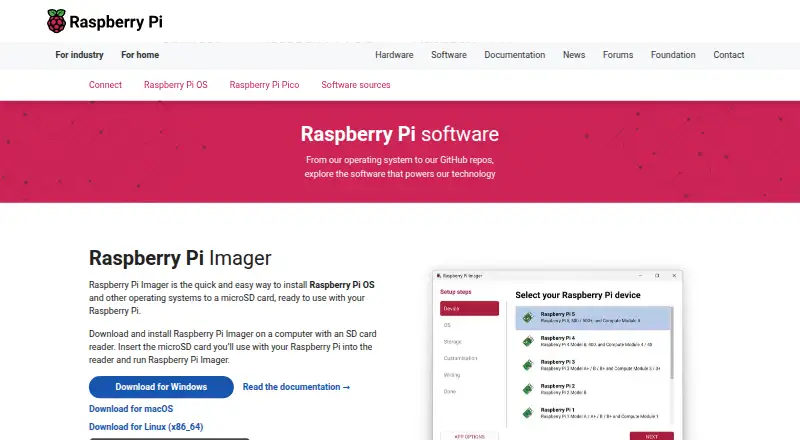
What Raspberry Pi Imager is
Raspberry Pi Imager is a free utility for writing Raspberry Pi OS and other operating systems to storage media for use with a Raspberry Pi. It includes popular images and can use images downloaded from Raspberry Pi or third-party providers such as Ubuntu. You can also choose a local image or set a custom repository from a file or URL. For supported systems, setup options include a hostname, time zone, user and Wi-Fi credentials, and remote connectivity. SSH can be enabled during customization with a password or public key. After writing, Imager verifies the image; Raspberry Pi recommends completing that check. The app is available for Windows, macOS, and Linux, with AppImage downloads documented for other Linux distributions. Compatible Raspberry Pi models can install an operating system over a wired network without a separate computer or SD card reader. Anonymous usage telemetry is on by default and can be disabled in App Options. Writing an image overwrites all data on the selected storage device, so choosing the destination carefully matters.
Good
- Free to use
- Supports local images and custom repositories
- Can preconfigure credentials and remote connectivity
- Verifies written images
Watch out
- Writing an image erases data on the selected storage device
- Anonymous usage telemetry is enabled by default
- Network installation is limited to compatible Raspberry Pi models
Who it suits
Imager suits people preparing bootable storage for Raspberry Pi devices, including headless setups that need credentials or remote access configured in advance. It also supports PC and Mac images through Raspberry Pi Desktop.
Verdict
Raspberry Pi Imager covers image selection, setup customization, and write verification in one free utility. Check the destination storage carefully before writing, and turn telemetry off in App Options if preferred.
Plans and prices
From Raspberry Pi Imager's own pricing page, checked 8 Oct 2026.
| Plan | Price | What it gives you |
|---|---|---|
| Raspberry Pi Imager | Free | Desktop imaging utility · Windows, macOS, Linux |
The facts
Each one read from Raspberry Pi Imager's own pages, with the date it was checked.
What it does
- Custom images
- Users can select a local operating system image, and advanced users can configure a custom image repository from a file or URL.checked 8 Oct 2026
- Installation options
- Raspberry Pi Imager is available for Windows, macOS, Ubuntu, and Raspberry Pi OS, with Linux AppImage downloads documented for other Linux distributions.checked 8 Oct 2026
- Intended users
- The tool is for people preparing bootable storage for Raspberry Pi devices, including headless setups that need preconfigured credentials or remote access.checked 8 Oct 2026
- Network install
- Compatible Raspberry Pi models can install an operating system over a wired network without a separate computer or SD card reader.checked 8 Oct 2026
- Open source
- Raspberry Pi publishes the Imager source code in a public GitHub repository.checked 8 Oct 2026
- Purpose
- Raspberry Pi Imager installs Raspberry Pi OS and other operating systems onto storage media for use with a Raspberry Pi.checked 8 Oct 2026
- Security reporting
- Raspberry Pi accepts vulnerability reports for Raspberry Pi Imager and describes its investigation and disclosure process on its security page.checked 8 Oct 2026
- SSH
- Imager can enable SSH with password or public key authentication during operating system customization.checked 8 Oct 2026
- Storage warning
- Writing an image overwrites all data on the selected storage device, and the documentation advises users to select the destination carefully.checked 8 Oct 2026
- Telemetry
- Anonymous usage telemetry is enabled by default and can be disabled in App Options; the project says the collected counts are not associated with personal data.checked 8 Oct 2026
- Write verification
- After writing an image, Imager verifies that it was written correctly, and Raspberry Pi recommends completing verification.checked 8 Oct 2026
Where it runs
- Device setup
- For supported operating systems, Imager can preconfigure a hostname, time zone, user credentials, Wi-Fi credentials, and remote connectivity.checked 8 Oct 2026
- OS selection
- Imager includes popular operating system images and supports images downloaded from Raspberry Pi or third-party vendors such as Ubuntu.checked 8 Oct 2026
The company
- Founded
- 2012checked 28 Sep 2026
- Headquarters
- Cambridge, United Kingdomchecked 28 Sep 2026
The full review of Raspberry Pi Imager
Raspberry Pi Imager writes operating system images to storage for Raspberry Pi computers. It is the clearest fit for people preparing a Pi, especially headless setups that need network or remote access configured before first boot. Its strength is bringing image choice, setup, and verification into a free desktop utility; its main caution is that writing erases the selected drive.
Overview
Imager offers popular operating system images, accepts images downloaded from Raspberry Pi and third-party vendors such as Ubuntu, and can use a local image. Advanced users can also point it to a custom image repository via a file or URL. That breadth supports both a straightforward Raspberry Pi OS installation and more specific image workflows without making the utility only for specialists.
Compatible Raspberry Pi models can install an operating system over a wired network, without a separate computer or SD card reader. This is useful when the model supports it, but it is not a universal substitute for preparing storage with the desktop app. In either workflow, the selected destination matters: writing an image overwrites all data on that device.
Key features
Configure before boot
For supported operating systems, Imager can set a hostname, time zone, user credentials, Wi-Fi credentials, and remote connectivity before writing. It can enable SSH using either a password or a public key. This is a meaningful advantage for headless installations, where preparing access details up front can spare an initial display-and-keyboard setup. The options depend on operating-system support, so they should not be assumed to apply to every image.
Image verification and privacy controls
After writing, Imager checks that the image was written correctly, a useful safeguard against an incomplete write; Raspberry Pi recommends completing verification. Anonymous usage telemetry is enabled by default and can be turned off in App Options. The project says those counts are not linked to personal data, but users who prefer not to contribute usage data need to change the default themselves.
Raspberry Pi publishes the source code in a public GitHub repository and accepts vulnerability reports under a described investigation and disclosure process. These are relevant trust signals for a utility that writes boot media, though they do not remove the need to verify the destination before starting.
Pricing
Raspberry Pi Imager costs nothing. The free plan is the desktop imaging utility for Windows, macOS, and Linux, with no free-trial period or paid tier described. There is no paid plan to unlock, but the utility's role is focused: it prepares operating-system media rather than serving as a general-purpose computer-management product.
Platforms
The utility is available for Windows, macOS, Ubuntu, and Raspberry Pi OS, with Linux AppImage downloads documented for other Linux distributions. It supports Raspberry Pi computers as well as Raspberry Pi Desktop images for PC and Mac, and covers 32-bit and 64-bit architectures. Regular free updates include security patches, with no fixed support duration stated.
On Raspberry Pi OS, built-in management options include APT software and firmware updates, graphical Add / Remove Software, and raspi-config. The 64-bit edition can run 32-bit software. Those are useful platform-level capabilities for users choosing Raspberry Pi OS, rather than reasons to treat Imager itself as a broader package manager.
Who it's for
Choose Imager if you need to prepare bootable storage for a Raspberry Pi and want image selection, supported preconfiguration, and write verification in one place. It is particularly well suited to headless setups that need credentials, Wi-Fi, or SSH ready before the first boot. It is less compelling if your goal is managing a different Linux distribution or a device outside the Raspberry Pi workflow.
Pros and cons
- Pros: Popular, third-party, local, and custom-repository image options accommodate both common installs and specialist workflows.
- Pros: Preconfigured network and SSH access can simplify headless Pi setup, when the chosen OS supports those settings.
- Pros: Post-write verification checks that the image was written correctly, and the utility is free across Windows, macOS, and Linux.
- Cons: Writing overwrites the selected storage device, so a wrong destination can destroy data.
- Cons: Telemetry is on by default, requiring a settings change for users who do not want to send anonymous usage counts.
- Cons: Setup customization is limited to operating systems that support it, and network install applies only to compatible Raspberry Pi models.
Alternatives
For a wider look at software in these categories, browse Operating Systems or Bootable USB Software.
Pick Kali Linux if you want a free, open-source distribution across Android, Linux, macOS, self-hosted, or Windows platforms rather than a Raspberry Pi imaging utility. Nix is a free open-source package manager for readers seeking package management across Linux, macOS, self-hosted, or Windows. Consider postmarketOS for a free and open-source operating system on Android or Linux, bearing in mind that device support and stability vary.
MX Linux is a free Linux distribution with Xfce, KDE, and Fluxbox editions. pfSense is a freemium firewall and router software option with a free Community Edition and a Plus plan. Rocky Linux is a no-cost Linux option with a 10-year support lifecycle and community support.
Solus is a free Linux operating system maintained by the independent Solus Project. Ubuntu Server offers a free Ubuntu Pro Community plan for up to 50 machines for active Ubuntu community members.
Verdict
Raspberry Pi Imager is the right choice for people preparing Raspberry Pi boot media, especially those who need headless access configured before first boot. Its free image workflow and write verification are the main reasons to choose it. Look elsewhere if you need a different kind of operating-system or device-management tool, and check the destination carefully before every write.
Alternatives to Raspberry Pi Imager
- 1
UNetbootin
Free planOpen sourceLinuxmacOSSelf-hostedWindows7.1Free plan - 2
USBImager
Free planOpen sourceLinuxmacOSWindows7.1Free plan - 3

balenaEtcher
Free planLinuxmacOSWindows6.8From $1,720 a year - 4
FlashBoot
Free planWindows6.5$29.95 one-time - 5
WinToUSB
Free planWindows6.5$44.95 one-time - 6
Unraid USB Creator
LinuxmacOSWindows6.4$49 one-time