QSpace
QSpace is a macOS file manager presented as a more flexible Finder, with dual-pane browsing, tabs, archives, batch renaming, and cloud storage access.
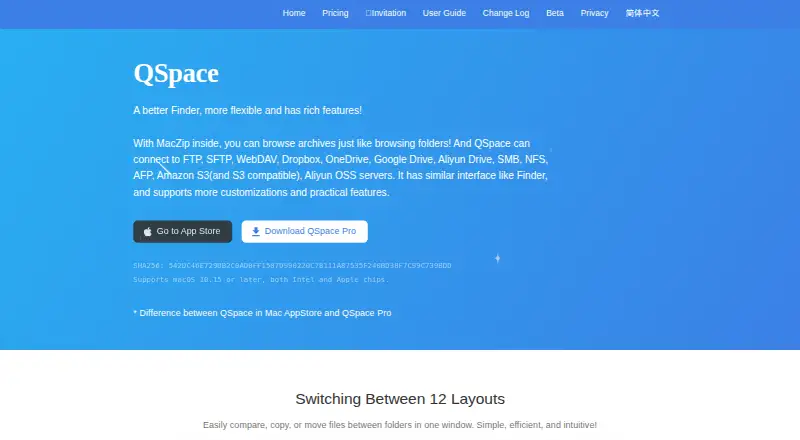
What QSpace is
QSpace is a macOS file manager presented as a more flexible Finder, with dual-pane browsing, tabs, archives, batch renaming, and cloud storage access. Its multi-pane interface provides 12 layouts for comparing folders or copying and moving files. Windows can act as workspaces that reopen where you left off. Search can filter a pane by keywords or use the Spotlight index globally. Customization includes toolbars, context menus, hotkeys, sidebar groups, colours, and icons. Server Connections supports more than 20 server types and cloud services, including FTP, SFTP, WebDAV, Dropbox, OneDrive, and Amazon S3. QSpace supports macOS 10.15 or later on Intel and Apple chips. A free plan and 30-day trial are listed, although the pricing model is paid. Enhanced Archiver is shown as free. Stash Shelf, Server Connections, and Advanced Batch Rename are each listed at $0.99, paid once. QSpace Pro allows one account on at most two devices at the same time. QSpace MAS is described as having no trials and no refunds.
Good
- Offers 12 multi-pane layouts
- Supports tabs, archives, and batch renaming
- Connects to over 20 server types and services
- Workspaces reopen previous windows
- 30-day trial listed
Watch out
- Available only for macOS
- QSpace MAS has no trials or refunds
- QSpace Pro limits one account to two devices
- Several extensions cost $0.99, paid once
Who it suits
QSpace suits Mac users who want multi-pane file work, reopenable workspaces, customization, archive tools, and connections to cloud or server storage.
Verdict
QSpace provides a broad Finder alternative with pane layouts, workspaces, customization, and remote connections. Check the platform requirement and extension terms before choosing among its plans.
Plans and prices
From QSpace's own pricing page, checked 24 Sep 2026.
| Plan | Price | What it gives you |
|---|---|---|
| Stash Shelf extension | — | — |
| Advanced Batch Rename extension | — | — |
| Server Connections extension | — | — |
| Enhanced Archiver extension | Free | Shown as Free |
| Enhanced Archiver | Free | Extension · Free |
| Advanced Batch Rename | $0.99, paid once | Extension purchase |
| Server Connections | $0.99, paid once | Extension purchase |
| Stash Shelf | $0.99, paid once | Extension purchase |
| QSpace MAS | $12.99, paid once | Without Extensions · No trials · No refunds · Purchase once |
| QSpace Pro | $13.99, paid once | Without Extensions · 30-day free trial · Returns within 3 days · One account on at most two devices at the same time · Purchase once |
The facts
Each one read from QSpace's own pages, with the date it was checked.
What it does
- Archive support
- Enhanced Archiver can browse archives as folders and extract more than 20 archive types, including RAR, ZIP, 7z, TAR, GZ, and BZ2.checked 7 Oct 2026
- Batch rename
- Yeschecked 24 Sep 2026
- Cloud storage access
- Yeschecked 24 Sep 2026
- Customization
- QSpace supports custom toolbars, context menus, hotkeys, sidebar groups, colors, and icons.checked 7 Oct 2026
- Dual-pane view
- Yeschecked 24 Sep 2026
- Latest listed release
- The changelog lists QSpace 7.0.2 and Beta 7.0.2.001 dated 2026-10-02.checked 7 Oct 2026
- Layouts
- Its multi-pane interface offers 12 layouts for comparing, copying, or moving files between folders.checked 7 Oct 2026
- Privacy
- The privacy policy says QSpace collects app and device details including version, account email, macOS version, language, IP address, user ID, and device ID, and says collected information is used for QSpace functions and is not shared with third parties.checked 7 Oct 2026
- Product
- QSpace describes itself as a more flexible Finder with rich features.checked 7 Oct 2026
- Remote connections
- Server Connections supports more than 20 server types and cloud services, including FTP, SFTP, WebDAV, Dropbox, OneDrive, and Amazon S3.checked 7 Oct 2026
- Search
- Users can filter files in a pane by keywords or search globally with the Spotlight index.checked 7 Oct 2026
- Support
- The privacy policy provides [email protected] for privacy questions.checked 7 Oct 2026
- System requirement
- The maker says QSpace supports macOS 10.15 or later on Intel and Apple chips.checked 7 Oct 2026
- Tabbed interface
- Yeschecked 24 Sep 2026
- Workspaces
- Each window can act as a self-contained workspace that users can reopen to resume where they left off.checked 7 Oct 2026
Money
- Free plan
- Nochecked 24 Sep 2026
Where it runs
- Supported platforms
- macoschecked 24 Sep 2026
Alternatives to QSpace
- 1

Filestash
Free planOpen sourceAndroidiOSWebAPI9.2From $50 a month - 2

Owlfiles
Free planAndroidiOSExtensionmacOS8.7From $12.99 a year - 3

WinSCP
Free planOpen sourceWindows7.9Free plan - 4

Dolphin
Free planOpen sourceLinuxWindows7.8Free plan - 5
FileRun
AndroidiOSWebAPI7.8From €9.90 a year - 6

OneCommander
Free planWindows7.8$30 one-time