Puntual
Puntual records employee working hours and applies labor rules for the company's selected country.
What Puntual is
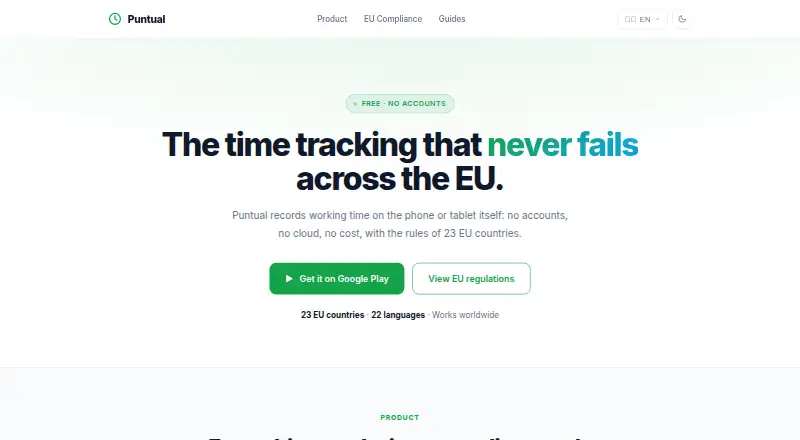
Puntual records employee working hours and applies labor rules for the company's selected country. It is available on Android and the web, and clock-ins are stored on the device first so staff can record hours offline and sync later. Employees can also clock in through a shared entrance tablet using their name and PIN, without installing the app on their phones. Administrators can review daily details, weekly and monthly totals, differences from expected hours, and monthly incidents. PDF and CSV exports include an annex for independently checking whether records were altered. The maker says clock-ins are chained with cryptographic fingerprints, server timestamps are sealed, and corrections add records instead of changing originals. Optional location records where a clock-in or clock-out took place without continuous tracking. Puntual lists labor-rule settings for 23 EU countries and says it works worldwide. Cloud-mode data is hosted in Ireland; local-mode data stays on the device. Plans include a free local option, a €4.99 per month subscription, and a €9.99 one-time purchase. A 30-day trial is offered without a card or automatic charge.
Good
- Clock-ins can be recorded offline and synced later.
- Supports shared tablet clock-ins with name and PIN.
- Exports PDF and CSV reports with alteration checks.
- Offers optional location at clock-in or clock-out.
- Includes a 30-day trial without card details.
Watch out
- Free Local Mode is limited to one employee.
- Local Mode has no cloud sync.
- One-time plan includes six months of cloud history.
Who it suits
Puntual suits employers who need employee hour records, reports, and country-specific labor-rule settings. Its shared-tablet option can suit workplaces where employees do not install the app on their phones.
Verdict
Puntual combines mobile and shared-tablet time recording with reporting and record-integrity features. Compare the local and cloud plan limits, including how long records are retained.
Plans and prices
From Puntual's own pricing page, checked 15 Oct 2026.
| Plan | Price | What it gives you |
|---|---|---|
| Local Mode | Free | 1 employee · on-device history · no cloud sync · basic PDF export · Always free |
| Subscription | €4.99 a month | 3 admins and 30 employees · cloud history while subscribed · EU country selection · verifiable PDF/CSV · records kept while service runs · €4.99/month · cancel anytime |
| One-Time Purchase | €9.99, paid once | 2 admins and 10 employees · 6 months cloud history · EU country selection · verifiable PDF/CSV · web admin panel · server-sealed timestamps · One-time · no monthly fees |
The facts
Each one read from Puntual's own pages, with the date it was checked.
Where it runs
- Android data disclosure
- Google Play’s developer declaration says no data is collected and no data is shared with third parties.checked 15 Oct 2026
- Android device storage
- The Google Play description says the local mode has no accounts or server and stores entries on the device.checked 15 Oct 2026
- Android listing
- Google Play lists Puntual as an Android productivity app by OnGear Studios, updated 28 September 2026.checked 15 Oct 2026
- Limit: device loss
- The Google Play description warns that unexported records are lost if the device is lost.checked 15 Oct 2026
- Limit: device synchronization
- The Google Play description states that records do not synchronize between phones because each device keeps its own entries.checked 15 Oct 2026
What it does
- Cloud data hosting
- The privacy policy says cloud-mode data is hosted by Supabase on servers in Ireland, and that local-mode data stays on the device.checked 5 Oct 2026
- Cloud hosting
- Cloud-mode data is hosted by Supabase on servers located in Ireland.checked 15 Oct 2026
- Data protections
- The DPA describes company-level database isolation, role-based access, encryption in transit, and no special-category or biometric data processing.checked 5 Oct 2026
- Developer address
- Google Play identifies the developer as Yilmar Londoño Castañeda at an address in Ponferrada, Spain.checked 15 Oct 2026
- Documentation and support
- The site provides product, EU-compliance, pricing and guide navigation plus email contact, while the app listing provides a support email.checked 15 Oct 2026
- EU coverage
- The site lists labor-rule settings for 23 European countries and says the service also works worldwide.checked 15 Oct 2026
- Exports
- It exports readable PDF or CSV reports with an annex for independently checking whether records were altered.checked 5 Oct 2026
- Google Play downloads
- The opened Google Play listing displays 10+ downloads.checked 15 Oct 2026
- History and calendar
- Managers can view daily details, weekly and monthly totals, and differences from expected hours.checked 15 Oct 2026
- History and incidents
- The product shows daily details, weekly and monthly totals, expected-hours differences, and monthly incidents for administrators.checked 5 Oct 2026
- Inspection exports
- The product exports readable PDF and CSV reports with an annex for checking record integrity.checked 15 Oct 2026
- Integrations
- The opened Puntual pages describe PDF/CSV export and accountant access but name no third-party business integrations.checked 15 Oct 2026
- Invoice limitation
- Company purchases through Google Play produce receipts in a personal name without a company tax ID or deductible VAT.checked 15 Oct 2026
- Limit: local timestamps
- The Google Play listing explains that local-mode time comes from the device and has no server stamping.checked 15 Oct 2026
- Location
- Optional location records where clock-in or clock-out occurred at that moment; the maker says it does not track continuously.checked 5 Oct 2026
- Offline clocking
- Clock-ins are saved on the device first and synchronized later, allowing use without an internet connection.checked 15 Oct 2026
- Offline clock-ins
- Clock-ins are stored on the device first and synced later, so recording works without an internet connection.checked 5 Oct 2026
The company
- Headquarters
- Ponferrada, Spainchecked 28 Sep 2026
- Maker
- The site credits studiosongear; Google Play lists developer yilmar londoño castañeda and an address in Ponferrada, Spain.checked 5 Oct 2026
The full review of Puntual
Puntual is an attendance and working-hours app for employers that need country-aware labor settings, dependable clock-ins, and auditable records. It fits small teams that can stay within its employee limits, especially workplaces needing offline recording or a shared tablet terminal. The strongest reason to choose it is record integrity; the main compromise is restricted cloud history and capacity on the lower-cost plans.
Overview
Puntual records employee hours and applies labor regulations according to the company’s selected country. Its settings cover 23 EU countries, while the maker says the service works worldwide, so it can serve organizations operating outside the listed European configurations as well.
Clock-ins are saved on the device before syncing, allowing staff to record time during an internet outage. Administrators get daily detail, weekly and monthly totals, differences between worked and expected hours, and monthly incident views. That is a focused attendance record rather than a broad workforce suite, and the paid plans are aimed at small groups of 10 or 30 employees.
Key features
Clock-ins and scheduling
Employees can use the Android app or a shared entrance tablet. On the tablet, a worker selects their name and enters a PIN, avoiding the need to install an app on a personal phone. Shift scheduling is supported, making the product more suitable for teams that organize work in scheduled shifts than for simple timestamp collection alone.
Location capture is optional and records where a clock-in or clock-out occurred at that moment. The maker says it does not continuously track employees, which makes this setting more limited than ongoing location surveillance.
Auditable records
Puntual’s integrity features are its clearest differentiator. The maker says clock-ins are chained with cryptographic fingerprints, server timestamps are sealed, and corrections create additional records instead of rewriting originals. PDF and CSV exports include an annex for independently checking whether records were altered. Employers that must explain or defend attendance records will get more practical value from this than teams needing only informal time notes.
Privacy and storage
In cloud mode, data is hosted by Supabase on servers in Ireland; Local Mode keeps data on the device. The DPA describes company-level database isolation, role-based access, encryption in transit, and no processing of special-category or biometric data. Employers remain responsible for exporting and retaining records for the legally required period, which matters because cloud retention is plan-dependent.
Pricing
Local Mode — free
Local Mode costs €0.00 and is billed always free. It supports one employee for individual use, keeps full history on the device, has no cloud sync, and offers basic PDF export. This is a sensible no-cost choice for a single user who accepts device-only storage; it is not a practical shared employer system because there is no cloud synchronization and only one employee is included.
Subscription — €4.99/month
The Subscription plan costs €4.99 per month, includes taxes, and can be cancelled anytime. It allows three admins and 30 employees, cloud history while subscribed, verifiable PDF/CSV exports, and records retained while the subscription runs. Choose it when a small organization needs the largest stated employee allowance and ongoing cloud access. The trade-off is that records do not remain covered after the subscription ends, so an employer must export them for longer-term retention.
One-Time Purchase — €9.99 once
The One-Time Purchase costs €9.99 as a single payment with no monthly fees and taxes included. It covers two admins and 10 employees, a web admin panel, verifiable PDF/CSV exports, server-sealed timestamps, and six months of cloud history. It suits a small team wanting a fixed cost and integrity-checked exports, but the 10-employee ceiling and six-month cloud window make it less suitable for growing teams or organizations needing longer online history.
A 30-day trial includes the entire staff, web dashboard, verifiable exports, and server-side timestamps. It requires no card and does not trigger an automatic charge. Users needing an invoice or another payment method can contact support.
Platforms
Puntual runs on Android and the web. Mobile clock-in is available, while web access supplies administration. The shared-tablet terminal offers an alternative to putting the mobile app on every employee’s phone.
Who it's for
Puntual is best for small employers that need defensible attendance records, offline clock-ins, and country-based labor-rule settings. The Subscription plan is the better fit for teams of up to 30 employees that need continuing cloud history; the One-Time Purchase is more appropriate for up to 10 employees that prefer a one-off payment. Local Mode is primarily for individual use.
Look elsewhere if you need more than 30 employees, broader platform coverage than Android and web, or cloud retention beyond the selected plan’s period without actively managing exports.
Pros and cons
Pros
- Offline recording: device-first clock-ins continue during connectivity gaps and sync later.
- Verifiable exports: PDF and CSV reports include an integrity-checking annex, with server-sealed timestamps and additive corrections.
- Flexible attendance point: staff can use Android phones or a shared name-and-PIN tablet.
- Country-aware setup: labor-rule settings cover 23 EU countries, with worldwide operation stated by the maker.
- Clear privacy boundaries: optional point-in-time location is not continuous tracking, and biometric data is not processed.
Cons
- Small capacity: the one-time plan stops at 10 employees and the subscription at 30.
- Short or conditional cloud history: One-Time Purchase retains six months, while Subscription retains records only while active.
- Local Mode is isolated: one employee, no cloud sync, and basic rather than verifiable PDF export limit it to individual use.
- Platform range is narrow: the stated apps and administration channels are Android and web.
Alternatives
Consider Jibble if you need a free plan with unlimited users, two geofences, one work schedule, and coverage across Android, iOS, desktop, web, API, extension, and self-hosted deployments.
Connecteam is a better direction for organizations seeking a freemium product with a broader team-operations emphasis and Android, iOS, API, and web access.
Choose Shiftbase when a free tier for up to 15 employees, one department, and five teams is a closer match.
Infor Workforce Management suits buyers seeking an enterprise workforce-management product with sales-led pricing.
Deltek Maconomy is aimed at professional-services firms wanting an enterprise ERP rather than a small attendance tool.
Homebase is an alternative for teams that also want restaurant-oriented labor features and add-ons.
TimeClock 365 offers another freemium time-and-attendance option with Android, iOS, web, API, and extension support.
TimeTrex is a paid alternative with a professional edition that includes up to 10 employees.
Verdict
Choose Puntual for a small workforce that needs offline clock-ins and attendance records whose history and corrections can be independently checked. The €4.99 monthly plan gives the most room at 30 employees, while the €9.99 one-time option keeps costs fixed for a 10-person team. Look elsewhere when you need larger headcount, longer guaranteed cloud retention, or a wider range of device platforms.
Alternatives to Puntual
- 1

Connecteam
Free planAndroidiOSWebAPI8.3From $29 a month - 2

Homebase
Free planAndroidiOSWebAPI8.2From $30 a month - 3

Shiftbase
Free planAndroidiOSWebAPI8.1From €0.50 a month - 4

Jibble
Free planAndroidiOSWebAPI8.0From $4.49 a month - 5

Workforce.com
AndroidiOSWebAPI7.9From C$12.80 a month - 6
QuickBooks Time
AndroidiOSWebAPI7.8From $20 a month