Prototypo
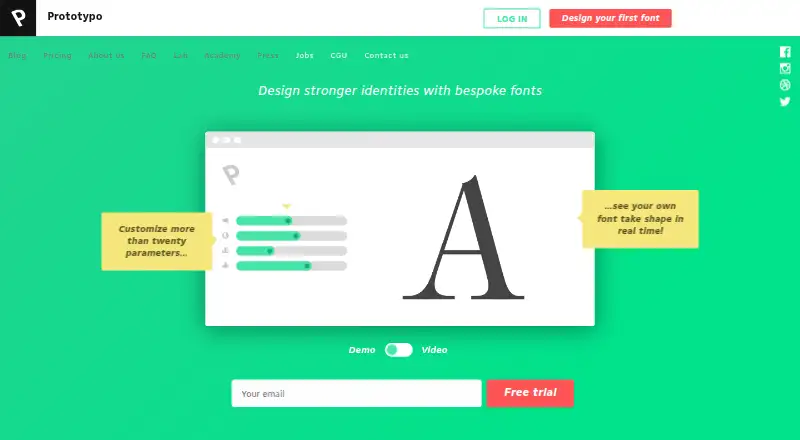
Prototypo is an online app for designing custom typefaces from parametric typefaces.
What Prototypo is
Prototypo is an online app for designing custom typefaces from parametric typefaces. Designers can start with Prototypo Fell, Prototypo Grotesk, Prototypo Elzevir, or Spectral, then adjust more than thirty parameters, including thickness, aperture, and roundness. Separate adjustments are available for serif details. Letters can be edited individually or in groups, and the app includes a manual editing tool. Fonts export in OTF format and can be installed on macOS, Windows, and Linux, or displayed in a browser. A Chrome extension previews font changes live on websites, and fonts can be exported directly to Glyphr Studio for further editing. Prototypo supports the Latin Extended 3 glyph set, but does not offer cursive templates or allow users to import their own fonts for modification. Exported fonts use a CC0 license, permitting copying, modification, distribution, and commercial use without permission. The Free plan is for one user, has a limited parameter range, and includes one week of support. Pro is listed at $8.25 a month, with full-range parameters and unlimited exports.
Good
- Starts from four parametric typefaces.
- Offers more than thirty font parameters.
- Exports OTF fonts for desktop installation or browser display.
- Chrome extension previews changes on websites.
- Exported fonts use a CC0 license.
Watch out
- No cursive font templates are offered.
- Users cannot import fonts to modify.
- Free plan limits parameter range.
- Free plan includes one week of support.
Who it suits
It suits designers who want to customize typefaces from parametric starting points and export OTF fonts. The listed tools include browser previews and further editing through Glyphr Studio.
Verdict
Prototypo offers adjustable typeface templates, glyph editing, and OTF export, with a free plan and paid options. Its lack of cursive templates and font importing limits the starting material designers can use.
Plans and prices
From Prototypo's own pricing page, checked 8 Oct 2026.
| Plan | Price | What it gives you |
|---|---|---|
| Free | Free | 1 user · One week support · Limited parameter range · Free forever! |
| Pro | $8.25 a month | 1 user · 48h support · Full-range parameters · Unlimited font exports · Manual editing · Glyph individualization · Web preview extension · Monthly billing and yearly billing options are shown; the page does not label which price corresponds to each option. |
| Team | $49.96 a month | Custom plan and pricing for larger teams · 24h support · Full-range parameters · Unlimited font exports · Manual editing · Glyph individualization · Web preview extension · Kickoff course · Team management and user roles · Collaborative tools (coming soon) · Monthly billing and yearly billing options are shown; the page does not label which price corresponds to each option. |
The facts
Each one read from Prototypo's own pages, with the date it was checked.
Where it runs
- Browser requirement
- The FAQ says the app requires an up-to-date version of Chrome, Firefox, or Opera; Safari support was described as upcoming.checked 8 Oct 2026
The company
- Company origin
- The maker's press page says Prototypo was created in May 2013 in Lyon, France.checked 8 Oct 2026
- Font ownership
- The maker says exported fonts use a CC0 license, allowing copying, modification, distribution, and commercial use without permission.checked 8 Oct 2026
- Founded
- 2009checked 28 Sep 2026
What it does
- Export and compatibility
- Fonts export in OTF format and can be installed on macOS, Windows, and Linux or displayed in a browser.checked 8 Oct 2026
- Extension
- A Chrome extension lets users preview font changes live on any website.checked 8 Oct 2026
- Font controls
- The app offers more than thirty parameters, including thickness, aperture, and roundness, with separate serif adjustments.checked 8 Oct 2026
- Glyph editing
- Users can individually modify letters or groups of letters, and the FAQ also describes a manual editing tool.checked 8 Oct 2026
- Import limit
- Users cannot import their own fonts to modify them because Prototypo uses coded letter templates and algorithms.checked 8 Oct 2026
- Integration
- Prototypo can export fonts directly to Glyphr Studio for further editing.checked 8 Oct 2026
- Parametric fonts
- Users can start with four parametric typefaces: Prototypo Fell, Prototypo Grotesk, Prototypo Elzevir, and Spectral.checked 8 Oct 2026
- Product
- Prototypo is an online app that lets designers customize their own typeface.checked 8 Oct 2026
- Security and data
- The terms say the payment provider retains card details and Prototypo does not keep bank details; the linked privacy policy could not be opened.checked 8 Oct 2026
- Support
- The FAQ says users may contact the team regardless of subscription, and company plan subscribers receive 24-hour premium support.checked 8 Oct 2026
- Supported glyphs
- The FAQ says Prototypo supports the Latin Extended 3 glyph set and does not currently offer cursive font templates.checked 8 Oct 2026
The full review of Prototypo
Prototypo is an online typeface-design app for shaping new fonts from adjustable templates. It suits designers who want to customize and export a typeface without building every letter from scratch. Its template-led approach is useful for exploration, but not for editing an imported font or starting with cursive forms.
Overview
Choose from four starting designs—Fell, Grotesk, Elzevir and Spectral—then adjust more than 30 parameters, including thickness, aperture and roundness. Separate serif adjustments and individual or grouped glyph editing give room to refine the result beyond broad stylistic changes. The trade-off is fundamental: Prototypo’s coded templates constrain the starting material, and users cannot import their own fonts.
Exported fonts are OTF files that can be installed on macOS, Windows or Linux, or displayed in a browser. The maker says exports carry a CC0 license, permitting commercial use, copying, modification and distribution without permission. Prototypo supports Latin Extended 3, but has no cursive templates.
Key features
- Parametric design: More than 30 controls, including thickness, aperture and roundness, make it possible to explore substantial variations within the supplied designs. That is a good fit for adapting a template, not for drawing a wholly original typeface from a blank canvas.
- Glyph editing: Users can modify individual letters or groups, with manual editing and glyph individualization included in Pro and Team. These tools help address characters that do not respond well to overall parameter changes.
- Live website preview: A Chrome extension previews font changes on websites, helping designers judge a typeface in context. The app itself requires an up-to-date Chrome, Firefox or Opera browser; Safari support was described as upcoming.
- Further editing: Fonts can be exported directly to Glyphr Studio for additional work, a useful handoff for users whose design needs extend beyond Prototypo’s template system.
Pricing
Prototypo has a free plan and a free trial. The Free plan costs nothing, forever, for one user, with a limited parameter range and one-week support. It is a sensible way to explore the workflow, but the restricted controls and lack of the paid editing features make it a limited choice for sustained font work.
Pro costs $8.25 a month and supports one user. It adds full-range parameters, unlimited font exports, manual editing, glyph individualization and the web preview extension, with 48-hour support. Monthly and yearly billing options are shown, but the price is not tied to either option. Pro is the relevant tier for an individual who needs the full toolset; the free plan gives up both parameter range and those listed editing and preview features.
Team costs $49.96 a month and includes full-range parameters, unlimited exports, manual editing, glyph individualization and 24-hour support. Larger teams have custom plans and custom pricing. The displayed Team price is not tied to a billing option, and collaboration level is none, so this tier should not be mistaken for shared editing tools. Company plan subscribers receive 24-hour premium support.
Platforms
Prototypo is available on the web, Windows, macOS and Linux, as well as through a Chrome extension. OTF exports can be installed on the three desktop operating systems or displayed in a browser. The need for a current Chrome, Firefox or Opera browser narrows the browser choice despite the broad platform support.
Who it's for
Prototypo is best for individual designers who want to customize one of its four parametric typefaces, refine particular glyphs and export a usable OTF font. Pro makes more sense when the full parameter range, manual editing and unlimited exports matter. Look elsewhere if the job starts with an existing font, calls for cursive templates, or requires collaboration features.
Pros and cons
- Pros: Four starting designs and more than 30 controls offer a structured way to customize letterforms.
- Pros: OTF export, individual glyph editing and browser preview connect design adjustments to practical use.
- Pros: The maker’s CC0 licensing allows commercial use and modification without permission.
- Cons: No font importing means existing typefaces cannot be revised in the app.
- Cons: No cursive templates limits its usefulness for script-style projects.
- Cons: The free plan restricts parameters and support, while collaboration is not provided.
Alternatives
For a broader comparison, see Font Design Software.
- FontBob is another freemium option, with a free tier and a $7 a month Pro plan; consider it if its drawing, spacing, preview and OTF export offering better matches the workflow.
- FontMaker has a free plan and no free trial; consider it if its free-tier character allowance suits the project.
- Counterpunch is a free, GPLv3-licensed editor usable without registration; choose it if open-source editing without an account is the priority.
- Birdfont offers a free open-source plan with TTF and monochrome SVG fonts, kerning, ligature substitutions, alternates and SVG import; consider it when those font features or SVG import matter.
- Calligraphr has a free plan with one concurrent font, 75 characters per font and two variants per character; consider it if those limits fit the intended project.
- Fontra is free/libre, open source, browser-based and cross-platform; choose it if that combination is a better fit.
- Runebender is free and open source, with a native editor and experimental browser build; consider it if alpha software is acceptable.
- FontForge is free and open source, with source access and permission to redistribute; consider it if those terms are the priority.
Verdict
Choose Prototypo if you want to turn one of its four templates into a customizable, exportable typeface, with glyph-level correction available on Pro. Its main constraint is also its defining one: designs must begin with its coded templates. For editing an existing font, creating cursive forms or working collaboratively, another tool is the better choice.
Alternatives to Prototypo
- 1

Counterpunch
Free planOpen sourceWebAPILinuxmacOS8.0From €5 a month - 2
FontBob
Free planAndroidiOSWebLinux7.9From $7 a month - 3
Calligraphr
Free planWebmacOSWindows7.6From £8 a month - 4
Fontra
Free planOpen sourceWebLinuxmacOSSelf-hosted7.5Free plan - 5
FontMaker
Free planAndroidiOSWebLinux7.3From $3.99 a month - 6
Birdfont
Free planLinuxmacOSWindows6.7$4.99 one-time