
Birdfont
Birdfont is a font editor for creating vector graphics and exporting TTF, OTF, and SVG fonts.
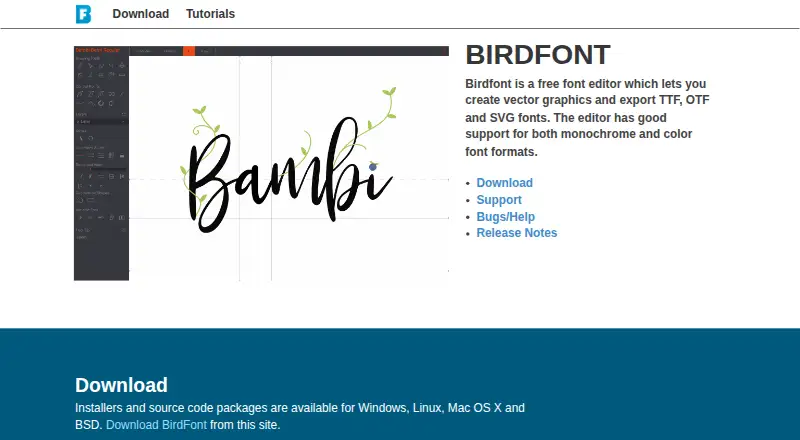
What Birdfont is
Birdfont is a font editor for creating vector graphics and exporting TTF, OTF, and SVG fonts. It runs on Linux, Windows, and macOS, and supports monochrome and color font formats. SVG files can be imported from Inkscape and Adobe Illustrator. The Open Source plan is free and includes TTF and monochrome SVG fonts, kerning, ligature substitutions, alternates, SVG import, and commercial use. The Freeware plan allows users to create free fonts under the SIL Open Font license. Commercial costs $4.99, paid once and covers commercial fonts and one year of upgrades; the purchased version continues working afterward. Plus costs $9.99, paid once and adds color fonts, OpenType SVG, OTF, COLR/CPAL, single-stroke CNC fonts, and variable fonts. Plus can export multiple static fonts from a variable master font. Birdfont is also available through Steam. The app does not collect user data by default, though optional crash reports are available. Users can seek help or report bugs through email, social channels, or GitHub issues.
Good
- Runs on Linux, Windows, and macOS.
- Imports SVG files from Inkscape and Adobe Illustrator.
- Free Open Source plan includes commercial use.
- App does not collect user data by default.
Watch out
- Commercial costs $4.99, paid once.
- Plus costs $9.99, paid once.
- No free trial is listed.
Who it suits
Birdfont suits people who want to create fonts and vector graphics on Linux, Windows, or macOS. Its free plans cover different font-use cases, while Plus adds color and variable-font capabilities.
Verdict
Birdfont offers free options alongside paid editions with additional font formats and capabilities. Check which plan covers the intended font use and formats before choosing.
Plans and prices
From Birdfont's own pricing page, checked 30 Sep 2026.
| Plan | Price | What it gives you |
|---|---|---|
| Freeware | Free | Binary version · create free fonts under the SIL Open Font license |
| Open Source | Free | Source code under GNU GPL · TTF and monochrome SVG fonts · kerning · ligature substitutions · alternates · SVG import · commercial use |
| Commercial | $4.99, paid once | Commercial fonts · TTF and monochrome SVG fonts · kerning · ligature substitutions · alternates · SVG import · Upgrades for one year; purchased version continues working afterward |
| Plus | $9.99, paid once | Commercial fonts · color fonts · OpenType SVG · OTF fonts · COLR/CPAL · single-stroke CNC fonts · variable fonts · Upgrades for one year; purchased version continues working afterward |
The facts
Each one read from Birdfont's own pages, with the date it was checked.
What it does
- Color support
- The editor supports both monochrome and color font formats.checked 30 Sep 2026
- Development
- BirdFont is developed by Johan Mattsson and is written in Vala with around 124,000 lines of code.checked 30 Sep 2026
- Distribution
- Birdfont is also available through Steam.checked 30 Sep 2026
- OpenType
- The Plus version supports OTF fonts with OpenType CFF outlines and OpenType SVG color fonts.checked 30 Sep 2026
- Privacy
- The BirdFont app does not collect user data by default, with optional crash reports available.checked 30 Sep 2026
- Product
- Birdfont is a free font editor for creating vector graphics and exporting TTF, OTF and SVG fonts.checked 30 Sep 2026
- Purchase records
- Purchase information and receipts are stored when a commercial version is bought.checked 30 Sep 2026
- Subscription
- A PayPal subscription provides access to the latest version and all upgrades while the subscription lasts.checked 30 Sep 2026
- Support
- Users can report bugs or get help by email, Mastodon, Twitter, Facebook or GitHub issues.checked 30 Sep 2026
- Supported systems
- Birdfont runs on Linux, Windows and Mac OS.checked 30 Sep 2026
- SVG workflow
- Birdfont can import SVG files from Inkscape and Adobe Illustrator.checked 30 Sep 2026
- Variable fonts
- The Plus version supports variable fonts and can export multiple static fonts from one variable master font.checked 30 Sep 2026
- Website data
- The website stores cookies for login purposes and keeps a regular request log.checked 30 Sep 2026
The full review of Birdfont
Birdfont is a desktop editor for designing fonts from vector graphics, with SVG import and font export. It suits designers who want a free starting point or a low-cost route to commercial typefaces. The main trade-off is clear: standard plans cover monochrome fonts, while color and variable-font work calls for Plus.
Overview
Birdfont combines glyph creation with a workflow for importing SVG artwork from Inkscape and Adobe Illustrator. It runs on Linux, Windows and macOS, giving desktop font makers a choice of operating system. Its free tiers and one-time paid licenses make it approachable, but buyers should match the plan to both the font’s intended use and its output formats.
Key features
SVG-based design
Importing SVG files lets designers build on vector artwork rather than recreate every glyph in Birdfont. The Open Source and Commercial plans include SVG import, kerning, ligature substitutions and alternates, alongside TTF and monochrome SVG fonts. That is a useful foundation for conventional type design, though it does not include the color and OTF capabilities reserved for Plus.
Color and variable fonts
Plus adds color fonts, OpenType SVG, OTF with OpenType CFF outlines, COLR/CPAL, single-stroke CNC fonts and variable fonts. It can also export multiple static fonts from one variable master. Those additions make Plus the relevant choice for designers working with color or variable type; the lower tiers are a better fit when monochrome TTF or SVG output is enough.
Privacy and support
The app does not collect user data by default, though users can opt into crash reports. The website stores login cookies and a regular request log, and commercial purchases generate stored purchase information and receipts. Help and bug reports are available by email, Mastodon, Twitter, Facebook and GitHub issues.
Pricing
Birdfont uses a freemium model, with two free options and two one-time purchases. Paid purchases include upgrades for one year; the purchased version continues working afterward. A PayPal subscription provides the latest version and all upgrades for as long as the subscription remains active.
- Open Source — free: Source code under GNU GPL, commercial use, TTF and monochrome SVG fonts, kerning, ligature substitutions, alternates and SVG import. This is the strongest free fit for users who want source access and the option to make commercial fonts.
- Freeware — free: Binary version for creating free fonts under the SIL Open Font license. It costs nothing, but its license terms make it unsuitable for commercial font projects.
- Commercial — $4.99, paid once: Commercial fonts, TTF and monochrome SVG fonts, kerning, ligature substitutions, alternates and SVG import. It is the lowest-cost paid route for commercial output, but does not include Plus’s color, OTF or variable-font features.
- Plus — $9.99, paid once: Commercial fonts, color fonts, OpenType SVG, OTF, COLR/CPAL, single-stroke CNC fonts and variable fonts. Choose it when those formats or workflows are central; otherwise Commercial costs less and covers the listed monochrome features.
There is no free trial. The one-year upgrade period matters to buyers who want ongoing upgrades, while the perpetual ability to keep using the purchased version avoids making continued use depend on renewal.
Platforms
Birdfont runs on Linux, Windows and macOS. It is also available through Steam, which gives desktop users another way to obtain it.
Who it's for
Birdfont is a good fit for independent designers and small type projects that need vector-based glyph creation, SVG import and a clear path from free use to commercial licensing. Open Source suits users comfortable with its GNU GPL terms; Freeware is specifically for free fonts under the SIL Open Font license. Commercial fits paid monochrome font work, while Plus is aimed at creators who need color, OTF or variable fonts. It is less suitable for anyone who needs collaboration: Birdfont has no collaboration support.
Pros and cons
- Pros: Linux, macOS and Windows support gives desktop users broad platform coverage.
- Pros: The free Open Source tier permits commercial use and includes core type features, unlike the Freeware tier’s restriction to free fonts under the SIL Open Font license.
- Pros: SVG import from Inkscape and Illustrator can incorporate existing vector artwork into a font project.
- Pros: One-time paid plans continue working after the included year of upgrades ends.
- Cons: Color, OTF and variable-font capabilities require the more expensive Plus plan.
- Cons: Freeware’s license terms rule it out for commercial font work, so free commercial use means choosing Open Source instead.
- Cons: No collaboration support makes Birdfont a weaker fit for teams that need shared work.
Alternatives
For a broader category comparison, browse Font Design Software.
- FontBob is a freemium alternative for readers who want drawing, spacing, preview, OTF export and sharing, or who need its listed Android, iOS and web availability alongside desktop platforms.
- Fontra is a free, libre open-source, browser-based option for readers who prefer a cross-platform web workflow.
- Runebender is a free option for readers willing to consider alpha software and an experimental browser build alongside its native editor.
- FontForge is a free and open-source alternative for readers who value source access and permission to redistribute.
- Glyphr Studio is free and open source, with no sign-up, for readers seeking a self-hosted or web option.
- Bezy is another free option for Linux, macOS or web users.
- FontLab 8 is a paid alternative with a free trial for macOS and Windows users.
- FontCreator is a paid alternative with a free trial for macOS and Windows users.
Verdict
Choose Birdfont if you want a desktop font editor with SVG import, broad desktop support and a free route that can cover commercial use. Its strongest case is the affordable progression from core monochrome tools to color and variable-font capabilities. Look elsewhere if team collaboration is essential, or if the Freeware license is the only free tier you are considering for a commercial project.
Alternatives to Birdfont
- 1

Counterpunch
Free planOpen sourceWebAPILinuxmacOS8.0From €5 a month - 2

FontBob
Free planAndroidiOSWebLinux7.9From $7 a month - 3
Calligraphr
Free planWebmacOSWindows7.6From £8 a month - 4

Fontra
Free planOpen sourceWebLinuxmacOSSelf-hosted7.5Free plan - 5
FontMaker
Free planAndroidiOSWebLinux7.3From $3.99 a month - 6
Prototypo
Free planWebExtensionLinuxmacOS7.0From $8.25 a month