
Counterpunch
Counterpunch is a browser-based studio for creating and editing fonts, including fonts with complex-script shaping such as Arabic and Devanagari.
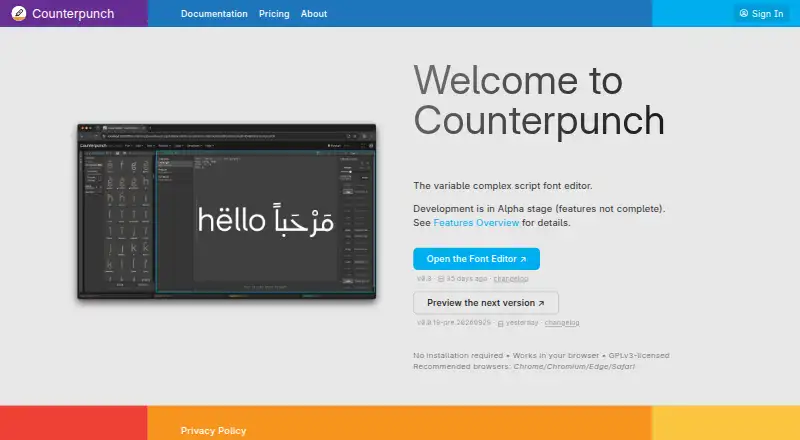
What Counterpunch is
Counterpunch is a browser-based studio for creating and editing fonts, including fonts with complex-script shaping such as Arabic and Devanagari. Its editor is in Alpha, so features are still being developed. Users can edit components in place and inspect glyphs with code-driven dynamic filters. A Python environment is included, and the maker describes user code as able to catch and repair broken scripts. Counterpunch is built with variable fonts in mind, including weight, width, and custom axes. Its AI assistant generates Python scripts that run locally rather than sending font data to AI servers. The editor is GPLv3-licensed and can be used without registration. The maker says font projects stay on the user's device and describes data collection as minimal. Documentation supports macOS, Windows, and Linux, but says the app is not optimized for mobile operating systems. Installing it as a Progressive Web App allows offline editing of fonts on disk, Python execution, and preview compilation. The AI assistant still needs an internet connection and a signed-in account. The free editor does not include the assistant; the Free Trial plan includes 0.50 EUR free AI-agent credit each month, which does not accumulate.
Good
- Supports Arabic and Devanagari shaping
- Includes in-place component editing and glyph filters
- Built with variable-font axes in mind
- Installed PWA can edit fonts offline
- Font projects stay on the user's device, according to the maker
Watch out
- Editor is in Alpha
- Not optimized for mobile operating systems
- Free editor excludes the AI assistant
- AI assistant requires a connection and signed-in account
Who it suits
It suits font designers who need complex-script shaping, variable-font editing, or a Python environment. It is not optimized for mobile operating systems.
Verdict
Counterpunch brings font editing, scripting, and offline work into a browser-based studio. Its Alpha status and mobile limitation are important considerations for choosing it.
Plans and prices
From Counterpunch's own pricing page, checked 15 Oct 2026.
| Plan | Price | What it gives you |
|---|---|---|
| Free | Free | No account required · Editor use forever · AI assistant unavailable · €0 forever |
| Free Trial | Free | Registered account · €0.50 AI-agent credit monthly · Credit resets and does not accumulate · No overage · €0 forever |
| Basic | €5 a month | Half subscription price included as AI-agent credit · Credit expires at billing-period end · Pay as you go after credit · Supports editor development · €5 per month excl. VAT |
The facts
Each one read from Counterpunch's own pages, with the date it was checked.
What it does
- AI assistant
- The assistant generates Python scripts that run locally instead of sending font data to AI servers.checked 9 Oct 2026
- AI assistant privacy
- The assistant generates Python that runs locally and the product says font data is not sent to AI servers.checked 15 Oct 2026
- AI conversation limitation
- Assistant conversations are currently discarded when a new conversation is started and are not saved.checked 15 Oct 2026
- AI operation controls
- The assistant can inspect fonts by default, while data-changing Python execution requires explicitly enabling editing.checked 15 Oct 2026
- Alpha status
- The project identifies itself as alpha software with incomplete features.checked 15 Oct 2026
- Complex-script shaping
- It provides bidirectional shaping aimed at Arabic, Devanagari, and other complex writing systems.checked 15 Oct 2026
- Component editing
- Components can be edited directly in the context where they are used.checked 15 Oct 2026
- Desktop support
- The documentation says the browser app supports macOS, Windows, and Linux, and is not optimized for mobile operating systems.checked 9 Oct 2026
- Documentation maturity
- The repository rates documentation as partial and says screenshots are poor.checked 15 Oct 2026
- Dynamic glyph filters
- Glyph-overview filters are programmable with code rather than limited to fixed controls.checked 15 Oct 2026
- Editing
- Users can edit components in place and inspect fonts with code-driven dynamic glyph filters.checked 9 Oct 2026
- Export limitation
- Binary export currently covers variable fonts, while static-instance export is not yet available.checked 15 Oct 2026
- File handling
- The documentation says font data, edits, and scripts stay on the user's computer and are not uploaded for editing or compilation.checked 9 Oct 2026
- Licence
- The editor is released as open source under GPLv3.checked 15 Oct 2026
- Limit: early usability
- A TypeDrawers participant reported not understanding how to start a new font and managed only to open an existing one after two partial days of use.checked 15 Oct 2026
- Limit: immature drawing and features
- The creator’s Reddit announcement says automatic OpenType features are missing and drawing tools remain very basic during alpha.checked 15 Oct 2026
- Local data architecture
- Font data, edits, and scripts stay on the computer and are not uploaded for editing or compilation.checked 15 Oct 2026
- Mobile limitation
- The documentation says Counterpunch is not optimized for mobile operating systems and recommends a desktop computer.checked 15 Oct 2026
Where it runs
- Browser operation
- The editor runs without installation or a desktop download.checked 15 Oct 2026
- Limit: mobile and browser dependence
- The creator states that mobile browsers are unsupported and that some other browsers lack essential disk-access capabilities.checked 15 Oct 2026
The company
- Company size
- LinkedIn lists Counterpunch Font Editor as a self-employed organization with one employee.checked 15 Oct 2026
- Founded
- LinkedIn lists the Counterpunch Font Editor organization as founded in 2026.checked 15 Oct 2026
- Maker headquarters
- Yanone’s studio, which develops Counterpunch, is based in Berlin, Germany.checked 15 Oct 2026
- Maker identity
- Yanone’s site identifies Jan Gerner (Yanone) as Counterpunch’s principal engineer.checked 15 Oct 2026
The full review of Counterpunch
Counterpunch is a browser-based studio for making and editing fonts, with an emphasis on complex scripts, variable fonts, and Python tools. It is best suited to desktop font makers who want local, code-friendly workflows. The focused feature set is promising, but its Alpha status calls for caution where dependable production work matters.
Overview
Counterpunch brings component editing, code-driven glyph filters, and font scripting into one browser editor. Its bidirectional shaping support for Arabic and Devanagari makes it relevant to type work that needs more than basic Latin glyph handling. Variable fonts are a core consideration too, with weight, width, and custom axes in scope.
The editor is GPLv3-licensed and does not require registration. The maker says font data, edits, and scripts stay on the user's computer and are not uploaded for editing or compilation, and describes data collection as minimal. That local approach is useful for people working with sensitive or unreleased fonts, though it does not make every feature offline: the AI assistant needs a connection and a signed-in account.
Key features
In-place component editing and dynamic filters driven by code support detailed inspection and repeatable glyph work. The Python environment can help users catch and repair broken scripts, but its value depends on comfort with code; it is a narrower fit for designers seeking a purely visual workflow.
The AI assistant generates Python scripts that run locally, keeping font data off AI servers. That is a considered privacy choice, but access to the assistant depends on an account, connectivity, and AI agent credit. Offline, an installed Progressive Web App can open and edit fonts on disk, run Python, and compile previews, so the core workflow has real utility away from a network.
Pricing
The Free plan costs nothing and provides font editor usage forever without an account. It is the clearest fit for someone who wants the editor's core tools and does not need the AI assistant.
Free Trial costs nothing and requires a registered account. It includes €0.50 free AI agent credit every month; the credit resets monthly and does not accumulate, and there is no pay-as-you-go overage. That makes it a way to try the assistant within a fixed allowance, rather than a paid subscription or a conventional time-limited trial.
Basic costs €5 a month, billed Monthly, and includes AI agent credit equal to half the subscription price. Credit expires at the end of the billing period, with pay-as-you-go charges after it runs out. It suits regular assistant use, but readers should account for usage beyond the included credit. The free editor plan gives up AI access; the paid plan's value therefore rests on whether generated scripts justify its recurring cost.
Platforms
Counterpunch is a web app documented for macOS, Windows, and Linux browsers. It is not optimized for mobile operating systems, making it a poor choice for font editing on a phone or tablet. Installing it as a Progressive Web App enables the described offline workflow on fonts stored on the device.
Who it's for
Counterpunch fits desktop type designers who need complex-script shaping, variable-font work, or a scriptable editor and who are comfortable with an Alpha product. Its GPLv3 license, no-registration free plan, and local editing model also suit users who value control over their tools and files. Those needing a mature, mobile-ready editor or a shared team workspace should look elsewhere; collaboration is not supported.
Pros and cons
- Pros: Bidirectional shaping for Arabic and Devanagari supports font work across complex scripts.
- Pros: Local file handling and offline PWA support allow editing, scripting, and preview compilation without a network.
- Pros: GPLv3 licensing and free editor use without registration lower barriers to trying it.
- Cons: Alpha status means the editor is still developing, which is a concern for production-critical workflows.
- Cons: The editor is not optimized for mobile, and collaboration is unavailable.
- Cons: AI access requires a connection and account; Basic adds metered credit that can lead to pay-as-you-go charges.
Alternatives
Browse the Font Design Software category to compare other font tools. Choose FontBob if you want a freemium option spanning mobile and desktop platforms, with free drawing, spacing, preview, and OTF export. FontMaker is another freemium option across mobile and desktop platforms. Prototypo may suit someone seeking a freemium editor with a free trial and a limited free parameter range. Pick Birdfont for a free, open-source desktop option with TTF and monochrome SVG fonts, kerning, ligature substitutions, alternates, and SVG import.
Calligraphr is a freemium option for macOS, web, and Windows, with a free tier that limits each font to 75 characters and one concurrent font. Fontra is a free, libre, open-source browser-based option that also supports self-hosting. Runebender offers free open-source software with a native editor and experimental browser build. FontForge is a free, open-source desktop option for Linux, macOS, and Windows.
Verdict
Counterpunch is a strong candidate for desktop font makers who need complex-script shaping, variable-font support, and local Python scripting in a browser studio. Its offline workflow and GPLv3 license add practical control over projects. Choose it with the understanding that the editor remains in Alpha; for a settled production tool, mobile editing, or collaboration, another option is a better fit.
Getting started
- Open https://counterpunch.space/ in a supported browser on macOS, Windows, or Linux.
- Use the Free plan without registering, or register for the Free Trial plan to access monthly AI-agent credit.
- Install the app as a Progressive Web App if you want to edit local fonts offline.
- Sign in and connect to the internet to use the AI assistant.
Limits worth knowing
The Free plan allows font editor use but does not include the AI assistant. The Free Trial plan provides €0.50 in AI-agent credit each month; credit resets monthly and does not accumulate, and there is no pay-as-you-go overage. Basic costs €5 a month and includes AI-agent credit equal to half the subscription price; that credit expires at the end of the billing period, with pay-as-you-go charges after it runs out.
Questions
How much does Counterpunch cost?
The Free plan is free. The Free Trial plan is also free, and Basic costs €5 a month.
What does the free plan include?
The Free plan provides font editor usage without requiring a user account. It does not include the AI assistant.
Which platforms does Counterpunch support?
The browser app supports macOS, Windows, and Linux. It is not optimized for mobile operating systems.
Can I use Counterpunch offline?
After installing it as a Progressive Web App, you can edit fonts on disk, run Python, and compile previews offline. The AI assistant requires a connection and a signed-in account.
Is Counterpunch open source?
The editor is GPLv3-licensed and can be used without registration.
What happens to my font files and edits?
The maker says font data, edits, and scripts stay on your computer and are not uploaded for editing or compilation.
Alternatives to Counterpunch
- 1

FontBob
Free planAndroidiOSWebLinux7.9From $7 a month - 2
Calligraphr
Free planWebmacOSWindows7.6From £8 a month - 3

Fontra
Free planOpen sourceWebLinuxmacOSSelf-hosted7.5Free plan - 4
FontMaker
Free planAndroidiOSWebLinux7.3From $3.99 a month - 5
Prototypo
Free planWebExtensionLinuxmacOS7.0From $8.25 a month - 6

Birdfont
Free planLinuxmacOSWindows6.7$4.99 one-time