
FontBob
FontBob is a browser-based font editor for designers who want to create and prepare typefaces without installing software.
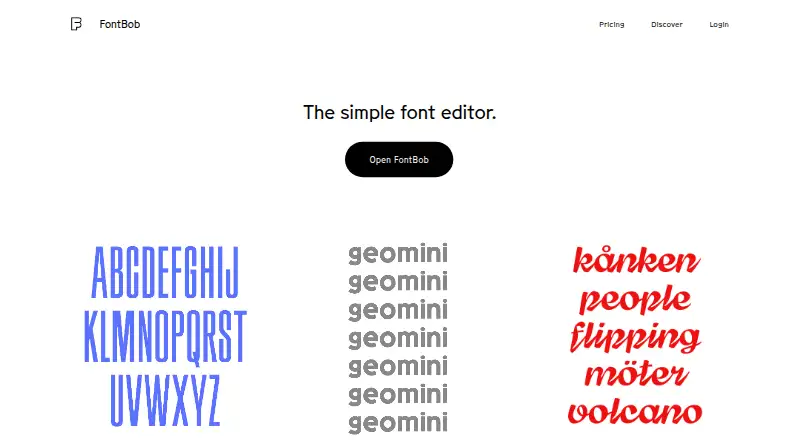
What FontBob is
FontBob is a browser-based font editor for designers who want to create and prepare typefaces without installing software. You can sketch glyphs on an infinite canvas or look them up in a glyph table, then use automatic letter spacing, prefilled metadata, autosave, and version history in your workflow. The site lists OTF, UFO, and variable font downloads, and lets you share font links or publish specimens. Interactive tutorials and shared fonts are available to explore. The free plan includes drawing, spacing, preview, OTF export, production-ready fonts, and sharing. FontBob Pro costs $7 a month and adds an unlimited glyph set, variable font export, TTF, OTF, and UFO imports, ligatures, and alternates. Studio Beta includes smart fonts, premium templates, and Pro features; its price is not listed. The pricing page poses a question about a Pro trial but does not provide an answer.
Good
- Starts in a browser with no installs required
- Free plan includes OTF export and sharing
- Autosave and version history are included
- Pro adds variable export and an unlimited glyph set
Watch out
- Pro costs $7 a month
- Studio Beta price is not listed
Who it suits
FontBob suits designers creating and refining fonts in a browser, especially those who want to sketch glyphs, manage versions, and share specimens. Pro may suit users who need an unlimited glyph set, variable export, or import and OpenType features.
Verdict
FontBob combines browser-based glyph drawing with spacing, metadata, and version history. The free plan covers basic creation and sharing, while Pro adds expanded font tools for $7 a month.
Plans and prices
From FontBob's own pricing page, checked 15 Oct 2026.
| Plan | Price | What it gives you |
|---|---|---|
| Free | Free | Drawing, spacing, preview · OTF export · production-ready fonts · sharing · Free |
| FontBob Pro | $7 a month | Unlimited glyph set · variable font export · TTF, OTF, and UFO import · ligatures · alternates · $7 / month |
| FontBob Studio Beta | Priced on request | Smart fonts · premium templates · everything in Pro |
The facts
Each one read from FontBob's own pages, with the date it was checked.
What it does
- API and SDK availability
- The official pages opened for this research provide no public API or SDK documentation.checked 15 Oct 2026
- Build tooling
- Geomini documents GitHub Actions builds plus make commands for building, testing and proof generation.checked 15 Oct 2026
- Documentation support
- Carl Enlund offered to help set up FontBob for a workshop and write documentation for scanned-image workflows via [email protected].checked 15 Oct 2026
- Drawing
- Users can sketch glyphs on an infinite canvas and search a glyph table.checked 3 Oct 2026
- Export formats
- The site advertises OTF, UFO and variable-font downloads.checked 15 Oct 2026
- Exports
- The home page lists OTF, UFO, and variable font downloads.checked 3 Oct 2026
- Font license
- The Geomini font files are released under the SIL Open Font License 1.1; this does not establish an open-source license for the FontBob editor.checked 15 Oct 2026
- Geomini project
- The FontBob team describes Geomini as a font published to make type design more accessible.checked 15 Oct 2026
- Geomini release
- The repository records version 1.000 and an initial Google Fonts submission dated 7 February 2026.checked 15 Oct 2026
- GitHub presence
- The FontBob GitHub organization is located in Sweden and shows four public repositories.checked 15 Oct 2026
- Glyph drawing
- Users can sketch glyphs on an infinite canvas.checked 15 Oct 2026
- Glyph navigation
- A searchable glyph table is provided for finding characters.checked 15 Oct 2026
- Independent directory classification
- Font Tools lists FontBob as a browser-based font editor in beta.checked 15 Oct 2026
- Independent feature report
- A creator post describes a browser vector editor with instant text preview, spacing, basic kerning, weight-axis variable fonts, cloud saving, OTF export and remixable shared fonts.checked 15 Oct 2026
- Learning
- The home page lists interactive tutorials and shared fonts to explore.checked 3 Oct 2026
- Learning content
- The home page points to interactive tutorials and shared fonts to explore.checked 15 Oct 2026
- Limit: clunky interface
- Type expert Thomas Phinney described FontBob's interface choices as clunky and counterintuitive and said he could not recommend it.checked 15 Oct 2026
- Limit: incomplete vector workflow
- The creator acknowledges that the pen and brush tools are intentionally simple, many full-vector controls are missing and brush smoothing is not automatic.checked 15 Oct 2026
- Limit: usability confusion
- A tester reported being unable to work out how to draw desired glyphs after about 15 minutes.checked 15 Oct 2026
Where it runs
- Browser-based
- The editor starts in a browser and requires zero installs.checked 3 Oct 2026
- Browser delivery
- The editor starts in a browser and the site says no installation is required.checked 15 Oct 2026
Money
- Free-tier scope
- The free tier covers drawing, spacing, preview, OTF export, production-ready output and sharing.checked 15 Oct 2026
The company
- Maker identity
- Carl Enlund identifies himself as a Stockholm design engineer building interactive tools including font editors.checked 15 Oct 2026
- Maker timeline
- Enlund's portfolio dates his work making type design accessible at FontBob from 2025 onward.checked 15 Oct 2026
The full review of FontBob
Overview
FontBob is a browser-based editor for drawing typefaces and moving them toward production. It is best suited to designers who want to work on glyphs without installing desktop software. Its free plan makes it practical to start and share a font, but advanced export and layout tools require Pro.
Key features
Glyphs can be sketched on an infinite canvas or found through a searchable glyph table. That pairing supports both freeform drawing and more deliberate work across a font’s character set. Automatic letter spacing, prefilled metadata, autosave, and version history address routine production tasks, so the editor is not limited to drawing alone.
FontBob supports variable fonts and OpenType layout tools. The free plan includes OTF export, while Pro adds variable font export, import of TTF, OTF, and UFO files, ligatures, and alternates. This makes the paid tier more relevant to designers developing an existing font or needing more sophisticated typographic behavior. Users can share font links and publish specimens; collaboration is basic, so this is better for sharing work than for extensive team workflows.
Interactive tutorials and shared fonts offer ways to learn and explore other work. They are useful companions to the editor, though the core case for choosing FontBob remains its browser-based drawing and production workflow.
Pricing
FontBob’s Free plan costs nothing. It includes drawing, spacing, preview, OTF export, production-ready fonts, and sharing. That is a meaningful starting point for individual creators who can work within the included glyph set and do not need variable font export or import tools.
FontBob Pro costs $7 a month and adds an unlimited glyph set, variable font export, TTF, OTF, and UFO import, ligatures, and alternates. It is the more capable choice for sustained font work that needs those features; the Free plan gives up that expanded glyph capacity and toolset. FontBob Studio Beta has custom pricing and includes smart fonts, premium templates, and everything in Pro. It is aimed at users who specifically need those additional tools. The Pro page raises the question of a free trial without stating trial terms.
Platforms
FontBob supports web, Windows, macOS, Linux, iOS, and Android. Because the editor starts in a browser and requires no installs, it is a flexible option across those platforms rather than a desktop-only workflow.
Who it's for
FontBob fits designers who want to sketch glyphs, prepare fonts, and share specimens from a browser, particularly those who can begin with the Free plan. Pro makes more sense for users who need an unlimited glyph set, variable font export, imports, ligatures, or alternates. Those seeking more than basic collaboration should look elsewhere.
Pros and cons
- Pros: Browser-based editing requires no installs, and the infinite canvas is paired with a searchable glyph table.
- Pros: The Free plan includes OTF export and sharing, while autosave, version history, spacing, and metadata support a fuller production workflow.
- Cons: Variable font export, import, ligatures, alternates, and an unlimited glyph set require the $7 a month Pro plan.
- Cons: Collaboration is basic, limiting its fit for team-centered font production.
Alternatives
For a wider comparison, browse Font Design Software. Choose Birdfont if you want a free, open-source editor with TTF and monochrome SVG fonts, kerning, ligature substitutions, alternates, SVG import, and commercial use under GNU GPL; it supports Linux, macOS, and Windows. Fontra is a free/libre open-source, browser-based, cross-platform option for Linux, macOS, Windows, and self-hosting.
Runebender costs nothing and offers a native editor plus an experimental browser build, but it is alpha software. FontForge is a free, open-source alternative with source code access and permitted redistribution on Linux, macOS, and Windows. For a free option on those same desktop platforms, Bitmap Font Editor is another alternative.
Prototypo is a freemium choice for web, Windows, macOS, and Linux. Shift and Type Light are free alternatives for Windows, macOS, and Linux.
Verdict
Choose FontBob if you want a browser-based way to draw and prepare fonts, with a useful free starting tier and a clear path to more advanced tools. Its strongest case is the combination of glyph work, production workflow, and sharing without an installation. Look elsewhere if basic collaboration is not enough or if you need Pro features without a monthly subscription.
Getting started
- Open https://fontbob.com/ in a browser.
- Start using the browser-based editor without installing software.
- Use the Free plan for drawing, spacing, preview, OTF export, production-ready fonts, and sharing.
- Choose FontBob Pro at $7 a month for its additional features.
- Choose Studio Beta for smart fonts, premium templates, and everything in Pro.
Limits worth knowing
The Free plan includes OTF export; variable font export and an unlimited glyph set are Pro features. TTF, OTF, and UFO imports, ligatures, and alternates are also listed with Pro.
Questions
Does FontBob have a free plan?
Yes. The Free plan costs nothing and includes drawing, spacing, preview, OTF export, production-ready fonts, and sharing.
How much does FontBob Pro cost?
FontBob Pro costs $7 a month.
What does Pro add?
Pro adds an unlimited glyph set, variable font export, TTF, OTF, and UFO imports, ligatures, and alternates.
Which platforms does FontBob support?
FontBob lists web, Windows, macOS, Linux, iOS, and Android.
What does Studio Beta include?
Studio Beta includes smart fonts, premium templates, and everything in Pro.
Alternatives to FontBob
- 1

Counterpunch
Free planOpen sourceWebAPILinuxmacOS8.0From €5 a month - 2
Calligraphr
Free planWebmacOSWindows7.6From £8 a month - 3

Fontra
Free planOpen sourceWebLinuxmacOSSelf-hosted7.5Free plan - 4
FontMaker
Free planAndroidiOSWebLinux7.3From $3.99 a month - 5
Prototypo
Free planWebExtensionLinuxmacOS7.0From $8.25 a month - 6

Birdfont
Free planLinuxmacOSWindows6.7$4.99 one-time