FontForge
FontForge is a free, open-source font editor for Windows, macOS, and GNU/Linux.
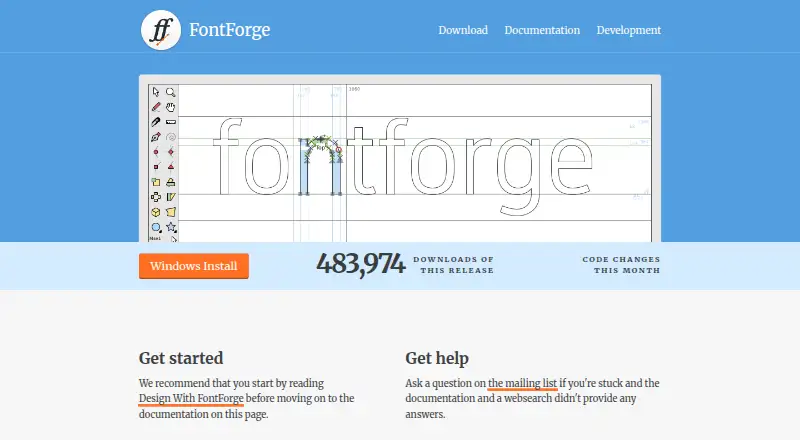
What FontForge is
FontForge is a free, open-source font editor for Windows, macOS, and GNU/Linux. It creates and modifies PostScript, TrueType, and OpenType fonts, saves fonts in multiple outline formats, and can generate bitmaps. Users can draw letter outlines and manage glyph metrics, ligatures, and related metadata. FontForge supports OpenType and Apple Advanced Typography tables, including GPOS and GSUB features. Its font, bitmap, and metrics views provide different ways to inspect and edit a typeface. The software also includes Python and a legacy native scripting interpreter for modifying fonts, while Python-package plugins can add tools to the Font View or Char View menus. Its command line accepts formats such as PostScript, TrueType, OpenType, Mac resource, bitmap, and SVG files. FontForge provides its source under a libre license and permits redistribution with or without a fee. The Mac installation requires OS X 10.15 or later; the Windows launcher may upset some antivirus and firewall applications.
Good
- Creates and modifies PostScript, TrueType, and OpenType fonts.
- Supports OpenType and Apple typography tables.
- Includes Python scripting and Python-package plugins.
- Source is available under a libre license.
Watch out
- Mac installation requires OS X 10.15 or later.
- Windows launcher may upset antivirus or firewall applications.
- Questions are directed to the mailing list.
Who it suits
FontForge may suit people creating or editing fonts who want access to outline, bitmap, metrics, and scripting tools. It is available across Windows, macOS, and GNU/Linux.
Verdict
FontForge provides font editing, format support, and scripting tools across major desktop platforms. Its Mac requirement and possible Windows security-software warnings are worth noting before installation.
Plans and prices
From FontForge's own pricing page, checked 30 Sep 2026.
| Plan | Price | What it gives you |
|---|---|---|
| Free and open source | Free | source code access · redistribution permitted |
The facts
Each one read from FontForge's own pages, with the date it was checked.
What it does
- Availability
- Releases are available for Windows, Mac and GNU+Linux, with developer builds also available.checked 30 Sep 2026
- File support
- The command line accepts formats including PostScript, TrueType, OpenType, Mac resource, bitmap and SVG files.checked 30 Sep 2026
- Font editing
- The editor lets users draw letter outlines and manage glyph metrics, ligatures and related metadata.checked 30 Sep 2026
- Font formats
- It creates and modifies PostScript, TrueType and OpenType fonts.checked 30 Sep 2026
- Output
- It saves fonts in many outline formats and generates bitmaps.checked 30 Sep 2026
- Plugins
- Plugins are Python packages that extend FontForge, often by adding entries to the Font View or Char View Tools menu.checked 30 Sep 2026
- Purpose
- FontForge is a free and open source font editor.checked 30 Sep 2026
- Scripting
- FontForge includes Python and a legacy native scripting interpreter for modifying fonts.checked 30 Sep 2026
- Source and license
- The project provides source code under a libre license and describes FontForge as libre software whose copies may be redistributed with or without a fee.checked 30 Sep 2026
- Support
- The homepage directs users to the mailing list for questions after consulting the documentation and web search.checked 30 Sep 2026
- Typography
- FontForge supports OpenType and Apple Advanced Typography tables, including GPOS and GSUB features.checked 30 Sep 2026
- Views
- The documentation describes font, bitmap and metrics views for inspecting and editing fonts.checked 30 Sep 2026
Where it runs
- Mac requirement
- The Mac installation page says OS X 10.15 or later is required.checked 30 Sep 2026
- Windows warning
- The Windows page says the launcher may upset some antivirus and firewall applications.checked 30 Sep 2026
The full review of FontForge
Overview
FontForge is a free, open-source editor for designing and modifying digital typefaces. It suits type designers and technically minded users who want control over glyphs, font data and scripting without a software fee. It is a capable cross-platform toolkit, though Mac users need a recent version of macOS and Windows users may encounter security-software warnings during installation.
Its work spans PostScript, TrueType and OpenType fonts, with bitmap generation alongside outline-format output. That breadth makes FontForge useful for both drawing letterforms and handling existing font files; it is less compelling for anyone who prioritizes a browser-first workflow or a simpler, tightly guided design process.
Compare it with other options in Font Design Software.
Key features
Glyph design and layout
The editor combines letter-outline drawing with tools for glyph metrics, ligatures and related metadata. Support for OpenType and Apple Advanced Typography tables—including GPOS and GSUB—gives users access to important layout features. Webfont export is also supported. This makes the program relevant beyond drawing individual glyphs, but the range of controls will best serve people prepared to work directly with font structure.
Views, scripts and extensions
FontForge provides font, bitmap and metrics views for examining and editing different aspects of a typeface. Python and a legacy native scripting interpreter can modify fonts, which is useful for repeatable or code-driven workflows. Python-package plugins can extend the application, often by adding commands to the Font View or Char View Tools menu; users should expect to rely on extensions only where they fit their workflow.
File handling
Alongside its PostScript, TrueType and OpenType work, the command line accepts Mac resource, bitmap and SVG files. It can save in multiple outline formats and generate bitmaps, making it a flexible choice for users moving among different font assets rather than a tool limited to one output type.
Pricing
FontForge is free and open source. Its Free and open source plan costs free and includes source-code access, with redistribution permitted. There is no paid tier or seat-based charge to weigh against the core editor. The libre license also allows copies to be redistributed with or without a fee.
This is a strong fit for individuals, studios and developers who need font-editing tools without a purchase cost and value access to the source. The trade-off is not a reduced free tier, but that FontForge’s feature-rich, technical approach may take more effort to suit users seeking a streamlined design experience.
Platforms
FontForge supports Windows, macOS and GNU/Linux, with releases for each and developer builds also available. Mac installation requires OS X 10.15 or later. The Windows launcher may trigger warnings from some antivirus or firewall applications, a practical consideration when installing it on a managed or security-sensitive machine.
Who it's for
Choose FontForge if you need a no-cost desktop editor with outline drawing, glyph metrics, OpenType layout support, scripting and broad file handling. Its Python tools and plugin system particularly suit users who want to automate or extend font work. Look elsewhere if you need a browser-based workflow as the central experience, or if you want a more narrowly scoped editor rather than extensive access to font internals.
Pros and cons
- Pros: No-cost access to the editor and source code, with redistribution permitted.
- Pros: Combines glyph drawing, metrics, ligatures and OpenType/Apple layout tables, including GPOS and GSUB.
- Pros: Python and native scripting, plugins and command-line file support offer flexibility for technical workflows.
- Cons: Mac installation requires OS X 10.15 or later, excluding older systems.
- Cons: Some Windows antivirus and firewall applications may object to the launcher.
- Cons: Users who prefer a browser-based editor may find its desktop-centered workflow a poor fit.
Alternatives
Fontra is another free, open-source option for readers who want a browser-based tool alongside Linux, macOS, Windows and self-hosted platform support.
Runebender is free and available for Linux, macOS, Windows and the web, but its software is alpha; consider it if you are willing to use an early-stage native editor or experimental browser build.
FontBob offers a free plan with drawing, spacing, preview, OTF export, production-ready fonts and sharing. Its paid Pro plan is $7 a month; it may suit readers who want those stated creation and sharing capabilities in a freemium product.
Birdfont has a free open-source plan covering TTF and monochrome SVG fonts, kerning, ligature substitutions, alternates and SVG import. Choose it if that feature set is the closer match for your font work.
FontLab 8 is a paid Mac and Windows alternative with a free trial. Its Starter 3-months license costs $97, paid once and includes full functionality, regular feature updates, one user and three computers for 97 days; it fits readers considering a paid, time-limited license.
FontCreator is a paid alternative for macOS and Windows with a free trial. Its Essentials 16 plan costs $49, paid once for a perpetual license and includes free minor updates within version 16.
FontStruct is another alternative.
Glyphr Studio is a free, open-source web and self-hosted alternative with no sign-up.
Verdict
FontForge is the right choice for users who want a free, capable font editor with deep access to glyph data, layout features, scripting and varied formats across major desktop systems. Its breadth and source availability are the strongest reasons to choose it. Look elsewhere if you need a browser-led workflow or cannot accommodate its Mac system requirement or potential Windows security warnings.
Alternatives to FontForge
- 1

Counterpunch
Free planOpen sourceWebAPILinuxmacOS8.0From €5 a month - 2

FontBob
Free planAndroidiOSWebLinux7.9From $7 a month - 3
Calligraphr
Free planWebmacOSWindows7.6From £8 a month - 4

Fontra
Free planOpen sourceWebLinuxmacOSSelf-hosted7.5Free plan - 5
FontMaker
Free planAndroidiOSWebLinux7.3From $3.99 a month - 6
Prototypo
Free planWebExtensionLinuxmacOS7.0From $8.25 a month