PestPro Manager
PestPro Manager is web-based business management software for pest control companies, combining scheduling, customer records, invoicing, route tracking, and …
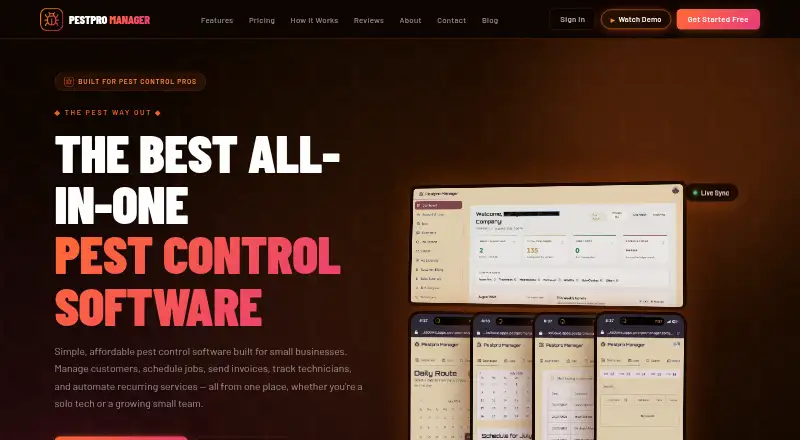
What PestPro Manager is
PestPro Manager is web-based business management software for pest control companies, combining scheduling, customer records, invoicing, route tracking, and recurring service automation. Its scheduling tools include drag-and-drop jobs and route optimization. Client records can hold service histories, notes, photos, and treatment records. Users can create and send invoices from a job site and collect card or ACH payments. The service also lists real-time GPS route tracking, automated appointment reminders, recurring service alerts, and reports covering revenue, completed jobs, chemical usage, and technician performance. PestPro Manager is designed for solo technicians, one-truck operators, small teams, and small residential pest control businesses. The Basic plan is free and allows up to two admins, two technicians, and 100 emails per month, with no customer portal. Premium is $29.99 per month, Pro is $79.99 per month, and Custom is $299.99 per month. The customer portal is listed on Pro, with a limit of 100. The site identifies working pest control technician Silvester Ondigo as founder and builder, and names Ondigo Productions in its copyright line.
Good
- Scheduling includes drag-and-drop jobs and route optimization.
- Client records can include photos and treatment records.
- Accepts card or ACH payments.
- Reports cover revenue and technician performance.
- Automates appointment reminders and recurring service alerts.
Watch out
- Basic plan limits admins to two.
- Basic plan limits technicians to two.
- Basic includes 100 emails per month.
- Basic and Premium do not include a customer portal.
Who it suits
PestPro Manager is intended for solo technicians, one-truck businesses, small teams, and small residential pest control companies. It may suit operators who want scheduling, treatment documentation, invoicing, and route tools together.
Verdict
PestPro Manager brings operational tools for pest control businesses into a web service, with a free entry plan and paid tiers. Review the plan limits, particularly the lack of a customer portal on Basic and Premium.
Plans and prices
From PestPro Manager's own pricing page, checked 5 Oct 2026.
| Plan | Price | What it gives you |
|---|---|---|
| Basic | Free | Up to 2 Admins · Up to 2 Technicians · 100 emails/month · No customer portal · Free Forever |
| Premium | $29.99 a month | Up to 50 Admins · Up to 100 Technicians · No customer portal · Billed monthly |
| Pro | $79.99 a month | Customer Portal up to 100 · 2,000 emails/month · Higher limits for admins & techs · Billed monthly |
| Custom | $299.99 a month | Unlimited Admins · Unlimited Technicians · Unlimited Customers · Unlimited emails · Custom pricing available |
The facts
Each one read from PestPro Manager's own pages, with the date it was checked.
What it does
- Client records
- Client records can include service history, notes, photos, and treatment records.checked 5 Oct 2026
- Data security
- The site says payments use Stripe PCI-compliant infrastructure and that it uses bank-level encryption and daily backups, describing the service as GDPR compliant.checked 5 Oct 2026
- Founder
- The about page identifies Silvester Ondigo, a working pest control technician, as the product's founder and builder.checked 5 Oct 2026
- Intended customers
- The product is designed for solo technicians, one-truck businesses, small teams, and small residential pest control companies.checked 5 Oct 2026
- Payments
- The product says users can create and send invoices from the job site and collect payments by card or ACH.checked 5 Oct 2026
- Purpose
- PestPro Manager is business management software for pest control companies, covering scheduling, customer management, invoicing, route tracking, and recurring service automation.checked 5 Oct 2026
- Reminders
- Automated appointment reminders and recurring service alerts are listed as features.checked 5 Oct 2026
- Scheduling
- Its scheduling feature includes drag-and-drop jobs and route optimization.checked 5 Oct 2026
- Support
- The contact page says email replies usually arrive within one business day and that WhatsApp tends to get the fastest response.checked 5 Oct 2026
- Tracking and reports
- It offers real-time GPS route tracking and reports on revenue, completed jobs, chemical usage, and technician performance.checked 5 Oct 2026
The company
- Headquarters
- United Stateschecked 28 Sep 2026
- Maker
- The site's copyright line names Ondigo Productions.checked 5 Oct 2026
The full review of PestPro Manager
PestPro Manager is web-based business software for pest-control operators, with tools for scheduling, customer records, billing, and recurring work. It is most compelling for solo technicians and small residential teams that want those jobs in one system. The free plan is a useful start, but its staffing and email caps can make an upgrade necessary as a business grows.
Overview
PestPro Manager brings dispatch, route planning, client histories, invoicing, and repeat-service administration together. For a small operator, that breadth can replace separate processes for tracking treatments and collecting payment; the trade-off is that its stated audience is small businesses, not complex or large-scale operations. Founder Silvester Ondigo is a working pest-control technician, giving the product a builder with direct industry experience.
Key features
Scheduling and field coordination
Drag-and-drop job scheduling makes it easier to rearrange assignments, while route optimization helps coordinate travel between stops. Real-time GPS tracking adds route visibility. Together, these tools suit businesses managing technicians in the field, particularly when a day includes multiple appointments.
Records, payments, and reports
Client records can hold service histories, notes, photos, and treatment records, giving technicians a place to retain context from previous visits. Users can create and send invoices from the job site and accept card or ACH payments. Reports cover revenue, completed jobs, chemical usage, and technician performance, which can help a small operator monitor both workload and service activity.
Recurring work and safeguards
Automated appointment reminders and recurring-service alerts support repeat visits without relying solely on manual follow-up. The product says payments run through Stripe's PCI-compliant infrastructure, with bank-level encryption and daily backups, and describes the service as GDPR compliant. Email replies usually arrive within one business day; WhatsApp tends to receive the fastest response.
Pricing
The freemium structure offers a no-cost starting point, but the seat and email limits matter more than the headline price for a growing team. All paid prices below are billed monthly and renew on a recurring basis.
| Plan | Price | What it includes and who it suits |
|---|---|---|
| Basic | free (Free Forever) | Up to 2 Admins, 2 Technicians, and 100 emails/month; no customer portal. Best for a solo operator or very small business testing its workflow, but the email ceiling and two-technician cap constrain growth. |
| Premium | $29.99 a month | Up to 50 Admins and 100 Technicians, with no customer portal. It removes Basic's tight staffing limits, but still lacks the portal and does not state an email allowance. |
| Pro | $79.99 a month | Customer Portal up to 100, 2,000 emails/month, and higher limits for admins and technicians. This is the clearest fit for a growing team that needs a customer-facing portal and more email capacity. |
| Custom | $299.99 a month | Unlimited admins, technicians, customers, and emails. It is intended for operations that have outgrown the stated Pro limits, though smaller businesses are unlikely to need unlimited capacity. |
The main step-up decision is between Premium and Pro: Premium raises staffing limits, while Pro adds the customer portal and a defined 2,000-email allowance. Basic is genuinely free forever, but its 100-email monthly cap and lack of portal make it a narrow long-term fit.
Platforms
PestPro Manager is available on the web. A technician mobile app is also offered, alongside online payments and recurring billing.
Who it's for
Solo technicians, one-truck businesses, and small residential pest-control companies are the natural audience. The combination of job scheduling, treatment documentation, route tools, and billing suits operators who need an operational hub without committing to a paid plan immediately. Businesses that need a customer portal must choose Pro or Custom; organizations with more complex requirements should compare larger field-service products before settling on a small-business-focused system.
Pros and cons
Pros
- Basic is free forever, offering small operators a way to start without a recurring subscription.
- Scheduling, optimized routes, GPS tracking, records, invoicing, and recurring-service alerts cover a broad set of day-to-day pest-control tasks.
- Job-site invoicing and card or ACH collection can connect field work directly to payment.
- Pro includes a customer portal and a 2,000-email monthly allowance.
Cons
- Basic is limited to 2 admins, 2 technicians, and 100 emails per month, so even modest growth can force a plan decision.
- Premium has no customer portal, leaving that customer-facing capability to Pro and Custom.
Alternatives
Pest Control Software is a category list for comparing pest-control options. Consider Plannit instead if broader platform coverage matters: its free plan supports two users with job requests, customers, scheduling, job tracking, work orders, quotes, and invoicing, and it offers a free trial. PestPro is another free option, with unlimited jobs and no credit card or trial. Choose PestPac if you want a paid pest-control product with customer management, basic scheduling and routing, termite inspection, mobile app, billing and payments, and basic accounting. ServiceWorks has a $150 a month Bronze plan and may suit readers comparing a paid service platform with API-credit pricing. TeamPoint charges £50 a month per user plus VAT on fixed-term contracts of 12, 24, 36, or 48 months, so it is a different commitment structure to weigh against PestPro Manager's monthly billing. FieldRoutes is worth comparing for its mobile sales capabilities, route optimization, technician app, and automated communication and reminders. Fieldwork starts at $59 a month per field user, with free office users, and offers a $79 a month Business plan. PestScan offers a Budget yearly-payment plan at €50 a year for one technician, 15 customers or locations, and one administrator; it also offers a monthly-pay Budget option.
Verdict
PestPro Manager is a strong shortlist choice for a solo technician or small residential pest-control business that wants scheduling, records, routes, and billing together, with a free entry plan. Its main drawback is the gap between the no-portal Basic and Premium tiers and the portal-equipped Pro plan, so businesses that need customer self-service should budget for the higher tier or look elsewhere.
Alternatives to PestPro Manager
- 1

Servgrow
AndroidiOSWebAPI7.9From $19 a month - 2
Smart Book
AndroidiOSWeb7.7From $300 a year - 3

Smart Service
AndroidiOSWebAPI7.6 - 4

Fieldwork
AndroidiOSWebAPI7.5From $59 a month - 5
ServiceWorks
AndroidiOSWebAPI7.5From $49 a month - 6
Plannit
Free planAndroidiOSWebmacOS7.4From $59 a month