PaperStream Capture
PaperStream Capture is Windows software for digitizing and organizing business documents through scanning workflows.
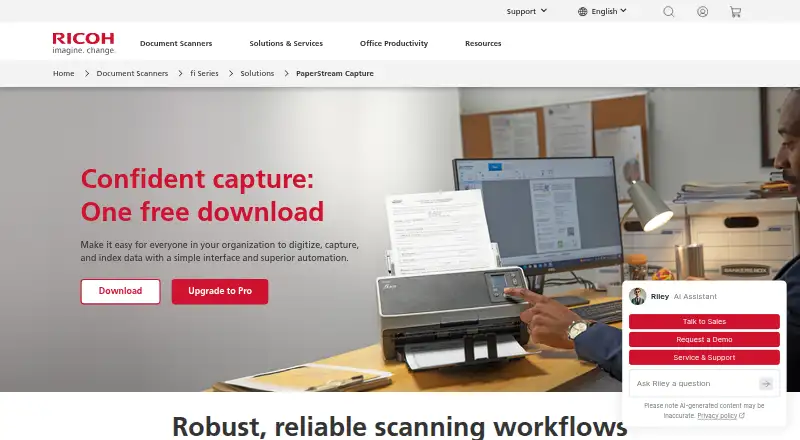
What PaperStream Capture is
PaperStream Capture is Windows software for digitizing and organizing business documents through scanning workflows. It can scan, sort, separate and save documents as searchable PDFs or other selected formats, including PDF/A, TIFF, JPEG and BMP. Separation can use rules such as page count, blank pages, barcodes, patch codes, OCR, document forms or file size. Default settings are included, and advanced users can configure profiles; administrators can lock profiles to keep scanning consistent. AIQC helps select images for data capture and quality control. The software supports batch scanning and lists 28 OCR languages, as well as FTP and SharePoint linkage. The manufacturer says it is compatible with current fi Series scanners and recommends it with fi and SP Series scanners. PaperStream IP TWAIN or ISIS driver connectivity is required. A free download is listed for compatible fi Series scanners. ARM-based Windows 11 support is limited to specified scanner models and the 32-bit PaperStream IP TWAIN driver.
Good
- Separates documents using multiple listed rules.
- Saves searchable PDFs and other file types.
- AIQC supports image selection and quality control.
- Administrators can lock profiles for consistency.
- FTP and SharePoint linkage are listed.
Watch out
- Requires PaperStream IP TWAIN or ISIS connectivity.
- ARM Windows 11 support has model and driver limits.
- Free download is listed for compatible fi Series scanners.
Who it suits
It suits organizations using compatible fi or SP Series scanners to capture business documents. It may also fit teams that need configurable scanning profiles and searchable document output.
Verdict
PaperStream Capture brings scanning, document separation and searchable output together for business capture workflows. Check scanner and driver compatibility before choosing it.
Plans and prices
From PaperStream Capture's own pricing page, checked 30 Sep 2026.
| Plan | Price | What it gives you |
|---|---|---|
| PaperStream Capture | Free | Free download · compatible with current fi Series scanners · requires PaperStream IP TWAIN or ISIS drivers |
The facts
Each one read from PaperStream Capture's own pages, with the date it was checked.
What it does
- Document output
- Users can scan, sort, separate, and save documents as searchable PDFs or other selected file types.checked 30 Sep 2026
- Driver requirement
- PaperStream IP TWAIN or ISIS driver connectivity is required.checked 30 Sep 2026
- File formats
- The datasheet lists PDF, PDF/A, PDF with OCR, TIFF, JPEG, and BMP output options.checked 30 Sep 2026
- Image quality
- Its AIQC function helps select ideal images for data capture and quality control.checked 30 Sep 2026
- Integrations
- The datasheet lists FTP and SharePoint linkage.checked 30 Sep 2026
- Intended users
- The maker describes the software as a front end for business document capture workflows and recommends it with fi and SP Series scanners.checked 30 Sep 2026
- Operating system
- The manufacturer lists PaperStream Capture among software supporting ARM-based Windows 11 PCs as of June 30, 2026, with support limited to specified scanner models and the 32-bit PaperStream IP TWAIN driver.checked 30 Sep 2026
- Profiles
- The software includes default settings and lets advanced users configure custom profiles.checked 30 Sep 2026
- Purpose
- PaperStream Capture helps organizations digitize, capture, and index data through scanning workflows.checked 30 Sep 2026
- Scanner compatibility
- The manufacturer says PaperStream Capture is compatible with current fi Series scanners and may run on an unlimited number of computers.checked 30 Sep 2026
- Security and administration
- Administrators can lock profiles to maintain scanning consistency, and Scanner Central Admin can centrally manage and deploy fleet updates and profiles.checked 30 Sep 2026
- Separation methods
- Documents can be separated by count, blank page, barcode, patch code, OCR, keyboard, document form, or file size.checked 30 Sep 2026
- Support
- PFU America lists technical support by phone and email on weekdays from 5 a.m. to 5 p.m. Pacific Time.checked 30 Sep 2026
The company
- Founded
- 1960checked 28 Sep 2026
- Headquarters
- Ishikawa, Japanchecked 28 Sep 2026
The full review of PaperStream Capture
Overview
PaperStream Capture is Windows software for turning scanner input into organized, indexed business documents. Its strongest case is a workflow built around compatible Fujitsu fi Series scanners, especially where batches need reliable separation and searchable output. Scanner and driver requirements narrow its appeal, but its capture controls go well beyond a basic scan-and-save utility.
Key features
PaperStream Capture can scan, sort, separate and save documents as searchable PDFs or other file types. Separation options include page count, blank pages, barcodes, patch codes, OCR, keyboard input, document form and file size. That breadth suits mixed business batches that need to be divided automatically; for a one-off scan, it is more workflow machinery than most people need.
AIQC helps select images for capture and quality control, while default settings offer a starting point and custom profiles give advanced users room to shape repeatable jobs. Administrators can lock profiles to keep scanning consistent across users. Scanner Central Admin can manage and deploy fleet updates and profiles centrally, making the software a more natural fit for managed scanner fleets than for an individual with an unrelated device.
Output options include PDF, PDF/A, searchable PDF, TIFF, Multi-TIFF, JPEG, JPEG2000, BMP, PNG, RTF, Word, Excel and PowerPoint. OCR supports 28 languages, and FTP and SharePoint linkage provide routes into document workflows. Batch scanning and scanner support are included. These capabilities make the package useful when scans need to become searchable, structured files rather than image-only copies.
Pricing
PaperStream Capture — free. The free download works with current fi Series scanners and requires PaperStream IP TWAIN or ISIS drivers. That makes it a strong option for organizations already using compatible scanners: the price is straightforward, and the core capture, batch and searchable-PDF capabilities are included. It is not a general-purpose free scanner app, because access depends on the right scanner and driver.
The pricing model is freemium, and the pricing note mentions a 60-day trial; however, the free-plan entry is the applicable offer, and no separate paid plan or seat or scan quota is given. There is no need to budget for a stated renewal term, but scanner compatibility and driver setup remain essential conditions.
Platforms
PaperStream Capture supports Windows. The manufacturer also lists it for ARM-based Windows 11 PCs as of June 30, 2026, but that support is limited to specified scanner models and the 32-bit PaperStream IP TWAIN driver. The software may run on an unlimited number of computers, according to the manufacturer, though that does not remove the scanner and driver requirements.
Who it's for
This is best suited to businesses digitizing recurring document batches with fi Series scanners, particularly teams that need OCR-based separation, controlled profiles or central administration. The manufacturer recommends it with fi and SP Series scanners and describes it as a front end for business document capture. Support is available by phone and email on weekdays from 5 a.m. to 5 p.m. Pacific Time.
It is a poor fit for Mac or Linux users, owners of unsupported scanners, and people who only need occasional basic scanning. The Windows-only platform and required PaperStream IP driver connection are practical constraints, not minor setup details.
Pros and cons
- Pros: Broad separation methods, 28 OCR languages and searchable output help turn large mixed batches into usable documents.
- Pros: Locked profiles and central fleet management support consistent scanning across an organization.
- Pros: The free download includes batch scanning and multiple export formats for compatible fi Series scanners.
- Cons: It requires a compatible scanner and PaperStream IP TWAIN or ISIS driver, limiting its value outside that hardware setup.
- Cons: Windows is the only general platform, and ARM Windows 11 support has model and driver restrictions.
Alternatives
NAPS2 is a better choice for users who need a free scanner app across Linux, macOS and Windows; it is free for individuals and businesses with no ads or restrictions. PaperScan suits Windows users who want a free edition with 10-page TWAIN/WIA batches, or a one-time 79.00 USD Home Edition for unlimited batch scanning and importing.
Brother iPrint&Scan is the natural alternative for users with a supported Brother machine who also want printing features. Epson Scan 2 is a free option for Epson scanner or multifunction-printer owners, with features varying by scanner.
Dynamic Web TWAIN is aimed at application workflows needing unlimited computers and scans, offline or intranet support, and a tailored quote. ExactScan offers paid software for Linux, macOS and Windows, with one-time ExactScan pricing at 80.00 EUR. VueScan is another paid cross-platform option, with a Standard Edition monthly plan at £6.75 a month.
GNOME Document Scanner is a free Linux desktop option. Readers comparing more tools can browse Scanner Software or Document Scanning Software.
Verdict
Choose PaperStream Capture if your organization runs compatible fi Series scanners and needs batch separation, searchable output and centrally controlled profiles without a software purchase price. Its specialized scanner and Windows requirements are also its main reason to look elsewhere: users with different hardware or simpler needs should choose a broader scanner utility instead.
Alternatives to PaperStream Capture
- 1
Dynamic Web TWAIN
AndroidiOSWebAPI7.7$1,249 usage-based - 2

EzeScan
Free planWebAPISelf-hostedWindows7.6$500 usage-based - 3

NAPS2
Free planOpen sourceAPILinuxmacOSWindows7.4Free plan - 4

PaperScan
Free planWindows7.4$79 one-time - 5
Avidemux
Free planOpen sourceWebLinuxmacOSWindows7.3Free plan - 6
Readiris PDF
macOSWindows6.6