Brother iPrint&Scan
Brother iPrint&Scan lets supported mobile devices print from and scan to a Brother machine over a wireless network without a computer.
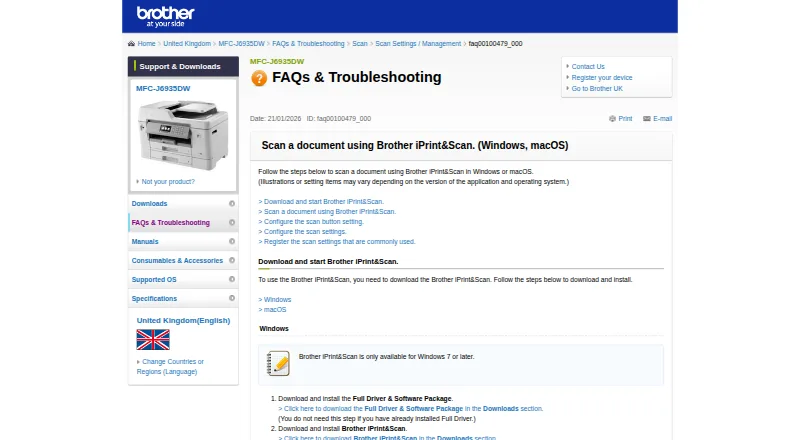
What Brother iPrint&Scan is
Brother iPrint&Scan lets supported mobile devices print from and scan to a Brother machine over a wireless network without a computer. Mobile printing covers photos, documents, and web pages; the Android FAQ also names Gmail and cloud services. Depending on the platform, scans can be saved to a device or cloud storage, emailed, or opened in another application. The iOS listing names Dropbox, OneDrive, and Evernote for printing, and iCloud as a scan destination. On supported newer machines, mobile features may also include image editing, fax sending and preview, copy preview, and machine status. Windows and macOS versions provide scan settings for size, color, resolution, brightness, contrast, file type, destination, and target application. Desktop users can save scan settings as reusable Workflows. Brother lists support for Windows 7 or later and macOS 10.10 or later. The free app is available for Android, iOS, macOS, and Windows; its listed output formats include PDF and JPEG. Printing and scanning depend on the machine, and a mobile device must be on the same Wi-Fi network. Brother also notes that contact access is needed for fax functions, while location access is optional for certain device searches.
Good
- Prints photos, documents, and web pages from mobile devices.
- Desktop versions offer detailed scan settings.
- Saved Workflows can retain frequently used scan settings.
- Scans can go to devices, cloud storage, email, or apps.
- Available free on Android, iOS, macOS, and Windows.
Watch out
- Mobile printing and scanning are not available on every Brother machine.
- Mobile device must share the machine’s Wi-Fi network.
- Some mobile features depend on newer supported models.
- Fax functions require contact access.
Who it suits
The app is for owners of supported Brother printers or all-in-ones who want to print, scan, or use model-dependent copy and fax functions from mobile devices or computers. Check machine compatibility and network requirements first.
Verdict
Brother iPrint&Scan provides printing and scanning for supported Brother machines, with desktop scan controls and additional model-dependent mobile tools. Compatibility and same-network Wi-Fi are key requirements for mobile use.
Plans and prices
From Brother iPrint&Scan's own pricing page, checked 14 Oct 2026.
| Plan | Price | What it gives you |
|---|---|---|
| Free | Free | Compatible Brother printer, scanner or all-in-one required · Functions vary by model |
The facts
Each one read from Brother iPrint&Scan's own pages, with the date it was checked.
What it does
- Advanced functions
- On newer models the app offers image editing, mobile fax sending, fax preview, copy preview and machine-status information.checked 14 Oct 2026
- Cloud integrations
- The mobile app can print from Dropbox, OneDrive and Evernote.checked 14 Oct 2026
- Desktop requirements
- The referenced Brother support page says the app is available for Windows 7 or later and macOS 10.10 or later.checked 28 Sep 2026
- Desktop scanning
- On Windows and macOS, users can set scan size, color, resolution, brightness, contrast, file type, destination, and target application.checked 28 Sep 2026
- Desktop support
- Brother provides iPrint&Scan downloads for Windows and macOS; supported functions depend on the printer or scanner model.checked 14 Oct 2026
- Developer SDKs
- Brother publishes mobile printing SDK materials and developer samples for Xamarin, SwiftUI, .NET MAUI Android/iOS bindings and React Native.checked 14 Oct 2026
- Google Play data safety
- Google Play states that no data is shared with third parties, data in transit is encrypted and users can request deletion, while app activity, app information/performance and device identifiers may be collected.checked 14 Oct 2026
- Licence
- Brother’s licence agreement says Brother retains the software copyrights and does not undertake to disclose source code, so the product is proprietary rather than open source.checked 14 Oct 2026
- Limit: connectivity complaints
- App Store reviewers reported repeated wireless relinking and lost iPhone connections after previously reliable operation.checked 14 Oct 2026
- Limit: multiple-photo scanning
- Tom’s Guide reported that the software cannot automatically separate multiple photos placed on the scanner glass into individual files.checked 14 Oct 2026
- Limit: outdated interface
- An App Store reviewer complained that status and toner actions open browser windows that usually fail to connect and called the interface outdated.checked 14 Oct 2026
- Limit: permissions
- The Android listing says fax uses contact permission and device discovery can request location permission for Wi-Fi Direct, Bluetooth or NFC.checked 14 Oct 2026
- Mobile permissions
- The App Store listing says contact access is needed for fax functions, while location access is optional and requested for device search features such as Wi-Fi Direct, Bluetooth, or NFC.checked 28 Sep 2026
- Mobile printing
- The app can print photos, documents, and web pages from mobile devices; the Android FAQ also lists Gmail and cloud services.checked 28 Sep 2026
- Model limitations
- Brother warns that some listed models lack printing, OCR or fully supported scanning functions and that macOS 11/12 operation may be unsupported.checked 14 Oct 2026
- NFC
- Compatible phones and machines can use NFC for print or scan actions by tapping over the machine NFC mark.checked 14 Oct 2026
Where it runs
- Android requirement
- AppBrain reports Android 7.0 or later as the Android requirement.checked 14 Oct 2026
- Device discovery
- The app automatically searches for supported Brother devices on the local wireless network.checked 14 Oct 2026
- iOS capabilities
- The iOS listing supports printing from camera, Open In, clipboard and iTunes File Sharing, scanning to the device, iCloud or email, and cloud printing from Dropbox, OneDrive and Evernote.checked 14 Oct 2026
- iOS fax and editing
- Newer compatible models can edit previewed images, send faxes and view received faxes from iOS.checked 14 Oct 2026
- Mac processor support
- Brother states that Apple M1 processors are supported by the desktop app.checked 14 Oct 2026
The company
- Company founding and size
- LinkedIn lists Brother Industries as founded in 1908 with a 1,001–5,000 employee company-size band.checked 14 Oct 2026
- Headquarters
- Nagoya, Japanchecked 28 Sep 2026
- Maker identity
- The maker is Brother Industries, Ltd., a public Japanese electronics manufacturer headquartered in Mizuho-ku, Nagoya.checked 14 Oct 2026
The full review of Brother iPrint&Scan
Overview
Brother iPrint&Scan connects supported Brother printers and all-in-one machines with mobile devices and computers. Over Wi-Fi, it can send print jobs from a phone or tablet and scan from the machine without routing the work through a computer. The app is free, but a compatible Brother machine is required, and available functions vary by model.
For mobile printing or scanning, the device and Brother machine must be on the same Wi-Fi network. Brother notes that not every machine supports these mobile features. Its Mobile Print/Scan Guide and customer service are available for setup and further assistance.
Key features
Mobile printing and scanning
From a mobile device, iPrint&Scan can print photos, documents, and web pages. The Android FAQ also identifies Gmail and cloud services as print sources. Scans can be saved to the device or cloud storage, sent by email, or opened in another application, depending on the platform.
The iOS listing names Dropbox, OneDrive, and Evernote for cloud printing, and iCloud as a scan destination. PDF and JPEG are listed output formats. OCR and ADF support are included, although the functions available in practice depend on the Brother machine and platform.
Extra tools on some models
Supported newer machines may expose additional mobile options: image editing, fax sending and preview, copy preview, and machine status. These capabilities are model-dependent rather than guaranteed across the range. The App Store listing says contact access is required for fax functions; location access is optional and requested for device-search features such as Wi-Fi Direct, Bluetooth, or NFC.
Desktop scan controls
The Windows and macOS apps provide controls for scan size, color, resolution, brightness, contrast, file type, destination, and target application. Users can save frequently used scan configurations as Workflows and apply them again later.
Pricing
Brother iPrint&Scan is free: the Free plan costs nothing, billed as a Free application. It requires a supported Brother machine, and printing and scanning features vary by model.
Platforms
The app is available for Android, iOS, Windows, and macOS. Brother's cited support page specifies Windows 7 or later and macOS 10.10 or later for desktop use. Mobile device compatibility still depends on the printer or all-in-one model and a shared Wi-Fi network.
Who it's for
This is aimed at owners of supported Brother printers or all-in-ones who want to print, scan, or use model-dependent copy and fax tools from a phone, tablet, or computer. It is most relevant when Brother hardware is already part of the setup; the app is not a general-purpose scanner interface for unrelated devices.
Pros and cons
- Pros: Free to use with supported hardware; covers mobile printing and scanning as well as desktop scan configuration; offers reusable scan workflows on Windows and macOS.
- Cons: Requires a compatible Brother machine; mobile printing and scanning require the same Wi-Fi network; features vary by model and platform.
Google Play's developer disclosure says data is encrypted in transit, no data is shared with third parties, and users can request deletion. This is the developer-reported disclosure shown in the listing.
Alternatives
For more options, browse Scanner Software and Photo Scanning Software. Alternatives include Epson Scan 2, NAPS2, and PaperScan. Other options in the category are GNOME Document Scanner, PaperStream Capture, Skanpage, XSane, and Dynamic Web TWAIN.
Verdict
Brother iPrint&Scan is a practical companion for supported Brother hardware, combining everyday mobile print and scan tasks with more detailed desktop scan settings. Its no-cost plan is straightforward, but compatibility is the deciding factor: check that the specific machine supports the functions you need, and that your mobile device can share its Wi-Fi network.
Getting started
- Check that your Brother machine supports mobile printing or scanning.
- Connect the mobile device and Brother machine to the same Wi-Fi network.
- Install the app for Android, iOS, Windows, or macOS.
- On Windows, use Windows 7 or later; on macOS, use macOS 10.10 or later.
- Select a print or scan function, then choose the available destination or scan settings.
Limits worth knowing
Mobile printing and scanning are unavailable on some Brother machines and depend on the model. The mobile device must use Wi-Fi on the same network as the machine; advanced copy and fax functions are limited to supported newer models.
Questions
How much does Brother iPrint&Scan cost?
The app is free, with a listed price of no cost application.
Which platforms are supported?
It is available for Android, iOS, Windows, and macOS. Brother lists Windows 7 or later and macOS 10.10 or later.
Can it print from cloud services?
The iOS listing names Dropbox, OneDrive, and Evernote as cloud services for printing. The Android FAQ also lists Gmail and cloud services.
Where can scans be sent?
Depending on platform, scans can be saved to a mobile device or cloud storage, emailed, or opened in another application. The iOS listing names iCloud as a scan destination.
Does it support faxing and copying?
Mobile fax and copy features, including fax sending and preview and copy preview, are available on supported newer models.
Does it work with every Brother machine?
No. Brother says mobile printing or scanning is unavailable on some machines and features vary by model.
Alternatives to Brother iPrint&Scan
- 1
Dynamic Web TWAIN
AndroidiOSWebAPI7.7$1,249 usage-based - 2

NAPS2
Free planOpen sourceAPILinuxmacOSWindows7.4Free plan - 3

PaperScan
Free planWindows7.4$79 one-time - 4
Avidemux
Free planOpen sourceWebLinuxmacOSWindows7.3Free plan - 5

bcWebCam
Free planWindows7.2€4,989 one-time - 6
SilverFast
iOSmacOSWindows7.2$49 one-time