
NAPS2
NAPS2 is free, open-source software for scanning documents and saving them as PDF, TIFF, JPEG, or PNG.
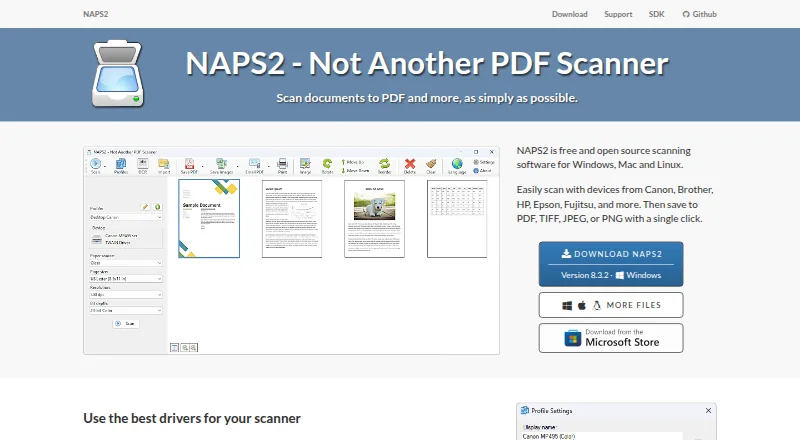
What NAPS2 is
NAPS2 is free, open-source software for scanning documents and saving them as PDF, TIFF, JPEG, or PNG. It runs on Windows, macOS, and Linux and works with WIA and TWAIN drivers, flatbed scanners, and automatic document feeders, including duplex scanning. After scanning, users can reorder, interleave, rotate, crop, deskew, and adjust page brightness and contrast. OCR can make scans searchable, supports more than 100 languages, and can add text recognition to imported PDFs. NAPS2 can share scanners on a local network through ESCL, including with compatible Android and iPhone clients, but it must remain running on the server. It can send email through Gmail and Outlook, and offers an optional command-line interface for automation and a .NET scanning library for developers. The software is free for individuals and businesses, with no ads or restrictions. OCR text cannot be saved directly to a text file, though it can be copied from a saved PDF in a PDF viewer.
Good
- Scans to PDF, TIFF, JPEG, and PNG.
- Supports duplex scanning with flatbeds and feeders.
- OCR supports more than 100 languages.
- Free for individuals and businesses, with no ads or restrictions.
- Offers CLI automation and a .NET scanning library.
Watch out
- Scanner sharing requires NAPS2 to keep running on the server.
- OCR text cannot be saved directly to a text file.
Who it suits
NAPS2 suits individuals and organizations that need document scanning across Windows, macOS, or Linux, including users who want searchable PDFs or batch scanning. Developers can also use its command-line interface or .NET library for scanning workflows.
Verdict
NAPS2 combines scanning, page editing, searchable OCR, and several export formats in a free package for major desktop platforms. Note the server requirement for network scanner sharing and the lack of direct text-file export for OCR results.
Plans and prices
From NAPS2's own pricing page, checked 29 Sep 2026.
| Plan | Price | What it gives you |
|---|---|---|
| Free | Free | Free for individuals and businesses · no ads or restrictions |
| NAPS2 | Free | Windows, Mac and Linux desktop · no ads or restrictions · donations optional |
The facts
Each one read from NAPS2's own pages, with the date it was checked.
Where it runs
- Application license
- The main NAPS2 application is licensed under GPL-2.0-or-later.checked 15 Oct 2026
- Linux requirements
- Linux builds require GTK 3.20+, glibc and libsane; the site lists modern Ubuntu, Debian, Mint and Fedora versions.checked 15 Oct 2026
- Mac requirements
- The current release supports macOS 12 and later; version 7.5.3 is the last release for macOS 10.15 and 11.checked 15 Oct 2026
What it does
- Automation and SDK
- NAPS2 offers an optional command-line interface for scanning and saving documents through automation or scripts, and a .NET scanning library for developers.checked 29 Sep 2026
- Command line
- Its CLI supports scripted scanning, importing, conversion, OCR, PDF/A, encryption, splitting, interleaving and email operations.checked 15 Oct 2026
- Developer SDK
- NAPS2.Sdk is a free C#/.NET 6+ scanning library for Windows, Mac and Linux.checked 15 Oct 2026
- Documentation and support
- Official support includes getting-started guides, OCR, batch scanning, troubleshooting, CLI and organization documentation, tickets and forums.checked 15 Oct 2026
- Download scale
- The download page reports 16,542,323 total downloads and 165,325 weekly downloads.checked 15 Oct 2026
- Editing
- Users can reorder, interleave, rotate, crop, deskew, and adjust the brightness and contrast of scanned pages.checked 29 Sep 2026
- Email integrations
- NAPS2 can send email using Gmail and Outlook; the email address and secure sending token are stored on the user's computer and sent only to the corresponding provider.checked 29 Sep 2026
- Extensibility
- The project links a naps2-webscan example for browser-based scanning through ESCL.checked 15 Oct 2026
- Interface languages
- The application offers more than 40 interface languages.checked 15 Oct 2026
- Latest release
- Version 8.5.1, released October 12, 2026, fixed Windows Smart App Control blocking naps2_jpeg.dll.checked 15 Oct 2026
- Library licenses
- NAPS2.Sdk and several related libraries use LGPL-2.1-or-later, while SDK samples use MIT.checked 15 Oct 2026
- Limit: cloud and mobile
- The Digital Project Manager review says NAPS2 has no native cloud storage or sharing, no mobile scanning app and limited file management.checked 15 Oct 2026
- Limit: image straightening
- PCWorld’s review criticized the lack of image straightening and reported some TWAIN crashes and unreliable grayscale profile behavior.checked 15 Oct 2026
- Limit: scanner compatibility
- A GitHub issue reports heavy text-compression artifacts with Brother wireless ESCL scanning, with commenters attributing the behavior to the scanner protocols.checked 15 Oct 2026
- Limit: TWAIN reliability
- A SnapFiles reviewer reported that the TWAIN module stopped after one scan on a Canon scanner, preventing batch scanning.checked 15 Oct 2026
- Network scanning
- NAPS2 can share scanners across a local network using ESCL, and compatible clients include Android and iPhone apps.checked 29 Sep 2026
- Network sharing
- NAPS2 can share scanners across a local network so another computer or phone can use them.checked 15 Oct 2026
- Network sharing limit
- Scanner sharing works only while NAPS2 is running on the server; running it as a service is planned but not currently supported.checked 29 Sep 2026
- OCR
- Tesseract-based OCR creates searchable PDFs in more than 100 languages.checked 15 Oct 2026
The company
- Maker
- The project identifies Ben Olden-Cooligan as its developer and copyright holder.checked 15 Oct 2026
- Maker location
- Ben Olden-Cooligan’s LinkedIn profile lists Vancouver, British Columbia, Canada.checked 15 Oct 2026
The full review of NAPS2
Overview
NAPS2 is a desktop scanning app for Windows, macOS, and Linux. It is best suited to individuals and businesses that want control over scanning, page cleanup, and searchable documents without paying for a license. Its broad toolkit is compelling, though OCR text cannot be exported directly to a text file.
It earns a place in our Document Scanning Software and Scanner Software lists. If your priority is digitizing photos rather than managing documents, see our Photo Scanning Software list.
Key features
Scanning and page cleanup
NAPS2 works with WIA and TWAIN drivers and scans from flatbeds or automatic document feeders, including duplex models. Batch scanning and tools to reorder, interleave, rotate, crop, deskew, and adjust brightness and contrast make it useful when captured pages need organizing or correction before saving. Exports include PDF, TIFF, JPEG, and PNG.
OCR and searchable files
OCR can make scans searchable, handles more than 100 languages, and can add recognition to imported PDFs. That broadens its use from new scans to existing image-based documents. The trade-off is that recognized text cannot be saved directly as a text file; to reuse it, users must copy it from a saved PDF in their PDF viewer.
Network sharing, email, and automation
NAPS2 can share scanners over a local network using ESCL, including with compatible Android and iPhone apps. This is convenient for shared access, but the computer acting as the server must keep NAPS2 running; service-based sharing is not supported. Sharing uses HTTPS with an automatically generated self-signed certificate by default, may fall back to HTTP, and can be configured to require HTTPS or use a custom certificate.
Email sending works with Gmail and Outlook. The email address and secure sending token remain on the user's computer and are sent only to the corresponding provider. For repeatable workflows, an optional command-line interface can scan and save through scripts, while a .NET scanning library gives developers another integration route. Windows organizations can use an MSI installer and application-level configuration for managed deployments.
Pricing
NAPS2's Free plan costs nothing. It is free for individuals and businesses, with no ads or restrictions, and there is no free trial because the software itself is free. That makes it an unusually straightforward choice for routine personal or workplace scanning, with no paid tier to unlock more capacity.
Platforms
NAPS2 supports Windows, macOS, and Linux. Its scanning and editing scope makes it suited to desktop workflows across all three; network sharing can also serve compatible Android and iPhone clients. Support tickets can include error logs to help diagnose issues or report bugs.
Who it's for
Choose NAPS2 if you need a no-cost desktop scanner workflow with batch capture, page correction, multiple export formats, and searchable OCR. It is also a sensible fit for scripted scanning or organizations managing Windows deployments. Look elsewhere if scanner sharing must continue when its host application is closed, or if direct OCR-to-text export is essential.
Pros and cons
- Pros: Free for individuals and businesses with no ads or restrictions, so cost does not impose a usage cap.
- Pros: Flatbed and feeder support, duplex scanning, batch work, page correction, and four export formats cover a substantial document workflow.
- Pros: OCR supports more than 100 languages and can add searchable text to imported PDFs.
- Pros: Command-line automation, a .NET library, and managed Windows deployment options serve technical and organizational users.
- Cons: Network scanner sharing depends on NAPS2 remaining open on the server computer.
- Cons: OCR results cannot be exported straight to a text file, adding a copy step through a PDF viewer.
- Cons: Network sharing may fall back to HTTP unless configured to require HTTPS.
Alternatives
- Brother P-touch Editor is a free option for users working with select Brother P-touch and QL models, including on mobile platforms.
- PaperScan is a Windows alternative with a 10-page batch cap in its free edition; its $79, paid once Home Edition removes the batch limit for TWAIN/WIA scanning and import.
- PaperStream Capture is a free Windows download to consider if you use a current fi Series scanner and its required PaperStream IP TWAIN or ISIS drivers.
- scanservjs is a free, self-hosted option for users with a SANE-compatible scanner and a Linux host or VM.
- DocScan is an iOS alternative that is free to download, with PRO features requiring a subscription.
- Dynamic Web TWAIN is a paid alternative with a free trial and custom pricing for unlimited computers.
- ExactScan is a paid alternative with a free trial and lifetime-license options starting at €80, paid once.
- Readiris PDF is a paid alternative for macOS and Windows, with no free plan.
Verdict
NAPS2 is an easy recommendation for people and organizations that want capable, searchable document scans without a license cost. Its strongest case is the combination of scanning, page repair, OCR, and automation across major desktop platforms. Choose another tool if you need scanner sharing to run as a persistent service or need OCR text files directly.
Getting started
- Visit https://www.naps2.com/.
- Choose the download for Windows, macOS, or Linux.
- On Windows, the download page also offers an MSI installer for managed deployments.
- Connect a scanner that uses WIA or TWAIN drivers.
- Use the free plan; it is available to individuals and businesses.
Limits worth knowing
The free plan is available without ads or restrictions. OCR recognition cannot be exported directly to a text file, and network scanner sharing works only while NAPS2 is running on the server.
Questions
How much does NAPS2 cost?
NAPS2 is free for individuals and businesses, with no ads or restrictions.
Which operating systems does it support?
NAPS2 supports Windows, macOS, and Linux.
What file formats can scans use?
Scans can be saved as PDF, TIFF, JPEG, or PNG.
Can NAPS2 create searchable documents?
Yes. OCR makes scans searchable in more than 100 languages and can add recognition to imported PDFs.
Can a scanner be shared over a network?
Yes, through ESCL with compatible clients, including Android and iPhone apps. NAPS2 must remain running on the server.
Can OCR text be saved directly as a text file?
No. Recognized text can instead be copied from a saved PDF using a PDF viewer.
Alternatives to NAPS2
- 1
Dynamic Web TWAIN
AndroidiOSWebAPI7.7$1,249 usage-based - 2

EzeScan
Free planWebAPISelf-hostedWindows7.6$500 usage-based - 3

PaperScan
Free planWindows7.4$79 one-time - 4
Avidemux
Free planOpen sourceWebLinuxmacOSWindows7.3Free plan - 5
Readiris PDF
macOSWindows6.6 - 6
ExactScan
LinuxmacOSWindows6.5€80 one-time