
PacketSnitch
PacketSnitch analyzes PCAP and PCAPNG captures and turns them into searchable, protocol-aware information for network investigations.
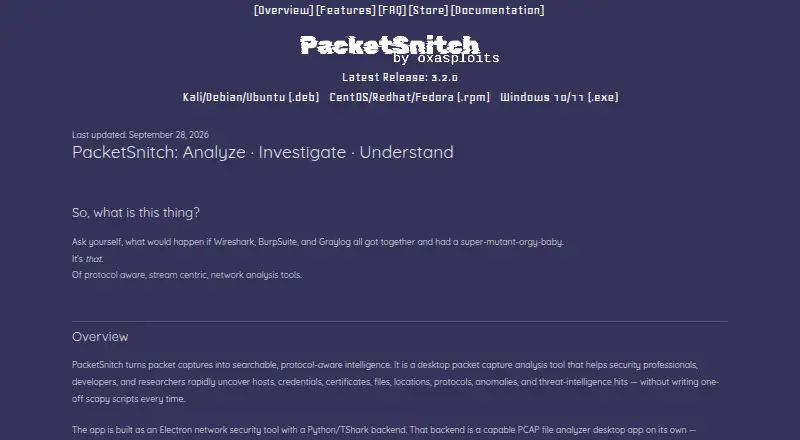
What PacketSnitch is
PacketSnitch analyzes PCAP and PCAPNG captures and turns them into searchable, protocol-aware information for network investigations. It can extract hosts, credentials, certificates, files, locations, protocols, anomalies, and threat-intelligence hits. Analysis tools include stream reconstruction, protocol decoding, complex filters, visualizations, threat-intelligence scoring, file carving, GeoIP enrichment, and capture investigation workspaces. It supports traffic decryption, flow analysis, local capture sources, and CLI tools; ZIP-packaged plugins can be installed through Settings. The bundled Python backend parses captures locally, and the FAQ says captures are not uploaded. Optional network activity includes configured LLM calls, threat-intelligence lookups, and anonymous metrics, which can be disabled in Settings. LLM analysis supports Ollama, OpenRouter, and Cohere when configured. New installations get the full feature set in Demo mode for 30 days, then move to Free mode with core analysis and reduced functionality. Professional, Enterprise, and Developer licenses are named options for restoring licensed features, but readable store pricing is not provided. Prebuilt installers are available for Windows 10/11 and Linux DEB or RPM distributions; macOS has no signed installer. Analysis outputs are not guaranteed accurate or complete and should be independently validated before consequential use.
Good
- Supports PCAP and PCAPNG captures
- Extracts credentials, files, and threat-intelligence hits
- Includes traffic decryption and flow analysis
- Parses captures locally with its bundled backend
- Offers CLI tools and ZIP-packaged plugins
Watch out
- Free mode has reduced functionality after 30 days
- No signed macOS installer is available
- Analysis outputs are not guaranteed accurate or complete
Who it suits
PacketSnitch is intended for security analysts, incident responders, forensics engineers, developers, CTF players, and researchers working with packet captures. Its local parsing may suit users who want captures processed on their own machine.
Verdict
PacketSnitch offers a broad set of capture investigation tools and local parsing. Keep its reduced Free mode and the warning to validate consequential outputs in mind.
Plans and prices
From PacketSnitch's own pricing page, checked 9 Oct 2026.
| Plan | Price | What it gives you |
|---|---|---|
| Free | Free | Core packet analysis; reduced functionality after Demo ends |
The facts
Each one read from PacketSnitch's own pages, with the date it was checked.
What it does
- Accuracy limitation
- The EULA says the software’s analysis and outputs are not guaranteed accurate or complete and should be independently validated before consequential use.checked 8 Oct 2026
- Analysis features
- Features include credential extraction, file carving, GeoIP enrichment, threat-intelligence scoring, stream analysis, and capture investigation workspaces.checked 9 Oct 2026
- Analysis tools
- Features include stream reconstruction, protocol decoding, complex filtering, visualizations, and threat intelligence scoring.checked 8 Oct 2026
- Audience
- The maker lists security analysts, incident responders, forensics engineers, developers debugging networked applications, CTF players, and researchers as intended users.checked 9 Oct 2026
- Core capabilities
- It extracts hosts, credentials, certificates, files, locations, protocols, anomalies, and threat intelligence hits from captures.checked 8 Oct 2026
- Intended users
- The FAQ names security analysts, incident responders, forensics engineers, developers, CTF players, and researchers as intended users.checked 8 Oct 2026
- LLM integration
- LLM analysis is optional and supports Ollama; the FAQ also describes cloud models served through ollama.com.checked 9 Oct 2026
- Local processing
- The maker says packet captures are parsed locally and remain under the user's control unless the user chooses diagnostic transmission or third-party services.checked 9 Oct 2026
- Metrics
- Anonymous metrics are optional, and the maker says no events are queued or shipped when the metrics setting is off.checked 9 Oct 2026
- Network egress
- The FAQ lists optional LLM calls, threat intelligence lookups, and anonymous metrics transport as network egress; metrics can be disabled in Settings.checked 8 Oct 2026
- Other integrations
- The privacy policy names Paddle for payment processing, Ollama, VirusTotal, and other user-configured APIs as third-party services or integrations.checked 9 Oct 2026
- Paid license tiers
- The FAQ names Professional, Enterprise, and Developer licenses as ways to restore licensed features.checked 9 Oct 2026
- Plugins
- Users can install plugins packaged as ZIP files through Settings → Plugins.checked 8 Oct 2026
- Pricing
- The FAQ says the core app is distributable under its EULA and that paid themes and a catalog are available through the store; the store page did not expose readable pricing details.checked 8 Oct 2026
- Purpose
- PacketSnitch analyzes PCAP and PCAPNG captures and surfaces searchable, protocol-aware intelligence for security professionals, developers, and researchers.checked 9 Oct 2026
- Support
- The maker directs questions and support requests to [email protected].checked 9 Oct 2026
- Supported captures
- PacketSnitch supports classic .pcap and .pcapng capture files.checked 8 Oct 2026
- Supported installers
- Pre-built installers are published for Windows 10/11 and Linux distributions using DEB or RPM packages; macOS is not shipped as a signed installer, though the FAQ describes running it from source on macOS.checked 9 Oct 2026
- What it does
- PacketSnitch turns PCAP and PCAPNG captures into searchable, protocol-aware intelligence for network investigation.checked 8 Oct 2026
The company
- Headquarters
- Arden, North Carolina, United Stateschecked 28 Sep 2026
- Maker
- The privacy policy identifies PacketSnitch as developed and distributed by Marshall Whittaker, doing business as oxasploits.checked 9 Oct 2026
Where it runs
- Supported platforms
- Prebuilt installers are available for Windows 10/11 and Linux distributions using DEB or RPM packages; macOS has no signed installer.checked 8 Oct 2026
Money
- Trial and free mode
- New installations receive the full feature set in Demo mode for 30 days, then move automatically to Free mode with core analysis and reduced functionality.checked 9 Oct 2026
The full review of PacketSnitch
PacketSnitch is a desktop investigation suite for turning PCAP and PCAPNG files into searchable, protocol-aware evidence. It is aimed at security analysts, incident responders, forensic engineers, developers, CTF players, and researchers who need more than packet-by-packet browsing. The strongest case for it is its broad extraction and analysis workflow, provided you treat its findings as leads to verify rather than final proof.
Overview
PacketSnitch gathers hosts, credentials, certificates, files, locations, protocols, anomalies, and threat-intelligence hits from captures. Stream reconstruction, protocol decoding, complex filtering, visualizations, flow analysis, and scoring let investigators move from a suspicious packet to the surrounding conversation and related artifacts. Traffic decryption is supported, and local capture sources keep the workflow focused on files already on the desktop.
A bundled Python backend parses captures locally, and captures are not uploaded. That is valuable for sensitive incident material, but PacketSnitch can still communicate externally when you enable LLM analysis, threat-intelligence lookups, or anonymous metrics. Metrics are optional and can be turned off in Settings; when disabled, events are neither queued nor sent. Integrations named by the privacy policy include Ollama, VirusTotal, and other user-configured APIs, so data-handling decisions depend on which services you activate.
The EULA does not guarantee that analysis is accurate or complete. Forensics and incident-response teams should independently corroborate extracted credentials, files, locations, and threat scores before taking consequential action.
Key features
- Evidence extraction: Credential extraction, file carving, certificate and host discovery, GeoIP enrichment, and protocol-aware results reduce the manual work involved in finding useful material in a large capture.
- Investigation workspace: Stream reconstruction, protocol decoding, filters, visualizations, and flow analysis are suited to following a session across packets instead of merely listing frames.
- Threat context: Threat-intelligence scoring and optional lookups can prioritize suspicious material, although external lookups introduce network egress and scores still need analyst judgment.
- Optional LLM assistance: Ollama, OpenRouter, and Cohere can provide analysis when configured. This extends the workflow for teams willing to manage external or local model settings; it is not required for core parsing.
- Extensibility: ZIP-packaged plugins can be installed from Settings → Plugins, giving experienced users a way to add capabilities without replacing the desktop application.
- Command-line access: CLI tools complement the graphical investigation workflow and can fit scripted or repeatable analysis tasks.
Pricing
Every new installation starts in full-featured Demo mode for 30 days. After that period it moves automatically to Free mode, which costs free and retains core packet analysis with reduced functionality. That makes the product practical for occasional investigation and evaluation, but users who depend on features removed after the trial will need a paid license.
Professional, Enterprise, and Developer licenses restore licensed features. The store offers paid themes and a catalog, while license and store prices are custom pricing rather than published amounts. There are no stated seat, usage-quota, renewal, or cancellation terms to compare, so organizations should request those terms before budgeting or deployment.
Platforms
Pre-built installers cover Windows 10 and 11 and Linux distributions using DEB or RPM packages. macOS has no signed installer; the FAQ describes running PacketSnitch from source instead. That makes Windows and supported Linux distributions the straightforward choices, while macOS users must accept a less turnkey setup.
Who it's for
Choose PacketSnitch when your work involves local captures and you want extraction, reconstruction, filtering, enrichment, and threat context in one desktop tool. It is particularly relevant to security operations, incident response, forensic analysis, networked-application debugging, CTF practice, and research. It is a weaker fit for teams requiring guaranteed forensic accuracy, a signed macOS package, or a fully documented predictable license price before adoption.
Pros and cons
Pros
- Broad capture investigation covering extraction, decoding, reconstruction, visualization, and flow analysis.
- Local parsing keeps capture files off the service while allowing optional integrations.
- 30-day full-featured Demo provides a meaningful evaluation period before the reduced Free mode.
- Windows, Linux packages, CLI tools, and ZIP plugins support varied technical workflows.
Cons
- Free mode loses functionality after Demo, and paid license prices are custom.
- Optional lookups, LLM calls, and metrics can create network egress that administrators must control.
- Analysis is not guaranteed accurate or complete, so consequential conclusions require independent validation.
- macOS lacks a signed installer and is described as a source-based deployment.
Alternatives
For a wider category comparison, see Network Packet Analyzer Software and Network Protocol Analyzers.
- PacketSafari is the better choice if you need web, API, or self-hosted deployment alongside desktop platforms and prefer a freemium model.
- Scapy suits users who want a free, GPLv2 Python-oriented toolkit rather than PacketSnitch's packaged investigation workspace.
- termshark is a free terminal interface for users comfortable with tshark and an MIT-licensed workflow.
- NETCAP is worth considering for an open-source CLI with 66-plus audit record types and a free-forever core.
- NetworkMiner is a free/open-source option for users who prefer its GPLv2 managed-C# approach.
- A-Packets fits browser-based public or workspace analysis, including a no-signup 25 MB public-analysis tier.
- Sniffnet is a fully free, open-source alternative for users who need straightforward cross-platform monitoring rather than this product's investigation breadth.
- TShark is the choice for a free GPLv2 command-line analyzer maintained by the Wireshark project.
Verdict
PacketSnitch is a strong match for investigators and developers who want local PCAP/PCAPNG analysis with extraction, reconstruction, enrichment, and optional intelligence integrations in one application. Its reduced post-trial Free mode, custom-priced licenses, macOS installation caveat, and mandatory validation of consequential findings are the main reasons to look elsewhere.
Alternatives to PacketSnitch
- 1

NETCAP
Free planOpen sourceWebAPILinuxmacOS8.1From €49 a month - 2

A-Packets
Free planWebAPILinuxSelf-hosted7.5From $99 a year - 3
Wireshark
Free planOpen sourceAPILinuxmacOSSelf-hosted7.5Free plan - 4
Colasoft Capsa
Free planWindows7.4$295 one-time - 5

Arkime
Free planOpen sourceWebAPILinuxSelf-hosted7.3Free plan - 6
OpenGrep
Free planOpen sourceAPILinuxmacOSSelf-hosted7.3Free plan