TShark
TShark is the Wireshark project's terminal-mode utility for capturing and examining network traffic.
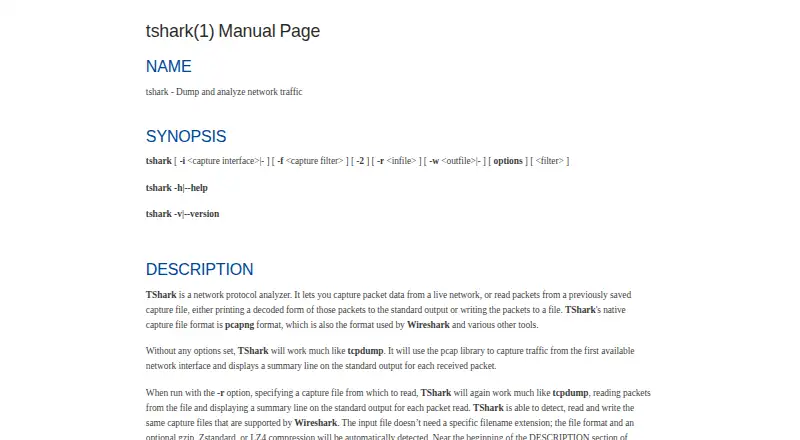
What TShark is
TShark is the Wireshark project's terminal-mode utility for capturing and examining network traffic. It can capture packets live or read saved capture files, decode their contents for output, and write captures to disk. Its native format is pcapng, and it can read and write file formats supported by Wireshark. Display filters use Wireshark syntax to select packets and protocol fields. Output choices include fields, JSON, PDML, and text, while capture controls include interface selection, capture filters, packet limits, and ring-buffer files. TShark can also produce ElasticSearch mapping data or pass packet output to another program or script. One constraint: display filters are unavailable when TShark captures and saves packets with the -w option. The manual sets a 2 TB maximum capture-file size and notes potential issues above 2^32 packets. TShark is free under GNU GPL version 2 and is listed for Linux, macOS, and Windows, among other systems supported by Wireshark.
Good
- Captures live traffic and reads saved captures
- Filters use Wireshark display-filter syntax
- Outputs fields, JSON, PDML, or text
- Free under GNU GPL version 2
Watch out
- Display filters are unavailable with capture-and-save using -w
- Capture files are limited to 2 TB
- Manual notes possible issues above 2^32 packets
Who it suits
TShark suits people who want to capture or inspect network packets from a terminal, or feed packet output into another program. It is available for Linux, macOS, and Windows.
Verdict
TShark combines live capture and offline packet analysis with multiple output formats and scriptable piping. Note the display-filter restriction when saving captures with -w.
Plans and prices
From TShark's own pricing page, checked 30 Sep 2026.
| Plan | Price | What it gives you |
|---|---|---|
| Free | Free | GNU GPL v2 · network protocol analyzer |
The facts
Each one read from TShark's own pages, with the date it was checked.
What it does
- Analysis limit
- Display filters are not supported when TShark captures and saves packets with the -w option.checked 30 Sep 2026
- Capture controls
- Capture options include interface selection, capture filters, packet limits, and ring-buffer files.checked 30 Sep 2026
- File size limit
- The manual states that capture file size is limited to a maximum of 2 TB, and notes potential issues above 2^32 packets.checked 30 Sep 2026
- Integration
- TShark can write ElasticSearch mapping data and supports piping packet output to another program or script.checked 30 Sep 2026
- License
- Wireshark is freely available under the GNU General Public License version 2, with no license fee for downloading.checked 30 Sep 2026
- Output
- TShark can output packet data in formats including fields, JSON, PDML, and text.checked 30 Sep 2026
- Packet formats
- TShark uses pcapng as its native capture format and can read and write capture files supported by Wireshark.checked 30 Sep 2026
- Project features
- The Wireshark project describes TShark as its terminal-mode utility and lists live capture, offline analysis, protocol inspection, and display filters among its features.checked 30 Sep 2026
- Protocol analysis
- TShark provides display filters for selecting packets and protocol fields, using the same syntax as Wireshark.checked 30 Sep 2026
- Purpose
- TShark captures live network traffic or reads saved captures, then decodes packets for output or writes them to a file.checked 30 Sep 2026
- Security information
- The documentation page links to security advisories covering past vulnerabilities and how to report a vulnerability.checked 30 Sep 2026
- Support and learning
- The project offers documentation, mailing lists, community forums, and educational resources including SharkFest.checked 30 Sep 2026
- Supported systems
- The project lists Windows, Linux, macOS, FreeBSD, NetBSD, and other platforms as supported by Wireshark.checked 30 Sep 2026
The company
- Maker
- The Wireshark project is maintained by the Wireshark Foundation, described as a nonprofit supported by donations.checked 30 Sep 2026
The full review of TShark
Overview
TShark is a command-line network protocol analyzer for capturing live traffic and examining saved packet captures. It suits network engineers and analysts who want packet-level inspection in terminal workflows or scripts. Its strength is the combination of capture controls, Wireshark-compatible filtering and structured output; its clearest trade-off is that display filters cannot be used while saving a live capture with -w.
Key features
- Live capture and offline analysis: Capture from a selected interface or read an existing capture, then decode packets. That makes TShark useful both for collecting traffic and investigating files after the fact.
- Capture controls: Interface selection, capture filters, packet limits and ring-buffer files give operators practical control over collection. The manual sets a 2 TB maximum capture-file size and notes potential issues above 232 packets, so exceptionally large captures deserve care.
- Protocol filtering: Display filters select packets and protocol fields using the same syntax as Wireshark, a useful advantage for people moving between the terminal utility and Wireshark. However, display filters are not supported when capturing to a file with -w; capture filters are the available filtering control for that workflow.
- Flexible output: TShark can emit fields, JSON, PDML or text, and can write capture files in pcapng, its native format. It also reads and writes capture files supported by Wireshark.
- Scriptable integration: Packet output can be piped to another program or script, and TShark can write ElasticSearch mapping data. These options favor repeatable analysis and downstream processing over a graphical investigation workflow.
Pricing
TShark is free: the Free plan costs nothing and is covered by GNU GPL v2. There is no free trial because the software is already available at no license fee. The project is maintained by the nonprofit Wireshark Foundation, which is supported by donations.
The free plan is the only plan described, so there are no paid tiers, seat counts or quotas to compare. The license permits free downloading; readers who need a graphical interface rather than a terminal utility should consider Wireshark.
Platforms
TShark is available for Linux, macOS and Windows. The Wireshark project also supports FreeBSD, NetBSD and other platforms, though those are not among the platforms specified for TShark here. Deployment is both, and capture sources are both; remote capture and PCAP support are also included.
Who it's for
TShark is a strong fit for network professionals who need protocol inspection from a CLI, want to filter packets with familiar Wireshark syntax, or need output that can feed scripts and other programs. Its capture limits and the -w display-filter restriction matter most to users collecting very large captures or expecting to apply display filters during file-writing capture.
It is less suited to readers who want a graphical analysis experience or do not want to work with command-line tools. The Wireshark project provides documentation, mailing lists, community forums and educational resources including SharkFest.
Pros and cons
- Pro: Live capture and offline file analysis in one utility make it useful across collection and investigation workflows.
- Pro: Shared display-filter syntax and multiple output formats support precise inspection and automation.
- Pro: Free under GNU GPL v2, with no license fee for downloading.
- Con: Display filters cannot be used while capturing and saving with -w, which constrains that collection workflow.
- Con: Capture files have a stated 2 TB maximum, with potential issues above 232 packets; very large captures need special consideration.
- Con: As a terminal-mode utility, it is not the right choice for users seeking a graphical interface.
Alternatives
Wireshark is the natural choice when the same free, Wireshark-project analysis is needed in the full version rather than TShark's terminal mode.
NETCAP is worth considering for readers who want an open-source CLI with 66+ audit record types and community support in its free Core plan; its Pro plan is $548 a month.
Malcolm is another free option for readers comparing network packet analyzers.
tcpdump is a free alternative; its capture permission depends on the operating system and configuration.
Zui is free to download and use, and may suit readers comparing other packet-analysis tools.
PacketSafari is a freemium alternative with a free plan.
Arkime is a free, open-source option with no license fees or paid-only features.
NetworkMiner is a freemium alternative with a free edition.
Browse Network Packet Analyzer Software, Network Packet Capture Software or Network Protocol Analyzers for more options.
Verdict
Choose TShark if you need a free, scriptable CLI for live network capture and detailed packet analysis across Windows, macOS or Linux. Its Wireshark-compatible filters, output choices and piping make it particularly capable in automated workflows. Look elsewhere if you need a graphical interface or must apply display filters while saving a live capture with -w.
Alternatives to TShark
- 1
Wireshark
Free planOpen sourceAPILinuxmacOSSelf-hosted7.5Free plan - 2
Colasoft Capsa
Free planWindows7.4$295 one-time - 3
Sniffnet
Free planOpen sourceLinuxmacOSWindows7.4Free plan - 4

Arkime
Free planOpen sourceWebAPILinuxSelf-hosted7.3Free plan - 5
Avidemux
Free planOpen sourceWebLinuxmacOSWindows7.3Free plan - 6

NetworkMiner
Free planLinuxmacOSWindows6.9$1,300 one-time