
OrgNice
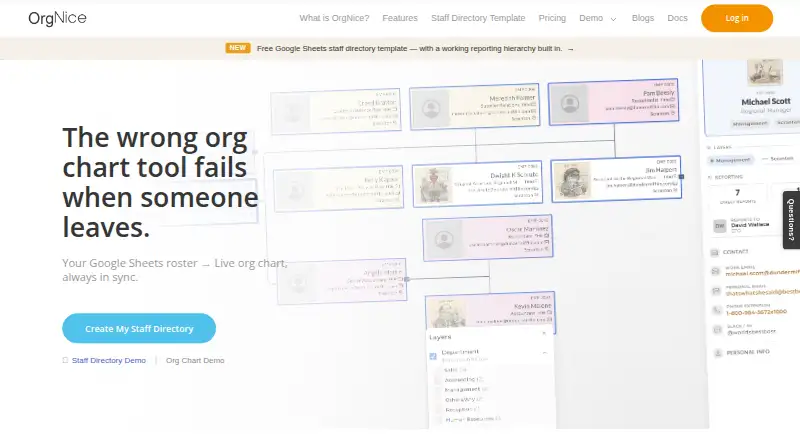
OrgNice turns a Google Sheet into a live staff directory and organization chart, reading the sheet when someone views either one.
What OrgNice is
OrgNice turns a Google Sheet into a live staff directory and organization chart, reading the sheet when someone views either one. The web directory supports search across any field, card or table layouts, and profiles in a side panel or on their own pages. Org charts can be coloured by department or location; data validation flags reporting gaps and loops and repairs common ones. Map View creates named views from location columns, with up to five per project. Charts can be exported as PNG, SVG, or PDF. OrgNice connects to Google Sheets and can be embedded in Google Sites, Confluence, or WordPress; profile links can show a name and photo in Slack or email. Google OAuth 2.0 provides read-only access to the specific sheet connected to a project. OrgNice says it does not store sheet contents, while account and project configuration data are stored on Google Cloud Platform in the United States. A free plan and seven-day trial are listed. Standard costs $20 a month billed annually, and Plus costs $25 a month billed annually.
Good
- Searches directory entries by any field
- Flags reporting gaps and loops
- Supports up to five named map views per project
- Can embed in Google Sites, Confluence, or WordPress
- Does not store Google Sheet contents
Watch out
- Standard is $20 a month billed annually
- Plus is $25 a month billed annually
- Does not support SSO/SAML
- Has not had a WCAG accessibility audit
Who it suits
OrgNice suits companies, schools, NGOs, and universities that need a staff directory or org chart based on Google Sheets. Its stated audience includes teams with contractors, volunteers, or staff without company email.
Verdict
OrgNice turns spreadsheet data into searchable directory and chart views, with maps, embeds, and export options. Consider its lack of SSO/SAML and WCAG audit if those are requirements.
Plans and prices
From OrgNice's own pricing page, checked 15 Oct 2026.
| Plan | Price | What it gives you |
|---|---|---|
| Standard | $30 a month | Per-project subscription · local taxes calculated separately · monthly |
| Plus | $40 a month | Sharing · embedding · public links · profile images · colour layers · export · Map View · monthly |
| Basic | Free | Directory and org chart · live from Google Sheet · details panel and profiles |
The facts
Each one read from OrgNice's own pages, with the date it was checked.
What it does
- Accessibility limitation
- OrgNice states that it has not completed a WCAG accessibility audit.checked 15 Oct 2026
- API and SDKs
- The public documentation lists no API or SDK section; its advanced topics are exports and embedding.checked 15 Oct 2026
- Authentication limitation
- The security documentation says SSO and SAML are not currently supported and sign-in uses Google OAuth.checked 15 Oct 2026
- Business classification
- ZaubaCorp classifies Arshna Solutions LLP’s principal activity as information and communication.checked 15 Oct 2026
- Data handling
- OrgNice says it does not store Sheet contents in its database; account and project configuration data are stored on Google Cloud Platform in the United States.checked 8 Oct 2026
- Data storage
- The service says it does not store Sheet rows; account and project configuration data are stored on Google Cloud in us-central1, while mapped images are cached temporarily.checked 15 Oct 2026
- Directory features
- The directory supports live search by any field, card or table views, and profiles shown in a side panel or on their own pages.checked 8 Oct 2026
- Directory views
- People can be browsed as cards or a table, searched across fields, and opened in side-panel or standalone profiles.checked 15 Oct 2026
- Documentation
- The documentation covers setup, the data model, field and image configuration, appearance, layers, sharing, access management, security, exports and embedding.checked 15 Oct 2026
- Embedding
- Directory and chart views can be embedded by iframe in Google Sites, Confluence, WordPress, intranets and other compatible pages.checked 15 Oct 2026
- Exports
- Plus projects can export charts as PNG, SVG or PDF, including a text-only accessible PDF.checked 15 Oct 2026
- Google access
- OrgNice uses Google OAuth 2.0 for read-only access to the specific Sheet connected to a project, and says it has completed Google’s OAuth application verification process.checked 8 Oct 2026
- Google OAuth
- OrgNice uses Google OAuth 2.0 with read-only access to the connected Sheet and says its OAuth application passed Google verification.checked 15 Oct 2026
- Google Sheets add-on
- A Google Sheets add-on can create projects and embed an OrgNice chart inside a Sheet.checked 15 Oct 2026
- Integrations
- OrgNice connects to Google Sheets and can be embedded in Google Sites, Confluence or WordPress; profile links can unfurl with a name and photo in Slack or email.checked 8 Oct 2026
- Intended users
- The site describes OrgNice as suited to companies, schools, NGOs and universities, including teams with contractors, volunteers or staff without company email.checked 8 Oct 2026
- Legal incorporation
- ZaubaCorp lists Arshna Solutions LLP (LLPIN ACC-4140) as incorporated in 2023 and registered with the Hyderabad Registrar of Companies.checked 15 Oct 2026
- Licence
- Terms prohibit copying, distribution, modification and derivative works, indicating proprietary software rather than an open-source licence.checked 15 Oct 2026
- Limit: Marketplace feedback
- The January 2025 review requested PDF/JPG export and flexible horizontal or vertical branch layouts; the developer replied that the product was in beta and export was planned.checked 15 Oct 2026
The company
- Company location
- The registered office is listed at Tulip 68, Serene County, Hyderabad, Telangana 500032, India.checked 15 Oct 2026
- Company partners
- ZaubaCorp names Aruna Rao and Sachin Satish Hejip as designated partners appointed in 2023.checked 15 Oct 2026
- Company status
- ZaubaCorp reports Arshna Solutions LLP as active with a ₹1,000,000 contribution obligation.checked 15 Oct 2026
- Founded
- 2025checked 28 Sep 2026
- Legal maker
- OrgNice’s terms identify Arshna Solutions LLP as the service provider and owner of org-nice.com.checked 15 Oct 2026
The full review of OrgNice
OrgNice is a web app that turns a Google Sheet into a staff directory and org chart. It suits organizations that already keep personnel data in Sheets and want to make it searchable and easier to browse. Its Google-first approach is useful, but it rules out teams that need another data source.
Overview
OrgNice reads the connected Sheet when someone views a directory or chart; it does not store the Sheet contents in its database. That keeps the spreadsheet as the source of truth, but ties every project to Google Sheets. The app uses Google OAuth 2.0 for read-only access to the specific Sheet connected to a project, and says its application has completed Google’s OAuth verification process.
Account and project configuration data are stored on Google Cloud Platform in the United States. Paddle processes payments, and OrgNice says it does not see or store payment method details. Two meaningful limits are the lack of SSO/SAML support and the absence of a WCAG accessibility audit. Organizations with either requirement should look elsewhere.
Key features
The directory searches across any field and supports card and table layouts. Profiles can appear in a side panel or on their own pages, while custom employee fields let teams reflect the details they need to maintain. Together, those options make a Sheet more useful as a directory than a static roster, especially when staff need to find people by different attributes.
Charts can be coloured by department or location. Data validation identifies missing links and loops in reporting lines and can repair common issues, which is a practical aid for teams maintaining a changing hierarchy. Map View creates named views from location columns, with up to five named map views per project. Charts can be exported as PNG, SVG or PDF.
OrgNice connects to Google Sheets and can be embedded in Google Sites, Confluence or WordPress. Profile links can unfurl with a person’s name and photo in Slack or email. These options help teams surface the directory in places they already work, though they do not change its dependence on Sheets.
Pricing
OrgNice has a free plan, paid plans starting at $20/mo (annual), and a 7-day trial. It may suit a small team exploring several directories or charts, though the project cap is worth checking against the organization’s needs.
Standard costs $20 a month, billed annually, and includes a Google Sheets connection plus sharing and embedding. It is the clearest fit for teams that need to publish Sheet-backed directories without advanced sharing or export formats. Plus costs $25 a month, billed annually, and adds advanced sharing and PNG, SVG and PDF export; teams that need those capabilities pay the higher annual rate. Paid plans receive priority email support, while the team says it will endeavour to support Basic users as well.
Platforms
OrgNice is web-based. Its integrations with Google Sheets, Google Sites, Confluence, WordPress, Slack and email make it accessible through connected services, but the product itself is not described as a native mobile or desktop app.
Who it's for
Companies, schools, NGOs and universities can use OrgNice to publish staff information from an existing Google Sheet. It is particularly relevant to organizations that need to include contractors, volunteers or staff without company email, and that want a directory alongside a visual reporting structure. It is a poor fit for teams that cannot use Google Sheets or require SSO/SAML or a completed WCAG accessibility audit.
Pros and cons
Pros
- Works from the existing Sheet: live reading avoids a separate copy of Sheet contents in OrgNice’s database.
- Useful directory and chart controls: field-wide search, flexible profile views, custom fields and reporting-line validation support more than a basic static org chart.
- Maps, embeds and exports: location views and multiple publishing options help teams share information in relevant contexts.
Cons
- Google Sheets is required: teams with staff data in another source cannot use the described workflow.
- No SSO/SAML or WCAG audit: this may disqualify OrgNice where identity controls or accessibility review are requirements.
- Basic pricing is unclear: its five-project cap is stated, but the price is not.
Alternatives
For a broader comparison, see Org Chart Software and Employee Directory Software.
Org Chart Studio offers a free plan for up to 250 people with watermarked PNG output, or a $1.00 USD one-time 24-hour option for clean exports. Choose it when a small chart and a one-off clean export matter more than a live Sheet-backed directory.
orgchart.live has a free plan with unlimited people and charts, spreadsheet/CSV/Excel import, live editing and PNG output. It is worth considering if those chart-focused capabilities are the priority.
OrgChartBuilder offers self-hosted and web options; its free plan is limited to 200 employees, one user and 90-day inactivity retention. Consider it if self-hosting is important or those free-plan limits fit.
The Org is a web, API and extension option with a free plan limited to one seat and 10 credits per seat each month. It may suit someone who wants its broader platform options and can work within those limits.
Maptio offers self-hosted and web access and describes its code as open source, making it an alternative for readers who value inspectable, modifiable software.
Organimi has a free web plan for 25 employees, one admin user and one org chart. It may fit a small organization with a single-chart need.
Our Org Chart has a free web plan with CSV import and export, PNG export and a Google Workspace add-on. It is a reasonable alternative for readers who want those chart functions without OrgNice’s described Sheet-driven directory workflow.
SharePoint Smart Org Chart & Directory is a free, MIT-licensed SharePoint Online web part with no per-user licensing, for organizations already using SharePoint.
Verdict
Choose OrgNice if your organization already maintains staff data in Google Sheets and wants that data to power a searchable directory, org chart and map views. Its mix of directory controls, validation and embedding is more useful than a chart alone for teams publishing staff information. Look elsewhere if you need a non-Google data source, SSO/SAML or a completed WCAG accessibility audit.
Alternatives to OrgNice
- 1

Maptio
Open sourceWebSelf-hosted7.8From $10 a month - 2

Sift
AndroidiOSWebAPI7.8From $150 a month - 3
The Org
Free planWebAPIExtension7.3From $19.33 a month - 4

Our Org Chart
Free planWebExtensionSelf-hosted7.2From $5 a month - 5

OrgChart
WebAPI6.9From $105 a month - 6

TeamOrgChart
Web6.9From $200 a year