
TeamOrgChart
TeamOrgChart creates, maintains, and shares interactive organization charts from employee data.
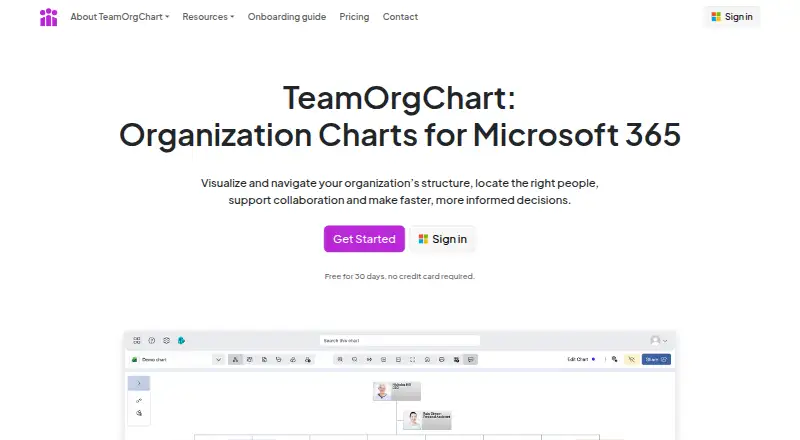
What TeamOrgChart is
TeamOrgChart creates, maintains, and shares interactive organization charts from employee data. It can use Microsoft Entra ID, Active Directory, SharePoint, Excel, SQL databases, and other connected business sources, then generate and format charts to reduce repeated manual updates. Employees can search for people and roles, inspect reporting relationships, and use bookmarks. Charts can be shared in Microsoft Teams, Outlook, SharePoint, or on the web, and exported to PDF, image, or SVG or printed. Planning views can include vacant roles, temporary positions, cross-team assignments, and proposed changes. Microsoft Entra authentication and single sign-on are used, and the maker says passwords are not stored or managed internally. Data is read directly from Microsoft sources without being copied, except for manually uploaded data and plans or positions made in the app. TLS 1.2 or higher protects data in transit, while Microsoft Azure methods protect stored data. The web service offers a 30-day trial and paid plans.
Good
- Uses multiple Microsoft and business data sources
- Searchable reporting relationships and bookmarks
- Shares charts across Teams, Outlook, SharePoint, web
- Exports to PDF, image, and SVG
- All plans include full functionality and support
Watch out
- No free plan
- Plans differ by employee count
- Web platform only
Who it suits
It is designed for Microsoft 365 organizations wanting searchable charts across Teams, Outlook, or SharePoint. It fits organizations that need current structures alongside vacancies and planned assignments.
Verdict
TeamOrgChart focuses on searchable, shareable organization charts connected to business data. Its 30-day trial and full-featured plans make employee-count limits the main purchasing distinction.
Plans and prices
From TeamOrgChart's own pricing page, checked 15 Oct 2026.
| Plan | Price | What it gives you |
|---|---|---|
| Small | $25 a month | Up to 200 employees · $25 USD per month |
| Medium | $60 a month | Up to 750 employees · $60 USD per month |
| Large | $140 a month | Over 750 employees · $140 USD per month |
| Small | $200 a year | Up to 200 employees · $200 USD per year |
| Medium | $500 a year | Up to 750 employees · $500 USD per year |
| Large | $1,200 a year | Over 750 employees · $1200 USD per year |
The facts
Each one read from TeamOrgChart's own pages, with the date it was checked.
What it does
- Access limitation
- The setup guide says anonymous access is unsupported and viewers need a Microsoft Entra ID account in the tenant.checked 15 Oct 2026
- API and extensibility limitation
- The certification record says the app has no additional Microsoft APIs beyond Graph and does not identify SDKs or a public developer API.checked 15 Oct 2026
- API scope
- Microsoft’s certification record says the app uses Microsoft Graph and no additional Microsoft APIs; no public SDK is identified there.checked 15 Oct 2026
- Audience
- TeamOrgChart is designed for Microsoft 365 organizations that need searchable organization charts available across Teams, Outlook or SharePoint.checked 7 Oct 2026
- Chart maintenance
- Charts are generated and formatted from data to reduce repeated manual updates.checked 7 Oct 2026
- Compliance
- The maker states TeamOrgChart complies with GDPR and the Data Protection Act.checked 7 Oct 2026
- Compliance limitation
- The certification record reports no SOC 2, SOC 3, ISO 27001, ISO 27017, ISO 27018, ISO 27002, FedRAMP or CSA Star certification.checked 15 Oct 2026
- Conditional formatting
- Rules can style charts according to departments, roles, locations, vacancies and other data.checked 15 Oct 2026
- Configuration
- The maker says setup uses single sign-on and guided no-code configuration.checked 15 Oct 2026
- Data analysis
- Built-in analysis identifies incomplete or incorrect employee data for review and correction.checked 15 Oct 2026
- Data geography
- The certification record places stored Microsoft customer data in the Netherlands.checked 15 Oct 2026
- Data handling
- The product says it reads employee data directly from Microsoft sources and does not store or copy it, with exceptions for manually uploaded data, plans and positions created in the app.checked 7 Oct 2026
- Data sources
- Charts can use Microsoft Entra ID, Active Directory, SharePoint, Excel, SQL databases and other connected sources.checked 15 Oct 2026
- Documentation
- User guides cover installation, chart creation, navigation, customization, custom roles, data integrity and sharing.checked 15 Oct 2026
- Dynamic Entra charts
- It reads employee and manager data from Microsoft Entra ID through Microsoft Graph and rebuilds chart hierarchies automatically.checked 15 Oct 2026
- Encryption
- Data in transit is encrypted using TLS 1.2 or higher, and stored data is encrypted using Microsoft Azure methods.checked 7 Oct 2026
- Entra permission requirement
- Creating Entra charts requires one-time Directory.Read.All consent from a Microsoft Global Administrator.checked 15 Oct 2026
- Exports
- Charts can be printed or exported as PDF, image or SVG files.checked 15 Oct 2026
- G2 pricing listing
- G2 lists a 30-day trial and monthly prices of $25, $60 and $140 for the Small, Medium and Large tiers.checked 15 Oct 2026
- Hosting
- The certification record identifies Azure as the hosting cloud and PaaS as the service model.checked 15 Oct 2026
- Incident-response limitation
- The certification record reports no formal information-security risk-management process and no formal security-incident response process.checked 15 Oct 2026
- Integrations
- Charts can be shared through Microsoft Teams, Outlook, SharePoint and the web.checked 7 Oct 2026
The company
- Company number
- The maker’s onboarding materials list company number 07777066.checked 15 Oct 2026
- Headquarters
- Chinnor, Oxfordshire, Englandchecked 28 Sep 2026