
Org Chart Studio
Org Chart Studio is a web tool for creating, updating and sharing organizational charts.
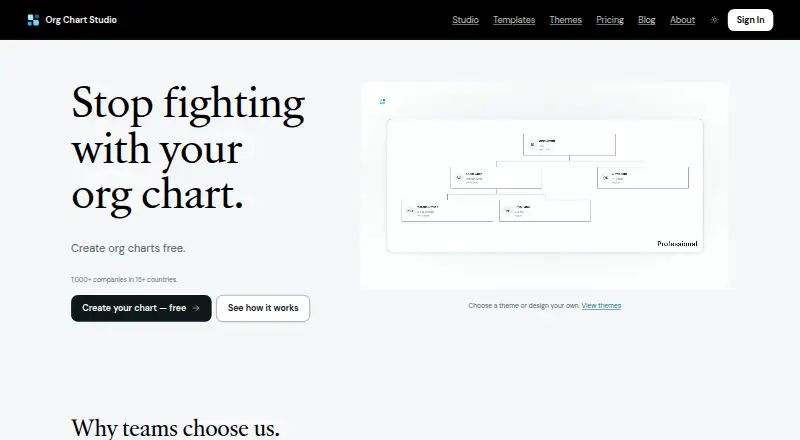
What Org Chart Studio is
Org Chart Studio is a web tool for creating, updating and sharing organizational charts. Users can import Excel, CSV or Google Sheets data, then edit charts in a spreadsheet-like table or through drag-and-drop on a desktop visual canvas. Import intelligence can flag missing managers and fix some naming errors. Charts can be exported to PowerPoint, PDF, PNG and CSV; PowerPoint exports use native shapes and text. The free plan allows up to 10 charts, with up to 2,500 people per chart, though free watermarked PNG exports are limited to charts of 250 people or fewer. Clean export passes are one-time purchases: $1.00 USD for one day, $5.00 USD for seven days, $10.00 USD for 30 days, or $100.00 USD for a year. Each pass covers every chart in the account, is sized by its largest chart and does not renew automatically. The product supports MCP connections for AI agents and provides spreadsheet import guides for named HR systems.
Good
- Imports Excel, CSV and Google Sheets.
- Supports table and drag-and-drop chart editing.
- Exports to PowerPoint, PDF, PNG and CSV.
- Free plan supports up to 10 charts.
- Chart data is encrypted in transit and at rest.
Watch out
- Free PNG exports are watermarked.
- Free PNG exports cover charts up to 250 people.
- No directory sync or HRIS sync.
- Export pass size is based on the largest chart.
Who it suits
It suits managers who need to build and share organizational charts from spreadsheet data. Teams needing clean exports can choose a one-time pass rather than a subscription.
Verdict
Org Chart Studio combines spreadsheet imports with visual chart editing and several export formats. Its free tier has export limits, while paid passes provide clean exports for a fixed period without automatic renewal.
Plans and prices
From Org Chart Studio's own pricing page, checked 30 Sep 2026.
| Plan | Price | What it gives you |
|---|---|---|
| Always | Free | Up to 250 people · watermarked PNG · Free; no subscription |
| 1-Day | $1, paid once | Clean exports for 24 hours · Up to 250 people · one-time |
| 7-Day | $5, paid once | Clean exports for a week · Up to 250 people · one-time |
| 30-Day | $10, paid once | Clean exports for 30 days · Up to 250 people · one-time |
| Annual | $100, paid once | Clean exports for a year · Up to 250 people · one-time |
The facts
Each one read from Org Chart Studio's own pages, with the date it was checked.
What it does
- AI data use
- The privacy policy says organizational chart data and employee information are never used to train, fine-tune, or improve AI or machine-learning systems.checked 30 Sep 2026
- AI integrations
- The product supports MCP connections for AI agents such as ChatGPT, Claude, and Gemini to build and edit org charts.checked 30 Sep 2026
- Editing
- Users can edit charts in a spreadsheet-like table or use drag-and-drop editing on the desktop visual canvas.checked 30 Sep 2026
- Exports
- Export formats include PowerPoint, PDF, PNG, and CSV; PowerPoint exports use native shapes and text.checked 30 Sep 2026
- HR data workflows
- The site provides spreadsheet import guides for Workday, BambooHR, and ADP; its FAQ also names Gusto and Rippling in a question about compatibility.checked 30 Sep 2026
- Pass limits
- Each export pass covers every chart in the account, is sized by the largest org chart, and does not renew automatically.checked 30 Sep 2026
- Privacy and security
- The privacy policy states that chart data is encrypted in transit and at rest, and that original spreadsheets selected in the browser app are not uploaded or retained as part of import.checked 30 Sep 2026
- Purpose
- Org Chart Studio creates professional organizational charts that users can build, update, and share.checked 30 Sep 2026
- Spreadsheet import
- It imports Excel (.xlsx), CSV, and Google Sheets, with import intelligence that can flag missing managers and fix some naming errors.checked 30 Sep 2026
- Support
- The company directs questions, ideas, and bug reports to [email protected] and says it reads everything.checked 30 Sep 2026
- Themes
- Users can choose a theme or customize chart colors, cards, and connectors in the Theme Editor.checked 30 Sep 2026
The company
- Company positioning
- The maker describes Org Chart Studio as a focused tool for managers and says it charges for clean exports rather than per-seat access.checked 30 Sep 2026
Money
- Free limits
- The free tier allows up to 10 charts with up to 2,500 people per chart, while free watermarked PNG export is limited to charts of up to 250 people.checked 30 Sep 2026
The full review of Org Chart Studio
Org Chart Studio is a web app for making and maintaining organizational charts from employee data. It is best suited to managers who want to shape a chart themselves from spreadsheets, rather than keep it automatically synced to an HR system. Its strongest appeal is flexible editing without per-seat access charges.
Overview
The workflow spans importing a roster, editing its structure in a table or on a visual canvas, and sharing the resulting chart. Import intelligence can flag missing managers and correct some naming errors, useful when a spreadsheet needs tidying before it becomes a reporting structure. The trade-off is that imports are not a substitute for ongoing directory or HRIS synchronization.
Key features
Import and chart editing
Excel, CSV, and Google Sheets imports give users several ways to bring existing employee data into a chart. After import, the spreadsheet-like table suits structured edits, while drag-and-drop on the desktop canvas is better for arranging the visual hierarchy. Custom employee fields and API access provide additional ways to adapt the charting workflow, but teams needing directory sync or HRIS sync will have to look elsewhere.
Exports, themes, and AI connections
Charts can be exported as PowerPoint, PDF, PNG, or CSV. PowerPoint output uses native shapes and text, so it can be edited as presentation content instead of being confined to a flat image. Themes and the Theme Editor let users adjust chart colors, cards, and connectors, which helps tailor a chart for sharing. MCP connections support AI agents including ChatGPT, Claude, and Gemini in building and editing charts; the privacy policy says employee and chart data are not used to train or improve AI or machine-learning systems.
Privacy and support
The privacy policy states that chart data is encrypted in transit and at rest, and that original spreadsheets selected in the browser app are not uploaded or retained as part of import. Questions, ideas, and bug reports can be sent to [email protected].
Pricing
Org Chart Studio charges for clean exports through one-time passes rather than per-seat subscriptions. Every pass covers all charts in an account, is sized according to its largest chart, and does not renew automatically. That model can suit occasional chart updates, but the largest chart determines the applicable size limit even if the rest are smaller.
- Always: free, with no subscription. It allows up to 250 people and watermarked PNG exports. This is the no-cost choice for small charts where a watermark is acceptable.
- 1-Day: $1, paid once for clean exports over 24 hours, up to 250 people. It fits a short, one-off sharing or presentation need.
- 7-Day: $5, paid once for clean exports for a week, up to 250 people. Choose it when revisions or export work may stretch across several days.
- 30-Day: $10, paid once for clean exports for 30 days, up to 250 people. It gives a longer editing and export window without an ongoing subscription.
- Annual: $100, paid once for clean exports for a year, up to 250 people. It is the pass for recurring export needs, though it remains a one-time purchase rather than an automatically renewing plan.
The free tier permits up to 10 charts with up to 2,500 people per chart, but free watermarked PNG export is capped at charts of up to 250 people. The paid passes also have a 250-person cap, so a larger chart can be built on the free tier but does not fit these clean-export passes.
Platforms
Org Chart Studio is available on the web. Its visual editing canvas is described as a desktop canvas, so the visual arrangement workflow is the clearest fit for desktop use.
Who it's for
This is a sensible choice for managers assembling or updating org charts from spreadsheets, especially when they want presentation-ready output and do not want to buy access seat by seat. It is less suitable for teams whose charts must follow live changes in a directory or HR system: spreadsheet import guides cover Workday, BambooHR, and ADP, and the FAQ discusses Gusto and Rippling compatibility, but directory sync and HRIS sync are not supported.
Pros and cons
- Pro: Excel, CSV, and Google Sheets imports plus checks for missing managers and some naming errors reduce manual cleanup before editing.
- Pro: Table and drag-and-drop editing, editable PowerPoint output, and theme controls cover both data correction and presentation needs.
- Pro: One-time export passes cover every chart in an account and do not renew automatically, avoiding seat-based charges and recurring billing.
- Con: Clean exports are capped at 250 people, despite the free chart allowance reaching 2,500 people per chart.
- Con: No directory or HRIS sync means imported rosters will not automatically track changes in those systems.
- Con: Free PNGs carry a watermark, limiting the free tier for polished external sharing.
Alternatives
Compare org chart software if you want to weigh this workflow against the broader category.
- orgchart.live is worth considering if unlimited people and charts on its free plan matter more than Org Chart Studio's stated export-pass model.
- OrgChartBuilder may fit a self-hosted preference; its free plan supports 200 employees, one user, and 90-day inactivity retention.
- Organimi is another web-based freemium option, with a free plan limited to 25 employees, one admin, and one chart.
- Workleap Pingboard may suit readers seeking a broader people-directory offering across web and mobile; its Standard plan starts at $4,999 a year and includes SSO.
- SharePoint Smart Org Chart & Directory is the alternative to consider if a free, MIT-licensed open-source SharePoint web part with no sign-up or per-user licensing is the priority.
- Sift is aimed at a different scale: its Org Chart plan starts at $150 a month, billed annually, with a 20-user minimum and unlimited people charted.
- Orgonaut is another paid option.
- Functionly is another option for readers comparing organizational tools.
Verdict
Org Chart Studio is a strong fit for managers who already work from spreadsheets and need editable charts, flexible exports, and no per-seat access fee. Its main advantage is the combination of structured and visual editing with one-off export passes; its main reason to look elsewhere is the 250-person clean-export cap and lack of automatic HR-system sync.
Getting started
- Open the Org Chart Studio website in a browser.
- Import an Excel, CSV, or Google Sheets file.
- Edit the chart in the table or on the desktop visual canvas.
- Choose a theme or customize colors, cards, and connectors.
- Use the free plan or buy a one-time pass for clean exports.
Limits worth knowing
The free plan allows up to 10 charts, with up to 2,500 people per chart. Free watermarked PNG exports are limited to charts of up to 250 people. Paid export passes cover every chart in the account, are sized by the largest chart, and do not renew automatically.
Questions
Is Org Chart Studio free?
Yes. The free plan allows up to 10 charts with up to 2,500 people per chart, and watermarked PNG exports for charts of up to 250 people.
How much do clean exports cost?
One-time passes cost $1.00 USD for 24 hours, $5.00 USD for a week, $10.00 USD for 30 days, or $100.00 USD for a year. Each pass covers every chart in the account and does not renew automatically.
Which platforms does it support?
Org Chart Studio is available on the web.
What can it import and export?
It imports Excel (.xlsx), CSV, and Google Sheets. Exports include PowerPoint, PDF, PNG, and CSV.
Does it connect to AI agents?
Yes. It supports MCP connections for agents such as ChatGPT, Claude, and Gemini to build and edit organizational charts.
Is chart data used to train AI?
The privacy policy says organizational chart data and employee information are never used to train, fine-tune, or improve AI or machine-learning systems.