OrgChartBuilder
OrgChartBuilder creates, annotates, and shares browser-based organization charts from CSV data.
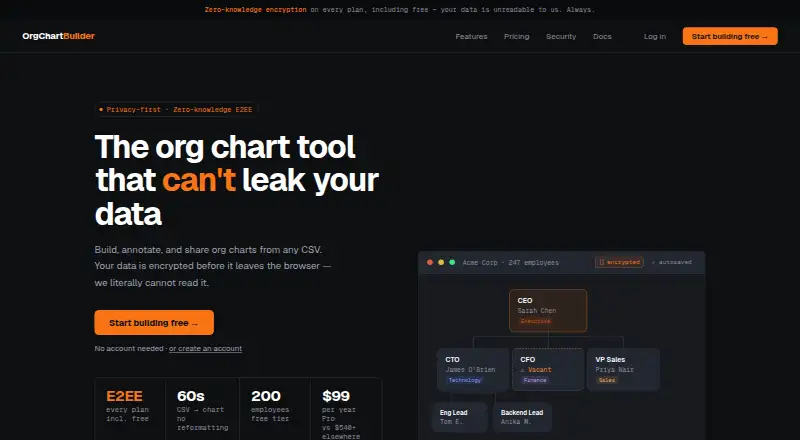
What OrgChartBuilder is
OrgChartBuilder creates, annotates, and shares browser-based organization charts from CSV data. Its import feature detects columns in HRIS exports and saves mappings for one-click re-imports; documented compatible exports include Workday, BambooHR, HiBob, and Personio, as well as plain spreadsheets. Scenario modelling supports private restructure drafts with side-by-side colour-coded changes and redundancy cost analysis. The service exports multi-page PDFs, SVGs, and CSV data, with SVG export available on Pro and higher plans. Advanced mode treats vacant roles as chart nodes and supports role sharing and interim appointments. Team and Company plans offer collaborative editing, with one editor at a time and read-only views for others. Org charts are encrypted in the browser, and the server stores only encrypted bytes. The Free plan supports 200 employees and one user, but encrypted data is deleted after 90 days without login.
Good
- Imports CSV and compatible HRIS exports
- Private restructure drafts include cost analysis
- Exports multi-page PDF and CSV data
- Browser-side chart encryption
- Free plan supports 200 employees
Watch out
- Free-plan data is deleted after 90 days inactive
- Free plan supports one user
- SVG export requires Pro or higher
Who it suits
OrgChartBuilder suits HR and people-ops teams that need to build charts from CSV or HRIS exports. Its free tier may also fit a small startup needing a chart for up to 200 employees.
Verdict
OrgChartBuilder combines CSV-based charting with imports, scenario modelling, and export options. Check its user limits and inactivity retention before relying on the Free plan.
Plans and prices
From OrgChartBuilder's own pricing page, checked 1 Oct 2026.
| Plan | Price | What it gives you |
|---|---|---|
| Free | Free | 200 employees · 1 user · 90-day inactivity retention · forever. No gimmicks. No ads. 100% free |
| Pro | $99 a year | 1,000 employees · 1 user · unlimited data retention · per year · ~$8.25/month · excl. tax |
| Team | $499 a year | 5,000 employees · up to 10 users · unlimited data retention · per year · up to 10 users · excl. tax |
| Company | $5,999 a year | Unlimited employees · unlimited users · unlimited data retention · per year · unlimited users · excl. tax |
The facts
Each one read from OrgChartBuilder's own pages, with the date it was checked.
What it does
- Collaboration
- Team and Company plans provide collaborative editing with one editor at a time and read-only views for others.checked 1 Oct 2026
- CSV and HRIS import
- CSV import auto-detects columns from HRIS exports and saves mappings for one-click re-imports.checked 1 Oct 2026
- Exports
- The product exports multi-page PDF, scalable SVG and CSV data; SVG is available on Pro and higher plans.checked 1 Oct 2026
- Intended users
- The service is positioned for HR teams and people-ops teams, while also being simple enough for a 10-person startup.checked 1 Oct 2026
- Purpose
- OrgChartBuilder builds, annotates and shares org charts from CSV data in a browser.checked 1 Oct 2026
- Scenario modelling
- Scenario modelling creates private restructure drafts with side-by-side, colour-coded diffs and redundancy cost analysis.checked 1 Oct 2026
- Security
- Org charts are encrypted in the browser with XChaCha20-Poly1305 using Argon2id-derived keys, and the server stores only encrypted bytes.checked 1 Oct 2026
- Self-hosting
- The Company plan offers self-hosting with SSO/SAML, Microsoft Entra ID import, unlimited employees and unlimited version history.checked 1 Oct 2026
- Share links
- Share-link decryption keys are placed after the URL hash, which browsers do not send to servers.checked 1 Oct 2026
- Support
- Support channels are community for Free, email for Pro and Team, and priority support for Company.checked 1 Oct 2026
- Supported HRIS exports
- Documentation names Workday, BambooHR, HiBob and Personio as compatible HRIS exports, plus plain spreadsheets.checked 1 Oct 2026
- Vacancy tracking
- Advanced mode treats vacant roles as first-class nodes and supports role sharing and interim appointments.checked 1 Oct 2026
Money
- Free-plan retention
- Free-plan encrypted data is deleted after 90 days without login, with warning emails sent on days 75 and 88.checked 1 Oct 2026
The company
- Headquarters
- Victoria, Australiachecked 23 Sep 2026
The full review of OrgChartBuilder
Overview
OrgChartBuilder is a browser-based tool for building, annotating and sharing organizational charts from CSV data. It suits HR and people-ops teams that need to plan restructures, as well as small organizations seeking a straightforward way to chart roles. Its import, scenario and security features are compelling, but the Free plan’s 200-employee cap and 90-day inactivity deletion call for care.
Key features
CSV import detects columns in HRIS exports and saves mappings for one-click re-imports. Documentation names Workday, BambooHR, HiBob and Personio, as well as plain spreadsheets, as compatible inputs. That can reduce repeated setup for teams working from those exports, though OrgChartBuilder does not offer HRIS sync.
Scenario modelling lets teams create private restructure drafts and compare changes with colour-coded, side-by-side diffs, alongside redundancy cost analysis. This makes the product more useful for evaluating organizational changes than a charting tool focused only on presenting the current structure.
Vacant roles can appear as first-class nodes, with support for role sharing and interim appointments. Exports include multi-page PDF and CSV; scalable SVG is available on Pro and higher plans, so Free users give up that format.
Team and Company plans support collaborative editing, but only one person edits at a time while others have read-only views. That enables shared review without simultaneous editing. The security design encrypts charts in the browser using XChaCha20-Poly1305 and Argon2id-derived keys, with only encrypted bytes stored on the server. Share-link decryption keys sit after the URL hash, which browsers do not send to servers.
Pricing
OrgChartBuilder is freemium, with no free trial. Free costs nothing, billed forever, and includes 200 employees, one user and community support. Its 90-day inactivity retention is the important trade-off: encrypted data is deleted after 90 days without login, with warning emails on days 75 and 88. It is a reasonable starting point for a small chart, but not a safe fit for anyone who may leave the account idle.
Pro costs $99 a year, billed yearly at approximately $8.25/month, excluding tax. It raises the employee cap to 1,000, retains one user, adds unlimited data retention and email support. This is the clearest step up for a solo user who needs more capacity or durable storage; it does not add collaborators.
Team costs $499 a year, billed yearly, excluding tax, for up to 10 users and 5,000 employees. It adds collaborative editing, but keeps editing to one person at a time; others have read-only views. Company costs $5,999 a year, billed yearly, excluding tax, and includes unlimited users, employees and version history, self-hosting, SSO/SAML, Microsoft Entra ID import and priority support. It is aimed at organizations that need those deployment and identity options, rather than teams simply looking for more editors. The listed employee limit is 1,000; the plan-specific caps are 200 for Free, 1,000 for Pro, 5,000 for Team and unlimited for Company.
Platforms
OrgChartBuilder runs on the web and can also be self-hosted through the Company plan. Its browser-based workflow fits teams that work with CSV files; Company adds a self-hosting route for organizations that require it.
Who it's for
HR and people-ops teams are the natural audience, especially those using supported HRIS exports and modelling restructures or vacancies. The product is also positioned as simple enough for a 10-person startup. A solo user may find Pro sufficient, while teams needing shared access can consider Team; organizations requiring self-hosting, SSO/SAML or unlimited scale are the target for Company. It is a weaker fit for buyers who require live HRIS sync or simultaneous editing.
Pros and cons
- Pros: Saved CSV mappings make repeat imports more efficient, and support for named HRIS exports broadens its usefulness beyond manually prepared spreadsheets.
- Pros: Private scenario drafts, visual diffs and redundancy cost analysis support restructure planning, not just chart publication.
- Pros: Browser-side encryption and share links whose decryption keys are kept out of server requests provide a considered security approach.
- Cons: Free data is deleted after 90 days without login, so occasional users must keep signing in or risk losing stored charts.
- Cons: Pro remains limited to one user, while Team collaboration permits only one editor at a time and read-only access for others.
- Cons: HRIS sync is not offered, and SVG export starts at Pro, limiting automation and export flexibility on Free.
Alternatives
For a wider comparison, see Org Chart Software. Organimi is another web-based freemium option; its Free plan supports 25 employees, one admin user and one org chart, making it a smaller-capacity starting point.
orgchart.live offers a free web plan with unlimited people and charts, spreadsheet/CSV/Excel import, live editing and PNG export; choose it when those free-plan capabilities matter more than OrgChartBuilder’s scenario modelling or encrypted storage approach. Functionly is a web-based freemium option with a free trial and an Enterprise plan priced at $79 a month billed annually for 20+ user seats; consider it when a larger seat-based plan and trial are priorities.
OrgChart Agile is a paid web and API option with a free trial; its Core plan is €12 a year per tenant, billed annually, and shows up to 100 boxes, one Org Designer / Power User, and unlimited Editors and Managers. OrgChart is a paid web alternative whose Core plan is $105 a year billed annually, starts at $105 /mo for 100 employees charted, and includes one data source integration, unlimited automated org charts and two access groups.
Workleap Pingboard is a freemium alternative available on Android, iOS, web and API; its Standard plan is $4,999 a year billed annually and starts at $4,999 USD with an org chart, people directory and SSO. Org Chart Studio offers a free web plan for up to 250 people with watermarked PNG, plus a 1-Day option at 1.00 USD one-time for clean exports over 24 hours, suited to a short export need. Built for Teams is a paid web alternative with a free trial and custom pricing based on organization size, selected modules and contract length.
Verdict
OrgChartBuilder is a strong fit for HR and people-ops teams that need to import CSV-based structures, explore private reorganization scenarios and share protected charts. Choose Pro for a solo user who needs up to 1,000 employees and unlimited retention, or Company when self-hosting, SSO/SAML and unlimited scale justify its price. Look elsewhere if you need HRIS sync, multiple simultaneous editors, or a Free plan that retains data indefinitely.
Getting started
- Open the OrgChartBuilder website
- Use the browser-based chart builder
- Import a CSV or compatible HRIS export
- Choose the Free, Pro, Team, or Company plan
- Use the saved mapping for later one-click imports
- Share or export the resulting organization chart
Limits worth knowing
The Free plan supports 200 employees and one user, with encrypted data deleted after 90 days without login. Pro supports 1,000 employees and one user; Team supports up to 5,000 employees and 10 users; Company lists unlimited employees and users.
Questions
Does OrgChartBuilder have a free plan?
Yes. Free is listed as free, supports 200 employees and one user, and has 90-day inactivity retention.
What are the paid prices?
Pro costs $99 a year, Team costs $499 a year, and Company costs $5,999 a year, each billed yearly and excluding tax.
Which HR systems can supply imports?
Documentation names Workday, BambooHR, HiBob, and Personio exports, plus plain spreadsheets. CSV import can detect columns and save mappings.
Can OrgChartBuilder be self-hosted?
Yes. The Company plan offers self-hosting with SSO/SAML and Microsoft Entra ID import.
Does it support collaborative editing?
Team and Company plans provide collaborative editing with one editor at a time and read-only views for others.
How are charts protected?
Charts are encrypted in the browser with XChaCha20-Poly1305 using Argon2id-derived keys, and the server stores only encrypted bytes.