OpenScreenShot
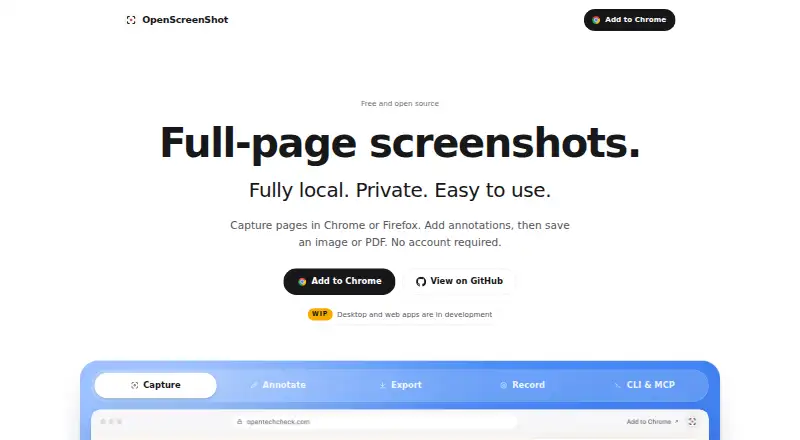
OpenScreenShot is a free, open-source browser extension for capturing and editing webpage screenshots.
What OpenScreenShot is
OpenScreenShot is a free, open-source browser extension for capturing and editing webpage screenshots. It captures a full page, visible area, or selected region, with exports in PNG, JPEG, WebP, or PDF. The editor includes arrows, rectangles, text, blur, mosaic, opaque redaction, spotlight, crop, pen, highlighter, and numbered step badges. Screenshot capture works on desktop Firefox, Chrome, Edge, Brave, Arc, and other Chromium browsers; recording is Chrome-only and offers auto zoom, timeline trimming, and WebM export. Capture, editing, export, PDF creation, and recording run locally in the browser, including offline. The extension needs no account and uses no upload, telemetry, watermark, or third-party service. Its optional CLI captures webpages from a locally installed Chrome-compatible browser and can save PNG output to a file or stdout. It can also run as an MCP server with a screenshot capture tool for AI agent clients. The project is MIT licensed. Selection is limited to the visible viewport, and pages that grow during scrolling or load images late may be incomplete or blank. Settings stay local and do not sync between devices or profiles.
Good
- Captures full pages, visible areas, or selected regions.
- Offers opaque redaction and blur tools.
- Processing works locally, including offline.
- Supports PNG, JPEG, WebP, and PDF exports.
Watch out
- Recording is Chrome-only.
- Region selection cannot extend below the viewport.
- Settings do not sync across devices or profiles.
- Dynamic pages may be incomplete or blank.
Who it suits
OpenScreenShot suits people who want local browser-based screenshot capture, annotation, or redaction without an account. It may also suit developers using its optional CLI or MCP server for screenshot workflows.
Verdict
OpenScreenShot provides broad screenshot editing and local processing across several desktop browsers. Check the Chrome-only recording support and viewport and dynamic-page limits against your capture needs.
Plans and prices
From OpenScreenShot's own pricing page, checked 28 Sep 2026.
| Plan | Price | What it gives you |
|---|---|---|
| Free | Free | No sign-up required · no account · no watermark · no cloud |
The facts
Each one read from OpenScreenShot's own pages, with the date it was checked.
What it does
- Annotation
- Its editor supports arrows, rectangles, text, blur, mosaic, opaque redaction, spotlight, crop, pen, highlighter, and numbered step badges.checked 28 Sep 2026
- Annotation Tools
- The editor supports arrows, boxes, text, and blur.checked 28 Sep 2026
- Capture limitation
- Region selection is viewport-only, so a region cannot extend below the fold during selection.checked 28 Sep 2026
- Capture Modes
- Users can capture a full page, visible area, or a selected region.checked 28 Sep 2026
- Chrome Capture Limit
- Chrome limits captureVisibleTab to about two calls per second.checked 28 Sep 2026
- CLI
- The separate openscreenshot CLI captures webpages from a locally installed Chrome-compatible browser and can write PNG output to a file or stdout.checked 28 Sep 2026
- CLI Tool
- The optional npm CLI captures screenshots from a terminal and can run as an MCP server.checked 28 Sep 2026
- Core function
- OpenScreenShot captures full webpages, visible areas, or selected regions from a browser.checked 28 Sep 2026
- DevOps and CI/CD
- The maker positions the CLI for incident reports, runbooks, postmortems, documentation, release notes, and visual diffs in CI/CD pipelines.checked 28 Sep 2026
- Dynamic-page limitation
- The capture engine measures page height once, so pages that grow during scrolling or load images late may be incomplete or blank.checked 28 Sep 2026
- Export formats
- The editor exports PNG, JPEG, WebP, and PDF files.checked 28 Sep 2026
- License
- OpenScreenShot is open source under the MIT license.checked 28 Sep 2026
- Local Processing
- All capture, annotation, and export processing runs locally in the browser.checked 28 Sep 2026
- MCP Integration
- The MCP server provides a capture_screenshot tool for AI agent clients.checked 28 Sep 2026
- Measurement tools
- Nochecked 24 Sep 2026
- Network Behavior
- The extension makes no network request and uses no third-party services.checked 28 Sep 2026
- No Account Required
- Users can capture screenshots without creating an account.checked 28 Sep 2026
- PDF Export
- PDF export uses a built-in writer and the browser's CompressionStream without network requests.checked 28 Sep 2026
- Permissions
- The extension has no standing host permissions at install; tab-capture and optional all-sites permissions are requested only when recording requires them.checked 28 Sep 2026
Where it runs
- Browser extension
- Yeschecked 24 Sep 2026
- Browser support
- Screenshots work on desktop Firefox, Chrome, Edge, Brave, Arc, and other Chromium browsers, while recording is Chrome-only.checked 28 Sep 2026
The company
- Company Identity
- OpenScreenShot is associated with @PGHQdev and OpenTechCheck.checked 28 Sep 2026
Money
- Free and Open Source
- The tool is free, open source, and MIT licensed.checked 28 Sep 2026
- Free plan
- Yeschecked 24 Sep 2026
Alternatives to OpenScreenShot
- 1

Awesome Screenshot
Free planiOSWebExtensionmacOS8.3From $5 a month - 2

Monosnap
Free planWebExtensionLinuxmacOS8.1From $2.50 a month - 3
Usersnap
AndroidiOSWebAPI7.9From €49 a month - 4

Greenshot
Free planWindows7.8$1.99 one-time - 5
ShareX
Free planOpen sourceWindows7.6Free plan - 6
Markup Hero
Free planExtensionmacOSWindows7.6From $3 a month