OnlineWhiteboard.org
OnlineWhiteboard.org is a free browser-based workspace for drawing, diagrams, notes, image annotation, and visual brainstorming.
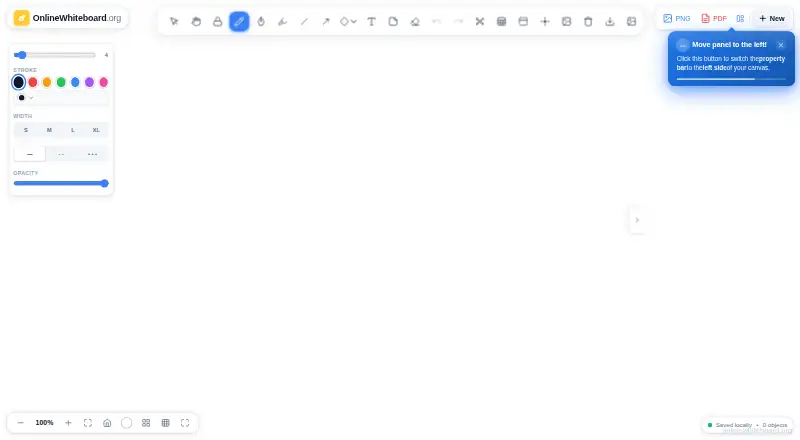
What OnlineWhiteboard.org is
OnlineWhiteboard.org is a free browser-based workspace for drawing, diagrams, notes, image annotation, and visual brainstorming. Its tools include pens, a highlighter, shapes, text, sticky notes, arrows, and connectors, and it also offers presentation mode. Users can create several boards and switch between them in one session, then export a board as PNG or PDF or save it as an editable JSON project file. The site describes classroom use during Zoom or Google Meet lessons, as well as sharing exported files through email, Google Classroom, Teams, Slack, or other platforms. It supports web, Android, iOS, macOS, and Windows, and lists major browsers and Chromebook support. Board content is processed in the browser and is not sent to or stored on the service’s servers during normal use. However, session data is cleared when the browser tab closes, so save work before refreshing or leaving. The free plan requires no subscription or account and adds no export watermark.
Good
- Free plan requires no account or subscription.
- Exports PNG, PDF, and editable JSON files.
- Multiple boards can be switched within one session.
- Board content stays in the browser during normal use.
- Presentation mode is included.
Watch out
- Session data clears when the browser tab closes.
- The privacy policy makes no specific regulatory compliance claim.
- No guest collaboration is listed.
Who it suits
It suits teachers, students, remote teams, designers, project managers, and individuals who want a browser-based board for visual work. It is also suited to people sharing board exports in lessons or team communication.
Verdict
OnlineWhiteboard.org offers a broad set of visual tools and useful export options at no cost. Save work before closing or refreshing the tab, and consider its stated privacy limitations if compliance requirements matter.
Plans and prices
From OnlineWhiteboard.org's own pricing page, checked 11 Oct 2026.
| Plan | Price | What it gives you |
|---|---|---|
| Free | Free | No subscription · No account required · No watermark on exports |
The facts
Each one read from OnlineWhiteboard.org's own pages, with the date it was checked.
Where it runs
- Browser and device support
- The site lists Chrome, Firefox, Safari, Edge, Brave, Opera, iPad/iOS, Android, and Chromebook, and says it also works on Windows and Mac.checked 11 Oct 2026
What it does
- Compliance
- The privacy policy makes no representation that the service complies with any specific data-protection regulation, including GDPR, CCPA, COPPA, or PIPEDA.checked 11 Oct 2026
- Data collection
- The privacy policy says hosting infrastructure may collect standard server logs, including IP address, browser details, access time, and requested pages.checked 11 Oct 2026
- Drawing tools
- The toolkit includes pens, a highlighter, shapes, text, sticky notes, arrows, and connectors.checked 11 Oct 2026
- Exports
- Boards can be exported as PNG or PDF, and saved as an editable JSON project file.checked 11 Oct 2026
- Multiple boards
- Users can create and switch between multiple boards in one session.checked 11 Oct 2026
- Other integrations
- The export guide says PNG or PDF files can be shared through email, Google Classroom, Teams, Slack, or other platforms.checked 11 Oct 2026
- Privacy
- The privacy policy says board content is processed in the browser and is not transmitted to or stored on the service’s servers during normal use.checked 11 Oct 2026
- Saving limitation
- The export guide advises saving work before refreshing or closing the tab and says session data is cleared when the browser tab closes.checked 11 Oct 2026
- Teaching use
- The site describes using the board during Zoom or Google Meet lessons and sharing exported PDFs through Google Classroom.checked 11 Oct 2026
- What it does
- It is a browser-based whiteboard for drawing, diagrams, notes, image annotation, and visual brainstorming.checked 11 Oct 2026
- Who it is for
- The site names teachers, students, remote teams, designers, creators, project managers, and personal users as audiences.checked 11 Oct 2026
Alternatives to OnlineWhiteboard.org
- 1
Boardmix
Free planAndroidiOSWebAPI9.0From $5 a month - 2
Explain Everything
Free planAndroidiOSWebmacOS9.0Free plan - 3

FigJam
Free planAndroidiOSWebAPI8.9From $3 a month - 4

Miro
Free planAndroidiOSWebAPI8.9From $8 a month - 5

Creately
Free planWebAPILinuxmacOS8.8Free plan - 6

Limnu
Free planAndroidiOSWebAPI8.7From $5 a month