
OfficeClip Contact Manager
OfficeClip Contact Manager is a web-based tool for organizing contacts, companies, leads, client histories, communications, and call lists.
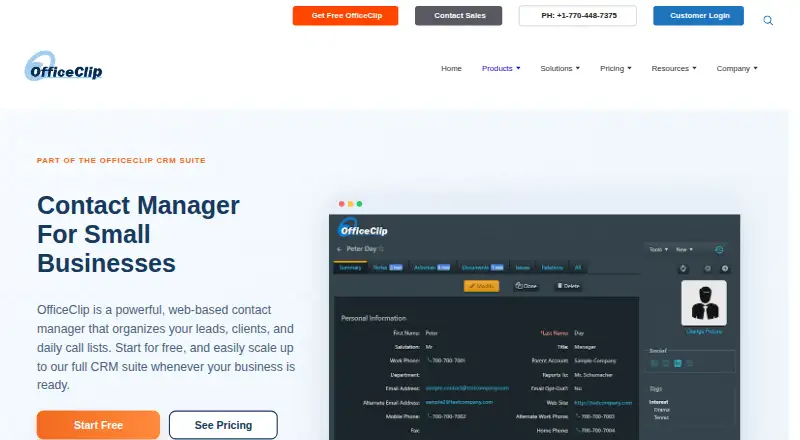
What OfficeClip Contact Manager is
OfficeClip Contact Manager is a web-based tool for organizing contacts, companies, leads, client histories, communications, and call lists. Its features include notes and activity history, calls and follow-ups, tasks, calendars, documents, reports, permissions, and a customer portal. Search and filters, hierarchical tags, campaigns, drip marketing, invoices, lead capture, and daily call lists add ways to manage contact-related work. The free web edition includes unlimited users and contacts, document management, and campaign creation. OfficeClip can run as a hosted cloud service or be installed on an organization's servers or private cloud. It integrates with Google Forms, Zapier, Amazon SES, Mailjet, and SocketLabs, and can sync with Google and Outlook. Its Outlook add-in synchronizes contacts, notes, calendar events, and tasks in one or both directions. Security features include feature- and record-level permissions, custom roles, two-factor authentication, encryption, backups, and audit trails. Plans include Standard Edition at no cost, Professional Edition at $5 a month, Enterprise Edition at $18 a month, Professional Edition (Installed) at $36, paid once, and Enterprise Edition (Installed) at $144, paid once.
Good
- Free edition includes unlimited users and contacts.
- Supports hosted and installed deployment.
- Syncs contacts and activities with Outlook.
- Includes two-factor authentication and audit trails.
- Offers mobile access and a customer portal.
Watch out
- Professional Edition costs $5 a month.
- Enterprise Edition costs $18 a month.
- Installed editions have one-time per-user costs.
Who it suits
It suits small businesses, service firms, recruiting teams, and sales teams that need to organize contacts and follow-up activity. Its hosted and installed options may suit organizations with different deployment preferences.
Verdict
OfficeClip Contact Manager combines contact records with follow-ups, documents, reporting, permissions, and integrations. Its free web edition includes unlimited users and contacts; paid and installed editions add costs.
Plans and prices
From OfficeClip Contact Manager's own pricing page, checked 1 Oct 2026.
| Plan | Price | What it gives you |
|---|---|---|
| Standard Edition | Free | no user or time limit · unlimited upgrades · unlimited file uploads · mobile access · customer portal · free forever |
| Professional Edition | $5 a month | 30-day free trial · no credit card · unlimited file uploads · yearly payment 10% discount · per user-month |
| Enterprise Edition | $18 a month | 30-day free trial · no credit card · unlimited file uploads · yearly payment 10% discount · per user-month |
| Professional Edition (Installed) | $36, paid once | installed on computer or private cloud · operates behind firewall · one-time per user |
| Enterprise Edition (Installed) | $144, paid once | installed on computer or private cloud · operates behind firewall · one-time per user |
The facts
Each one read from OfficeClip Contact Manager's own pages, with the date it was checked.
What it does
- Advanced features
- Listed Contact Manager features include search and filters, drip marketing, hierarchical tags, campaigns, invoices, customer portal, lead capture, daily call lists and smartphone access.checked 1 Oct 2026
- API
- OfficeClip provides a developer API with documentation for its business, data-access and utility layers plus source-code walkthroughs.checked 1 Oct 2026
- Core features
- The product includes contacts and companies, notes and activity history, calls and follow-ups, tasks and calendar, documents and customer portal, reports and permissions.checked 1 Oct 2026
- Deployment
- OfficeClip can be used as a hosted cloud service or installed on an organization's own servers or private cloud.checked 1 Oct 2026
- Hosted security
- OfficeClip states that its hosted data center is in the United States and certified to ISO27001, HIPAA, ISO 90001, PCI-DSS and SOC2-Type2 standards.checked 1 Oct 2026
- Integrations
- OfficeClip lists integrations with Google Forms, Zapier, Amazon SES, Mailjet and SocketLabs, and synchronization with Google and Outlook.checked 1 Oct 2026
- Outlook sync
- The Outlook Add-in synchronizes contacts, notes, calendar events and tasks between OfficeClip and Microsoft Outlook, with one-way or two-way synchronization options.checked 1 Oct 2026
- Purpose
- OfficeClip Contact Manager is a web-based contact manager for organizing leads, clients, companies, call lists, communications and customer history.checked 1 Oct 2026
- Security controls
- Contact Manager provides feature-level and record-level permissions, custom roles, ownership-based visibility, 256-bit SSL encryption, daily multi-location backups, two-factor authentication and audit trails.checked 1 Oct 2026
- Support
- OfficeClip says it provides phone support during business hours, 24/7 email support and chat support.checked 1 Oct 2026
- Target users
- The Contact Manager is presented for small businesses, service firms, recruiting teams and sales teams.checked 1 Oct 2026
Money
- Free edition
- The free web Contact Manager provides unlimited users, unlimited contacts, document management and campaign creation.checked 1 Oct 2026
The full review of OfficeClip Contact Manager
OfficeClip Contact Manager is a business contact system built around shared records and customer follow-up. It suits small businesses and service, recruiting, or sales teams that need contacts alongside activity tracking and administrative controls. Its unlimited free web edition is a compelling starting point; per-user fees apply for paid cloud editions, while installed editions carry one-time per-user charges.
Overview
OfficeClip is designed to keep leads, clients, companies, communications, and customer history together. Calls, follow-ups, reminders, tasks, and calendar functions make it more useful for team workflows than a simple address book, while documents, reporting, and a customer portal broaden its reach.
Teams can use it as a hosted cloud service or install it on their own servers or private cloud. That flexibility, paired with record-level controls, can suit organizations that need to manage access closely. The trade-off is that this is a more involved system than a lightweight personal contacts app.
For a broader category comparison, see Contact Management Software.
Key features
Contact and company records include notes and activity history, giving teammates a place to preserve context across customer interactions. Search and filters, hierarchical tags, campaigns, drip marketing, lead capture, and daily call lists help organize outreach. Invoices and a customer portal extend the system beyond prospecting, though teams that only need to store contact details may not need that breadth.
Document management and reporting support shared administration, while feature-level and record-level permissions, custom roles, ownership-based visibility, and audit trails help restrict access. Security controls also include 256-bit SSL encryption, two-factor authentication, and daily backups across multiple locations. OfficeClip says its hosted US data center is certified to ISO27001, HIPAA, ISO 90001, PCI-DSS, and SOC2-Type2 standards.
Integrations include Google Forms, Zapier, Amazon SES, Mailjet, and SocketLabs, with synchronization for Google and Outlook. The Outlook add-in can sync contacts, notes, calendar events, and tasks, with one-way or two-way options. A developer API includes documentation for business, data-access, and utility layers, plus source-code walkthroughs—useful for teams planning custom connections, but likely unnecessary for simpler deployments.
Contact imports support CSV, Google Contacts, and Outlook. Smartphone access and mobile apps are included, and support comprises phone service during business hours, 24/7 email, and chat.
Pricing
Standard Edition: free, billed free forever, with no user or time limit. It includes unlimited upgrades, unlimited file uploads, mobile access, and a customer portal. The unlimited-user and unlimited-contact free web edition makes it unusually practical for teams that want to start without a seat cap; it also includes document management and campaign creation.
Professional Edition: $5 a month, billed per user-month, with a 30-day free trial and no credit card required. It includes unlimited file uploads, and yearly payment gets a 10% discount. This is the lower-cost paid cloud tier, but seat-based billing means costs rise with team size.
Enterprise Edition: $18 a month, billed per user-month, with a 30-day free trial, no credit card requirement, unlimited file uploads, and a 10% discount for yearly payment. It is the higher-priced cloud option for teams that need the enterprise tier; the per-user monthly structure remains a material cost as users are added.
Professional Edition (Installed): $36, paid once, billed one-time per user, for installation on a computer or private cloud and operation behind a firewall. Enterprise Edition (Installed): $144, paid once, also billed one-time per user, with the same installation and behind-firewall terms. These options fit organizations that want local or private-cloud deployment, but the stated per-user charge still scales with staff count.
Platforms
OfficeClip supports web, Android, iOS, Windows, API, extension, and self-hosted use. That spread gives teams mobile and desktop access as well as deployment and integration options, rather than limiting use to a browser. Both Android and iOS mobile apps are available.
Who it's for
Small businesses, service firms, recruiting teams, and sales teams are the clearest fit, particularly when several people need shared customer history, follow-up tools, and controlled access. The free edition can accommodate unlimited users and contacts, while the paid cloud plans charge per user. Organizations that need a behind-firewall installation can consider the installed editions. Individuals seeking only a personal contact book may find the campaigns, permissions, and administrative features excessive.
Pros and cons
- Pros: The free web edition has no user or contact limit and includes document management and campaign creation, making it viable for a whole team rather than just an individual trial.
- Pros: Follow-ups, activity history, tasks, calendar tools, daily call lists, and reminders support ongoing customer work in one system.
- Pros: Hosted and installed deployment options, detailed permissions, and Outlook synchronization offer flexibility for organizations with different access and workflow needs.
- Cons: Paid cloud pricing is per user-month, so costs grow with team size; even the cheaper paid edition is not a flat team price.
- Cons: Installed options are billed per user as one-time charges, so they also scale with headcount rather than offering a single organization-wide fee.
- Cons: Its sales and administration breadth is more than many individuals or small contact lists require.
Alternatives
Cloze is worth considering for readers who want contact management with an email inbox and are comfortable with its listed $17 a month Pro plan; OfficeClip is the stronger fit for teams prioritizing unlimited free users and contacts or installed deployment.
Pobuca Connect offers a free access option, but registration requires an invitation.
ContactsPlus may suit an individual who can work within its free plan’s one synced account and 1,000-contact limit; OfficeClip’s free edition has unlimited users and contacts.
UpHabit is an alternative with a free Personal CRM plan for managing 10 relationships, while OfficeClip is oriented toward shared business records and team follow-up.
ConnectMachine is another freemium option.
KADO is another freemium option.
Cardhop is another freemium option for iOS and macOS.
Memotoo is another freemium option with a free plan capped at 50 contacts.
Verdict
Choose OfficeClip Contact Manager if your team needs shared customer records, structured follow-up, and access controls, especially if an unlimited free web edition or behind-firewall installation fits your needs. Its chief advantage is combining substantial team functionality with a no-seat-limit free plan. Look elsewhere if you need only a personal address book or want to avoid per-user charges when moving to a paid cloud or installed edition.
Alternatives to OfficeClip Contact Manager
- 1

Blinq Email Signatures
Free planAndroidiOSWebAPI8.2Free plan - 2

HiHello Email Signature Manager
Free planAndroidiOSWebmacOS8.2From $5 a month - 3

ContactsPlus
Free planAndroidiOSWebAPI8.1From $9.99 a month - 4

Haystack
Free planAndroidiOSWebAPI8.1From $2.50 a year - 5

Cloze
Free planAndroidiOSWebAPI7.8From $17 a month - 6
Memotoo
Free planAndroidiOSWebAPI7.8Free plan