KADO
KADO is a digital business card platform with contact management and CRM synchronization for professionals, teams and enterprises.
What KADO is
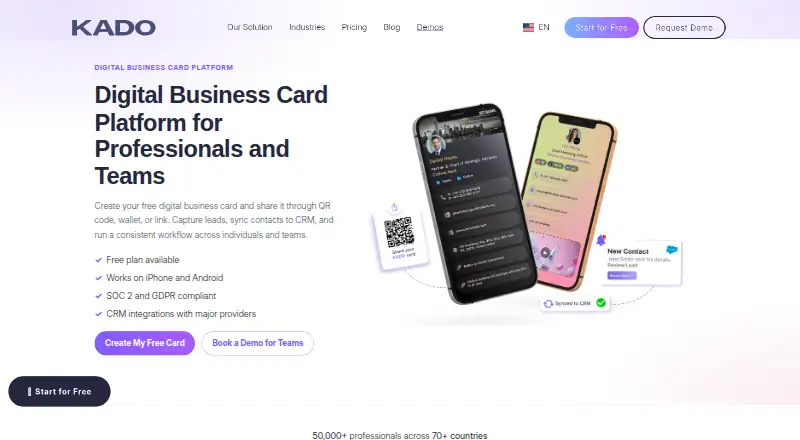
KADO is a digital business card platform with contact management and CRM synchronization for professionals, teams and enterprises. Cards can be shared through QR codes, links, Apple Wallet, Google Wallet, email signatures and NFC cards. The platform captures contacts and supports notes, tags, tasks and contact records. Admins can manage users, roles, permissions, branding and bulk card updates from one dashboard. Team integrations include Salesforce, HubSpot, Dynamics and Zapier Webhooks, alongside Active Directory, Google Contacts, Outlook Contacts, and Outlook email and calendar integrations. KADO offers Android, iOS and web access. Its free Networker Lite plan covers one user and includes an interactive digital business card and contact capture, with no credit card required. QR and NFC recipients can open a profile in their browser without the KADO app. KADO does not manufacture or sell NFC cards; users obtain compatible cards from third-party suppliers and encode them in the app.
Good
- Free plan includes one user and contact capture.
- Cards can be shared through QR codes and wallets.
- Admins can manage roles, permissions and branding.
- Integrations include major CRM and contact services.
- Recipients can view shared profiles in a browser.
Watch out
- NFC cards must be sourced from third parties.
- Free plan is limited to one user.
Who it suits
KADO suits professionals who want to share digital contact details and teams that need contact capture, administration or CRM synchronization. Networker Lite is for a single user; paid tiers add team management and other listed tools.
Verdict
KADO combines digital card sharing with contact records and team administration. Its free tier covers one user, while team features and CRM integrations are offered on paid plans.
Plans and prices
From KADO's own pricing page, checked 30 Sep 2026.
| Plan | Price | What it gives you |
|---|---|---|
| Networker Lite | Free | 1 user · interactive digital business cards · full branding and animated backgrounds · contact capture |
| Networker | $2.50 a month | team management · fully branded cards · multiple cards per user · contact capture · monthly |
| Business Developer | $4 a month | notes and tasks · Outlook and Google Contacts sync · CRM integration · tags and contact grouping · monthly |
| Enterprise | Priced on request | dedicated account manager · premium onboarding · priority support · NFC cards via partners · HRM and subdomain options |
The facts
Each one read from KADO's own pages, with the date it was checked.
What it does
- Cancellation
- KADO says customers can cancel at any time and, when cancelling during a billing cycle, are charged at the end of the month for days used.checked 30 Sep 2026
- Enterprise support
- Enterprise includes a dedicated account manager, premium onboarding, priority support, and company-wide admin tools.checked 30 Sep 2026
- Integrations
- KADO lists team-level Salesforce, HubSpot, Dynamics, and Zapier Webhooks integrations, plus Active Directory, Google Contacts, Outlook Contacts, and Outlook email and calendar integrations.checked 30 Sep 2026
- Lead capture
- KADO captures contacts and lets users manage notes, tags, tasks, and contact records.checked 30 Sep 2026
- NFC limitation
- KADO does not manufacture or sell NFC cards; users obtain compatible cards from third-party suppliers and encode them in the KADO app.checked 30 Sep 2026
- Product
- KADO is a digital business card platform with contact management and CRM synchronization for professionals, teams, and enterprises.checked 30 Sep 2026
- Recipient requirement
- Recipients do not need the KADO app when a card is shared by QR code or NFC because the profile opens in their browser.checked 30 Sep 2026
- Security
- KADO states that it uses SOC 2 Type II controls, GDPR-compliant processing, role-based access controls, and encrypted storage and transport.checked 30 Sep 2026
- Sharing
- Digital cards can be shared through QR code, links, Apple Wallet, Google Wallet, email signatures, and NFC cards.checked 30 Sep 2026
Money
- Free access
- The Networker Lite plan is free, requires no credit card, and provides one user with an interactive digital business card and contact capture.checked 30 Sep 2026
The company
- Headquarters
- 368 9th Avenue, 6th floor, New York, New York 10001, United Stateschecked 23 Sep 2026
- Team administration
- Admins can manage users, roles, permissions, branding, and bulk card updates from one dashboard.checked 30 Sep 2026
Where it runs
- Mobile apps
- KADO provides mobile apps through the Apple App Store and Google Play Store, alongside web access.checked 30 Sep 2026
The full review of KADO
Overview
KADO is a digital business card and contact-management platform for professionals who want to turn introductions into organized contact records, and for teams that need shared administration. Its mix of sharing options and team controls is compelling; the trade-off is that useful follow-up tools and integrations sit above the free single-user plan.
Cards can be shared by QR code, link, Apple Wallet, Google Wallet, email signature, or NFC. QR-code and NFC recipients can open the profile in a browser without installing KADO. The NFC route does require compatible cards from a third-party supplier: KADO does not sell or manufacture them, though users can encode them in its app.
Contact capture gives users a place to manage the people they meet, while team administrators can manage users, roles, permissions, branding, and bulk card updates from one dashboard. This makes KADO more than a profile-sharing tool, but its value depends on whether you need that contact workflow and team oversight.
Key features
Sharing that works across settings
The range of sharing methods covers digital and in-person exchanges, from wallet passes and email signatures to QR codes and NFC. Browser access for QR and NFC recipients removes an app-install barrier. The caveat is practical: NFC users need to source and encode a compatible card themselves.
Contact capture and follow-up
KADO captures contacts and supports records with notes, tags, and tasks. Those tools can help users keep context and next steps attached to a new contact rather than leaving an introduction as a name alone. Notes, tasks, tagging, and contact grouping are part of Business Developer, so the free plan is a starting point rather than the full follow-up workflow.
Team controls and integrations
Admins can manage roles, permissions, branding, users, and bulk card changes. Team-level integrations include Salesforce, HubSpot, Dynamics, and Zapier Webhooks; other connections include Active Directory, Google Contacts, Outlook Contacts, and Outlook email and calendar. CRM integration and Google and Outlook Contacts sync are included in Business Developer, making that tier the relevant step for teams that need those connections.
KADO states that it uses SOC 2 Type II controls, GDPR-compliant processing, role-based access controls, and encrypted storage and transport. Enterprise adds a dedicated account manager, premium onboarding, priority support, and company-wide admin tools.
Pricing
KADO uses a freemium model, with paid plans starting at $2.50/user/mo. The free Networker Lite plan costs nothing, requires no credit card, and covers one user. It includes an interactive digital business card, full branding, animated backgrounds, and contact capture. That is a useful individual entry point, but the one-user cap rules it out as a free team rollout.
Networker costs $2.50 a month, billed monthly. It adds team management, fully branded cards, multiple cards per user, and contact capture. It suits users who need shared administration or more than one card per person, though it does not include the notes, tasks, contact grouping, or CRM integration listed for the next tier.
Business Developer costs $4 a month, billed monthly. It adds notes and tasks, tags and contact grouping, Outlook and Google Contacts sync, and CRM integration. This is the more appropriate choice for users who intend to manage and follow up on captured contacts, not just collect them.
Enterprise has custom pricing and includes a dedicated account manager, premium onboarding, priority support, NFC cards via partners, and HRM and subdomain options. It is aimed at organizations needing company-wide administration and enterprise support rather than a standard individual setup. Customers can cancel at any time; cancellation during a billing cycle is charged at the end of the month for days used.
Platforms
KADO is available on Android, iOS, and the web, with mobile apps through Google Play and the Apple App Store. That combination gives users mobile access to cards and a browser-based option. The recipient can view a QR- or NFC-shared profile in a browser without the KADO app.
Who it's for
KADO is a strong fit for professionals who want a digital card paired with contact capture, and for teams that need centralized card branding and user administration. Business Developer is the logical tier for contact follow-up and CRM or address-book sync; Enterprise is better suited to organizations that need dedicated support and company-wide controls.
It is less suitable for someone who only needs a free card for a group: Networker Lite covers one user, and the NFC option requires a separately sourced card. If you do not need contact management or team administration, KADO's broader toolkit may be more than you need.
Pros and cons
- Pro: Multiple sharing methods, including wallet passes, email signatures, QR codes, links, and NFC, make the card adaptable to different exchange contexts.
- Pro: QR and NFC recipients can open a profile in a browser without installing KADO, reducing friction for the person receiving it.
- Pro: Team administration covers roles, permissions, branding, and bulk card updates in one dashboard.
- Con: The free plan is limited to one user, so teams must move to a paid plan for team management.
- Con: Notes, tasks, tags, contact grouping, and CRM integration are reserved for Business Developer, not Networker.
- Con: KADO does not supply NFC cards, leaving users to find compatible cards from third parties and encode them in the app.
Alternatives
For a broader category comparison, browse Digital Business Card Software or Contact Management Software.
- Haystack is another freemium option with a free Personal plan that includes unlimited digital cards, shares, and AI card scans.
- One Good Card may suit teams looking for a free plan for up to 30 users, with a central CRM and deal manager, analytics, and a leaderboard.
- Dot is an alternative with a free profile plan that is included with a one-time purchase of a dot.device.
- IdentiQ is another freemium option with a Starter plan priced at $316 a month and capped at five links per profile and 150 lead captures per month.
- Popl is an alternative freemium digital business card option with a team plan.
- MeCard offers a Business plan at $8 a year per user, with employee cards, a dashboard and analytics, and business-level support.
- ClickCard is a web-only option with a free plan for one active digital business card and a dynamic public QR link.
- Wave Connect is another freemium option available on web, iOS, and Android.
Verdict
KADO is best for professionals and teams that want digital card sharing to feed into contact records, with paid plans adding follow-up tools and team integrations. Its flexible sharing and centralized controls are the main reasons to choose it; look elsewhere if you need a free multi-user setup or want NFC cards supplied with the service.
Alternatives to KADO
- 1
Haystack
Free planAndroidiOSWebAPI8.1From $2.50 a year - 2

Linq
Free planAndroidiOSWebAPI7.4From $260 a month - 3
Uniqode
Free planAndroidiOSWebAPI7.4From $6 a year - 4
Wave Connect
Free planAndroidiOSWeb7.3From $5 a month - 5
Dot
Free planAndroidiOSWeb7.2From $15 a month - 6
DBC: Digital Business Card
AndroidiOSWeb7.0