Odoo Accounting
Odoo Accounting handles invoices, vendor bills, bank transactions, and related business records.
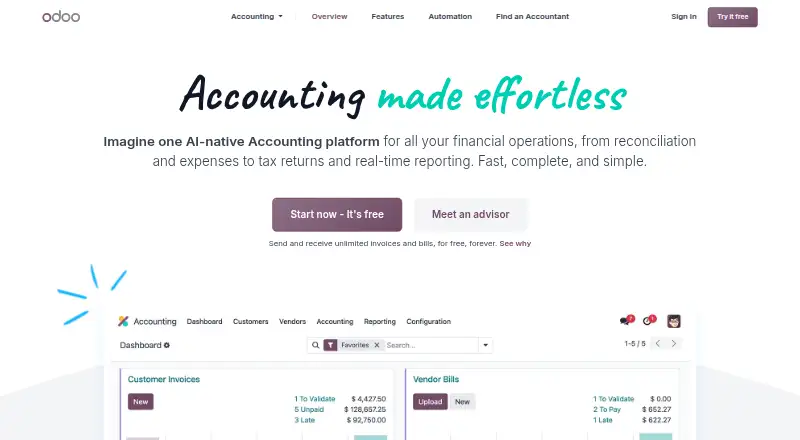
What Odoo Accounting is
Odoo Accounting handles invoices, vendor bills, bank transactions, and related business records. It supports invoice creation, bank feeds, automated reconciliation, inventory tracking, and accountant access. The free plan lets users send and receive unlimited invoices and bills, with one app and unlimited users; dependencies may also be included. The accounting app is available on the web and mobile devices, and Odoo also offers self-hosted options. Odoo says vendor bills can be processed in less than five seconds from login, while operations process in less than 90 milliseconds. Its AI-powered invoice capture has a stated 98% recognition rate, and 95% of transactions are matched automatically with financial records. Bank synchronization supports more than 28,000 banks worldwide. Accounting can be configured for country-specific charts, taxes, reports, e-invoicing, and audit files; electronic invoices support multiple formats, including Peppol. It connects with Odoo Sales, Purchase, Expenses, Inventory, Documents, and other apps. Standard and Custom plans include a free trial. Odoo is an open-source suite of integrated business applications, founded in 2004 and headquartered in Grand Rosière, Belgium.
Good
- Free plan includes unlimited invoices and bills.
- One app supports unlimited users on the free plan.
- Bank synchronization supports more than 28,000 banks.
- AI invoice capture has a stated 98% recognition rate.
- Integrates with Sales, Purchase, Expenses, Inventory, and Documents.
- Available on web, Android, iOS, and self-hosted setups.
Watch out
- The free plan is limited to one app.
- Custom hosting options require the Custom plan.
Who it suits
Odoo Accounting suits businesses that want invoicing, bank feeds, reconciliation, and inventory tracking alongside other Odoo business apps. Its mobile, web, and self-hosted options may also suit teams with varied access or hosting needs.
Verdict
Choose Odoo Accounting if you want core accounting tools in a connected business-app suite, with a free plan for one app and unlimited users. Look elsewhere if you need a stated paid-plan price before choosing; the listed Standard and Custom prices are not provided.
Plans and prices
From Odoo Accounting's own pricing page, checked 28 Sep 2026.
| Plan | Price | What it gives you |
|---|---|---|
| One App Free | Free | One app with unlimited users; free forever. · 1 app · Unlimited users · Shown as INR 0 per free on our read (localised); USD price not displayed to our checker |
| Standard | — | All apps for one fee; discounted price shown for initial users. · All apps · Odoo Online · Shown as INR 580 per month on our read (localised); USD price not displayed to our checker |
| Custom | — | All apps with Odoo Studio, Agentic AI, multi-company, external API, Odoo.sh, or on-premise options. · All apps · Odoo Online · Odoo.sh · On-premise · External API · Shown as INR 1080 per month on our read (localised); USD price not displayed to our checker |
| Light User | — | Cost-effective license for limited employee or HR access; customized quote may apply. · Shown as INR 195 per month on our read (localised); USD price not displayed to our checker |
The facts
Each one read from Odoo Accounting's own pages, with the date it was checked.
What it does
- Accountant access
- Yeschecked 20 Sep 2026
- AI Capture Rate
- AI-powered invoice data capture has a 98% recognition rate.checked 28 Sep 2026
- Auto Matching
- 95% of transactions are matched automatically with financial records.checked 28 Sep 2026
- Automated reconciliation
- Yeschecked 20 Sep 2026
- Bank feeds
- Yeschecked 20 Sep 2026
- Bank Support
- Odoo supports bank synchronization with more than 28,000 banks worldwide.checked 28 Sep 2026
- Country Compatibility
- Accounting is pre-configured for country-specific charts, taxes, reports, e-invoicing, and audit files.checked 28 Sep 2026
- EDI Formats
- Electronic invoices can be sent and received in multiple formats and standards, including Peppol.checked 28 Sep 2026
- Hosting Options
- Plans support Odoo Online, while Custom also supports Odoo.sh and on-premise hosting.checked 28 Sep 2026
- Inventory tracking
- Yeschecked 20 Sep 2026
- Invoice creation
- Yeschecked 20 Sep 2026
- Invoice Speed
- Vendor bill processing is described as taking less than five seconds from login.checked 28 Sep 2026
- Mobile Expenses
- Users can photograph expenses from the mobile experience for AI processing.checked 28 Sep 2026
- Paid Pricing
- Standard and Custom plans are priced per user per month, with displayed discounts for initial users.checked 28 Sep 2026
- Processing Speed
- All operations are processed in less than 90 milliseconds.checked 28 Sep 2026
The company
- Company Description
- Odoo is an open source suite of integrated business applications covering company needs.checked 28 Sep 2026
- Founded
- 2004checked 23 Sep 2026
- Headquarters
- Grand Rosière, Belgiumchecked 23 Sep 2026
Money
- Free Forever
- Send and receive unlimited invoices and bills for free forever.checked 28 Sep 2026
- Free plan
- Yeschecked 20 Sep 2026
- Free Plan Limits
- The free plan provides one app with unlimited users; dependencies may also be included.checked 28 Sep 2026
- Free Trial
- Standard and Custom plans offer a free trial.checked 28 Sep 2026
Where it runs
- Integrated Apps
- Accounting integrates with Sales, Purchase, Expenses, Inventory, Documents, and other Odoo apps.checked 28 Sep 2026
- Mobile platforms
- ios and androidchecked 20 Sep 2026
The full review of Odoo Accounting
Overview
Odoo Accounting is the accounting app in Odoo’s integrated business software suite. It is best suited to businesses that want bookkeeping connected to functions such as sales, purchasing, expenses, and inventory. Its free plan is unusually open on users and invoice volume, but moving beyond one app means choosing a paid plan with custom pricing.
Key features
Odoo combines invoice creation and bill handling with bank synchronization and automated reconciliation. It supports more than 28,000 banks worldwide, and says it automatically matches 95% of transactions to financial records. That can cut routine matching work, although unmatched items still need attention.
AI invoice capture has a stated 98% recognition rate. Vendor bill processing is described as taking less than five seconds from login, while operations are processed in less than 90 milliseconds. These figures point to quick processing, but captured information still merits review.
On mobile, users can photograph expenses for AI processing. Odoo also pre-configures accounting for country-specific charts of accounts, taxes, reports, e-invoicing, and audit files. Electronic invoices can be exchanged in multiple formats, including Peppol. This combination is useful for companies with localized compliance needs, though the value depends on whether Odoo supports the relevant country setup.
Accounting connects with Sales, Purchase, Expenses, Inventory, Documents, and other Odoo apps. That breadth is the main reason to choose it over a standalone accounting tool: financial activity can sit alongside related business operations. The trade-off is that access to all apps requires a paid plan.
Pricing
One App Free: free, with one app and unlimited users. Odoo says users can send and receive unlimited invoices and bills for free forever; dependencies may also be included. This is a strong fit for a business that can operate within a single app, but it is not a free route to the full suite.
Standard: custom pricing, with all apps on Odoo Online. A free trial is offered.
Custom: custom pricing, with all apps and options for Odoo Online, Odoo.sh, or on-premise hosting, plus Odoo Studio, Agentic AI, multi-company support, and an external API. A free trial is offered. It is the relevant tier for organizations needing those hosting or integration options; the extra flexibility comes with a price that must be obtained by quote.
Light User: custom pricing for limited employee or HR access, with a customized quote potentially required. It may fit staff who need constrained access rather than a full license, but it is not a substitute for an accounting plan.
Plans include hosting, daily backups on two continents, security, 24/7 monitoring, and unlimited email support Monday to Friday, 24/5, in four languages. Standard and Custom are priced per user per month, with displayed discounts for initial users. The One App Free plan avoids a per-user charge, while paid-plan pricing should be confirmed for the intended user count.
Platforms
Odoo Accounting is available on the web, Android, iOS, and self-hosted installations. Standard supports Odoo Online; Custom adds Odoo.sh and on-premise hosting. The mobile apps support expense photography for AI processing.
Who it's for
Choose Odoo Accounting if your business wants accounting tied to operational apps, needs bank feeds and automated matching, or can make the free one-app plan work. It is less suitable if you need a clear paid-plan price before evaluating a per-user commitment, or if you want the full connected suite without moving to a paid plan.
Pros and cons
- Pro: The free plan allows unlimited users and unlimited invoice and bill sending and receipt, making it practical for a small operation contained within one app.
- Pro: Connections to more than 28,000 banks and automatic matching of 95% of transactions can reduce repetitive bookkeeping.
- Pro: Country-specific accounting setup and multiple e-invoice formats, including Peppol, support businesses with local compliance requirements.
- Con: The free plan is limited to one app, so businesses wanting Odoo’s wider suite need a paid subscription.
- Con: Standard and Custom have custom pricing, which makes paid costs harder to assess before requesting a quote.
Alternatives
FreeAgent is another freemium option with Android, iOS, and web apps; its listed monthly plans include 10.00 GBP for a sole trader and 19.00 GBP for a partnership or LLP. Consider it when those plans and its platform coverage fit better than Odoo’s one-app free model.
Zoho Books offers a free plan for solopreneurs and micro businesses, available indefinitely while annual revenue stays below $50K, with one user and one account. That revenue cap and user limit may suit a small operation willing to trade Odoo’s unlimited free users for a defined threshold.
Zoho Inventory is a more focused alternative if inventory is the priority: its free plan allows 50 orders per month, one user, and one location.
Exact Online is a paid web-based option with a free trial and accounting plans that include online accounting, CRM, bank feeds, and invoicing.
FreshBooks is a paid alternative with Android, iOS, web, API, and extension support; its listed monthly plans start at 23.00 USD.
Holded API is a paid option with a 15.00 EUR monthly Plus plan that includes 250 invoices a year, one connected bank, and one user.
Zuora CPQ is a paid web and API product with contact-for-pricing terms.
Numarics Accounting is a paid option with a free trial and Android, iOS, and web support.
Browse SaaS Accounting Software, Bookkeeping Software, or Gym Accounting Software for more choices by category.
Verdict
Odoo Accounting is a strong choice for businesses that want accounting inside a connected app suite and can start with one app or justify a paid plan. Unlimited free users and invoices make the free tier compelling; the main reason to look elsewhere is the lack of a stated paid-plan price when budgeting for the full suite.
Getting started
- Open the Odoo Accounting website.
- Choose the One App Free plan or review the paid Standard and Custom plans.
- Use the web app, Android or iOS app, or select a supported hosting option.
- Start a free trial if choosing Standard or Custom.
- Connect accounting with other Odoo apps as needed.
Limits worth knowing
The free plan is limited to one app, though it allows unlimited users and unlimited sending and receiving of invoices and bills. Standard and Custom plans offer free trials; the listed plan facts do not state their trial length.
Questions
Is Odoo Accounting free?
Yes. The One App Free plan is free forever and includes one app with unlimited users, plus unlimited sending and receiving of invoices and bills.
Which platforms can I use?
Odoo Accounting is available on the web, Android, and iOS. Self-hosted options are also supported.
Does it support bank feeds and reconciliation?
Yes. It supports bank feeds and automated reconciliation, as well as synchronization with more than 28,000 banks.
Can it be self-hosted?
Custom supports Odoo.sh and on-premise hosting; plans also support Odoo Online.
Who makes Odoo?
Odoo is an open-source suite of integrated business applications. It was founded in 2004 and is headquartered in Grand Rosière, Belgium.
Alternatives to Odoo Accounting
- 1
Sage Accounting
Free planAndroidiOSWebAPI9.1From £2 a month - 2

Wave
Free planAndroidiOSWebAPI9.0From $72 a year - 3

FreeAgent
Free planAndroidiOSWebAPI8.9Free plan - 4

GnuCash
Free planOpen sourceAndroidiOSAPILinux8.8Free plan - 5

Zoho Books
Free planAndroidiOS8.7From $15 a month - 6

FreshBooks
AndroidiOSWebAPI8.7From $4.60 a month