
NoteBookCast
NoteBookCast is an online collaborative whiteboard for teaching, sketching, and working together in real time.
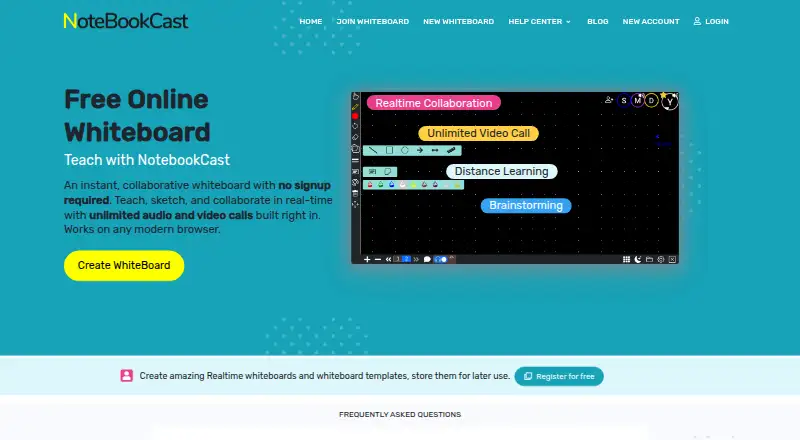
What NoteBookCast is
NoteBookCast is an online collaborative whiteboard for teaching, sketching, and working together in real time. It runs in a modern browser and can be used without registration; registered free accounts can save boards to a dashboard. Multiple people can draw on the same board at once, with updates synchronized live. Tools include chat, shapes, text, sticky notes, and a laser pointer. Users can build reusable templates and create as many boards from them as needed. The homepage describes audio and video calls without a time limit, while the new-board page limits audio conferences to two people. Boards can also hold audio notes. Listed additions include screen sharing with drawing and annotation, a PDF whiteboard generator with tables and image backgrounds, image uploads, and webcam image capture. Audio compatibility is listed for Windows, Linux, Mac, Android, and iPad, with limited Safari compatibility on iPad. Boards can be created without an account; the Free whiteboard plan is listed as free. The service offers a support form and a support email. Its terms place responsibility for uploaded or processed content on users.
Good
- Multiple users can draw with real-time synchronization.
- Board tools include chat, sticky notes, and a laser pointer.
- Reusable templates can generate additional whiteboards.
- Screen sharing supports drawing and annotation.
- Whiteboards can be created without an account.
Watch out
- Audio conferences currently support two people.
- Safari compatibility is limited on iPad.
- Users are responsible for content they upload or process.
Who it suits
NoteBookCast can suit teachers, sketchers, and groups who want a shared browser-based board. It may also fit people who prefer to start without registration or save boards through a free account.
Verdict
NoteBookCast offers a free, browser-based space for collaborative boards, with drawing tools and calls. Consider the two-person audio conference limit and iPad Safari compatibility if those matter to your group.
Plans and prices
From NoteBookCast's own pricing page, checked 5 Oct 2026.
| Plan | Price | What it gives you |
|---|---|---|
| Free whiteboard | Free | Whiteboards can be created without an account · registered free accounts save whiteboards to a dashboard |
The facts
Each one read from NoteBookCast's own pages, with the date it was checked.
What it does
- Audio and video
- The homepage describes built-in, time-unlimited audio and video calls; the new-board page says audio conferences currently support two people.checked 5 Oct 2026
- Audio notes
- Users can add audio notes to a whiteboard.checked 5 Oct 2026
- Export and images
- The changelog says the PDF whiteboard generator includes tables and image-type backgrounds, and lists image upload and webcam image capture.checked 5 Oct 2026
- Live collaboration
- Multiple users can draw at the same time, with changes synchronized in real time.checked 5 Oct 2026
- Product
- NoteBookCast is an online collaborative whiteboard for teaching, sketching, and real-time collaboration.checked 5 Oct 2026
- Recent changelog entry
- The latest listed changelog version is 8.5.0, dated December 28, 2024.checked 5 Oct 2026
- Screen sharing
- The changelog lists screen sharing with drawing and annotation over the shared screen.checked 5 Oct 2026
- Support
- The maker offers a support form and lists [email protected].checked 5 Oct 2026
- Templates
- Users can create reusable whiteboard templates and make as many whiteboards from them as needed.checked 5 Oct 2026
- Terms and content
- The terms say users are responsible for content they upload or process and describe the service as provided “as is” and “as available.”checked 5 Oct 2026
- Whiteboard tools
- Built-in tools include chat, shapes, text, sticky notes, and a laser pointer.checked 5 Oct 2026
Where it runs
- Browser access
- The service works in any modern browser and can be used without registering.checked 5 Oct 2026
- Device support
- Audio compatibility is listed for Windows, Linux, Mac, Android, and iPad, with limited Safari compatibility on iPad.checked 5 Oct 2026
Alternatives to NoteBookCast
- 1
Boardmix
Free planAndroidiOSWebAPI9.0From $5 a month - 2
Explain Everything
Free planAndroidiOSWebmacOS9.0Free plan - 3

FigJam
Free planAndroidiOSWebAPI8.9From $3 a month - 4

Miro
Free planAndroidiOSWebAPI8.9From $8 a month - 5

Creately
Free planWebAPILinuxmacOS8.8Free plan - 6

Limnu
Free planAndroidiOSWebAPI8.7From $5 a month