NodeJsScan
NodeJsScan is a free, open-source static application security testing scanner for Node.js application source code.
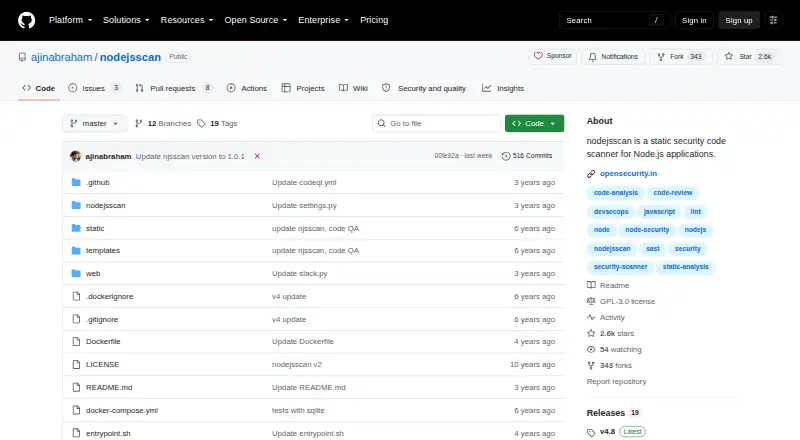
What NodeJsScan is
NodeJsScan is a free, open-source static application security testing scanner for Node.js application source code. Its detection engine uses libsast and Semgrep, and the project offers a web interface, command-line interface, and Python API through njsscan. A local setup serves the web interface at http://127.0.0.1:9090. CLI output can be produced in JSON, SARIF 2.1.0, SonarQube, DefectDojo, GitLab SAST, or HTML formats. Teams can configure file types, ignored paths and rules, severity filters, and severity overrides in a .njsscan file. Documented CI/CD integrations include GitHub Actions, GitHub Code Scanning, GitLab CI/CD, Travis CI, and CircleCI. Slack webhook and SMTP email alerts are supported. Deployment options include running a prebuilt Docker image or building the image locally. NodeJsScan is licensed under GPL-3.0 and is intended for CI/CD and DevSecOps pipelines. The current njsscan package requires Python 3.10 or newer and supports macOS and Linux; NodeJsScan version 4 onward dropped Windows support.
Good
- Free and open source under GPL-3.0.
- Provides CLI, web interface, and Python API.
- Supports multiple CI/CD integrations.
- Offers configurable scan rules and severity filters.
- Supports JSON, SARIF, and other output formats.
Watch out
- Current njsscan requires Python 3.10 or newer.
- Current package support is macOS and Linux.
- NodeJsScan version 4 onward dropped Windows support.
Who it suits
NodeJsScan suits teams scanning Node.js source code in CI/CD or DevSecOps workflows. It is relevant to users who can run a local or Docker deployment on macOS or Linux.
Verdict
NodeJsScan offers configurable source-code scanning with CLI, API, web, and CI/CD options. Teams should account for its Python requirement and macOS or Linux support when choosing a deployment.
Plans and prices
From NodeJsScan's own pricing page, checked 8 Oct 2026.
| Plan | Price | What it gives you |
|---|---|---|
| NodeJsScan | Free | Open source · self-hosted · Docker or local setup |
The facts
Each one read from NodeJsScan's own pages, with the date it was checked.
What it does
- Alerts
- NodeJsScan supports Slack alerts using a webhook URL and email alerts using SMTP settings.checked 8 Oct 2026
- CLI and API
- The project provides a command-line interface and a Python API through njsscan.checked 8 Oct 2026
- Configuration
- Users can configure scanned file types, ignored paths and rules, severity filters, and severity overrides with a .njsscan file.checked 8 Oct 2026
- Deployment
- The project documents running a prebuilt Docker image or building its Docker image locally.checked 8 Oct 2026
- Detection engine
- It is powered by libsast and Semgrep.checked 8 Oct 2026
- Integrations
- Documented CI/CD integrations include GitHub Actions, GitHub Code Scanning, GitLab CI/CD, Travis CI, and CircleCI.checked 8 Oct 2026
- Intended users
- The project describes use in CI/CD and DevSecOps pipelines to scan Node.js application code.checked 8 Oct 2026
- License
- The NodeJsScan repository identifies its license as GPL-3.0.checked 8 Oct 2026
- Maintainer support
- The repository invites users to support the project through PayPal donations or sponsorship.checked 8 Oct 2026
- Output formats
- The CLI supports JSON, SARIF 2.1.0, SonarQube, DefectDojo, GitLab SAST, and HTML output.checked 8 Oct 2026
- Purpose
- NodeJsScan is a static application security testing scanner for Node.js applications.checked 8 Oct 2026
- Supported systems
- The current njsscan package requires Python 3.10 or newer and supports macOS and Linux; NodeJsScan version 4 onward dropped Windows support.checked 8 Oct 2026
- Web interface
- The local setup runs a web user interface at http://127.0.0.1:9090.checked 8 Oct 2026
The company
- Headquarters
- Vancouver, Canadachecked 28 Sep 2026
- Maker location
- OpenSecurity lists Bangalore, India and Vancouver, Canada as its locations.checked 8 Oct 2026
The full review of NodeJsScan
NodeJsScan is a source-code security scanner built specifically for Node.js applications. It is best for development and DevSecOps teams comfortable operating self-hosted tools on Linux or macOS. The trade-off is clear: you get unusually adaptable scanning and reporting at no license cost, but deployment and upkeep remain your responsibility.
Overview
NodeJsScan combines the libsast and Semgrep engines to inspect Node.js application code for security issues. You can run scans from the command line, call them through the Python API exposed by njsscan, or use the local web interface at http://127.0.0.1:9090. That mix suits scripted developer workflows as well as teams that want a browser view without sending source to a hosted service.
Its .njsscan configuration file is a meaningful advantage for teams with established policies. It can select file types, ignore paths or rules, filter severities, and override severity levels. The cost of that control is operational ownership: your team must deploy, update, and secure the scanner itself.
Key features
- Actionable export choices: The CLI produces JSON, SARIF 2.1.0, SonarQube, DefectDojo, GitLab SAST, and HTML. Teams can feed findings into existing code-review, defect-tracking, and security systems instead of adapting to a single report format.
- CI/CD and pull-request workflows: Documented integrations include GitHub Actions, GitHub Code Scanning, GitLab CI/CD, Travis CI, and CircleCI. This makes NodeJsScan a sensible fit when security checks must run alongside builds or proposed changes.
- Notifications: Slack alerts use a webhook URL, while email alerts use SMTP settings. These are useful for routing findings to an engineering channel or mailbox, although they still require your own messaging infrastructure.
- Self-hosted deployment: The project documents both a prebuilt Docker image and local Docker builds. Docker can simplify repeatable pipeline setup, but neither option removes responsibility for host security and maintenance.
Pricing
| Plan | Price | Includes |
|---|---|---|
| NodeJsScan | free | Open source; self-hosted; Docker or local setup |
There is no paid tier, free trial, seat allowance, or usage quota to weigh against the free plan. The economic benefit is strongest for teams that already have Linux or macOS build infrastructure and can absorb maintenance. “Free” does not mean managed: hosting, upgrades, pipeline administration, and support are yours to handle. The repository identifies a GPL-3.0 license and invites support through PayPal donations or sponsorship.
Platforms
NodeJsScan is offered as an API, Linux and macOS software, a self-hosted deployment, and a web interface running locally. The current njsscan package requires Python 3.10 or newer. Version 4 onward dropped Windows support, so Windows-only teams should look elsewhere or provide a compatible Linux/macOS environment.
Who it's for
This is aimed at teams building Node.js applications that want source scanning embedded in CI/CD or broader DevSecOps pipelines. It is particularly suitable when pull-request checks, configurable severities, and machine-readable reports matter more than a vendor-hosted console. It is less suitable for organizations seeking a managed service, Windows-native operation, or vendor-backed maintenance.
Pros and cons
Pros
- Open-source and free: There is no subscription cost or trial expiry, making broad internal adoption feasible.
- Flexible automation: CLI, Python API, pull-request scanning, and documented integrations cover both developer scripts and delivery pipelines.
- Broad reporting: Six named output families reduce integration work with common security and quality systems.
- Policy control: File, path, rule, and severity settings let teams tune noise to their codebase.
Cons
- Platform constraint: Python 3.10+ and the loss of Windows support narrow where it can run.
- Self-hosting burden: Deployment, upgrades, infrastructure security, and availability are not outsourced.
- Node.js focus: It is a specialized choice rather than a general multi-language application scanner.
Alternatives
Snyk Open Source is the better choice when you need Windows support, a web platform, or a freemium service with a Free plan capped at five projects and monthly billing.
Choose MobSF instead for a broader open-source framework spanning Linux, macOS, Windows, web, API, and self-hosted use; its Professional plan costs $2,999.99 a year.
Semgrep Code suits teams wanting a paid platform with a Free Edition covering Code and Supply Chain for up to 10 repositories and 10 contributors.
NaiveSystems Analyze is an alternative freemium analyzer with some open-source components and on-premises deployment.
Flawfinder is a free GPL-2.0+ option for teams seeking a different open-source security checker.
Bandit is free Apache-licensed software for its supported scanning use case.
gosec is a free Apache-licensed Go security checker.
Security Code Scan is a free, open-source static analyzer for .NET, making it the relevant alternative for that ecosystem.
Verdict
Choose NodeJsScan if you need a no-cost, configurable Node.js scanner that can run in your own Linux or macOS pipelines and emit results in established security formats. Look elsewhere if you require Windows support, a managed service, or coverage beyond Node.js without taking on self-hosting work.
Alternatives to NodeJsScan
- 1

Semgrep Code
Free planOpen sourceWebAPIExtensionLinux8.3From $15 a month - 2
MobSF
Free planOpen sourceWebAPILinuxmacOS8.2From $2,999.99 a year - 3

GitHub CodeQL
Free planWebExtensionLinuxmacOS7.5From $30 a month - 4
gosec
Free planOpen sourceAPILinuxmacOSSelf-hosted7.2Free plan - 5
Horusec
Free planWebAPIExtensionLinux6.6Free plan - 6
Xygeni
Free planWebAPIExtensionLinux6.6Free plan