Horusec
Horusec is a static code analysis tool for finding security flaws during software development.
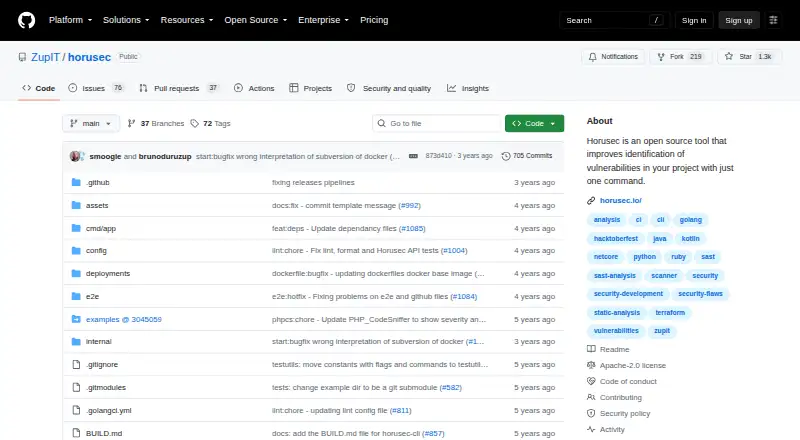
What Horusec is
Horusec is a static code analysis tool for finding security flaws during software development. It can scan source code and search project files and Git history for leaked keys and other security issues. The project describes analysis across 18 languages using 20 security tools; listed language coverage includes C#, Java, Kotlin, Python, Ruby, Golang, Terraform, JavaScript, TypeScript, Kubernetes, PHP, C, HTML, JSON, Dart, Elixir, Shell and Nginx. Analysis can be configured through CLI resources. Developers can run the command-line interface locally, and DevSecOps teams can use it in CI/CD pipelines; a Visual Studio Code extension is also available. Horusec-Web provides vulnerability dashboards, false-positive controls, authorization tokens and vulnerability updates. The platform integrates with the CLI to visualize and manage vulnerabilities and supports native Horusec, LDAP and Keycloak authentication. Its repository was archived by its owner on March 19, 2025 and is read-only. Running Horusec with all its tools requires Docker; the platform also requires RabbitMQ and PostgreSQL. The open-source plan is free under Apache License 2.0.
Good
- Scans source code and Git history for leaked keys.
- Supports CLI use and CI/CD pipelines.
- Includes a Visual Studio Code extension.
- Open-source plan is free.
Watch out
- All analysis tools require Docker.
- Disabling Docker reduces analysis capabilities.
- Platform repository is archived and read-only.
- Platform requires RabbitMQ and PostgreSQL.
Who it suits
Horusec suits developers and DevSecOps teams seeking source analysis through a CLI, editor extension or CI/CD pipeline. Its web platform may be relevant to teams managing vulnerability findings, though its repository is archived and read-only.
Verdict
Horusec combines configurable code analysis with CLI, CI/CD and editor workflows. Account for its Docker requirement and the archived, read-only status of the platform repository before deciding whether its components suit your needs.
Plans and prices
From Horusec's own pricing page, checked 1 Oct 2026.
| Plan | Price | What it gives you |
|---|---|---|
| Open source | Free | Apache License 2.0 · CLI and platform components |
The facts
Each one read from Horusec's own pages, with the date it was checked.
What it does
- Configurable analysis
- The analysis is fully configurable through CLI resources.checked 1 Oct 2026
- Developer workflow
- Developers can use Horusec through its CLI, while DevSecOps teams can use it in CI/CD pipelines.checked 1 Oct 2026
- Docker requirement
- Docker is required to run Horusec with all its tools; disabling Docker loses much of the analysis power.checked 1 Oct 2026
- Editor integration
- The project provides a Visual Studio Code extension for analyzing projects.checked 1 Oct 2026
- Languages
- It analyzes C#, Java, Kotlin, Python, Ruby, Golang, Terraform, JavaScript, TypeScript, Kubernetes, PHP, C, HTML, JSON, Dart, Elixir, Shell and Nginx.checked 1 Oct 2026
- Purpose
- Horusec performs static code analysis to identify security flaws during development.checked 1 Oct 2026
- Secret detection
- It searches project files and Git history for key leaks and other security flaws.checked 1 Oct 2026
- Security policy
- Zup's open-source projects adopt OpenSSF Security Scorecard and OpenSSF Best Practices Badge recommendations.checked 1 Oct 2026
- Security tools
- Horusec analyzes 18 languages with 20 different security tools simultaneously.checked 1 Oct 2026
- Support
- Questions and ideas are handled through GitHub Issues and the Zup Open Source Forum.checked 1 Oct 2026
Where it runs
- Platform authentication
- Horusec Platform supports native Horusec, LDAP and Keycloak authentication.checked 1 Oct 2026
- Platform dependencies
- Horusec Platform requires RabbitMQ and PostgreSQL.checked 1 Oct 2026
- Platform integration
- Horusec Platform is a set of web services integrating with Horusec CLI to visualize and manage vulnerabilities.checked 1 Oct 2026
- Platform status
- The Horusec Platform repository was archived by its owner on March 19, 2025 and is read-only.checked 1 Oct 2026
- Web application
- Horusec-Web provides vulnerability metrics dashboards, false-positive control, authorization tokens and vulnerability updates.checked 1 Oct 2026
The full review of Horusec
Horusec is a free, open-source tool for finding security flaws in source code during development. It suits teams that want configurable scans in a CLI or CI/CD workflow, especially across its broad language set. Its command-line and editor options are useful, but the Docker requirement and archived status of its platform components temper the appeal.
Overview
Horusec targets source code and combines 20 security tools to analyze 18 languages, from Java and Python to Terraform, Kubernetes, Shell and Nginx. It also searches project files and Git history for exposed keys and other security problems. The breadth makes it relevant to teams working across varied stacks, though running the full toolset depends on Docker.
Analysis is configurable through CLI resources, and the project includes software composition analysis (SCA) and fix guidance. Those capabilities put it beyond a narrow secret scanner, while the supplied details do not establish how fix guidance is presented.
For other options, see Static Application Security Testing Software.
Key features
CLI, CI/CD and editor workflows
Developers can run Horusec from its CLI, DevSecOps teams can place it in CI/CD pipelines, and a Visual Studio Code extension supports project analysis. That range suits teams that want security checks near development rather than only in a separate service. Docker is required for Horusec to run with all its tools; disabling it removes much of the analysis power, a consequential trade-off for environments that cannot accommodate Docker.
Vulnerability management
Horusec-Web offers vulnerability dashboards, false-positive control, authorization tokens and vulnerability updates. The Horusec Platform connects the CLI to web services for viewing and managing findings, with native Horusec, LDAP and Keycloak authentication. It requires RabbitMQ and PostgreSQL, adding operational dependencies for self-hosted teams. More importantly, the platform repository was archived on March 19, 2025 and is read-only, so teams should weigh that status before building their process around its web services.
The project says Zup open-source projects follow OpenSSF Security Scorecard and Best Practices Badge recommendations. Questions and ideas go through GitHub Issues and the Zup Open Source Forum.
Pricing
Horusec's Open source plan costs nothing and is offered under Apache License 2.0. It includes CLI and platform components, making it a fit for teams comfortable operating open-source software themselves. There are no paid tiers or plan quotas in the supplied pricing; the practical cost is the Docker and platform infrastructure needed for the desired setup.
Platforms
Horusec supports API, extensions, Linux, macOS, self-hosted, web and Windows. The Visual Studio Code extension and CLI/CI/CD workflows are its clearest developer-facing options; platform use brings the additional RabbitMQ and PostgreSQL requirements.
Who it's for
Horusec is best suited to development and DevSecOps teams seeking a free, configurable source scanner across multiple languages, with secret checks that include Git history and the option to integrate scans into CI/CD. It is less suitable for teams that need a maintained vulnerability-management platform or cannot run Docker for comprehensive analysis.
Pros and cons
- Pros: Broad language coverage and 20 simultaneous security tools can address mixed-language codebases with one tool.
- Pros: CLI configuration, CI/CD support and a Visual Studio Code extension offer several ways to put analysis into developer workflows.
- Pros: Free Apache-licensed CLI and platform components lower the licensing barrier, while secret detection also checks Git history.
- Cons: Docker is needed for the full toolset; turning it off sacrifices much of the analysis power.
- Cons: The platform repository is archived and read-only, a material concern for teams relying on its dashboards and vulnerability management.
- Cons: Self-hosted platform deployment depends on RabbitMQ and PostgreSQL, increasing setup obligations.
Alternatives
Skylos is worth considering for a freemium option with local CLI scans that need no login, plus a cloud free tier limited to one project, 10 stored scans and seven-day history.
Puma Scan offers a free Community plan and a $299 a year End User plan; consider it if those plan terms suit your needs.
Semgrep Code has a free edition covering code and supply chain for up to 10 repositories and 10 contributors, with 60 AI credits; consider it if those caps and a paid product's free tier fit your team.
Snyk Open Source may suit teams focused on SCA, with a free monthly plan for five projects and a Team plan at $25 a month for up to 10 developers.
Flawfinder is another free, GPL-2.0+ open-source option.
OpenGrep is a free open-source static analysis engine with a CLI.
Veracode DAST is a paid option for web applications and APIs, with custom pricing and a live demo available on request.
Black Duck Coverity uses custom enterprise pricing based on team size and codebase, making it an option for teams seeking a quote-based plan.
For a different software category, see UML Modeling Software.
Verdict
Choose Horusec if you want a no-cost, configurable scanner with broad language coverage and CLI or CI/CD use, and can run Docker. Look elsewhere if your workflow depends on an actively maintained web platform: the Horusec Platform repository is archived and read-only.
Getting started
- Open the Horusec GitHub project.
- Choose the free open-source plan under Apache License 2.0.
- Use the CLI to configure and run analysis.
- Install the Visual Studio Code extension if you want editor-based project analysis.
- Run with Docker for access to all tools.
- For the platform, provide RabbitMQ and PostgreSQL.
Limits worth knowing
Running Horusec with all its tools requires Docker; disabling Docker reduces its analysis capabilities. The platform requires RabbitMQ and PostgreSQL, and its repository is archived and read-only.
Questions
How much does Horusec cost?
The open-source plan is free under Apache License 2.0.
What does Horusec analyze?
It performs static source analysis and searches project files and Git history for key leaks and other security flaws. Listed language coverage includes C#, Java, Kotlin, Python, Ruby, Golang, Terraform, JavaScript, TypeScript, Kubernetes, PHP, C, HTML, JSON, Dart, Elixir, Shell, and Nginx.
Can teams use Horusec in CI/CD?
Yes. DevSecOps teams can use it in CI/CD pipelines, and developers can run it through the CLI.
Does Horusec have an editor integration?
A Visual Studio Code extension is available for analyzing projects.
Is the Horusec Platform still maintained as a writable repository?
Its repository was archived by its owner on March 19, 2025 and is read-only.
What is required to use all tools and the platform?
Docker is required to run Horusec with all its tools. The Horusec Platform requires RabbitMQ and PostgreSQL.
Alternatives to Horusec
- 1

Semgrep Code
Free planOpen sourceWebAPIExtensionLinux8.3From $15 a month - 2
MobSF
Free planOpen sourceWebAPILinuxmacOS8.2From $2,999.99 a year - 3

GitHub CodeQL
Free planWebExtensionLinuxmacOS7.5From $30 a month - 4
gosec
Free planOpen sourceAPILinuxmacOSSelf-hosted7.2Free plan - 5
Xygeni
Free planWebAPIExtensionLinux6.6Free plan - 6
NodeJsScan
Free planWebAPILinuxmacOS6.4Free plan