Monsta FTP
Monsta FTP is a browser-based file manager that you install as a subfolder on a website running PHP.
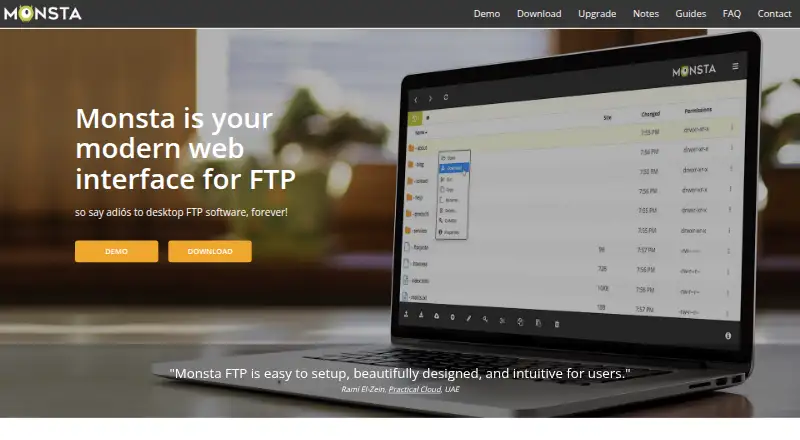
What Monsta FTP is
Monsta FTP is a browser-based file manager that you install as a subfolder on a website running PHP. It connects to remote servers using FTP, SFTP, or SCP, and supports SSH key authentication. From its web interface, you can upload and download files, copy or move them, rename or delete them, and change permissions with CHMOD. The free Lite plan includes transfers and file management. Business adds login profiles protected by a master password, an on-screen code editor, and the ability to upload ZIP files and extract them on the remote server. The Host edition adds rebranding, a password manager, and dynamic login forms for dashboards and control panels. The editor includes syntax colors, line numbers, and tabbed editing. Monsta FTP runs on a standard PHP installation, including Windows IIS. The maker recommends SSL and SFTP or SCP because FTP is not secure. Uploads pass through the installation server's memory, so PHP's per-request memory limit may restrict upload size. Business is $29 a year or $59, paid once; Host is $149 a year or $299, paid once.
Good
- Free Lite plan includes file management and transfers.
- Supports FTP, SFTP, SCP, and SSH key authentication.
- Business includes an editor and ZIP upload and extraction.
- Host offers dynamic login forms for dashboards.
Watch out
- Uploads may be constrained by PHP memory limits.
- FTP itself is not secure.
- Licenses are limited by installs.
Who it suits
Monsta FTP suits people who want to manage remote files through a browser on a PHP website. Teams needing login profiles, remote editing, ZIP extraction, or dashboard login forms can consider its paid editions.
Verdict
Monsta FTP provides remote file management from a PHP-hosted website, with paid editions adding editing and login tools. Consider the installation server's memory limit and use secure connections where possible.
Plans and prices
From Monsta FTP's own pricing page, checked 5 Oct 2026.
| Plan | Price | What it gives you |
|---|---|---|
| Lite | Free | Self-hosted web-based client · FTP and SFTP/SCP · File and folder transfers and management · Free, always |
| Business | $29 a year | Includes Lite · Login profiles with master password · File editor · Zip upload and extraction · One install, with stated multi-server exceptions · per year |
| Business lifetime license | $59, paid once | License covers the version and sub-versions available at purchase · Includes Business features · Lifetime license option $59 |
| Host | $149 a year | Includes Business · Rebranding · Password manager · Dynamic login forms · One install, with stated multi-server exceptions · per year |
| Host lifetime license | $299, paid once | License covers the version and sub-versions available at purchase · Includes Host features · Lifetime license option $299 |
The facts
Each one read from Monsta FTP's own pages, with the date it was checked.
What it does
- Archive handling
- Users can zip files and folders for download, and paid editions can upload ZIP archives and extract them on the remote server.checked 5 Oct 2026
- Connections
- It supports FTP and secure SFTP/SCP connections.checked 5 Oct 2026
- Editing
- The Business edition includes an on-screen code editor with syntax colors, line numbers, and tabbed editing.checked 5 Oct 2026
- File management
- Users can upload, download, copy, move, rename, and delete files and folders, and change permissions with CHMOD.checked 5 Oct 2026
- File size constraint
- Uploads pass through the install server's memory; the FAQ says PHP's per-request memory limit is normally 128 MB and may constrain upload size.checked 5 Oct 2026
- Integrations
- The Host edition can create dynamic login forms for automatic login from dashboards and control panels.checked 5 Oct 2026
- License limit
- A license has no user-count restriction, but is limited by installs, with documented exceptions for load balancing and multiple URLs.checked 5 Oct 2026
- Notable limitation
- The FAQ says Monsta FTP does not generate image thumbnails because doing so would require downloading remote images to the local server.checked 5 Oct 2026
- Product
- Monsta FTP is a browser-based FTP client written in PHP and JavaScript that is installed as a website subfolder.checked 5 Oct 2026
- Security
- The maker recommends serving Monsta FTP over SSL and using SFTP/SCP where possible because FTP itself is not secure.checked 5 Oct 2026
- Stored login encryption
- The FAQ says stored logins use AES-256-CBC or, if unavailable, Blowfish (bf-cbc).checked 5 Oct 2026
- Support
- The maker directs installation and troubleshooting questions to its user guides and common issues page, and advises contacting the web host for website recovery help.checked 5 Oct 2026
The company
- Headquarters
- New Zealandchecked 28 Sep 2026
Where it runs
- Platform requirements
- Monsta FTP runs on a standard PHP installation, including Windows IIS.checked 5 Oct 2026
The full review of Monsta FTP
Monsta FTP is a browser-based file client that you install on a PHP website. It suits administrators who want remote file access through a browser, especially when they can manage the hosting environment. Its free edition covers core transfers and file operations; editing and dashboard login tools require paid editions.
Overview
Installed in a website subfolder, Monsta FTP provides a browser interface for FTP, SFTP and SCP. It supports uploads and downloads, copying, moving, renaming and deleting files and folders, and changing permissions with CHMOD. SSH key authentication is also supported. This makes it useful for managing remote files without putting a desktop client on each device, but it depends on access to a suitable PHP server, including standard installations on Windows IIS.
That server is part of the transfer path, not just a place to host the interface: uploads pass through its memory. PHP's normal per-request memory limit is 128 MB and may constrain upload size, so Monsta FTP is a weaker fit for large transfers where the install server cannot be configured accordingly. It also does not generate image thumbnails; remote images would otherwise need to be downloaded to the local server.
Key features
File operations and security
The core tools cover routine file maintenance as well as transfers, and CHMOD makes permission changes available in the same browser workflow. FTP offers compatibility, while SFTP and SCP provide secure connection options. The maker recommends serving Monsta FTP over SSL and choosing SFTP or SCP where possible, since FTP itself is not secure. Stored login details are encrypted using AES-256-CBC, or Blowfish (bf-cbc) if AES is unavailable.
Editing, archives and login tools
Business adds an on-screen code editor with syntax colors, line numbers and tabs, plus login profiles protected by a master password and the ability to upload ZIP archives and extract them on the remote server. Lite can zip files and folders for download, but lacks those paid archive and editing tools. Host adds rebranding, a password manager and dynamic login forms for automatic sign-in from dashboards and control panels. These upgrades are useful for site operators embedding file access into their own workflows; they matter less to someone who only needs occasional transfers.
Pricing
Lite is free, with a self-hosted web client for FTP and SFTP/SCP plus file and folder transfers and management. It is a sensible starting point for basic use, but gives up login profiles, the editor and ZIP upload and extraction.
Business costs $29 a year and includes Lite, login profiles with a master password, the file editor, and ZIP upload and extraction. Its license covers one install, subject to stated exceptions for multi-server setups. The Business lifetime license costs $59, paid once and includes Business features; it covers the version and sub-versions available at purchase, rather than promising future versions.
Host costs $149 a year and adds rebranding, a password manager and dynamic login forms to Business. Its license also covers one install, with stated multi-server exceptions. The Host lifetime license costs $299, paid once and covers the version and sub-versions available at purchase. These editions suit operators who need branded or integrated access; the per-install limit matters when planning deployment across multiple sites. Licenses have no user-count restriction.
Platforms
Monsta FTP is web-based and self-hosted, running on a standard PHP installation. Although it can be accessed through a browser, the install server's PHP memory limit remains relevant to uploads. It is not a conventional desktop client installed independently on Windows, macOS or Linux.
Who it's for
Monsta FTP is best for website administrators and hosting operators who want browser-based remote file management on a PHP site. Lite suits users with basic transfer needs; Business is the practical step up for editing and archive extraction; Host is aimed at operators who need branded access or dashboard-driven login forms. Choose another client if you cannot host PHP software or if the server-side upload constraint is unsuitable for your transfers.
Pros and cons
- Pros: FTP, SFTP and SCP, plus SSH key authentication, cover common connection needs and secure options.
- Pros: The free Lite edition includes file and folder transfers and management, including permission changes.
- Pros: Paid editions add an editor, remote ZIP extraction and tools for integrating access into control panels.
- Cons: Uploads pass through the install server, where PHP's normal 128 MB per-request memory limit may constrain file size.
- Cons: A license is limited by installs, despite having no user-count restriction.
- Cons: FTP is not secure, so secure connections and SSL hosting are important; image thumbnails are not generated.
Alternatives
For a desktop client rather than a PHP-hosted browser tool, FileZilla Client is free and supports FTP, FTPS and SFTP on Linux, macOS and Windows. WinSCP is another free option if you use Windows; it supports SFTP, FTP, FTPS, SCP, WebDAV and S3.
Filestash is worth considering if you need a self-hosted file client with a broader platform range, including API, Android and iOS. CrossFTP is a freemium desktop alternative for Linux, macOS and Windows. ExpanDrive has a free personal-use plan for up to 10 users or devices per year and supports 15 cloud services and protocols, making it a different fit for cloud-service access.
Cyberduck is a freemium option for macOS and Windows, with GPL-licensed source code. ST Explorer is free for Linux, macOS and Windows, with Windows 10/11 using WebView2 and macOS and Linux builds available from source. Xftp is a freemium Windows alternative, with a free license limited to personal, home and educational use and a paid single-user perpetual license. Browse more options in SFTP Client Software.
Verdict
Choose Monsta FTP if you administer a PHP website and want browser-based file management with a free core tier and paid options for editing or integrated logins. The self-hosted setup and useful file operations are its main strengths; the server-memory upload constraint and install-based licensing are good reasons to look elsewhere for large transfers or wider deployments.
Getting started
- Open the Monsta FTP website
- Install it as a subfolder of a website
- Use a standard PHP installation, including Windows IIS
- Choose the Lite, Business, or Host edition
- Connect using FTP, SFTP, or SCP
- Serve the installation over SSL and prefer SFTP or SCP
Limits worth knowing
Uploads pass through the installation server’s memory; PHP’s per-request limit is normally 128 MB and can constrain upload size. The free Lite plan excludes Business features such as the code editor, ZIP upload and extraction, and login profiles.
Questions
Is Monsta FTP free?
Yes. A 45-day trial is available.
Which protocols does it support?
It supports FTP, SFTP, and SCP, with SSH key authentication.
Where does Monsta FTP run?
It runs as a web client installed in a website subfolder on a standard PHP installation, including Windows IIS.
What does Business add?
Business adds login profiles with a master password, an on-screen code editor, and ZIP upload and extraction on the remote server.
What does Host add?
Host includes Business features plus rebranding, a password manager, and dynamic login forms for dashboards and control panels.
Does it generate image thumbnails?
No. The FAQ states that Monsta FTP does not generate image thumbnails.
Alternatives to Monsta FTP
- 1

Filestash
Free planOpen sourceAndroidiOSWebAPI8.5From $50 a month - 2

CloudMounter
macOSWindows7.1 - 3
Cyberduck
Free planmacOSWindows7.1Free plan - 4

WinSCP
Free planOpen sourceWindows7.1Free plan - 5
CrossFTP
Free planLinuxmacOSWindows7.0$24.99 one-time - 6

FileZilla Client
Free planLinuxmacOSWindows6.9Free plan