Monitask
Monitask is employee monitoring and time-tracking software with automatic timesheets, reports, and workstation screenshots.
What Monitask is
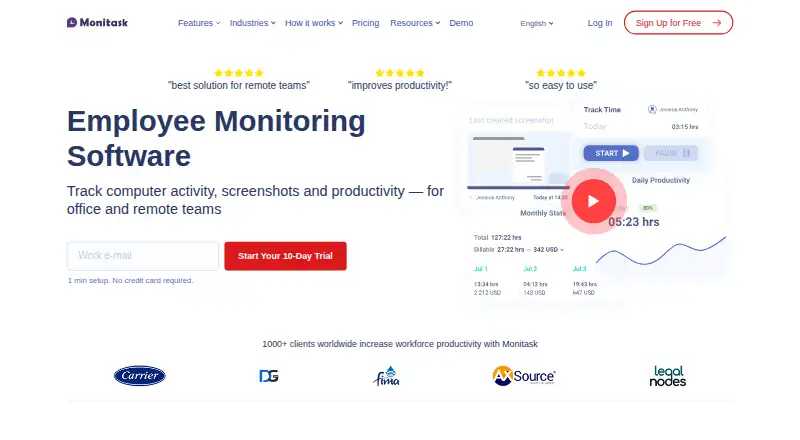
Monitask is employee monitoring and time-tracking software with automatic timesheets, reports, and workstation screenshots. Employees select a project and start tracking manually; while tracking is active, screenshots are captured at random or set intervals. Employees control when tracking begins and ends and can see the latest screenshot uploaded for managerial review. Activity levels use keyboard activity and mouse movement, but Monitask says it does not record the actual keys pressed. Reports include timesheets, project reports, statistics, and basic accounting reports. It is designed for companies with remote employees, freelancers, contractors, and employees who sometimes work from home. The product supports web, Windows, macOS, Linux, iOS, Android, and an extension. Mobile apps support time and task tracking, but not screenshots, app and internet tracking, or activity monitoring. Pro costs $7.99 a month, billed monthly, and includes one integration and one month of data storage. The listed starting price is 6.49 /user/mo with annual billing; a 10-day trial is available.
Good
- Employees control when tracking starts and stops.
- Provides timesheets and project reports.
- Does not record the actual keys pressed.
- Available on desktop, mobile, web, and as an extension.
- A 10-day trial is available.
Watch out
- No free plan is offered.
- Mobile apps lack screenshots and activity monitoring.
- Pro includes only one integration and one month of storage.
- Screenshot capture occurs while tracking is active.
Who it suits
It suits organizations tracking time and work activity for remote employees, freelancers, contractors, or staff who sometimes work from home. Teams relying on mobile apps should note their tracking limitations.
Verdict
Monitask combines manual time tracking, reports, and workstation screenshots, with employee controls around tracking sessions. Check the mobile limitations and the storage and integration limits of the listed Pro plan when choosing a setup.
Plans and prices
From Monitask's own pricing page, checked 7 Oct 2026.
| Plan | Price | What it gives you |
|---|---|---|
| Pro | $6.49 a month | 1 integration · 1-month data storage · basic support · per user; annual billing (18% savings) |
| Business | $8.99 a month | Unlimited integrations · 2-month data storage · standard support · per user; annual billing (18% savings) |
| Business Premium | $12.99 a month | Unlimited integrations · 2-month data storage · advanced location tracking · priority feature access · per user; annual billing (18% savings) |
| Enterprise | $15.99 a month | 100+ employees only · custom data retention · higher API limits · VIP support · security assessments · page lists monthly rate; billing cadence not specified for this displayed price |
The facts
Each one read from Monitask's own pages, with the date it was checked.
What it does
- Activity data
- Activity levels are based on keyboard use and mouse movement, while the FAQ says Monitask does not record the actual keys pressed.checked 7 Oct 2026
- Enterprise eligibility
- The Enterprise plan is listed for organizations with 100 or more employees and includes security assessments on request.checked 7 Oct 2026
- Integrations
- The integrations page features Basecamp 3, ClickUp, Jira, and RemoteTeam and lists integration categories including accounting, CRM, HR, and project management.checked 7 Oct 2026
- Intended users
- Monitask says it is designed for companies with remote employees, freelancers, contractors, and employees who sometimes work from home.checked 7 Oct 2026
- Mobile limits
- The platform comparison page says iOS and Android support time and task tracking but not screenshots, app and internet tracking, or activity monitoring.checked 7 Oct 2026
- Privacy
- Employees control when tracking starts and stops and can see the latest screenshot uploaded for managerial review.checked 7 Oct 2026
- Product
- Monitask is employee monitoring and time-tracking software with automatic timesheets and workstation screenshots as proof of work.checked 7 Oct 2026
- Reports
- Monitask provides timesheets, project reports, statistics, and basic accounting reports.checked 7 Oct 2026
- Security
- The pricing page FAQ says time-tracking and screenshot data are stored securely and encrypted with 256-bit AES encryption.checked 7 Oct 2026
- Support
- The pricing page lists basic support for Pro, standard support for Business, and VIP support with expedited technical support and one-on-one calls for Enterprise.checked 7 Oct 2026
- Tracking
- Employees choose a project and manually start tracking; screenshots are taken at random or set intervals while tracking is active.checked 7 Oct 2026
The company
- Headquarters
- Wilmington, Delaware, USAchecked 28 Sep 2026
Money
- Plan limits
- Pro includes one integration and one month of data storage; Business and Business Premium list unlimited integrations and two months of storage.checked 7 Oct 2026
Where it runs
- Platforms
- The download page offers employee apps for Windows, Mac OS, Linux, Android, iOS, and Chromebook, and says managers can use a web-based dashboard.checked 7 Oct 2026
Alternatives to Monitask
- 1
ActivTrak
Free planWebAPIExtensionLinux8.0From $10 a month - 2
DeskTime
AndroidiOSWebLinux7.2From $6.42 a month - 3
Insightful
WebAPILinuxmacOS7.0 - 4
SentryPC
AndroidWebmacOSWindows7.0From $69.95 a year - 5
Kickidler
APILinuxmacOSSelf-hosted6.7From $11 a month - 6

Time Doctor
AndroidiOSWebAPI6.7