Minecraft Image Converter
Minecraft Image Converter is a free web tool that turns photos, logos, and artwork into Minecraft block layouts and build plans.
What Minecraft Image Converter is
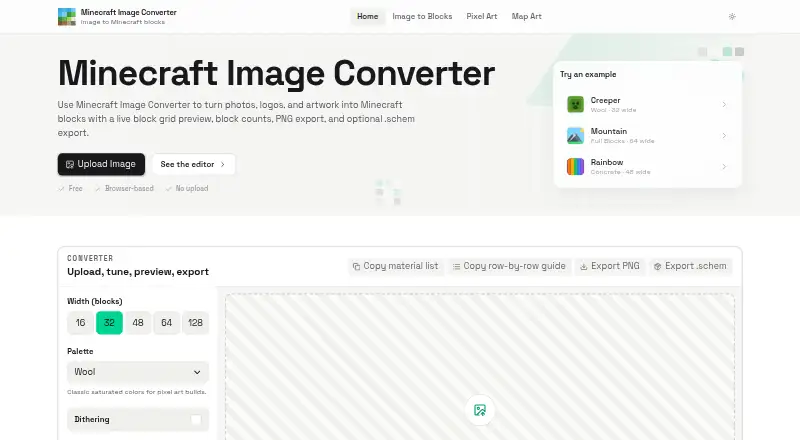
Minecraft Image Converter is a free web tool that turns photos, logos, and artwork into Minecraft block layouts and build plans. It accepts PNG, JPG, JPEG, and WebP images and offers Wool, Concrete, Terracotta, and Full Blocks palettes. Dithering, brightness and contrast adjustments, zoom, and grid lines let users alter the layout. For construction planning, it provides block counts, a copyable material list, and a row-by-row guide. Exports include PNG references and Sponge .schem v3 files for WorldEdit-style workflows, but the schematic is only a one-block-thick vertical wall rather than a full 3D model. Its current palettes use Java Edition blocks; Bedrock compatibility is described as planned for a future update. Images are processed locally in the browser and are not uploaded, stored, or reviewed by the maker. The site may collect aggregated usage data, including page views and feature interactions, without identifying individual users. The tool is free for personal and commercial use, with no sign-up or watermark, and is an independent fan project.
Good
- Accepts PNG, JPG, JPEG, and WebP.
- Provides block counts and a row-by-row guide.
- Exports PNG references and Sponge .schem v3 files.
- Images are processed locally in the browser.
- Free for personal and commercial use.
Watch out
- Schematics are one-block-thick vertical walls.
- Current palettes use Java Edition blocks.
- Bedrock compatibility is only planned.
- No 3D build preview.
Who it suits
It suits Survival builders, Creative architects, and server build teams planning image-based Minecraft builds. Users working with Java Edition palettes can use it to create block layouts and schematic files.
Verdict
Minecraft Image Converter offers image-to-block planning with material guidance and export options. Its Java-focused palettes and flat schematic output are important constraints for prospective builders.
Plans and prices
From Minecraft Image Converter's own pricing page, checked 4 Oct 2026.
| Plan | Price | What it gives you |
|---|---|---|
| Free | Free | Free to use · no sign-up or watermark · PNG and .schem export |
The facts
Each one read from Minecraft Image Converter's own pages, with the date it was checked.
What it does
- Audience
- The maker describes it for Survival builders, Creative architects, and server build teams.checked 4 Oct 2026
- Build guidance
- Shows block counts and a copyable material list, plus a row-by-row build guide.checked 4 Oct 2026
- Editing controls
- Includes dithering, brightness and contrast controls, zoom, and grid lines.checked 4 Oct 2026
- Edition support
- Current palettes are based on Java Edition blocks, and Bedrock compatibility is described as planned for a future update.checked 4 Oct 2026
- Exports
- Exports PNG references and Sponge .schem v3 schematic files for WorldEdit-style workflows.checked 4 Oct 2026
- Image formats
- Accepts PNG, JPG, JPEG, and WebP images.checked 4 Oct 2026
- Palettes
- Offers Wool, Concrete, Terracotta, and Full Blocks palettes.checked 4 Oct 2026
- Privacy
- Images are processed locally in the browser and are not uploaded, stored, or reviewed by the maker.checked 4 Oct 2026
- Project status
- The maker describes the tool as an independent fan project not affiliated with, endorsed by, or sponsored by Mojang Studios or Microsoft.checked 4 Oct 2026
- Purpose
- Converts photos, logos, and artwork into Minecraft block grids and build plans.checked 4 Oct 2026
- Schematic limit
- The schematic is a one-block-thick vertical wall rather than a full 3D model.checked 4 Oct 2026
- Support
- Users can email [email protected] with bug reports, questions, or feature requests.checked 4 Oct 2026
- Terms
- The tool is provided free for personal and commercial use.checked 4 Oct 2026
- Usage data
- The privacy policy says the site may collect aggregated usage data such as page views and feature interactions, without identifying individual users.checked 4 Oct 2026
The full review of Minecraft Image Converter
Overview
Minecraft Image Converter turns photos, logos, and artwork into Minecraft block grids and build plans in a browser. It suits builders who want material counts and a row-by-row guide, especially for Java Edition projects. Its free PNG and schematic exports make it useful for planning, but the schematic is a flat wall, not a 3D build.
Key features
PNG, JPG, JPEG, and WebP inputs cover common image formats. Wool, Concrete, Terracotta, and Full Blocks palettes give builders a choice of material families; the palette control is fixed, so this is not a tool for assembling a custom block set.
Dithering, brightness and contrast controls, zoom, and grid lines help shape an image into a readable block pattern. Block counts, a copyable material list, and a row-by-row guide turn that pattern into a practical building reference, particularly for Survival builders managing materials or teams dividing up construction.
PNG references suit visual planning, while Sponge .schem v3 files support WorldEdit-style workflows. The schematic is only a one-block-thick vertical wall, so builders seeking a full 3D model need another approach. There is no 3D build preview.
Image processing happens locally in the browser; images are not uploaded, stored, or reviewed by the maker. The privacy policy says aggregated usage data, such as page views and feature interactions, may be collected without identifying individual users.
Pricing
The Free plan costs nothing. It includes PNG and .schem exports, with no sign-up or watermark, and the tool is free for personal and commercial use. There is no free trial because the plan is free to use. No paid tier or seat-based plan is part of this offering.
That makes it a straightforward fit for occasional projects and ongoing builds alike. The trade-off is not a cheaper plan with reduced exports: the main constraints are the Java-based palettes, fixed palette control, and flat schematic output.
Platforms
This is a web tool. Its current palettes are based on Java Edition blocks; Bedrock compatibility is planned for a future update. Java builders can use its material guidance and schematic workflow, while Bedrock players should not count on edition-matched palettes today.
Who it's for
Survival builders can use the material counts and copyable list to plan resource gathering. Creative architects can turn artwork into a block reference, while server build teams can use the row guide to coordinate work. It is less suitable for anyone who needs a 3D structure preview, a full-depth schematic, or current Bedrock block palettes.
Pros and cons
- Pro: Free use includes both PNG and Sponge .schem exports, with no account or watermark to get started.
- Pro: Block counts, a copyable material list, and row-by-row guidance help translate an image into a build plan.
- Pro: Local browser processing keeps source images from being uploaded, stored, or reviewed by the maker.
- Con: The .schem is a one-block-thick wall, not a 3D model, limiting its usefulness for volumetric builds.
- Con: Palettes use Java Edition blocks, with Bedrock compatibility still planned.
- Con: Palette control is fixed, so builders cannot specify a custom set of blocks.
Alternatives
For a broader comparison, browse Minecraft Pixel Art Generators. Consider these specific options when their stated formats, limits, or platform suit your project better:
- BlockArtLab Minecraft Image Converter is another free web option; its free plan includes a PNG blueprint and CSV material list, while its Starter plan costs $9.99, paid once.
- Image2Pixel Minecraft Converter offers a free web plan described as having no signup, watermark, or limits.
- Minecraft Pixel Art Generator is a free web option with no account or paywall and no image-size limit beyond the device's capacity.
- Minecraft Pixel Art Generator & Editor is a free web option with no account, sign-up, or usage limits.
- MinecraftArt.org Pixel Art Generator is free, with a 10MB maximum image file size and height limits of 256 blocks before Minecraft 1.18 or 384 blocks in 1.18+.
- PixelCraft is the Windows alternative among these options.
- Pixvael Minecraft Pixel Art Generator is a free web and extension option that exports .litematic, .mcstructure, .schematic, PNG, CSV, and project files.
- MC Build Tools Pixel Art Generator is another free web option that requires no account or sign-up.
Verdict
Minecraft Image Converter is a sound choice for Java Edition builders who want a no-cost image-to-block plan with material guidance and PNG or schematic export. Its strongest case is the combination of build instructions and a copyable materials list; look elsewhere if you need Bedrock palettes, custom palette control, a 3D preview, or a full-depth schematic.
Getting started
- Open minecraftimageconverter.com in a web browser
- Choose a PNG, JPG, JPEG, or WebP image
- Select a Wool, Concrete, Terracotta, or Full Blocks palette
- Adjust dithering, brightness, contrast, zoom, or grid lines
- Review the block counts and row-by-row guide
- Export a PNG reference or Sponge .schem v3 file
Limits worth knowing
The schematic is limited to a one-block-thick vertical wall rather than a full 3D model. Current palettes target Java Edition; Bedrock compatibility is planned for a future update.
Questions
How much does Minecraft Image Converter cost?
It is free to use, including personal and commercial use.
Do I need an account?
No. The free tool requires no sign-up and adds no watermark.
Which image formats are supported?
PNG, JPG, JPEG, and WebP files are accepted.
Which Minecraft editions are supported?
The current palettes are based on Java Edition blocks. Bedrock compatibility is planned for a future update.
What files can I export?
You can export PNG references and Sponge .schem v3 schematic files.
Are uploaded images stored?
Images are processed locally in the browser and are not uploaded, stored, or reviewed by the maker.
Alternatives to Minecraft Image Converter
- 1

BlockArtLab Minecraft Image Converter
Free planWeb7.3$1.99 one-time - 2
Pixvael Minecraft Pixel Art Generator
Free planWebExtension6.6Free plan - 3

Coffee & Fun Minecraft Pixel Art Generator
Free planWeb6.0Free plan - 4

Image2Pixel Minecraft Converter
Free planWeb6.0Free plan - 5
Minecraft Pixel Art Generator
Free planWeb6.0Free plan - 6
Minecraft Pixel Art Generator & Editor
Free planWeb6.0Free plan