Minecraft Pixel Art Generator
Minecraft Pixel Art Generator is a free web tool that turns images or custom designs into layouts using named Minecraft blocks.
What Minecraft Pixel Art Generator is
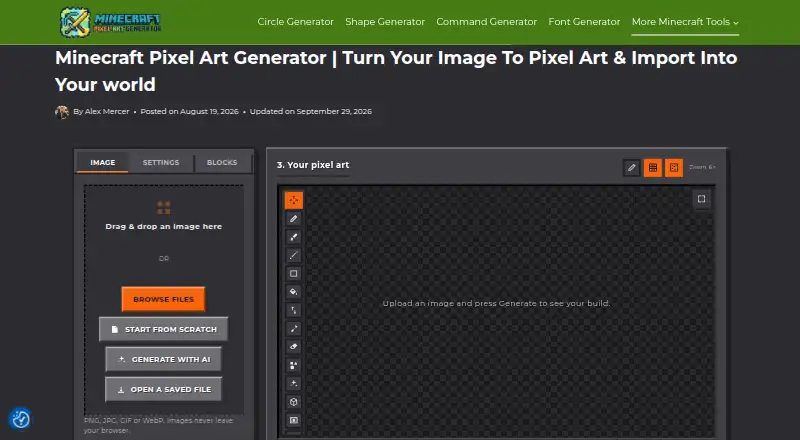
Minecraft Pixel Art Generator is a free web tool that turns images or custom designs into layouts using named Minecraft blocks. It accepts PNG, JPG, GIF, and WebP files, and an AI assistant can help produce a starting design from a written idea. Choose an All, Survival, or Custom block palette, then edit with Pencil, Brush, Line, Rectangle, Bucket Fill, Eyedropper, and Eraser tools. Color-matching methods, image adjustments, and dithering options help shape the result. The tool provides a material list and row-by-row build guide, and exports PNG, JSON, CSV, .mcfunction, .schem, or .schematic files. Users can also create multi-frame animations and export GIFs or short videos. Image conversion, cropping, color matching, and dithering happen locally in the browser, so those images are not uploaded to the site's servers. Exports and guides support workflows involving WorldEdit, MCEdit, Litematica, and no-mod datapacks. The tool is free, with no account or paywall; image-size limits depend on the user's device.
Good
- Accepts PNG, JPG, GIF, and WebP
- Includes three block palette options
- Provides materials and row-by-row guidance
- Image processing runs locally in the browser
- Free with no account or paywall
Watch out
- Image size depends on the user's device
- AI workflow uses an assistant's free tier, if available
Who it suits
This tool suits Minecraft players who want to turn an image or design into a block layout and build plan. It also fits users who want to edit designs, make animations, or export files for supported workflows.
Verdict
Minecraft Pixel Art Generator combines image conversion, editing, build planning, and animation in a free browser tool. Its local image processing and several export formats are useful features, while device capacity sets the image-size limit.
Plans and prices
From Minecraft Pixel Art Generator's own pricing page, checked 30 Sep 2026.
| Plan | Price | What it gives you |
|---|---|---|
| Free | Free | no account · no paywall · no limit on image size beyond what your own device can handle |
The facts
Each one read from Minecraft Pixel Art Generator's own pages, with the date it was checked.
Money
- AI cost
- The AI workflow requires no API key, billing setup, or account on the generator site and can use free tiers of assistants such as ChatGPT, Claude, or Gemini.checked 30 Sep 2026
- Build planning
- The tool provides a material list and a row-by-row build guide.checked 30 Sep 2026
What it does
- AI generation
- Users can describe an idea and use an AI assistant to create a starting Minecraft pixel-art design.checked 30 Sep 2026
- Animation
- Users can create multi-frame animations and export them as GIFs or short videos.checked 30 Sep 2026
- Block palettes
- The generator offers All, Survival, and Custom block palettes.checked 30 Sep 2026
- Color processing
- It provides color-matching methods, image adjustments, and dithering options.checked 30 Sep 2026
- Editing
- The built-in editor includes Pencil, Brush, Line, Rectangle, Bucket Fill, Eyedropper, and Eraser tools.checked 30 Sep 2026
- Exports
- Creations can be downloaded as PNG, JSON, CSV, .mcfunction, .schem, or .schematic files.checked 30 Sep 2026
- Independence
- The site is maintained independently by a small team and is not affiliated with Mojang Studios or Microsoft.checked 30 Sep 2026
- Input formats
- It supports PNG, JPG, GIF, and WebP images.checked 30 Sep 2026
- Integrations
- Its exports and guides support workflows involving WorldEdit, MCEdit, Litematica, and no-mod datapacks.checked 30 Sep 2026
- Privacy
- Image conversion, cropping, color matching, and dithering run locally in the browser, so images are not uploaded to the site’s servers.checked 30 Sep 2026
- Purpose
- The tool turns images or custom designs into layouts made from real, named Minecraft blocks.checked 30 Sep 2026
- Support
- Support is available by email, with a stated response target of 2–3 business days.checked 30 Sep 2026
The full review of Minecraft Pixel Art Generator
Minecraft Pixel Art Generator is a browser tool for turning images or original designs into layouts made from named Minecraft blocks. It suits builders who want to refine an image, plan the materials and export a build; its range is unusually broad for a free tool, though image size ultimately depends on the device running it.
Overview
The workflow covers more than image conversion: users can start with an image or an AI-assisted design, edit the result, and take it through to a build guide or file for another tool. That breadth makes it useful for players who want to move from visual idea to construction plan without juggling separate conversion and editing steps.
Image conversion, cropping, color matching and dithering happen locally in the browser, so source images are not sent to the site’s servers. The trade-off is that the practical image-size ceiling is the capacity of the user’s own device.
Key features
Image conversion and design
PNG, JPG, GIF and WebP inputs cover common image formats. Users can also describe an idea to an AI assistant to create a starting design; this requires no API key, billing setup or account on the generator site and can use free tiers of assistants such as ChatGPT, Claude or Gemini. That is a low-friction way to get a first draft, but it is a starting point rather than a replacement for shaping the design to suit a Minecraft build.
All, Survival and Custom block palettes give builders a choice between the broad selection, a survival-oriented set, or a palette they control. Color-matching methods, image adjustments and dithering provide further control over how an image maps onto blocks. The built-in editor’s Pencil, Brush, Line, Rectangle, Bucket Fill, Eyedropper and Eraser tools are useful when automated conversion needs cleanup or a design needs manual changes.
Build planning and exports
A material list and row-by-row guide make the result more actionable than a picture alone. Downloads include PNG, JSON, CSV, .mcfunction, .schem and .schematic, supporting workflows involving WorldEdit, MCEdit, Litematica and no-mod datapacks. A 3D build preview is also available. Together, these options suit users who need either a visual reference or files to carry a design into a building workflow.
Animation
Multi-frame animations can be exported as GIFs or short videos. That is a welcome creative extra for users making animated pixel art, though builders interested only in a single static layout may not need it.
Pricing
The Free plan costs nothing. It requires no account, has no paywall and imposes no image-size limit beyond what the user’s device can handle. The free tier includes the tool’s conversion, editing, planning, animation and export capabilities, making it a strong fit for casual projects as well as more involved builds. There is no free trial because the product is free.
Platforms
Minecraft Pixel Art Generator runs on the web. Local browser processing keeps image conversion on the user’s device, but the available image size depends on that device’s capacity.
Who it's for
This is a good fit for Minecraft builders who want control over block palettes, practical build instructions and multiple export routes, or for artists who want to turn an image into editable block art. Users who only need a quick conversion may find its broader editing and animation toolkit unnecessary; those planning especially large images should account for device limits.
Pros and cons
- Pro: Local image processing means uploaded images are not sent to the site’s servers.
- Pro: Material lists, row-by-row guides and six export formats support both manual construction and external workflows.
- Pro: All, Survival and Custom palettes, plus a full set of editing tools, give users meaningful control over the result.
- Pro: The free plan has no account requirement or paywall.
- Con: Image size is limited in practice by the capacity of the user’s device.
- Con: The AI option depends on using an assistant such as ChatGPT, Claude or Gemini rather than being a self-contained generator workflow.
Alternatives
For a broader comparison, see Minecraft Pixel Art Generators.
- MC Build Tools Pixel Art Generator is another free web option with no account or sign-up requirement.
- MinecraftArt is another free web-based choice.
- PixelCraft is a free Windows option for users who prefer desktop software.
- mc-pixel is a free web alternative with image upload, palette, dimension and orientation controls, plus .litematic export.
- BlockArtLab Minecraft Image Converter offers a free browser converter with no account, PNG blueprint and CSV material list; its Starter plan is a one-time purchase at 9.99 USD.
- Minecraft Pixel Art Generator & Editor is another free web alternative.
- Minecraft Image Converter is a free web tool with no sign-up or watermark and PNG and .schem export.
- Image2Pixel Minecraft Converter is a free web option with no signup, watermark or limits.
Verdict
Minecraft Pixel Art Generator is the strongest fit for builders who want an image-to-block workflow that includes editing, build planning and flexible exports without a fee or account. Its local processing is a meaningful privacy advantage. Look elsewhere if you need a desktop app or expect to work with images larger than your device can handle.
Alternatives to Minecraft Pixel Art Generator
- 1

BlockArtLab Minecraft Image Converter
Free planWeb7.3$1.99 one-time - 2
Pixvael Minecraft Pixel Art Generator
Free planWebExtension6.6Free plan - 3

Coffee & Fun Minecraft Pixel Art Generator
Free planWeb6.0Free plan - 4

Image2Pixel Minecraft Converter
Free planWeb6.0Free plan - 5
Minecraft Image Converter
Free planWeb6.0Free plan - 6
Minecraft Pixel Art Generator & Editor
Free planWeb6.0Free plan