Minecraft Pixel Art Generator & Editor
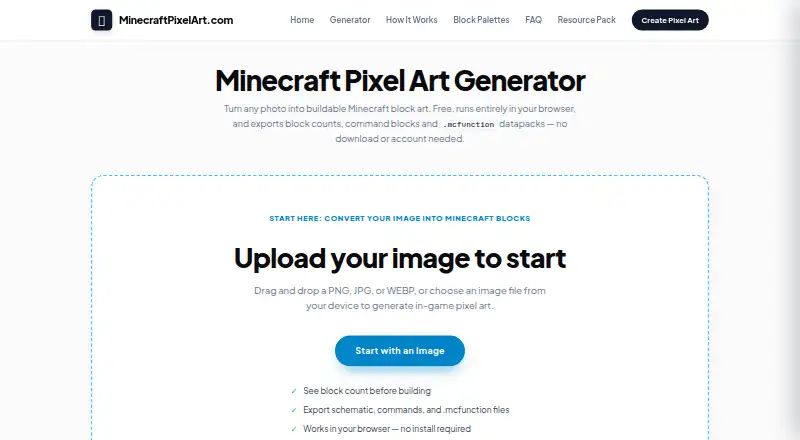
Minecraft Pixel Art Generator & Editor is a free browser-based tool that turns photographs, drawings, and logos into Minecraft block art.
What Minecraft Pixel Art Generator & Editor is
Minecraft Pixel Art Generator & Editor is a free browser-based tool that turns photographs, drawings, and logos into Minecraft block art. It accepts PNG, JPG, BMP, and WEBP files and converts them into grids of up to 1024 × 1024 blocks. Color matching uses CIELAB color distance, with optional Floyd–Steinberg dithering. Users can choose survival-obtainable blocks, select blocks manually, and exclude certain types, including gravity-affected, transparent, redstone-powered, or light-emitting blocks. The editor includes drawing and fill tools, eyedropper, bulk replacement, and unlimited undo. A material list estimates the blocks needed, and exports include a high-resolution PNG reference, a .mcfunction datapack, or command-block commands. The maker says image processing happens in the browser, with images not uploaded or stored on a server. No account or usage cap is listed. Conversion is limited to 1024 × 1024 blocks, and in-game height limits can affect builds. The site says it is not an official Minecraft product or affiliated with Mojang or Microsoft.
Good
- Accepts four image formats
- Offers multiple block palette controls
- Includes unlimited undo
- Provides a material list
- Image conversion runs in the browser
Watch out
- Conversion capped at 1024 × 1024 blocks
- Minecraft height limits can affect builds
- Not an official Minecraft product
Who it suits
This tool suits Minecraft builders who want to convert images into block layouts, plan materials, and export references or commands. It may also suit users who want browser-based conversion without an account or usage limit.
Verdict
The tool combines image conversion, block selection, editing, material planning, and several export options. Its grid limit and Minecraft's in-game height limit are important constraints when planning a build.
Plans and prices
From Minecraft Pixel Art Generator & Editor's own pricing page, checked 5 Oct 2026.
| Plan | Price | What it gives you |
|---|---|---|
| Free | Free | No account · no sign-up · no usage limits |
The facts
Each one read from Minecraft Pixel Art Generator & Editor's own pages, with the date it was checked.
What it does
- Affiliation
- The site says it is not an official Minecraft product and is not approved by or associated with Mojang or Microsoft.checked 5 Oct 2026
- Audience
- The maker says it aims to work on mid-range phones as well as desktop computers because many visitors use mobile devices.checked 5 Oct 2026
- Block palettes
- Users can choose survival-obtainable blocks, pick blocks manually, and exclude gravity-affected, transparent, redstone-powered, or light-emitting blocks.checked 5 Oct 2026
- Color matching
- It matches image pixels to blocks using CIELAB color distance and offers optional Floyd–Steinberg dithering.checked 5 Oct 2026
- Contact
- The maker lists [email protected] for support and privacy requests.checked 5 Oct 2026
- Editor
- The editor includes pencil, brush, bucket fill, eyedropper, bulk block replacement, and unlimited undo.checked 5 Oct 2026
- Exports
- Users can export a high-resolution PNG reference image, a .mcfunction datapack file, or command-block commands.checked 5 Oct 2026
- Image conversion
- It accepts PNG, JPG, BMP, and WEBP images and converts them into block grids up to 1024 × 1024 blocks.checked 5 Oct 2026
- Limit
- Conversion is limited to 1024 × 1024 blocks, and the site warns that Minecraft's in-game height limit can affect builds.checked 5 Oct 2026
- Minecraft compatibility
- Raw /setblock commands are described as compatible with Bedrock Edition, and the site also offers Java-oriented datapack and command-block exports.checked 5 Oct 2026
- No account or usage cap
- The maker says the tool has no account requirement, sign-up, or usage limits and is supported by advertising.checked 5 Oct 2026
- Privacy
- Image conversion runs in the user's browser, and the maker says images are never uploaded, stored on a server, or seen by anyone else.checked 5 Oct 2026
- Purpose
- The browser-based tool turns photographs, drawings, and logos into Minecraft block art.checked 5 Oct 2026
- Support
- The contact page says email replies usually arrive within two to three business days.checked 5 Oct 2026
Money
- Material planning
- The material list shows how many of each block a build requires.checked 5 Oct 2026
The full review of Minecraft Pixel Art Generator & Editor
Overview
Minecraft Pixel Art Generator & Editor is a browser tool that converts photos, drawings, and logos into Minecraft block layouts, then lets you revise the layout before building. It is best for builders who want palette and material control without installing software or creating an account. The free, uncapped access is its strongest draw, while the 1024 × 1024 conversion ceiling and Minecraft’s vertical build limit define the projects it can handle.
Key features
Image conversion and color matching
PNG, JPG, BMP, and WEBP files become block grids at up to 1024 × 1024 blocks. Matching uses CIELAB color distance, and optional Floyd–Steinberg dithering offers a way to trade smooth color transitions for a textured approximation. That combination gives more control than a single automatic mapping, but the fixed grid maximum makes the tool unsuitable for conversions that need a larger canvas.
Palette control and editing
You can restrict choices to survival-obtainable blocks, pick blocks manually, or exclude gravity-affected, transparent, redstone-powered, and light-emitting blocks. These controls matter when a design must be practical to gather or avoid blocks with unwanted behavior. After conversion, pencil, brush, bucket fill, eyedropper, bulk replacement, and unlimited undo support targeted corrections without rebuilding the image from scratch.
Materials and export
The material list counts every block required, turning the image into a resource-gathering plan. A high-resolution PNG provides a visual reference, while command-block commands and a .mcfunction datapack provide in-game routes. Raw /setblock commands are described as compatible with Bedrock Edition; the datapack and command-block options are aimed at Java-oriented workflows. The output choices suit both manual builders and players who want to automate placement, although the final build still has to respect Minecraft’s height limit.
Privacy and access
Conversion runs in the browser. The maker says images are not uploaded, stored on a server, or viewed by anyone else, which is a meaningful advantage for private or client-owned artwork. No account, sign-up, or usage cap is required; advertising supports the service. The stated goal of working on mid-range phones as well as desktops makes it a practical web option for mobile visitors, though the tool remains dependent on the browser and device handling the chosen grid.
Pricing
The Free plan costs nothing and includes no account, no sign-up, and no usage limits. There is no free trial because access is already free, and no seat restriction or renewal commitment applies. This is the right fit for individual builders, classrooms, and occasional projects that stay within the conversion and Minecraft height limits. Its trade-off is advertising support rather than a paid tier with different allowances; the 1024 × 1024 ceiling remains the important practical boundary.
Platforms
The tool runs on the web and accepts image input, producing schematic-oriented outputs including PNG, command-block commands, and .mcfunction files. Bedrock users can use the described raw /setblock compatibility, while Java players have datapack and command-block routes.
Who it's for
Choose it if you want to turn an existing image into a buildable plan, constrain the palette around survival materials, edit individual blocks, and know the quantities before gathering resources. It is especially suitable when privacy matters because conversion stays in the browser and when you need both visual and in-game export formats. Look elsewhere for conversions beyond 1024 × 1024 blocks or designs that cannot fit Minecraft’s height restrictions.
Pros and cons
Pros
- No account or usage cap: unlimited free access removes sign-up and quota friction.
- Detailed palette rules: survival-only selection and block exclusions help avoid impractical or troublesome materials.
- Real editing depth: bulk replacement, standard drawing tools, and unlimited undo make post-conversion cleanup manageable.
- Useful planning outputs: per-block material counts and PNG, command, and datapack exports support different building methods.
- Browser privacy: images are processed locally rather than uploaded to a server.
Cons
- 1024 × 1024 maximum: larger source plans cannot be converted in one grid.
- Minecraft height remains a constraint: a valid conversion may still exceed the playable build space.
- Advertising-supported access: the free service is not presented as an ad-free experience.
- Separate edition workflows: Bedrock relies on raw commands, while Java users use datapack or command-block exports.
Alternatives
Minecraft Pixel Art Generators is the broader directory choice when you want to compare several tools.
- BlockArtLab Minecraft Image Converter suits users who want a free browser converter with PNG blueprints and CSV material lists, with an optional 9.99 USD one-time Starter purchase.
- Image2Pixel Minecraft Converter is another free web option with no signup, watermark, or stated limits.
- Minecraft Image Converter fits readers seeking free PNG and .schem export without sign-up or a watermark.
- Minecraft Pixel Art Generator is a free web alternative with no account, paywall, or image-size limit beyond the user’s device.
- MinecraftArt.org Pixel Art Generator is free but sets a 10MB file limit and edition-dependent height limits.
- PixelCraft is the Windows alternative for users who prefer a desktop application.
- PixelStacker is a free API, web, and Windows project with no paid plans or usage limits stated.
- Pixvael Minecraft Pixel Art Generator suits users wanting browser or extension access plus .litematic, .mcstructure, .schematic, PNG, CSV, and project-file exports.
Verdict
Minecraft Pixel Art Generator & Editor is a strong pick for builders who want private, unlimited browser conversion with meaningful palette filtering, block-level editing, material counts, and both Bedrock- and Java-oriented exports. Choose it for controlled projects that fit 1024 × 1024 blocks; look elsewhere when your image or planned build exceeds that grid or Minecraft’s height limit.
Alternatives to Minecraft Pixel Art Generator & Editor
- 1

BlockArtLab Minecraft Image Converter
Free planWeb7.3$1.99 one-time - 2
Pixvael Minecraft Pixel Art Generator
Free planWebExtension6.6Free plan - 3

Coffee & Fun Minecraft Pixel Art Generator
Free planWeb6.0Free plan - 4

Image2Pixel Minecraft Converter
Free planWeb6.0Free plan - 5
Minecraft Image Converter
Free planWeb6.0Free plan - 6
Minecraft Pixel Art Generator
Free planWeb6.0Free plan