Pixvael Minecraft Pixel Art Generator
Pixvael Minecraft Pixel Art Generator converts an image into an editable Minecraft block map and build plan in the browser.
What Pixvael Minecraft Pixel Art Generator is
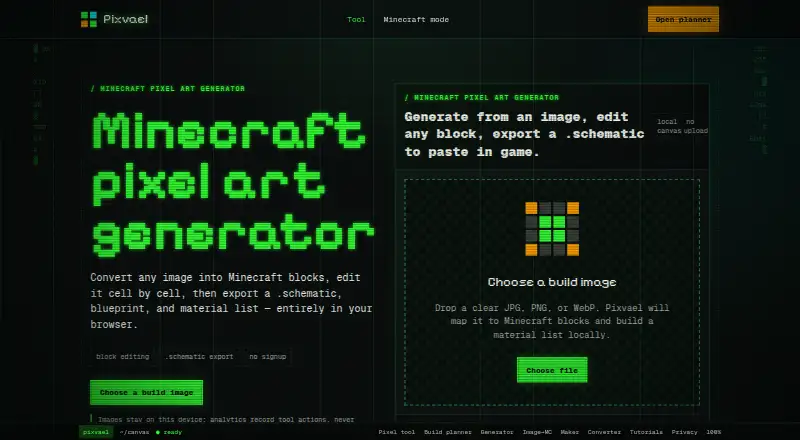
Pixvael Minecraft Pixel Art Generator converts an image into an editable Minecraft block map and build plan in the browser. It accepts JPG, PNG, and WebP images, and lets you set the build width from 16 to 128 blocks. Each cell is mapped to the nearest color among 52 buildable blocks, filtered for the selected Minecraft version. You can paint, pick, or restore individual cells, and undo edits.
Exports include `.litematic` for Java, `.mcstructure` for Bedrock, `.schematic`, a blueprint PNG, a material CSV, and a project file. The page says `.schematic` exports can be pasted in Java Edition with WorldEdit. The FAQ lists Java Edition versions 1.9 through 1.21+ and describes palette availability by version. The free browser-based tool requires no signup, and a Chrome extension can send a selected image to a Pixvael tab in the user's browser. Image decoding, mapping, editing, and exports happen in the browser; the source image is not uploaded. Pixvael recommends clear, high-contrast images with one subject, such as a pet, portrait, logo, or character.
Good
- Free and requires no signup
- Accepts JPG, PNG, and WebP
- Exports formats for Java and Bedrock
- Source image is not uploaded
Watch out
- Build width is limited to 16–128 blocks
- Each cell maps to the nearest of 52 buildable blocks
Who it suits
This generator suits Minecraft players who want to turn a clear, high-contrast image into a block plan for Java or Bedrock. It may also work for people who want to edit the map cell by cell before exporting it.
Verdict
Pixvael offers browser-based image conversion, cell editing, and several export formats for Minecraft builds. Choose a clear, high-contrast source image and check palette availability for your Minecraft version.
Plans and prices
From Pixvael Minecraft Pixel Art Generator's own pricing page, checked 15 Oct 2026.
| Plan | Price | What it gives you |
|---|---|---|
| Free | Free | browser conversion · block editing · .litematic/.mcstructure/.schematic · blueprint PNG · material CSV · project file · no signup · no upload |
The facts
Each one read from Pixvael Minecraft Pixel Art Generator's own pages, with the date it was checked.
What it does
- Analytics
- Google Analytics 4 records aggregate page and device usage but not image contents or filenames.checked 15 Oct 2026
- API and SDKs
- The reviewed public Pixvael pages document browser tools and a Chrome extension but do not publish an API or SDK.checked 15 Oct 2026
- Bedrock export
- The product exports mcstructure files for Bedrock workflows.checked 15 Oct 2026
- Block palette
- Each cell is matched to the nearest color among 52 buildable blocks.checked 15 Oct 2026
- Build width
- Users can choose widths from 16 to 128 blocks.checked 15 Oct 2026
- Cell editing
- Paint, pick, restore, undo, and redo tools let users change individual cells.checked 15 Oct 2026
- Chrome integration
- The Chrome extension sends a selected image to a Pixvael tab entirely within the browser.checked 15 Oct 2026
- Documentation
- Pixvael publishes beginner and complete workflow tutorials; the complete guide is marked 15 minutes and updated September 2, 2026.checked 15 Oct 2026
- Editing
- Users can paint, pick, or restore individual cells, and edits can be undone.checked 7 Oct 2026
- Exports
- Exports include .litematic for Java, .mcstructure for Bedrock, .schematic, a blueprint PNG, a material CSV, and a project file.checked 7 Oct 2026
- Image formats
- The generator accepts JPG, PNG, and WebP images.checked 7 Oct 2026
- Image privacy
- Image decoding, mapping, editing, and exports run in the browser; the source image is not uploaded.checked 7 Oct 2026
- Independent criticism: site maturity
- ScamAdviser describes the domain as very young with low Tranco traffic ranking.checked 15 Oct 2026
- Independent domain fact
- ScamAdviser lists a July 9, 2026 registration date and Vercel as the hosting ISP.checked 15 Oct 2026
- Independent security signal
- ScamAdviser reports a valid SSL certificate and a DNSFilter safe label for pixvael.com.checked 15 Oct 2026
- Input formats
- The generator accepts JPG, PNG, and WebP images.checked 15 Oct 2026
- Integration
- The privacy policy describes a Chrome extension that sends a selected image to a Pixvael tab within the user's browser.checked 7 Oct 2026
- Intended users
- The page recommends clear, high-contrast images with one subject, such as a pet, portrait, logo, or character.checked 7 Oct 2026
- Java export
- The product exports native Litematica files for Java workflows.checked 15 Oct 2026
- Licence
- The reviewed public pages do not state an open-source licence for Pixvael itself.checked 15 Oct 2026
Where it runs
- Browser storage
- Settings, planner progress, and temporary cross-tab image data are kept in local browser storage.checked 15 Oct 2026
Money
- Build planner
- The planner divides larger builds into sections and tracks progress locally.checked 15 Oct 2026
The company
- Company identity
- The public product pages identify the maker by the Pixvael brand and state that it is independent of Mojang and Microsoft.checked 15 Oct 2026
- Independent criticism: ownership transparency
- ScamAdviser says the domain owner identity is hidden in WHOIS.checked 15 Oct 2026
Alternatives to Pixvael Minecraft Pixel Art Generator
- 1

BlockArtLab Minecraft Image Converter
Free planWeb7.3$1.99 one-time - 2

Coffee & Fun Minecraft Pixel Art Generator
Free planWeb6.0Free plan - 3

Image2Pixel Minecraft Converter
Free planWeb6.0Free plan - 4
Minecraft Image Converter
Free planWeb6.0Free plan - 5

Minecraft Pixel Art Generator
Free planWeb6.0Free plan - 6

Minecraft Pixel Art Generator & Editor
Free planWeb6.0Free plan