
MC Build Tools Pixel Art Generator
MC Build Tools Pixel Art Generator turns an uploaded photo, logo or drawing into an editable Minecraft block design.
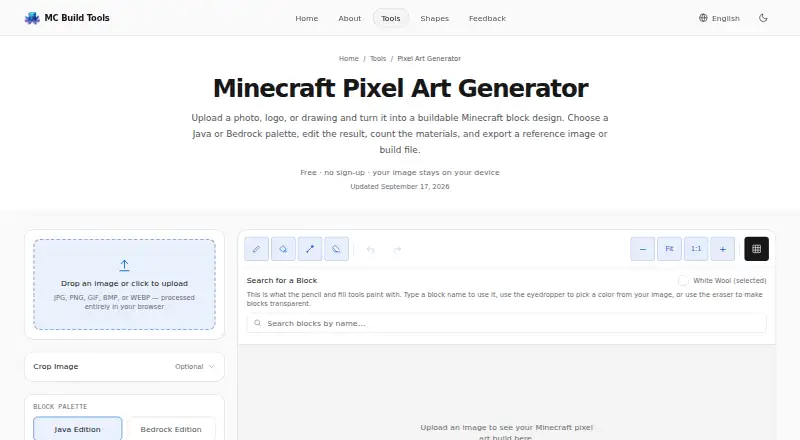
What MC Build Tools Pixel Art Generator is
MC Build Tools Pixel Art Generator turns an uploaded photo, logo or drawing into an editable Minecraft block design. It matches image colors to a selected Minecraft palette; it is not an AI image generator. The free browser tool accepts JPG, PNG, GIF, BMP and WEBP images, but designs are static rather than animated. Users can adjust brightness, saturation and contrast, apply dithering, and edit blocks with pencil, fill, eyedropper, eraser, undo and redo tools. A live block count shows material quantities and stacks, and the list can be downloaded as CSV or TXT. Export options include PNG, HD grid PNG, CSV, TXT, Java .schem and .litematic, and Bedrock .mcstructure files. Build-file exports need a matching schematic tool, mod, plugin or structure-import workflow to load into Minecraft. They produce a one-block-thick vertical design, and the preview uses representative flat colors rather than Minecraft textures or in-game lighting. Uploaded images are processed in the browser and are not uploaded to the site, stored in an account or used to train a model.
Good
- Free to use without an account
- Accepts JPG, PNG, GIF, BMP and WEBP
- Includes block-level editing tools
- Exports Java and Bedrock build files
- Uploaded images are processed in the browser
Watch out
- Generated designs are static, not animated
- Build-file exports are one block thick
- Preview uses flat colors rather than game textures or lighting
- Loading build files requires a matching workflow
Who it suits
It suits Minecraft players who want to convert an image into an editable block design for Java or Bedrock and need material counts or export files. It may not suit users who want animated designs or a 3D build preview.
Verdict
This tool provides image-to-block conversion, editing controls, material lists and several export formats at no cost. Keep in mind that build exports are one block thick and require a compatible workflow to load into Minecraft.
Plans and prices
From MC Build Tools Pixel Art Generator's own pricing page, checked 4 Oct 2026.
| Plan | Price | What it gives you |
|---|---|---|
| Free | Free | Free to use · no account or sign-up required |
The facts
Each one read from MC Build Tools Pixel Art Generator's own pages, with the date it was checked.
What it does
- Conversion
- It matches image colors to blocks in the selected Minecraft palette; it is a color-matching tool, not an AI image generator.checked 4 Oct 2026
- Editing
- Users can adjust brightness, saturation, and contrast; apply dithering; and edit blocks with pencil, fill, eyedropper, eraser, undo, and redo tools.checked 4 Oct 2026
- Export requirement
- Build files require a matching schematic tool, mod, plugin, or structure-import workflow to load into Minecraft.checked 4 Oct 2026
- Exports
- Exports include PNG and HD grid PNG, CSV, TXT, Java .schem and .litematic, and Bedrock .mcstructure files.checked 4 Oct 2026
- Image formats
- It accepts JPG, PNG, GIF, BMP, and WEBP images, while generated designs are static rather than animated.checked 4 Oct 2026
- Image privacy
- Uploaded images are processed in the browser and are not uploaded to MC Build Tools, stored in an account, or used to train a model.checked 4 Oct 2026
- Intended users
- MC Build Tools describes itself as an independent, fan-made toolkit built for Minecraft players, with Java and Bedrock support where relevant.checked 4 Oct 2026
- Materials
- A live block count shows material quantities and stacks, and the list can be downloaded as CSV or TXT.checked 4 Oct 2026
- Notable limitation
- Build-file exports create a one-block-thick vertical design, and the preview uses representative flat colors rather than Minecraft textures or in-game lighting.checked 4 Oct 2026
- Purpose
- The tool turns an uploaded photo, logo, or drawing into an editable Minecraft block design.checked 4 Oct 2026
- Security and data
- The privacy policy says tools run in the browser, the site uses no tracking cookies, and its hosting provider may log standard technical information for security and operations.checked 4 Oct 2026
- Support
- The contact page opens a prefilled message in the visitor’s email app and says nothing is sent from or stored on the site.checked 4 Oct 2026
The full review of MC Build Tools Pixel Art Generator
Overview
MC Build Tools Pixel Art Generator turns a photo, logo or drawing into an editable Minecraft block design, for builders who want to plan a picture and its materials before placing blocks. Its browser-based editing and broad export options make it a capable free starting point, though build-file exports are only one block thick and need a compatible Minecraft import workflow.
Key features
Conversion matches image colors to blocks in the selected Minecraft palette; it is not an AI image generator. JPG, PNG, GIF, BMP and WEBP files are accepted, but each result is static, so animated GIFs do not become animated builds. Brightness, saturation and contrast controls, plus dithering, let users tune how an image translates into a limited block palette. Pencil, fill, eyedropper and eraser tools provide block-level edits, while undo and redo make those corrections less risky.
A live block count tracks material quantities and stacks, and the list can be downloaded as CSV or TXT. That is useful for planning a build rather than estimating supplies by eye. Image exports include PNG and HD grid PNG; build and data exports include CSV, TXT, Java .schem and .litematic, and Bedrock .mcstructure. The range covers both editions, but the build files are one-block-thick vertical designs and must be loaded using a matching schematic tool, mod, plugin or structure-import workflow. The preview uses representative flat colors, not Minecraft textures or in-game lighting, so it is a planning view rather than a faithful rendering of the finished build.
Uploaded images are processed in the browser, not uploaded to MC Build Tools, stored in an account or used to train a model. The privacy policy says the site uses no tracking cookies, though its hosting provider may log standard technical information for security and operations. Support opens a prefilled message in the visitor’s email app; nothing is sent from or stored on the site.
Pricing
The Free plan costs nothing and requires no account or sign-up. It includes the tool’s conversion, editing, materials and export features, with no paid tier or free trial stated. That suits occasional builders and anyone who wants to check whether the one-block-thick workflow fits their project before committing to a Minecraft import method. There are no subscription or renewal terms to weigh.
Platforms
This is a web tool for Minecraft Java and Bedrock users. It has no 3D build preview; its design preview uses flat representative colors.
Who it's for
Choose it if you want to convert an existing image, refine the block pattern, and get a material count alongside files for Java or Bedrock. It is less suitable for animated art, depth-based builds, or anyone expecting a preview with in-game textures and lighting. Builders who do not already have a compatible way to import schematic or structure files should account for that extra workflow; PNG and text or CSV exports remain useful for reference and planning.
Pros and cons
- Pro: No account or sign-up is required, and the plan costs nothing.
- Pro: Editing tools, image adjustments and dithering offer control beyond a straight color conversion.
- Pro: Live block and stack counts, downloadable material lists, and Java and Bedrock build exports support both planning and building.
- Pro: Browser-side image processing avoids uploading the source image to the site.
- Con: Build exports are one block thick and need a compatible import workflow, limiting their usefulness as ready-to-place builds.
- Con: Flat-color previews do not show Minecraft textures or lighting, so the finished result may look different in game.
- Con: Input may include GIF, but output is static; it is not a tool for animated pixel art.
Alternatives
For a broader choice of tools, browse Minecraft Pixel Art Generators. If image-size limits matter more than editing or materials, Minecraft Pixel Art Generator is free on the web and has no image-size limit beyond the device’s capacity. MinecraftArt is another free web option. Windows users can consider PixelCraft, a free desktop tool by Kody, known online as Saturnity. For a web tool focused on image upload, palette, dimensions and orientation controls with .litematic export, try mc-pixel.
BlockArtLab Minecraft Image Converter offers a free browser converter with no account, PNG blueprint and CSV material list; its Starter plan costs $9.99, paid once, billed as a one-time purchase with no subscription. Minecraft Pixel Art Generator & Editor is a free web option with no sign-up or usage limits. Minecraft Image Converter is free on the web, with no sign-up or watermark and PNG and .schem export. Image2Pixel Minecraft Converter is another free web option with no signup, watermark or limits.
Verdict
MC Build Tools Pixel Art Generator is a strong fit for Minecraft players who want a free, editable image-to-block workflow with material counts and exports for both Java and Bedrock. Its main advantage is how much it combines in one browser tool; look elsewhere if you need animated output, a textured 3D preview or a build file that works without a separate import workflow.
Alternatives to MC Build Tools Pixel Art Generator
- 1

BlockArtLab Minecraft Image Converter
Free planWeb7.3$1.99 one-time - 2
Pixvael Minecraft Pixel Art Generator
Free planWebExtension6.6Free plan - 3

Coffee & Fun Minecraft Pixel Art Generator
Free planWeb6.0Free plan - 4

Image2Pixel Minecraft Converter
Free planWeb6.0Free plan - 5
Minecraft Image Converter
Free planWeb6.0Free plan - 6

Minecraft Pixel Art Generator
Free planWeb6.0Free plan